
1. Introdução
Obrigado pela compra.asing the GPX BCD2004 Boombox. This portable audio system features a top-loading CD player and an AM/FM tuner, designed for versatile audio playback. This manual provides essential information for setting up, operating, and maintaining your device to ensure optimal performance and longevity.
2. Informações de segurança
- Leia as instruções: Carefully read all operating instructions before using the unit.
- Instruções de retenção: Guarde este manual para referência futura.
- Água e Umidade: Não exponha este aparelho a gotejamento ou respingos de água. Não coloque objetos contendo líquidos, como vasos, sobre o aparelho.
- Ventilação: Garanta uma ventilação adequada. Não obstrua nenhuma abertura de ventilação.
- Aquecer: Não coloque perto de fontes de calor, como radiadores, aquecedores, fogões ou outros aparelhos (incluindo amplificadores) que produzem calor.
- Fontes de energia: Use only the power source indicated on the appliance.
- Baterias: Follow battery safety guidelines. Do not mix old and new batteries, or different types of batteries. Remove batteries if the unit is not used for extended periods.
- Manutenção: Deixe toda a manutenção a cargo de pessoal qualificado.
3. Conteúdo da embalagem
Por favor, verifique se os seguintes itens estão incluídos em seu pacote:
- GPX BCD2004 Boombox Unit
- Cabo de alimentação CA
- Manual do usuário
4. Controles e recursosview
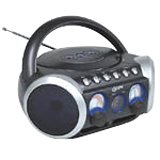
Figura 1: Frente view of the GPX BCD2004 Boombox. This image shows the overall design of the boombox, including the speaker grilles and the general layout of the front panel.
Familiarize yourself with the main controls and features of your boombox:
- Compartimento para CD: Top-loading bay for inserting CDs.
- Interruptor de função: Selects between CD, AM, FM, and OFF modes.
- Controle de volume: Rotary dial to adjust the audio output level.
- Botão de sintonia: Rotary dial for selecting AM or FM radio frequencies.
- Botão Reproduzir/Pausar: Starts or temporarily stops CD playback.
- Botão de parada: Interrompe a reprodução do CD.
- Botões de pular/pesquisar (◀◀ / ▶▶): Skips to the previous/next track or searches within a track.
- Botão do programa: Used to program a sequence of tracks for CD playback.
- Botão de repetição: Repeats the current track or the entire CD.
- Antena AM/FM: Telescopic antenna for FM reception, internal antenna for AM.
- Entrada de energia CA: Jack for connecting the AC power cord.
- Compartimento da bateria: Located on the bottom or rear for 'C' batteries.
- Fold-down Carrying Handle: Para facilitar o transporte.
5. Configuração
5.1 Alimentação da unidade
Your GPX BCD2004 Boombox can be powered by either AC power or batteries.
Operação de energia AC
- Ensure the Function Switch is in the OFF position.
- Insert the small end of the AC power cord into the AC power input jack on the back of the unit.
- Conecte a outra extremidade do cabo de alimentação CA a uma tomada de parede CA padrão (120V ~ 60Hz).
Operação de energia da bateria
Para uso portátil, o boombox requer 8 pilhas tamanho 'C' (não incluídas).
- Ensure the Function Switch is in the OFF position.
- Abra a tampa do compartimento da bateria, localizada na parte inferior ou traseira da unidade.
- Insert 8 'C' size batteries, observing the correct polarity (+ and -) as indicated inside the compartment.
- Feche bem a tampa do compartimento da bateria.
- Observação: When operating on battery power, disconnect the AC power cord from the unit.
6. Operando o Leitor de CD
The GPX BCD2004 is compatible with standard audio CDs, CD-R, and CD-RW discs.
6.1 Carregando um CD
- Levante a porta do compartimento de CDs localizada na parte superior do aparelho.
- Coloque o CD no eixo central com o lado da etiqueta voltado para cima.
- Gently close the CD compartment door until it clicks shut.
6.2 Basic CD Playback
- Ajuste o seletor de função para a posição CD.
- The CD player will begin to read the disc. The track number will typically display.
- Press the PLAY/PAUSE (▶/██) button to start playback.
- Ajuste o controle de volume para o nível de audição desejado.
- To pause playback, press the PLAY/PAUSE (▶/██) button. Press it again to resume.
- Para interromper a reprodução, pressione o botão PARAR (■).
6.3 Skipping and Searching Tracks
- Pular faixa: During playback, press the SKIP/SEARCH FORWARD (▶▶) button to go to the next track. Press the SKIP/SEARCH BACKWARD (◀◀) button to go to the beginning of the current track, or press it twice to go to the previous track.
- Search Within Track: During playback, press and hold the SKIP/SEARCH FORWARD (▶▶) or SKIP/SEARCH BACKWARD (◀◀) button to fast forward or rewind through the current track. Release the button to resume normal playback.
6.4 Program Play
Você pode programar até 16 faixas para serem reproduzidas em uma ordem específica.
- In STOP mode, press the PROGRAM button. The program indicator will flash.
- Use the SKIP/SEARCH buttons (◀◀ / ▶▶) to select your desired first track.
- Press the PROGRAM button again to confirm the selection.
- Repita os passos 2 e 3 para adicionar até 16 faixas à sua lista de reprodução.
- After programming all desired tracks, press the PLAY/PAUSE (▶/██) button to start programmed playback.
- Para limpar o programa, pressione o botão PARAR (■) duas vezes.
6.5 Repeat Play
During CD playback, press the REPEAT button:
- Pressione uma vez para Repetir 1 (repeats the current track).
- Pressione duas vezes para Repetir tudo (repeats the entire CD or programmed tracks).
- Press a third time to cancel repeat function.
7. Operando o rádio AM/FM
7.1 Tuning to Radio Stations
- Set the Function Switch to either the AM or FM position.
- Adjust the Tuning Dial to select your desired radio station.
- Ajuste o controle de volume para o nível de audição desejado.
7.2 Improving Radio Reception
- Recepção FM: Extend the telescopic antenna fully and adjust its position for the best reception.
- Recepção da manhã: The unit has a built-in AM antenna. Rotate the entire boombox for optimal AM reception.
8. Manutenção
8.1 Limpando a Unidade
- Limpe o exterior da unidade com um pano macio e úmidoamp pano. Não use produtos de limpeza abrasivos ou solventes.
- Para a lente de CD, use um disco de limpeza específico para lentes de CD ou um pano macio e sem fiapos, próprio para lentes ópticas.
8.2 Cuidados com a bateria
- Remova as pilhas se o aparelho não for usado por um longo período para evitar vazamentos.
- Descarte as baterias usadas de maneira responsável, de acordo com os regulamentos locais.
9. Solução De Problemas
If you experience issues with your boombox, please refer to the following common problems and solutions:
| Problema | Possível causa | Solução |
|---|---|---|
| Sem energia | AC cord not connected; Batteries dead or incorrectly inserted; Function switch OFF. | Check AC cord connection; Replace batteries or check polarity; Set Function switch to CD, AM, or FM. |
| CD não está tocando | CD inserted incorrectly; CD dirty or scratched; CD compartment door open; Function switch not on CD. | Insert CD with label side up; Clean or replace CD; Close CD door securely; Set Function switch to CD. |
| Má recepção de rádio | Antena não estendida/ajustada; sinal fraco. | Extend and adjust FM antenna; Rotate unit for AM reception; Try a different location. |
| Sem som ou volume baixo | Volume too low; Unit in pause mode. | Increase volume; Press Play/Pause button to resume playback. |
10. Especificações
- Modelo: BCD2004
- Marca: GPX
- Compatibilidade de CD: CD, CD-R, CD-RW
- Sintonizador de rádio: AM/FM
- Fonte de energia: Alimentação: AC 120V ~ 60Hz ou 8 pilhas 'C' (não incluídas)
- Palestrantes: 2 Full-range speakers
- Dimensões (aprox.): 33.02 x 27.94 x 17.02 cm (C x L x A)
- Peso (aprox.): 2.18 kg
- Características: 16-track programming, Repeat play, Song skip/search, Fold-down carrying handle
11. Garantia e Suporte
This GPX BCD2004 Boombox comes with a Garantia de 90 dias A garantia é válida a partir da data da compra original. Esta garantia cobre defeitos de materiais e de fabricação sob uso normal.
For warranty service or technical support, please refer to the contact information provided with your purchase documentation or visit the official GPX website. Please have your model number (BCD2004) and proof of purchase ready when contacting support.