
Introdução
Thank you for choosing the iConcepts M01517 Mobile 5-Port USB 2.0 Hub. This device is designed to expand the USB connectivity of your computer, allowing you to connect up to five USB 2.0 devices simultaneously. Its compact and mobile design makes it ideal for both desktop and portable use. Please read this manual carefully to ensure proper setup and operation.
Conteúdo da embalagem
Por favor, verifique se todos os itens estão presentes em sua embalagem:
- iConcepts M01517 Mobile 5-Port USB 2.0 Hub unit
- Cabo de conexão USB
Configurar
Follow these steps to set up your USB hub:
- Conecte o hub ao seu computador: Take the provided USB connection cable. Plug one end into the designated input port on the iConcepts M01517 hub. Plug the other end into an available USB port on your computer.
- Instalação automática de drivers: Your operating system (Windows, macOS, Linux) should automatically detect the new hardware and install the necessary drivers. This process typically takes a few moments. No manual driver installation is usually required.
- Connect Your USB Devices: Once the hub is recognized by your computer, you can connect up to five USB devices (such as flash drives, keyboards, mice, printers, etc.) into the available ports on the iConcepts M01517 hub.
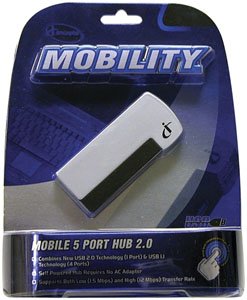
Image of the iConcepts M01517 Mobile 5-Port USB 2.0 Hub, showing its compact design and multiple USB ports ready for connection.
Operacional
The iConcepts M01517 hub operates as a standard USB 2.0 hub, providing additional ports for your devices.
- Reconhecimento de dispositivo: When a device is plugged into the hub, your computer will recognize it as if it were plugged directly into the computer's USB port.
- Transferência de dados: The hub supports USB 2.0 data transfer speeds, which are suitable for most peripherals and data storage devices.
- Fonte de energia: This mobile hub is typically bus-powered, meaning it draws power directly from the computer's USB port. For high-power consumption devices, ensure your computer's USB port can supply sufficient power.
Manutenção
To ensure the longevity and optimal performance of your iConcepts M01517 USB hub, follow these maintenance guidelines:
- Limpeza: Use um pano macio e seco para limpar a parte externa do hub. Evite usar produtos de limpeza líquidos ou solventes, pois podem danificar o dispositivo.
- Armazenar: Quando não estiver em uso, guarde o cubo em local fresco e seco, longe da luz solar direta e de temperaturas extremas.
- Manuseio: Avoid dropping the hub or subjecting it to strong impacts. Do not attempt to disassemble the unit.
Solução de problemas
If you encounter issues with your iConcepts M01517 USB hub, refer to the following common problems and solutions:
- Problema: Connected device is not recognized.
Solução:- Certifique-se de que o hub esteja conectado firmemente à porta USB do seu computador.
- Try connecting the device to a different port on the hub.
- Try connecting the device directly to your computer's USB port to verify the device itself is functioning.
- Reinicie o seu computador.
- Problema: Velocidades de transferência de dados lentas.
Solução:- Ensure both the hub and the connected device support USB 2.0 for optimal speeds.
- Avoid connecting too many high-bandwidth devices simultaneously to the hub.
- Problema: Hub or connected devices are not receiving power.
Solução:- Verify the hub's connection to the computer's USB port is firm.
- Try connecting the hub to a different USB port on your computer, as some ports may provide more power.
- If connecting high-power devices, consider using a self-powered hub (if available for this model) or connecting high-power devices directly to the computer.
Especificações
| Marca | iConcepts |
| Modelo | M01517 |
| interface de hardware | USB |
| Total de portas USB | 5 |
| Número de portas | 5 |
| Peso do item | 5 libras |
| Data da primeira disponibilidade | 7 de fevereiro de 2007 |
Garantia e Suporte
Specific warranty details and direct support contact information are not provided in this manual. For warranty claims, technical support, or further assistance, please refer to the official iConcepts webNo site ou entre em contato com o revendedor. Guarde o comprovante de compra como prova de aquisição.