
1. Introdução
Obrigado pela compra.asing the GPX CDP6806DT Personal CD Player. This manual provides important safety instructions, operational guidelines, and maintenance procedures to ensure optimal performance and longevity of your device. Please read this manual thoroughly before using the product and retain it for future reference.
2. Informações de segurança
Instruções importantes de segurança
- Não exponha a unidade à água ou umidade.
- Evite colocar a unidade perto de fontes de calor, como radiadores, aquecedores, fogões ou outros aparelhos (incluindo amplificadores) que produzem calor.
- Não tente desmontar ou modificar a unidade. Encaminhe todos os serviços de manutenção para pessoal qualificado.
- Use only the specified batteries (2 x AA batteries). Ensure correct polarity when inserting batteries.
- Remova as baterias se a unidade não for usada por um longo período.
- Evite ouvir em volumes altos por períodos prolongados para prevenir danos à audição.
- Limpe a unidade apenas com um pano seco.
3. Conteúdo da embalagem
Carefully unpack your GPX CDP6806DT Personal CD Player and ensure all items are present:
- GPX CDP6806DT Personal CD Player
- Manual do usuário (este documento)
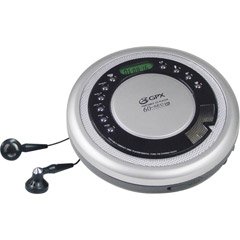
Figure 1: GPX CDP6806DT Personal CD Player. This image illustrates the compact design and general appearance of the device.
4. Controles e recursos
Familiarize yourself with the controls and features of your GPX CDP6806DT for optimal use.
- Tela LCD: 6-digit display for track number, time, and FM frequency.
- REPRODUZIR/PAUSAR (►/−): Press to start or pause CD playback.
- PARAR (■): Press to stop CD playback.
- PULAR/PESQUISAR (◀◀/▶▶): Press to skip tracks. Hold to search within a track.
- VOLUME (+/-): Ajusta o nível de saída de áudio.
- MODE/PROG: Selects playback mode (Repeat, Random) or programs CD tracks.
- FM TUNER (ON/OFF/BAND): Switches to FM radio mode, turns FM on/off, or changes FM band.
- PRESET (+/-): Navigates saved FM radio presets.
- Compartimento para CD: Area for inserting audio CDs.
- Compartimento da bateria: Located on the bottom, holds 2 AA batteries.
- Entrada para fone de ouvido (3.5mm): Conecta fones de ouvido para audição privada.
Figure 2: GPX CDP6806DT Controls Layout. This image provides a visual reference for the location of various buttons and ports on the device.
5. Configuração
5.1 Instalação da bateria
The GPX CDP6806DT requires two (2) AA batteries (not included) for portable operation.
- Localize o compartimento da bateria na parte inferior da unidade.
- Deslize a tampa do compartimento da bateria para abrir.
- Insira duas pilhas AA, certificando-se da polaridade correta (+ e -) conforme indicado dentro do compartimento.
- Feche bem a tampa do compartimento da bateria.
5.2 Conectando fones de ouvido
For private listening, connect your 3.5mm stereo headphones (not included) to the headphone jack located on the side of the unit.
6. Instruções de operação
6.1 Reprodução de CD
The unit supports CD and CD-R/RW disc formats.
- Open the CD compartment lid by gently pressing the OPEN button (if present, or lifting the lid).
- Coloque o CD com a etiqueta voltada para cima no eixo central.
- Feche firmemente a tampa do compartimento do CD até ouvir um clique.
- Pressione o REPRODUZIR/PAUSAR (►/−) button to begin playback. The track number and elapsed time will appear on the LCD display.
- Para pausar a reprodução, pressione REPRODUZIR/PAUSAR (►/−). Pressione novamente para retomar.
- Para parar a reprodução, pressione o PARAR (■) botão.
- Para pular para a próxima faixa, pressione SKIP/SEARCH (▶▶).
- To go back to the beginning of the current track, press PULAR/PESQUISAR (◀◀) once. Press twice to go to the previous track.
- To search rapidly forward or backward within a track, hold down SKIP/SEARCH (▶▶) or (◀◀) respectivamente.
- Ajuste o volume usando o VOLUME (+/-) controles.
6.2 Operação de rádio FM
The unit features a digital FM tuner with station presets.
- Deslize o SINTONIZADOR FM switch to the ON position or press the BANDA botão para entrar no modo FM.
- Pressione o SKIP/SEARCH (▶▶) or (◀◀) botões para sintonizar manualmente a frequência desejada.
- To auto-scan and save stations, hold down the REPRODUZIR/PAUSAR (►/−) button (or refer to specific instructions for auto-scan if available on the device).
- To recall saved presets, use the PRESET (+/-) botões.
6.3 CD Programming (24-Track)
Você pode programar até 24 faixas para serem reproduzidas em uma ordem específica.
- Com o CD parado, pressione o MODE/PROG botão. "PROG" piscará no visor.
- Use o SKIP/SEARCH (▶▶) or (◀◀) botões para selecionar a primeira faixa que você deseja programar.
- Imprensa MODE/PROG again to confirm the selection. The display will show the program number and the next available program slot.
- Repita os passos 2 e 3 para adicionar até 24 faixas ao seu programa.
- After programming all desired tracks, press REPRODUZIR/PAUSAR (►/−) Para iniciar a reprodução programada.
- Para limpar o programa, pressione o PARAR (■) botão duas vezes.
6.4 Anti-Skip Protection (ASP)
The GPX CDP6806DT features a 60-second Anti-Skip Protection system. This system buffers audio data to minimize interruptions caused by minor shocks or vibrations during CD playback. The ASP activates automatically when a CD is playing.
7. Manutenção
7.1 Limpando a Unidade
- Limpe a parte externa da unidade com um pano macio e seco.
- Não utilize produtos de limpeza abrasivos, ceras ou solventes.
- If the CD lens needs cleaning, use a specialized CD lens cleaner disc or a soft, lint-free cloth designed for optical lenses.
7.2 Cuidados com a bateria
- Remova as pilhas se o aparelho não for usado por um longo período para evitar vazamentos.
- Não misture pilhas velhas e novas, ou tipos diferentes de pilhas.
- Descarte as baterias usadas de maneira responsável, de acordo com os regulamentos locais.
8. Solução De Problemas
If you experience issues with your GPX CDP6806DT, please consult the following table for common problems and solutions.
| Problema | Possível causa/solução |
|---|---|
| A unidade não liga. | Check if batteries are inserted correctly with proper polarity. Ensure batteries are fresh and not depleted. |
| Nenhum som nos fones de ouvido. | Ensure headphones are fully plugged into the headphone jack. Increase the volume level. Test with another pair of headphones. |
| O CD pula trechos ou a reprodução é interrompida. | Ensure the CD is clean and free of scratches or smudges. Clean the CD with a soft, lint-free cloth. Ensure the unit is on a stable surface or held steadily during use. |
| O CD não funciona. | Ensure the CD is inserted correctly with the label side up. Close the CD compartment lid completely. Check if the CD is a supported format (CD, CD-R/RW). |
| A recepção de rádio FM é ruim. | Extend the headphone cable as it acts as the antenna. Try moving to a different location. |
9. Especificações
- Marca: GPX
- Modelo: CDP6806DT
- Formatos de disco suportados: CD, CD-R / RW
- Proteção anti-salto: 60 segundos
- Mostrar: LCD de 6 dígitos
- Rádio: Digital FM Tuner with Presets
- CD Programming: 24 pistas
- Fonte de energia: 2 pilhas AA (não incluídas)
- Conectividade: Conector de fone de ouvido de 3.5 mm (Auxiliar)
10. Garantia e Suporte
For detailed warranty information, please refer to the warranty card included with your original product packaging. For technical support, service inquiries, or to purchase replacement parts, please visit the official GPX webou entre em contato com o departamento de atendimento ao cliente usando as informações de contato fornecidas na documentação do produto.
Guarde o comprovante de compra para reclamações de garantia.