
1. Introdução
Welcome to NBA 10: The Inside for the Sony PlayStation Portable (PSP). This manual provides essential information for setting up, operating, and maintaining your game. NBA 10: The Inside delivers an immersive basketball experience, allowing players to control their favorite teams and athletes with unique gameplay mechanics.
2. Configuração
2.1 Inserting the Game Disc (UMD)
- Certifique-se de que seu sistema Sony PSP esteja desligado.
- Localize o slot UMD (Universal Media Disc) na parte traseira do seu PSP.
- Open the UMD cover.
- Gently insert the NBA 10: The Inside UMD with the label facing upwards until it clicks into place.
- Close the UMD cover securely.
2.2 Iniciando o Jogo
- Ligue o seu sistema Sony PSP.
- Acesse o menu 'Jogo' na XMB do PSP (XrossMediaBar).
- Select 'UMD' and then choose 'NBA 10: The Inside' from the list.
- Pressione o X botão para iniciar o jogo.
3. Instruções de operação
3.1 Controles Básicos
Familiarize yourself with the standard PSP controls for optimal gameplay:
- Vareta Analógica: Player movement, dribbling.
- Botões direcionais (D-Pad): Menu navigation, play calling.
- Botão X: Pass, confirm selection.
- Botão circular: Shoot, cancel selection.
- Botão Quadrado: Steal, block.
- Botão Triângulo: Lob pass, rebound.
- Botão L: Turbo, defensive stance.
- Botão R: Special moves, offensive plays.
- Botão de início: Pause game, access options menu.
- Botão SELECIONAR: View statistics, change camera angle.
3.2 modos de jogo
NBA 10: The Inside offers various modes to engage players:
- Exposição: Play a quick match against the AI or another player via Ad Hoc mode.
- Temporada: Lead your chosen team through a full NBA season, managing rosters and competing for the champmissão.
- Minijogos: Engage in various carnival-style basketball challenges such as Dodgeball, Pinball, Shooting Bricks, and Bang the Boards.
- Prática: Hone your skills and master controls in a non-competitive environment.

Figure 1: In-game action during a match, displaying team scores and time remaining.
3.3 Unique Gameplay Features
- Team DNA: This feature rates how players on the court perform as a cohesive unit. It also tracks individual player tendencies, such as the percentage a player drives left, right, or shoots from specific spots on the floor, influencing their in-game behavior.
- Rewrite History: Replay recent real-world NBA games with updated statistical data. This mode recreates identical conditions, including injuries, hot/cold streaks, tendencies, and player DNA, allowing you to experience or alter historical outcomes.
- Two-Man Game Mechanic: This mechanic allows you to control both the ball handler and the screener simultaneously. Set screens and execute two-man plays with on-court instructions guiding you through each maneuver.

Figure 2: Dynamic in-game action showcasing players contesting a shot or rebound.
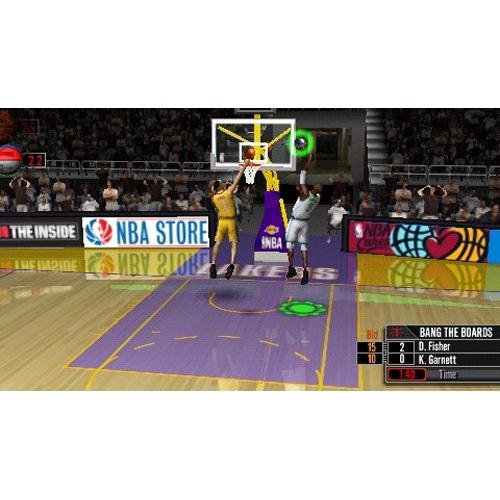
Figure 3: Screenshot from the 'Bang the Boards' mini-game, a carnival challenge.

Figure 4: A player executing a jump shot during gameplay.
4. Manutenção
Proper care of your game disc and PSP system ensures long-lasting enjoyment.
- UMD Care: Always handle the UMD by its edges. Store it in its protective case when not in use to prevent scratches and dust accumulation. Clean the UMD surface with a soft, dry cloth if necessary, wiping from the center outwards.
- Saving Game Data: Regularly save your game progress to avoid losing data. Ensure your PSP has sufficient memory stick space for save files.
- PSP System: Keep your PSP system clean and free from dust. Ensure the battery is adequately charged before playing to prevent unexpected power loss during gameplay, which could corrupt save data.
5. Solução De Problemas
If you encounter issues while playing NBA 10: The Inside, try the following solutions:
- O jogo não está carregando:
- Ensure the UMD is inserted correctly and the UMD cover is closed.
- Check the UMD for visible scratches or dirt. Clean if necessary.
- Reinicie o seu sistema PSP.
- Controles não respondem:
- Verify that your PSP's buttons and analog stick are functioning correctly with other applications or games.
- Reinicie o jogo.
- Ensure no external accessories are interfering with the controls.
- O jogo congela ou fecha inesperadamente:
- Reinicie o seu sistema PSP.
- Ensure your PSP's system software is up to date.
- If the issue persists, the UMD might be faulty.
6. Especificações
| Recurso | Detalhe |
|---|---|
| Título | NBA 10: The Inside |
| Plataforma | Sony PSP (PlayStation Portable) |
| Número do modelo | 98738 |
| Fabricante | Entretenimento de Computador Sony |
| Data de lançamento | 6 de outubro de 2009 |
| Linguagem | Inglês |
| Classificação ESRB | Todos |
| Dimensões do produto | 7.01 x 4.09 x 0.59 polegadas |
| Peso do item | 3.2 onças |
| GTIN/UPC | 00711719873822 |
7. Garantia e Suporte
For technical assistance, warranty information, or further support regarding NBA 10: The Inside or your Sony PSP system, please refer to the official PlayStation support channels. As this is a legacy product, specific game support may be limited, but general PSP system support resources are available.
You can typically find support information on the official PlayStation website or through their customer service contact details.