
Introdução
The Nokia Bluetooth Stereo Headset BH-905 is designed to provide a superior audio experience with active noise cancellation and wide compatibility. This manual provides instructions for setting up, operating, and maintaining your headset to ensure optimal performance.
The headset features 10 microphones: 8 dedicated to capturing ambient noise for cancellation and 2 for capturing speech in noisy environments. It offers versatile connectivity, supporting both wireless Bluetooth and wired connections with various devices.
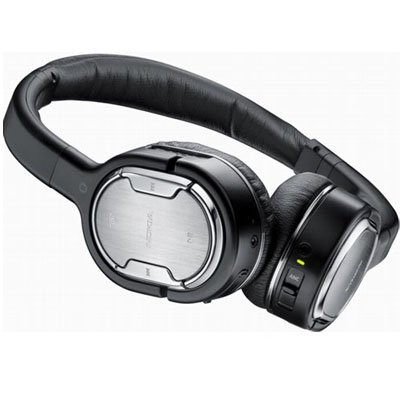
Image: The Nokia Bluetooth Stereo Headset BH-905, showcasing its sleek design and over-ear cups.
Principais características
- Cancelamento ativo de ruído (ANC): Significantly reduces ambient noise for an immersive listening experience.
- 10 microfones: Utilizes 8 microphones for noise capture and 2 for clear speech transmission in loud surroundings.
- Ampla compatibilidade: Connects wirelessly via Bluetooth or wired to a variety of mobile phones, music players, and other audio devices.
- Controle perfeito: Intuitive controls allow for easy switching between music and calls without needing to look at the device.
Configurar
Emparelhamento Bluetooth
- Ensure your headset is charged and powered off.
- Ative o Bluetooth no seu dispositivo móvel.
- Press and hold the power button on the headset until the indicator light flashes blue rapidly, indicating pairing mode.
- On your device, search for Bluetooth devices and select "Nokia BH-905" from the list.
- If prompted, enter the passcode (usually "0000").
- Once paired, the indicator light will turn solid blue or flash slowly.
Conexão com fio
For devices without Bluetooth or when battery is low, use the provided audio cables. The headset includes plugs for standard audio jacks and airplane adapters for versatile use.
- Connect one end of the audio cable to the headset's audio input port.
- Connect the other end to your audio source (e.g., mobile phone, MP3 player, airplane entertainment system).
Instruções de operação
Ligar/Desligar
- Para ligar, pressione e mantenha pressionado o botão liga/desliga até que a luz indicadora acenda.
- Para desligar, pressione e mantenha pressionado o botão liga/desliga até que a luz indicadora se apague.
Cancelamento de ruído ativo (ANC)
The BH-905 features advanced Active Noise Cancellation technology. With 8 dedicated microphones, it captures ambient low-frequency noise and generates an inverse sound wave, effectively canceling out unwanted sounds. This allows for a clearer audio experience, especially in noisy environments like airplanes or busy streets.
- To activate ANC, locate the ANC switch on the headset and slide it to the 'On' position. A green indicator light will confirm activation.
- To deactivate ANC, slide the switch to the 'Off' position.
Gestão de Chamadas
The headset is equipped with 2 microphones specifically designed for speech. These microphones not only capture your voice clearly but also work to cancel out ambient noise, ensuring that the person you are speaking with hears you, not your surroundings.
- Atender / encerrar chamadas: Use the dedicated call button on the headset.
- Switching between Music and Calls: The headset allows for seamless transitions between listening to music and taking calls. When a call comes in, your music will pause, and you can answer the call directly from the headset.
Reprodução de música
Control your music directly from the headset using the intuitive buttons. The design supports "blind usage," meaning you can operate the controls by feel without needing to look at them.
- Reproduzir/Pausar: Use the play/pause button.
- Pular faixas: Use the forward/backward track buttons.
- Controle de volume: Ajuste o volume usando os botões de volume dedicados.
Video: An official Nokia video demonstrating the features and technology behind the BH-905 headset, including its active noise cancellation and multi-microphone system for clear audio and calls.
Manutenção
- Limpe o fone de ouvido regularmente com um pano macio e seco.
- Evite expor o fone de ouvido a temperaturas extremas, umidade ou luz solar direta.
- Store the headset in its protective case when not in use to prevent damage.
- Não tente desmontar ou modificar o fone de ouvido, pois isso anulará a garantia.
Solução de problemas
- Sem energia: Certifique-se de que o fone de ouvido esteja totalmente carregado.
- Não foi possível emparelhar: Make sure the headset is in pairing mode and within range of your device. Try restarting both devices.
- Sem som/Qualidade de som ruim: Check volume levels on both the headset and your connected device. For wired connections, ensure cables are securely plugged in. For Bluetooth, ensure a stable connection.
- O ANC não está funcionando de forma eficaz: Ensure the ANC switch is in the 'On' position.
- Callers Cannot Hear Me Clearly: Ensure the headset's microphones are not obstructed.
If issues persist, refer to the Nokia support webPara obter mais assistência, visite o site ou entre em contato com o serviço de atendimento ao cliente.
Especificações
| Recurso | Especificação |
|---|---|
| Marca | Nokia |
| Número do modelo | 02716J5 |
| Fator de forma | Over-ear (two_ear) |
| Controle de Ruído | Cancelamento de ruído ativo |
| Tecnologia de Conectividade | Bluetooth, com fio |
| Tecnologia de comunicação sem fio | Bluetooth |
| Características adicionais | Microphone; Stereo |
| Tipo de controle | Controle de Mídia |
| Peso do item | 0.32 libras |
| UPC | 758478021477 |
| GTIN | 758478021477 |
Garantia e Suporte
The Nokia Bluetooth Stereo Headset BH-905 comes with a Garantia de 12 meses A garantia é válida a partir da data da compra e cobre defeitos de fabricação em condições normais de uso. Guarde o comprovante de compra para eventuais solicitações de garantia.
For technical support, warranty service, or additional information, please visit the official Nokia support website or contact your local Nokia customer service center.