
Garmin GPSMAP 78
Manual do Usuário do Navegador GPS Marinho Garmin GPSMAP 78
Model: GPSMAP 78 (010-00864-00)
Marca: Garmin
Introdução
This manual provides comprehensive instructions for the Garmin GPSMAP 78 Marine GPS Navigator. It covers device setup, operation, maintenance, and troubleshooting to ensure optimal performance and user experience. The GPSMAP 78 is a rugged, marine-friendly handheld device designed for navigation in various environments, featuring a high-sensitivity GPS receiver and a color display.
Informações de segurança
AVISO: Este produto contém produtos químicos conhecidos no Estado da Califórnia por causar câncer e defeitos congênitos ou outros danos reprodutivos. Para mais informações visite www.P65Warnings.ca.gov.
Always exercise caution when operating any electronic device near water. Ensure battery compartment is securely sealed to maintain water resistance. Use only recommended battery types.
Começando
O que está na caixa
- Garmin GPSMAP 78 device
- Alça de pulso
- Cabo USB
- Manual de Iniciação Rápida
Instalação da bateria
The GPSMAP 78 requires two AA batteries (not included). NiMH or Lithium batteries are recommended for optimal performance and battery life.
- Localize o compartimento da bateria na parte traseira do dispositivo.
- Abra a tampa do compartimento da bateria.
- Insert two AA batteries, observing the polarity markings (+ and -).
- Feche bem a tampa do compartimento da bateria para garantir a resistência à água.
Importante: The microSD card slot is located inside the waterproof battery compartment. Ensure the compartment is properly sealed after accessing the card slot to prevent water ingress.
Inicialização
Pressione e segure o Poder button (usually marked with a power symbol) to turn on the device. Follow the on-screen prompts for initial setup, including language selection and time zone settings.
Instruções de operação
Dispositivo acabadoview e botões
The Garmin GPSMAP 78 features a 2.6-inch color display and a series of buttons for navigation and control.

Imagem 1: Frente view of the Garmin GPSMAP 78 handheld GPS unit. The image displays the device's 2.6-inch color screen, which shows a map of the Great Lakes region. Above the screen are buttons labeled 'MOB', 'FIND', 'PAGE', and '+' and '-'. Below the screen is a directional pad, and buttons labeled 'QUIT', 'MENU', 'ENTER', and 'MARK'. The Garmin logo is visible at the bottom.
- Botão de energia: Turns the device on/off, adjusts backlight.
- Aumentar/Diminuir o zoom (+/-): Adjusts map zoom level.
- Botão de página: Alterna entre as páginas principais (Mapa, Bússola, Computador de Bordo, etc.).
- Botão de menu: Opens the menu for the current page; press twice for main menu.
- Botão Entrar: Selects options, confirms actions.
- Botão Sair: Cancels an action, returns to the previous page.
- Find Button: Accesses search functions for waypoints, geocaches, etc.
- Botão Marcar: Marca sua localização atual como um ponto de referência.
- MOB (Man Overboard) Button: Initiates a Man Overboard navigation.
- Teclado direcional: Navigates menus and pans the map.
Noções básicas de navegação
The GPSMAP 78 comes with a built-in worldwide basemap. Its high-sensitivity, WAAS-enabled GPS receiver and HotFix satellite prediction technology ensure quick and precise position acquisition, even in challenging environments like heavy tree cover or deep canyons.
- Viewing Your Position: On the Map page, your current location is indicated by a position icon.
- Panning the Map: Use the directional pad to move the map view.
- Zoom: Use o + e - buttons to zoom in or out.
Adding Maps
The device supports additional detailed maps via a microSD card.
- BlueChart g2: Preloaded cards for marine navigation.
- City Navigator NT: Map data for turn-by-turn routing on roads.
- Imagens de satélite BirdsEye: Download satellite images (subscription required).
- Mapas personalizados: Free software allows converting paper and electronic maps into downloadable maps for the device.
To install a microSD card, open the battery compartment, insert the card into the slot, and then securely close the compartment.
Pontos de referência, rotas e trilhas
- Pontos de referência: Mark specific locations. Press the MARCA button to save your current location as a waypoint.
- Rotas: Create a sequence of waypoints to navigate a planned path.
- Faixas: Record your path as you travel. The device automatically records a track log.
Geocaching
The GPSMAP 78 supports geocaching GPX files. You can download geocaches and their details directly to your unit, eliminating the need for manual coordinate entry or paper printouts. The device stores and displays key information such as location, terrain, difficulty, hints, and descriptions.
Conectividade
Connect your GPSMAP 78 to a computer using the provided USB cable to manage data and interact with Garmin Connect.
- Garmin Connect: Upload activities, analyze data, view tracks on a map, and share experiences.
- Transferência de dados: Transfer waypoints, routes, and tracks between your device and computer.
Manutenção
Limpeza do dispositivo
Limpe o dispositivo com um pano.ampened with a mild detergent solution. Avoid using abrasive cleaners or solvents that could damage the device's surfaces.
Resistência à água
The GPSMAP 78 is waterproof to IPX7 standards and floats in water. This means it can withstand incidental exposure to water of up to 1 meter for 30 minutes. However, it is not designed for continuous submersion. Always ensure all covers, especially the battery compartment, are securely closed to maintain water resistance.
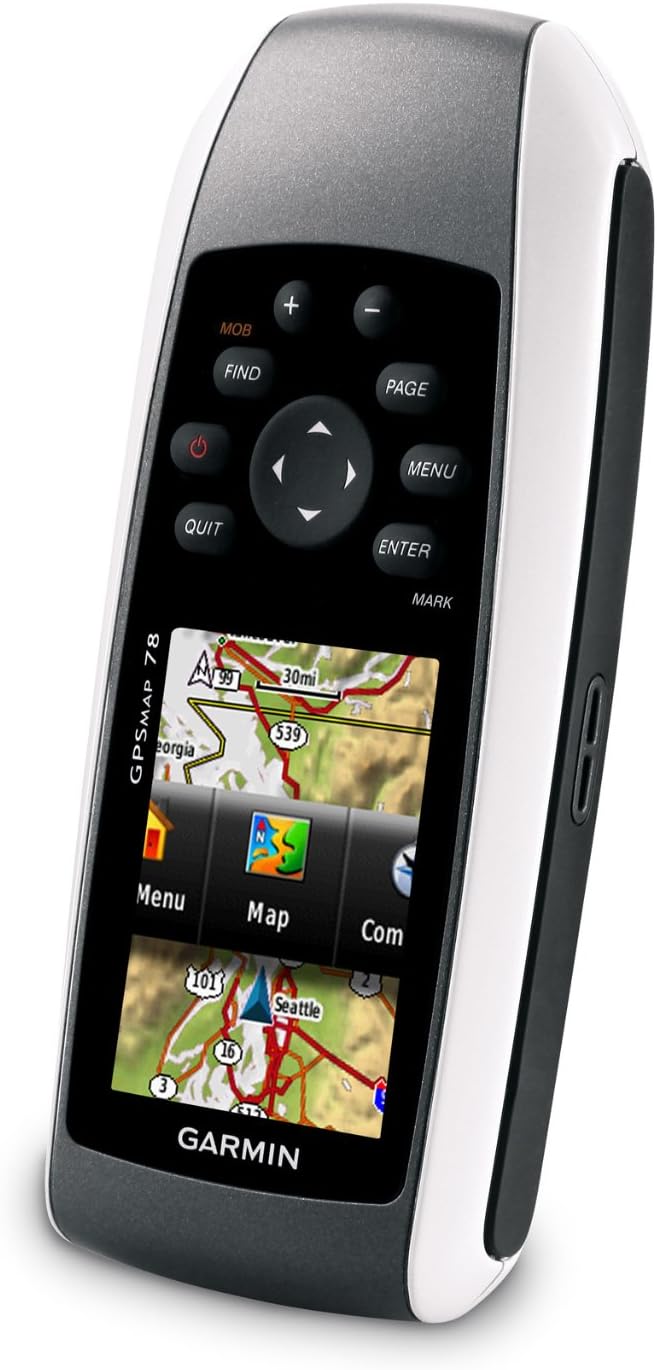
Imagem 2: Angulado view of the Garmin GPSMAP 78, highlighting its molded rubber side grips for enhanced handling. The screen displays a menu interface with options like "Menu", "Map", and "Com".
Armazenar
When storing the device for extended periods, remove the batteries to prevent leakage and potential damage. Store in a cool, dry place away from direct sunlight.
Solução de problemas
Dispositivo não liga
- Certifique-se de que as pilhas estejam instaladas corretamente e com a polaridade correta.
- Replace old batteries with fresh AA batteries (NiMH or Lithium recommended).
- Check if the battery compartment cover is fully closed.
Poor GPS Signal Reception
- Certifique-se de que o dispositivo tenha uma clara view do céu.
- Avoid operating in areas with dense foliage, tall buildings, or indoors.
- Allow sufficient time for the device to acquire satellites (HotFix technology assists in faster acquisition).
Maps Not Displaying Correctly
- Verify that the microSD card containing the maps is properly inserted.
- Ensure the map products are compatible with the GPSMAP 78.
- Check map settings within the device to ensure desired maps are enabled.
Especificações
| Dimensões do produto | 1.2 x 2.6 x 6 polegadas |
| Peso do item | 7.7 onças |
| Tamanho da tela | 2.6 inches diagonal (1.43" x 2.15") |
| Resolução de exibição | 160 x 240 pixels |
| Memória | 1.7 GB |
| Tipo de Bateria | 2 AA batteries (NiMH or Lithium recommended) |
| Duração da bateria | Até 20 horas |
| Classificação da água | IPX7 (floats) |
| Conectividade | USB |
| Características especiais | High-sensitivity receiver, WAAS-enabled, HotFix, Geocaching, Custom POIs, Garmin Connect Compatible |
Garantia e Suporte
For information regarding warranty coverage, product support, or service, please refer to the official Garmin website or contact Garmin customer support directly. Keep your purchase receipt as proof of purchase.
Online resources, including software updates and additional manuals, may be available on the Garmin support portal.
Documentos relacionados - Mapa GPS 78
 |
Garmin GPSMAP 10x2/12x2 Series Installation Guide Comprehensive installation manual for Garmin GPSMAP 10x2 and 12x2 series marine chartplotters. Covers safety, mounting, wiring, NMEA 0183/2000, and specifications. |
 |
Manual do Proprietário do Garmin GPSMAP 1222/1242 TOUCH: Guia Completo para Navegação Marítima e Recursos Este manual do proprietário fornece orientações completas para o plotter cartográfico marítimo Garmin GPSMAP 1222/1242 TOUCH. Aprenda sobre a configuração do dispositivo, recursos de navegação, capacidades de sonar e radar, integração com piloto automático, conectividade sem fio e personalização do sistema para uma experiência de navegação aprimorada. |
 |
Instruções de instalação do Garmin GPSMAP 1222/1242 Touch Instruções detalhadas de instalação para os plotters cartográficos marítimos Garmin GPSMAP 1222 e 1242 Touch, abrangendo montagem, fiação, conexões de rede e especificações. |
 |
Manual do Proprietário do Garmin GPSMAP 12x3, 9x3, 7x3 Manual do proprietário completo para os plotters cartográficos marítimos Garmin GPSMAP das séries 12x3, 9x3 e 7x3. Abrange configuração, navegação, sonar, radar, piloto automático e integração com o aplicativo ActiveCaptain para uso marítimo. |
 |
Manual do Proprietário dos GPSMAP Garmin 12x3, 9x3, 7x3, 12x2 Plus, 9x2 Plus e 7x2 Plus Explore the comprehensive owner's manual for Garmin GPSMAP chartplotters (12x3, 9x3, 7x3, 12x2 Plus, 9x2 Plus, 7x2 Plus). Learn about setup, navigation, sonar, radar, autopilot, and advanced features for your marine electronics. |
 |
Garmin GPSMAP 16x3, 15x3, 12x3, 9x3, 7x3 Owner's Manual Detailed owner's manual for Garmin GPSMAP 16x3, 15x3, 12x3, 9x3, and 7x3 series chartplotters, covering navigation, sonar, radar, autopilot, and connectivity. |
Ask a question about this manual
Ask about setup, troubleshooting, compatibility, parts, safety, or missing instructions. Manuals+ will review the question and use this page’s manual context to help answer it.