
Introdução
This manual provides comprehensive instructions for the safe and efficient use of your BlackBerry HS-300 Wireless Bluetooth Headset. Please read this manual thoroughly before operating the device and retain it for future reference. The BlackBerry HS-300 is designed for hands-free communication with compatible Bluetooth-enabled devices.
Conteúdo da embalagem
Verifique se seu pacote contém os seguintes itens:
- BlackBerry HS-300 Wireless Bluetooth Headset
- Ear hook (optional, for secure fit)
- Ear gels/tips (various sizes for comfort)
- Cabo de carregamento
- Manual do usuário (este documento)
Dispositivo acabadoview
Familiarize yourself with the components of your BlackBerry HS-300 headset.
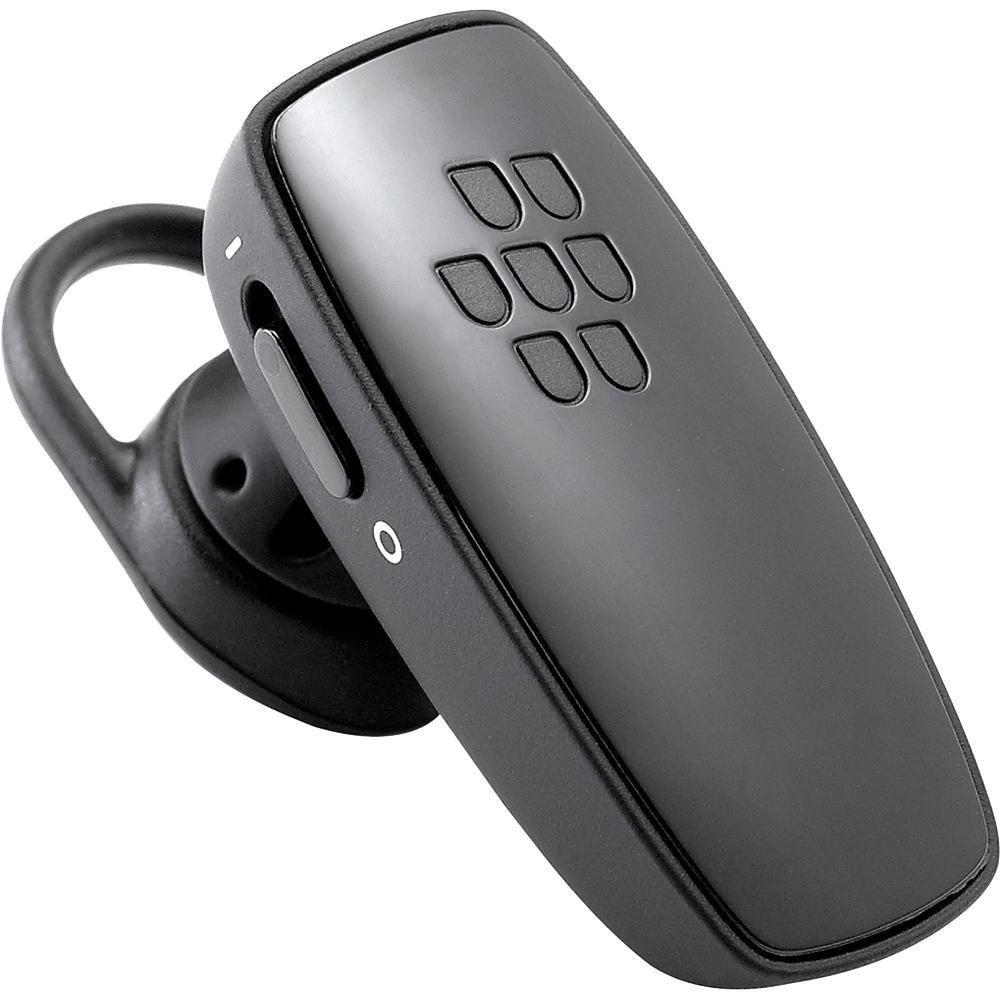
Imagem 1: Frente view of the BlackBerry HS-300 Wireless Bluetooth Headset. The image displays the main body of the headset, featuring the BlackBerry logo (seven-dot pattern) on the front surface. A slender button, likely for volume control or multi-function, is visible on the side. An ear hook is attached, designed to secure the headset over the ear. A small indicator light is also present near the button.
- Botão multifuncional: Used for answering/ending calls, voice commands, and pairing.
- Botões de controle de volume: Adjusts call and media volume.
- Luz indicadora de LED: Exibe o status (ligado, emparelhado, carregando).
- Microfone: Captures your voice during calls.
- Interruptor de alimentação: Liga ou desliga o fone de ouvido.
- Porta de carregamento: Connects to the charging cable.
Configurar
1. Carregando o fone de ouvido
Before initial use, fully charge your headset. The HS-300 features rapid charge capabilities.
- Connect the charging cable to the headset's charging port and to a compatible USB power source.
- The LED indicator will show the charging status (e.g., solid red for charging, solid blue for fully charged).
- Uma carga completa proporciona até 4 horas de conversação.
2. Emparelhamento com um dispositivo Bluetooth
To use your headset, it must be paired with a Bluetooth-enabled phone or device.
- Certifique-se de que o fone de ouvido esteja desligado.
- Press and hold the Multi-function Button until the LED indicator flashes blue and red alternately. This indicates pairing mode.
- On your phone, enable Bluetooth and search for new devices.
- Select "BlackBerry HS-300" from the list of available devices.
- Se for solicitada uma senha, digite "0000" (quatro zeros).
- Após o emparelhamento, o indicador LED piscará em azul periodicamente.
Instruções de operação
Ligar/Desligar
- Para ligar: Slide the Power Switch to the 'On' position. The LED indicator will flash blue.
- Para desligar: Slide the Power Switch to the 'Off' position. The LED indicator will turn off.
Fazendo e recebendo chamadas
- Atender uma chamada: Pressione o botão multifuncional uma vez.
- Finalizando uma chamada: Pressione o botão multifuncional uma vez durante a chamada.
- Rejeitando uma chamada: Pressione e mantenha pressionado o botão multifuncional por aproximadamente 2 segundos.
- Fazer uma chamada: Dial the number on your phone. The call will automatically transfer to the headset if connected.
- Voice Dialing (if supported by phone): Press the Multi-function Button once when not on a call.
Controle de volume
- Use the Volume Control Buttons on the headset to adjust the call or media volume.
Manutenção
- Limpe o fone de ouvido regularmente com um pano macio e seco.
- Evite expor o fone de ouvido a temperaturas extremas, umidade ou substâncias corrosivas.
- Guarde o fone de ouvido em local fresco e seco quando não estiver em uso.
- Não tente desmontar ou modificar o fone de ouvido, pois isso anulará a garantia e poderá causar danos.
Solução de problemas
| Problema | Solução |
|---|---|
| O fone de ouvido não liga. | Ensure the headset is charged. Connect it to a power source using the charging cable. |
| Não consigo emparelhar o fone de ouvido com meu telefone. |
|
| Sem áudio ou com qualidade de áudio ruim. |
|
| O fone de ouvido desconecta com frequência. |
|
Especificações
| Recurso | Detalhe |
|---|---|
| Número do modelo | HS-300 |
| Conectividade | Bluetooth Wireless (Version 2.1) |
| Tempo de conversação | Até 4 horas |
| Carregando | Rapid charge capable |
| Controles | Volume control, Multi-function button |
| Microfone | Integrado |
| Fator de forma | On-ear (single ear) |
| Peso | Aproximadamente 3.2 onças |
| Dimensões | 2.5 x 2 x 6.5 polegadas (aproximadamente) |
Garantia e Suporte
For warranty information and technical support, please refer to the documentation provided at the time of purchase or visit the official BlackBerry support website. Guarde o comprovante de compra para solicitações de garantia.
Suporte online: www.blackberry.com/support