
1. Introdução
This manual provides comprehensive instructions for the safe and effective use of your Manfrotto MH055M8-Q5 055 MAG Photo-Movie Head. This innovative head is designed to offer dual functionality, serving as both a high-performance photo head and a fully featured video head, ideal for DSLRs with video capabilities. Please read this manual thoroughly before operating the product to ensure proper setup and optimal performance.
2. Produto acabadoview
The Manfrotto MH055M8-Q5 head integrates advanced features for both still photography and videography. Key components include a unique Photo-Movie selector, a Q5 Quick Release System, fluid cartridges for smooth movement, and an adjustable counterbalance control.
2.1 Principais Características
- Dupla funcionalidade: Seamlessly switch between photo and video modes.
- Q5 Quick Release System: For rapid camera attachment and detachment.
- Fluid Cartridges: Ensure precise and smooth movements in both pan and tilt.
- Adjustable Counterbalance: Provides stability and control, especially for heavier camera setups.
- Reversible Pan Bar: Can be positioned for right or left-handed users.

Figure 1: Manfrotto MH055M8-Q5 Photo-Movie Head with pan bar attached. This image displays the overall structure of the head, including the quick release plate, mode selector, and pan lock mechanism.
3. Configuração
3.1 Attaching the Head to a Tripod
- Ensure your tripod is stable and its legs are securely locked.
- Locate the 3/8-inch mounting screw on your tripod's center column or leveling base.
- Align the base of the MH055M8-Q5 head with the tripod's mounting screw.
- Rotate the head clockwise until it is firmly secured to the tripod. Do not overtighten.
- If your tripod has a 60mm head bowl, ensure the head is seated correctly for optimal leveling.
3.2 Montando sua câmera
- Detach the Q5 quick release plate from the head by lifting the safety lever and pressing the release button.
- Attach the quick release plate to the base of your camera using the appropriate screw (1/4-inch or 3/8-inch). Ensure it is tightened securely with a coin or screwdriver.
- Align the quick release plate with the receiver on the head.
- Slide the plate into the receiver until it clicks into place. Ensure the safety lever automatically engages.
- Gently test the camera's security by attempting to lift it without pressing the release button.

Figura 2: Lateral view of the Manfrotto MH055M8-Q5 head demonstrating its extensive tilt range. This view highlights the robust construction and the ability to position the camera at various angles.
3.3 Installing the Pan Bar
- Locate the pan bar attachment point on the side of the head.
- Insert the pan bar into the socket.
- Tighten the locking knob on the pan bar to secure it in place.
- The pan bar can be reversed for left-handed operation by attaching it to the opposite side, if available, or by rotating the head's orientation.
4. Instruções de operação
4.1 Switching Between Photo and Video Modes
The MH055M8-Q5 features a dedicated Photo-Movie selector for quick mode changes.
- Modo de foto: Rotate the selector to "Photo". In this mode, the head provides maximum freedom of movement, similar to a ball head, allowing for rapid adjustments in all directions. The fluid cartridges ensure smooth, controlled movement.
- Modo de vídeo: Rotate the selector to "Movie". This mode activates the full video head functionality, offering precise and fluid pan and tilt movements with adjustable friction control, essential for smooth video recording.

Figure 3: Close-up of the Photo-Movie mode selector on the Manfrotto MH055M8-Q5 head. This dial allows users to quickly switch between optimized settings for still photography and video recording.
4.2 Adjusting Pan and Tilt Drag
Both pan and tilt movements feature continuously adjustable drag controls, allowing you to fine-tune the resistance for your specific shooting needs.
- Locate the pan and tilt drag adjustment knobs (typically large, textured knobs).
- Rotate the knobs to increase or decrease the friction. A higher setting provides more resistance for controlled, slow movements, while a lower setting allows for faster, freer movement.
- Ensure the pan lock is disengaged for smooth panning.
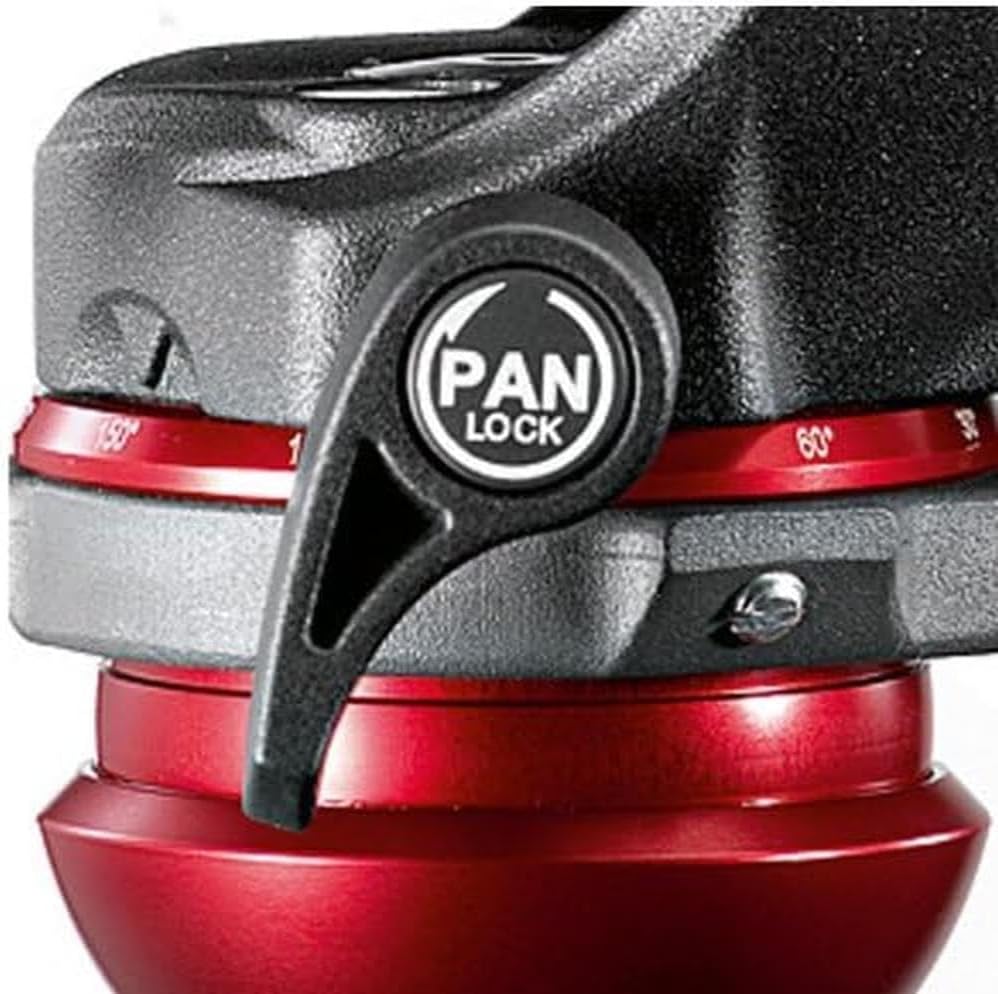
Figura 4: Detalhado view of the pan lock mechanism on the Manfrotto MH055M8-Q5 head. The "PAN LOCK" lever is used to secure the head's horizontal rotation, preventing unwanted movement.
4.3 Counterbalance Control
The adjustable counterbalance system helps to balance the weight of your camera and lens, preventing accidental drops and providing smoother tilt movements.
- Adjust the counterbalance knob (if present) to match the weight of your camera setup.
- Proper counterbalance will allow the camera to remain in position when tilted, even if the tilt lock is disengaged.
5. Manutenção
Regular maintenance ensures the longevity and optimal performance of your Manfrotto MH055M8-Q5 head.
- Limpeza: Use a soft, dry cloth to wipe down the head after each use. For stubborn dirt, a slightly damp Pode-se usar um pano e secar imediatamente. Evite produtos de limpeza abrasivos ou solventes.
- Lubrificação: The fluid cartridges are sealed and do not require user lubrication. Do not attempt to disassemble the head for lubrication.
- Armazenar: Store the head in a clean, dry environment, away from extreme temperatures and humidity.
- Inspeção: Periodically check all knobs, levers, and screws for tightness. Ensure the quick release plate mechanism operates smoothly.
6. Solução De Problemas
6.1 Head Movement is Not Smooth
- Check Drag Settings: Ensure the pan and tilt drag knobs are not set too high for your desired movement.
- Modo de verificação: Confirm the Photo-Movie selector is in the appropriate mode for your operation (e.g., "Movie" for fluid video pans).
- Superfícies limpas: Ensure no dirt or debris is obstructing moving parts.
6.2 Camera Not Securely Mounted
- Placa de Liberação Rápida: Ensure the quick release plate is firmly attached to the camera and fully seated in the head's receiver. The safety lever should be engaged.
- Plate Compatibility: Verify that you are using the correct Q5 quick release plate.
6.3 Pan Bar Feels Loose
- Tighten Locking Knob: Ensure the pan bar's locking knob is fully tightened after insertion.
7. Especificações
| Recurso | Especificação |
|---|---|
| Dimensões do produto | 6.9 x 15 x 10.23 polegadas |
| Peso do item | 2.8 libras (45.06 oz) |
| Capacidade de carga | 7 kg (15.43 libras) |
| Inclinação frontal | -90 ° / + 90 ° |
| Inclinação lateral | +90° / -20° |
| Arraste a panela | Continuously adjustable from 0 to max level |
| Inclinar e arrastar | Continuously adjustable from 0 to max level |
| Rotação Panorâmica | 360 graus |
| Head Bowl | 60 mm |
| Material | Magnésio |
| Altura de trabalho | 5.31 polegadas |
| Número do modelo | MH055M8-Q5 |
| ASIN | B0049F19AC |
| UPC | 989898720835, 719821324157 |
8. Garantia e Suporte
Manfrotto products are manufactured to high quality standards and are covered by a warranty. Specific warranty terms and conditions, including duration and coverage, are typically provided with your product at the time of purchase or can be found on the official Manfrotto website.
For technical support, spare parts, or warranty claims, please visit the official Manfrotto webVisite o site ou entre em contato com o departamento de atendimento ao cliente. Guarde o comprovante de compra para validação da garantia.
Official Manfrotto Website: www.manfrotto.com