
Johnson Controls TEC2203-3
Manual do usuário do termostato não programável TEC2203-3 da Johnson Controls
Model: TEC2203-3
1. Introdução
This manual provides essential information for the installation, operation, and maintenance of the Johnson Controls TEC2203-3 Non-Programmable Thermostat. This device is designed for controlling heating and cooling systems with 2 Heat and 2 Cool stages, and features a 1SPDFAN (Single Pole Double Throw Fan) control. It serves as a reliable replacement thermostat for compatible HVAC systems.
2. Produto acabadoview
2.1 Principais Características
- Operação não programável para controle de temperatura simplificado.
- Supports 2 Heat and 2 Cool stages for versatile HVAC system compatibility.
- Integrated 1SPDFAN control.
- Clear digital display for room temperature.
2.2 Componentes e Tela
The TEC2203-3 thermostat features a user-friendly interface with a digital display and intuitive buttons for control. Refer to the image below for a visual guide to the thermostat's components.
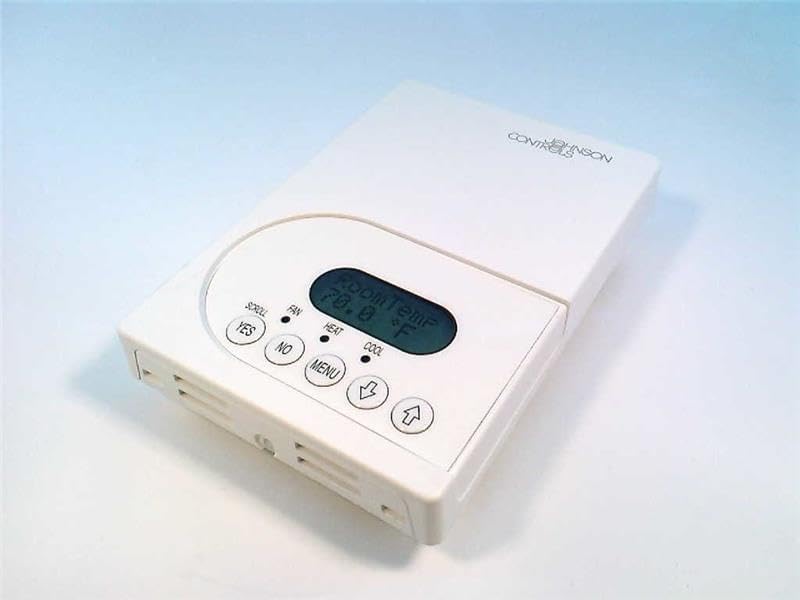
Figura 1: Frente view of the Johnson Controls TEC2203-3 Thermostat. The image shows the white rectangular thermostat unit with a central digital display indicating "Room Temp 70.0 °F". Below the display are control buttons: "YES", "NO", "MENU", a down arrow, and an up arrow. Indicators for "SCROLL", "FAN", "HEAT", and "COOL" are also visible.
The display shows the current room temperature. Indicators for HEAT and COOL illuminate when the respective modes are active. The FAN indicator shows fan operation. Buttons include:
- YES / NO: Used for confirming or canceling selections in menu options.
- CARDÁPIO: Accesses system settings and operational modes.
- Up Arrow / Down Arrow: Adjusts temperature setpoints and navigates menu options.
3. Instalação
Installation of the Johnson Controls TEC2203-3 Thermostat should be performed by a qualified HVAC technician. Incorrect installation can lead to system malfunction, property damage, or personal injury. Always ensure power to the HVAC system is turned off at the circuit breaker before beginning any installation work.
3.1 Precauções de segurança
- Disconnect all power to the heating and cooling system before installation.
- Siga todas as normas e regulamentos elétricos locais.
- Ensure wiring connections are secure and correct according to the wiring diagram provided with the product packaging (not included in this manual).
4. Instruções de operação
The TEC2203-3 is a non-programmable thermostat, meaning it maintains a set temperature until manually changed.
4.1 Configurando a temperatura
- O display mostra a temperatura ambiente atual.
- Pressione o Seta para cima or Seta para baixo button to adjust the desired temperature setpoint.
- The new setpoint will flash briefly and then be saved. The system will then work to reach and maintain this temperature.
4.2 Changing System Mode (Heat/Cool/Off)
- Pressione o MENU botão.
- Use o Seta para cima or Seta para baixo to navigate through the available system modes (e.g., HEAT, COOL, OFF).
- Imprensa SIM para selecionar o modo desejado.
- The corresponding indicator (HEAT or COOL) will illuminate when active.
4.3 Operação do Ventilador
The fan can typically be set to AUTO (runs only when heating or cooling) or ON (runs continuously).
- Pressione o MENU botão.
- Navigate to the fan settings using the Seta para cima or Seta para baixo.
- Imprensa SIM para selecionar o modo de ventilação desejado.
5. Manutenção
The Johnson Controls TEC2203-3 Thermostat requires minimal maintenance to ensure optimal performance.
- Limpeza: Limpe periodicamente a parte externa do termostato com um pano macio e seco.amp pano. Não use produtos de limpeza abrasivos ou solventes.
- Fluxo de ar: Certifique-se de que as aberturas de ventilação do termostato não estejam obstruídas por poeira ou detritos, pois isso pode afetar a precisão da medição da temperatura.
- Exames médicos profissionais: It is recommended to have your entire HVAC system, including the thermostat, inspected by a professional technician annually.
6. Solução De Problemas
If you experience issues with your TEC2203-3 thermostat, consider the following common troubleshooting steps:
- Sem tela/energia: Check the circuit breaker for your HVAC system. Ensure the thermostat is properly seated on its base.
- Leitura de temperatura incorreta: Ensure the thermostat's vents are clear of obstructions. Avoid placing the thermostat near heat sources (lamps, direct sunlight) or drafts.
- Sistema não responde: Verify the system mode (HEAT/COOL/OFF) is correctly selected. Check if the temperature setpoint is above (for heat) or below (for cool) the current room temperature.
- Ventilador não está funcionando: Check the fan mode setting (AUTO/ON). If set to AUTO, the fan will only run when heating or cooling is active.
Se os problemas persistirem após tentar essas etapas, entre em contato com um técnico de climatização qualificado para obter assistência.
7. Especificações
| Recurso | Detalhe |
|---|---|
| Modelo | TEC2203-3 |
| Marca | Controles Johnson |
| Tipo de controle | Termostato não programável |
| Stages | 2 Calor / 2 Frio |
| Controle do ventilador | 1SPDFAN |
| Peso do item | 1 libras |
| ASIN | B004H2XCMU |
8. Garantia e Suporte
For specific warranty information and technical support regarding your Johnson Controls TEC2203-3 Thermostat, please refer to the documentation included with your purchase or contact Johnson Controls directly. Warranty terms and support options may vary based on region and purchase location.
Ask a question about this manual
Ask about setup, troubleshooting, compatibility, parts, safety, or missing instructions. Manuals+ will review the question and use this page’s manual context to help answer it.