1. Introdução
This manual provides comprehensive instructions for the safe and effective use of the PeakTech True RMS P 3131 Clamp Meter with Multimeter. This device is designed for measuring AC/DC currents without circuit interruption, as well as AC/DC voltage and resistance, with continuity testing capabilities. It features a 3 3/4 digit LCD display with True RMS measurement for accurate readings.
Leia atentamente este manual antes de utilizar o dispositivo e guarde-o para futuras consultas.
2. Informações de segurança
WARNING: Improper use of this meter can cause damage, shock, injury, or death. Always follow all safety precautions.
- Sempre cumpra os códigos de segurança locais e nacionais.
- Do not use the meter if it appears damaged or if the insulation on test leads is compromised.
- Certifique-se de que o medidor esteja configurado com a função e a faixa corretas antes de realizar as medições.
- Evite o contato com circuitos energizados. Utilize equipamento de proteção individual (EPI) adequado.
- The device is rated for CAT II 600V. Do not exceed these limits.
- Substitua as pilhas imediatamente quando o indicador de bateria fraca aparecer.
- Do not operate the meter in explosive atmospheres.
3. Produto acabadoview e Componentes
The PeakTech P 3131 is a robust and reliable clamp meter. Familiarize yourself with its main components:

Figura 1: Frente view of the PeakTech P 3131 Clamp Medidor, mostrando o clamp jaw, function selector, LCD display, and input terminals.
- Clamp Mandíbula: For non-contact AC/DC current measurement.
- Seletor de funções: To select measurement modes (A~, A=, V~, V=, Ω/Continuity, OFF).
- Tela LCD: Exibe leituras de medição, unidades e indicadores.
- Botões: AC/DC, ZERO, H/MAX (Data Hold/Max Hold).
- Terminais de entrada: COM (common) and VΩ (voltage/resistance) for test leads.
- Protetor de mão: Provides protection against accidental contact.
4. Configuração
4.1 Instalação da bateria
The PeakTech P 3131 requires two 1.5V AAA batteries (included). To install or replace batteries:
- Certifique-se de que o dispositivo esteja DESLIGADO.
- Localize a tampa do compartimento da bateria na parte traseira do medidor.
- Use uma chave de fenda para abrir o compartimento.
- Insert the two AAA batteries, observing correct polarity (+ and -).
- Recoloque a tampa do compartimento da bateria e prenda-a com o parafuso.
When the low battery indicator appears on the display, replace the batteries immediately to ensure accurate measurements.
4.2 Conectando os Cabos de Teste
Para voltage, resistance, and continuity measurements, connect the supplied test leads:
- Insira a ponta de prova preta no COM terminal de entrada (comum).
- Insira o cabo de teste vermelho no VΩ terminal de entrada.

Figure 2: PeakTech P 3131 Clamp Meter shown with its carrying case, test leads, batteries, and user manual.
5. Instruções de operação
5.1 Ligar/Desligar
Rotate the function selector dial from the "OFF" position to any desired measurement function to power on the meter. To power off, rotate the dial back to "OFF". The meter features an automatic power-off function (can be deactivated) to conserve battery life.
5.2 Medição de corrente CA/CC (Clamp)
To measure current without breaking the circuit:
- Gire o seletor de função para a posição A~ (Corrente CA) ou A= (Corrente CC) posição.
- Pressione o CA/CC button if you need to switch between AC and DC current modes (if the dial position combines them).
- Pressione o ZERO button to zero the display before measuring DC current, especially for small currents, to compensate for residual magnetism.
- Abra o clamp mandíbula pressionando o gatilho.
- Enclose only um conductor with the clamp mandíbula. Certifique-se de que a mandíbula esteja completamente fechada.
- Leia o valor atual no visor LCD.
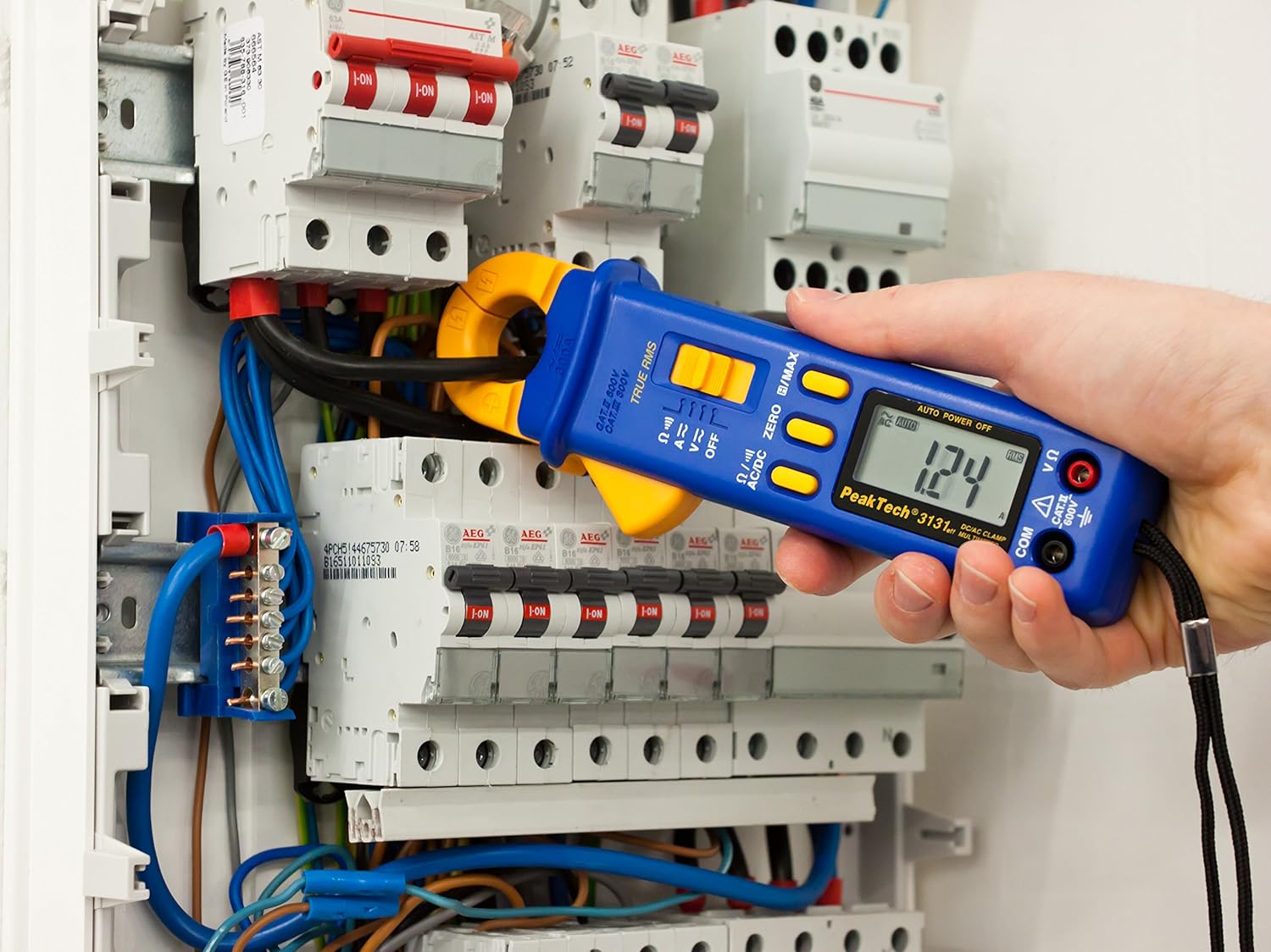
Figure 3: The PeakTech P 3131 Clamp Meter in use, measuring current on a single conductor within an electrical panel.
5.3 Vol AC/DCtage Medição
Para medir o volumetage:
- Conecte os cabos de teste conforme descrito na Seção 4.2.
- Gire o seletor de função para a posição V~ (AC Voltage) ou V= (DC Vol.tage) posição.
- Conecte as pontas de prova em paralelo ao circuito ou componente que deseja medir.
- Leia o vol.tage valor no display LCD.
5.4 Resistance and Continuity Measurement
To measure resistance or check for continuity:
- Conecte os cabos de teste conforme descrito na Seção 4.2.
- Gire o seletor de função para a posição Ω/))) (Resistance/Continuity) position.
- For resistance: Connect the test probes across the component. Ensure the circuit is de-energized.
- For continuity: Touch the test probes to the two points you want to check. A continuous beep indicates a low-resistance path (continuity).
- Leia o valor da resistência no visor LCD.
5.5 Funções especiais
- RMS verdadeiro: The meter measures True Root Mean Square values for AC voltage corrente, fornecendo leituras precisas para formas de onda não sinusoidais.
- Retenção de dados (H): Pressione o H/MAX Pressione o botão brevemente para congelar a leitura atual no visor. Pressione novamente para liberar.
- Maximum Value Hold (MAX): Pressione e segure o H/MAX button to capture and display the maximum measured value. Press again to exit.
- Função ZERO: Used to zero the display for DC current measurements to eliminate offset errors.
- Ajuste automático de alcance: The meter automatically selects the appropriate measurement range.
- Desligamento automático: The meter automatically turns off after a period of inactivity to save battery. This feature can typically be disabled by holding a specific button during power-on (refer to the device's on-screen indicators or a more detailed manual if available).
6. Manutenção
6.1 Limpeza
Limpe a caixa do medidor com o anúncio.amp Use um pano e um detergente suave. Não utilize abrasivos ou solventes. Certifique-se de que o medidor esteja completamente seco antes de usar.
6.2 Substituição da bateria
Refer to Section 4.1 for instructions on battery replacement. Always use two fresh 1.5V AAA batteries. Remove batteries if the meter is not used for an extended period to prevent leakage.
6.3 Armazenamento
Store the meter in a cool, dry place, away from direct sunlight and extreme temperatures. Use the provided carrying case for protection.
7. Solução De Problemas
| Problema | Possível causa | Solução |
|---|---|---|
| O medidor não liga. | Baterias descarregadas ou instaladas incorretamente. | Verifique a polaridade da bateria; substitua as baterias. |
| "OL" or "OVER" displayed. | A medição excede o intervalo selecionado ou a capacidade máxima do medidor. | Select a higher range (if manual ranging) or ensure measurement is within meter's limits. |
| Inaccurate DC current reading. | Residual magnetism in clamp mandíbula. | Pressione o ZERO button before measurement. |
| Sem sinal sonoro de continuidade. | Circuito aberto ou alta resistência. | Check connections; ensure circuit is complete. |
If problems persist, contact PeakTech customer support or a qualified service technician.
8. Especificações técnicas
| Parâmetro | Especificação |
|---|---|
| Mostrar | 3 3/4 digit LCD, max. 3999 counts |
| Vol. DCtage (DCV) | 0.1 mV to 600 V (Accuracy: 0.5% + 2 digits) |
| Vol. CAtage (ACV) | 1 mV to 600 V (Accuracy: 1.5% + 5 digits) |
| Corrente CC (DCA) | 10 mA to 300 A (Accuracy: 1% + 2 digits) |
| Corrente CA (ACA) | 10 mA to 300 A (Accuracy: 1% + 3 digits) |
| Resistência (Ω) | 0.1 Ω to 40 MΩ (Accuracy: 0.9% + 2 digits) |
| Teste de continuidade | função campainha |
| RMS verdadeiro | Yes, for AC measurements |
| Abertura da mandíbula | 22 mm max. conductor diameter |
| Classificação de segurança | EN 61010-1, CAT II 600 V |
| Fonte de energia | 2 pilhas AAA de 1.5 V |
| Dimensões (C x L x A) | 192 x 66 x 27 mm (aprox. 7.56 x 2.6 x 1.06 polegadas) |
| Peso | 205 g (aproximadamente 0.45 libras) |
9. Garantia e Suporte
PeakTech products are manufactured under strict quality control. This product is covered by a standard manufacturer's warranty against defects in materials and workmanship. Please refer to the warranty card included with your product or visit the official PeakTech website para obter termos e condições detalhados da garantia.
For technical support, service, or calibration inquiries, please contact your local PeakTech distributor or the PeakTech customer service department. Contact information can typically be found on the PeakTech website ou na embalagem do produto.


