
1. Introdução
This manual provides detailed instructions for the setup, operation, and maintenance of your Vibe Axcess 5-in-1 Universal Remote. Please read this manual thoroughly before using the remote control to ensure proper functionality and to maximize your user experience. This remote is designed to control up to five different audio/video devices.
2. Produto acabadoview
The Vibe Axcess 5-in-1 Universal Remote is designed to consolidate control of multiple home entertainment devices into a single unit. It features dedicated buttons for various functions and device types.
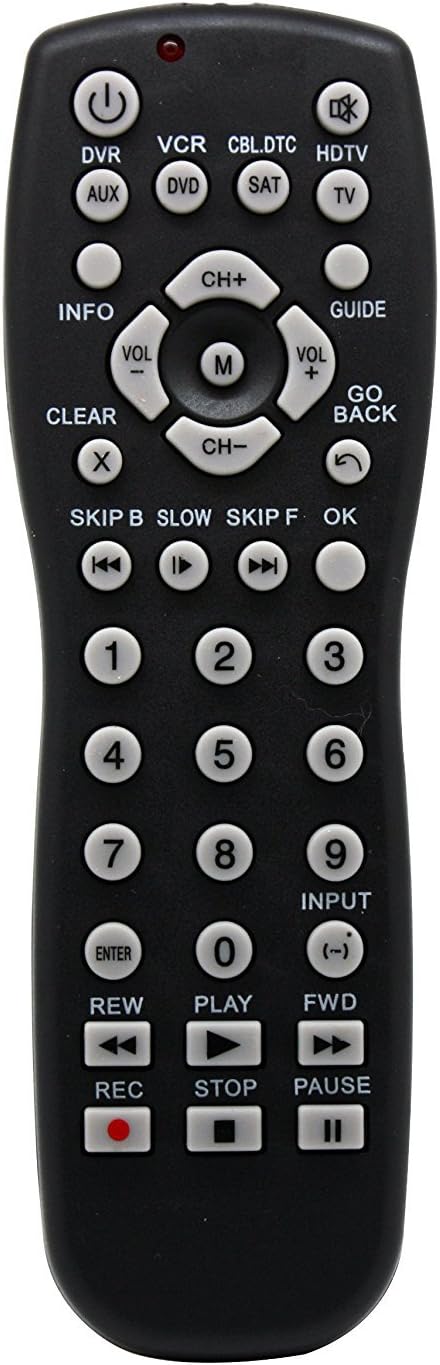
Figura 1: Frente view of the Vibe Axcess 5-in-1 Universal Remote. This image displays the remote's layout, including device selection buttons (DVR, VCR, CBL.DTC, HDTV, AUX, DVD, SAT, TV), navigation pad, number keys, and media control buttons (REW, PLAY, FWD, REC, STOP, PAUSE).

Figura 2: Packaging of the Vibe Axcess 5-in-1 Universal Remote. The packaging highlights the remote's 5-in-1 capability and compatibility with various device types such as DVD/VCR, HDTV, DVD, AUX, and CBL/SAT/CABLE.
3. Configuração
3.1 Instalação da bateria
- Localize a tampa do compartimento da bateria na parte traseira do controle remoto.
- Deslize a tampa para baixo ou pressione a trava e levante para abrir.
- Insira duas (2) pilhas AAA, certificando-se de que os terminais positivo (+) e negativo (-) correspondam aos diagramas dentro do compartimento.
- Recoloque a tampa do compartimento da bateria, deslizando-a de volta para o lugar até ouvir um clique.
Observação: Always use fresh batteries and replace both batteries at the same time. Do not mix old and new batteries or different types of batteries.
3.2 Programando o Controle Remoto
To control your devices, the universal remote must be programmed with the correct codes for each device. There are typically two methods for programming:
3.2.1 Entrada de código direto
This method involves entering a specific code from a code list (usually provided with the remote or available online) for your device's brand.
- Ligue o dispositivo que deseja controlar (por exemplo, TV, leitor de DVD).
- Press and hold the desired device button on the remote (e.g., TV, DVD) for approximately 3 seconds until the indicator light (usually red) illuminates and stays on.
- While the indicator light is on, enter the 3-digit or 4-digit code for your device's brand using the number keys.
- If the code is valid, the indicator light will turn off. If the light flashes and remains on, the code was invalid; re-enter the code.
- Teste o controle remoto pressionando o botão. PODER button. If the device turns off, the code is correct. If not, try the next code listed for your brand.
3.2.2 Pesquisa de código automática
If you cannot find a code or direct code entry fails, use the auto code search method.
- Ligue o dispositivo que deseja controlar.
- Pressione e mantenha pressionado o botão do dispositivo desejado (por exemplo, TV) for approximately 3 seconds until the indicator light illuminates and stays on.
- While holding the device button, press the PODER button once. The indicator light will start flashing, indicating it is searching for a code.
- Point the remote at the device and wait for the device to turn off. This may take several minutes as the remote cycles through codes.
- Assim que o dispositivo desligar, pressione imediatamente o DIGITAR Pressione o botão para salvar o código. A luz indicadora se apagará.
- Test the remote's functions. If some functions do not work, repeat the auto search process to find a more compatible code.
4. Instruções de operação
Once programmed, operating your Vibe Axcess 5-in-1 Universal Remote is straightforward.
- Selecionar dispositivo: Pressione o botão correspondente do dispositivo (por exemplo, TV, DVD, CBL.DTC) for the device you wish to control. The indicator light will briefly illuminate to confirm selection.
- Ligar/desligar: Pressione o PODER Botão para ligar ou desligar o dispositivo selecionado.
- Controle de volume: Use o VOL+ e vol- botões para ajustar o volume.
- Controle de Canal: Use o CH+ e CH- botões para mudar de canal.
- Teclas numéricas: Use the number keys (0-9) to directly enter channel numbers or other numerical inputs.
- Navegação: Use the directional pad (up, down, left, right) and OK button for menu navigation.
- Controles de mídia: Usar JOGAR, PAUSA, PARAR, REW, Para frente, e REC for controlling media playback on compatible devices.
5. Manutenção
5.1 Limpeza
To clean your remote, gently wipe it with a soft, dry cloth. Do not use abrasive cleaners, solvents, or harsh chemicals, as these can damage the remote's finish or internal components.
5.2 Substituição da bateria
When the remote's performance degrades or the indicator light fails to illuminate, it is time to replace the batteries. Follow the battery installation steps in Section 3.1. Dispose of used batteries responsibly according to local regulations.
6. Solução De Problemas
- Remoto não funciona:
- Verifique se as pilhas estão inseridas corretamente e se não estão descarregadas. Substitua-as, se necessário.
- Ensure you have selected the correct device button (e.g., TV for your television).
- Verify that the remote is programmed with the correct code for your device. Re-program if unsure.
- Certifique-se de que não haja obstruções entre o controle remoto e o sensor infravermelho do dispositivo.
- Algumas funções não estão funcionando:
- Some universal remote codes may not support all original remote functions. Try another code for your device brand using the programming steps.
- Ensure the device you are trying to control supports the specific function (e.g., not all TVs have a dedicated 'INFO' button function).
- Indicator light not illuminating:
- Verifique e substitua as baterias.
- If the issue persists after battery replacement, the remote may be faulty.
7. Especificações
- Modelo: OT795-KO
- Marca: Vibração
- Dimensões do produto: 10.7 x 4 x 0.8 polegadas
- Peso do item: 4 onças
- Baterias: São necessárias 2 pilhas AAA (não incluídas)
- Número máximo de dispositivos suportados: 5
- Tecnologia de conectividade: Infravermelho
- Recurso especial: Universal
8. Garantia e Suporte
For information regarding warranty coverage or technical support, please refer to the documentation included with your purchase or contact the retailer where the product was acquired. Specific warranty terms may vary.