
1. Introdução
This manual provides instructions for the OEM RMT-B119A remote control, designed as a replacement or secondary remote for various Sony Blu-ray player models. This remote offers full functionality for controlling your Blu-ray player's features.
Compatible Sony Blu-ray Player Models:
- BDP-BX59
- BDP-S390
- BDP-S590
- BDP-BX110
- BDP-S1100
- BDP-S3100
- BDP-BX310
2. Configuração
2.1 Instalação da bateria
The remote control requires two (2) AAA batteries (not included). Follow these steps to install the batteries:
- Localize a tampa do compartimento da bateria na parte traseira do controle remoto.
- Pressione a aba e deslize a tampa para baixo para abrir o compartimento.
- Insira duas pilhas AAA, certificando-se de que os terminais positivo (+) e negativo (-) estejam alinhados corretamente com as marcações dentro do compartimento.
- Deslize a tampa do compartimento da bateria de volta para o lugar até ouvir um clique que a encaixe firmemente.
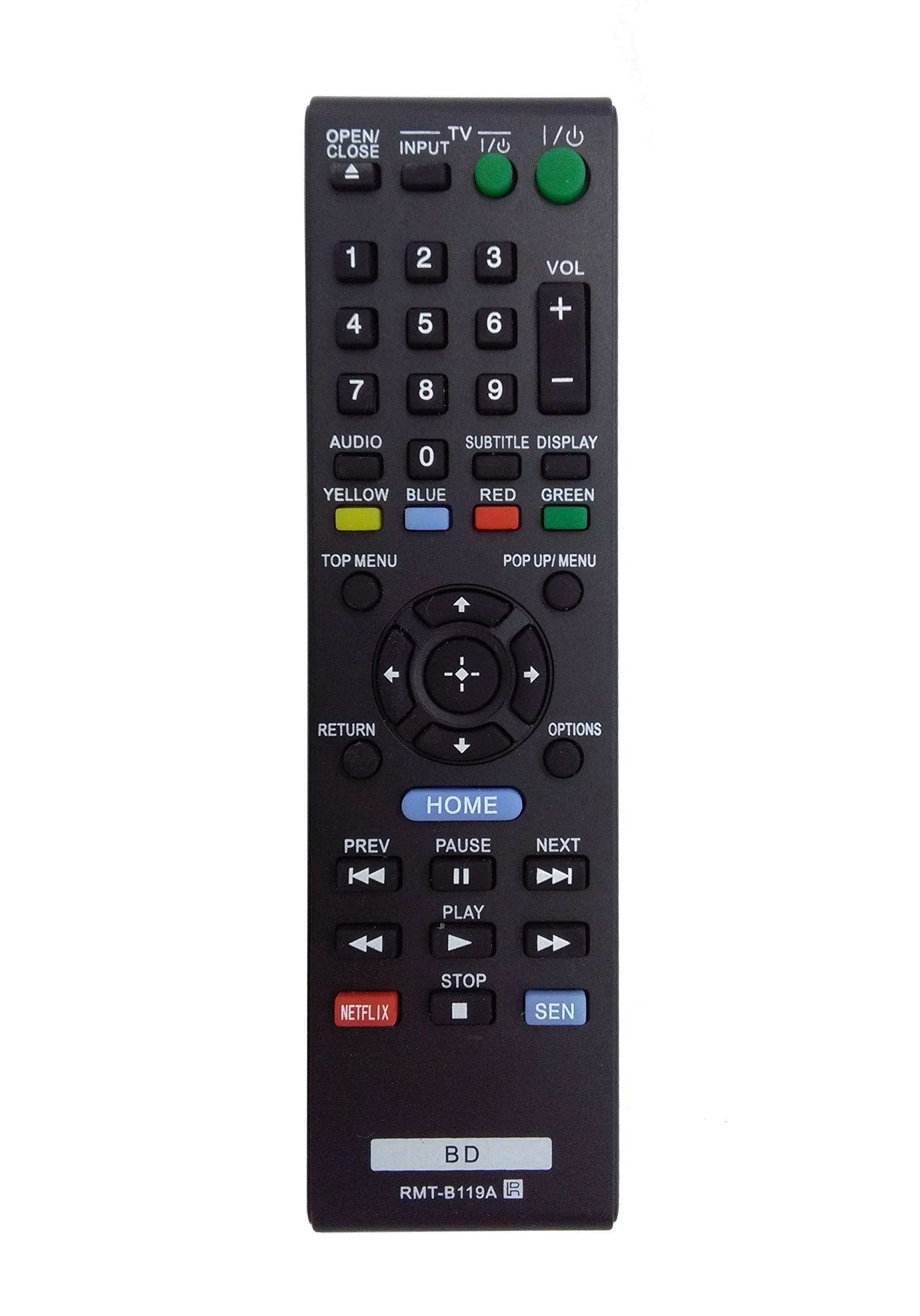
Image: The OEM RMT-B119A remote control, showing the full button layout on the front and a partial view of the open battery compartment on the back, revealing the battery terminals.
3. Instruções de operação
3.1 Layout do controle remoto e funções dos botões
Familiarize yourself with the buttons on your RMT-B119A remote control. Below is a description of each button's primary function.
Image: The OEM RMT-B119A remote control, displaying all buttons and their labels.
- Power (I/O): Turns the Blu-ray player on or off.
- OPEN/CLOSE (▲): Abre ou fecha a bandeja do disco.
- ENTRADA: Switches the input source on the connected TV (if programmed).
- TV: Switches the remote to TV control mode (if programmed).
- Teclado numérico (0-9): Used for direct track selection, chapter selection, or entering numerical data.
- VOLUME (+/-): Adjusts the volume level (typically for the connected TV, if programmed).
- ÁUDIO: Changes the audio track or language during playback.
- SUBTITLE DISPLAY: Toggles subtitle display on or off, or cycles through available subtitle languages.
- YELLOW, BLUE, RED, GREEN: Color-coded function buttons, typically used for specific features within menus or interactive content. Their function varies depending on the disc or menu.
- MENU DE CIMA: Accesses the main menu of the Blu-ray disc.
- POP UP/MENU: Displays the pop-up menu during disc playback.
- Directional Pad (↑↓←→): Navega pelos menus e opções.
- Center Button (Enter/Select): Confirms a selection or enters a menu item.
- RETORNAR: Retorna à tela ou menu anterior.
- OPÇÕES: Displays context-sensitive options or settings.
- CASA: Accesses the Blu-ray player's home menu.
- PREV (◀◀): Skips to the beginning of the current track/chapter or the previous track/chapter.
- PAUSE (▌▌): Pausa a reprodução.
- NEXT (▶▶): Pula para a próxima faixa ou capítulo.
- PLAY (▶): Inicia ou retoma a reprodução.
- PARAR (■): Interrompe a reprodução.
- NETFLIX: Botão de acesso direto ao serviço de streaming Netflix.
- SEN: Direct access button for the Sony Entertainment Network (now PlayStation Video/Music).
- BD: Likely a dedicated button for Blu-ray Disc functions or to switch to Blu-ray mode.
4. Manutenção
Para garantir a longevidade e o bom funcionamento do seu controle remoto, siga estas orientações de manutenção:
- Limpeza: Wipe the remote control with a soft, dry cloth. For stubborn dirt, slightly dampLimpe o pano com água ou um detergente suave e não abrasivo. Evite usar produtos químicos ou solventes agressivos.
- Substituição da bateria: Replace batteries when the remote's response becomes sluggish or it stops functioning. Always replace both batteries at the same time with new ones of the same type.
- Armazenar: Store the remote in a cool, dry place away from direct sunlight, extreme temperatures, and high humidity. If the remote will not be used for an extended period, remove the batteries to prevent leakage.
- Evite quedas: Proteja o controle remoto contra impactos físicos, pois quedas podem danificar os componentes internos.
5. Solução De Problemas
Se você tiver problemas com o seu controle remoto, consulte a tabela a seguir para problemas comuns e suas soluções:
| Problema | Possível causa | Solução |
|---|---|---|
| Remoto não funciona. | Pilhas descarregadas ou inseridas incorretamente. | Substitua as pilhas por novas, certificando-se da polaridade correta (+/-). |
| O funcionamento remoto é intermitente. | Low battery power or obstruction. | Replace batteries. Ensure no objects are blocking the remote's signal path to the Blu-ray player. |
| Remote does not control the TV. | Remote not programmed for TV or TV mode not selected. | This remote is primarily for Blu-ray players. TV control functionality may require specific programming not covered by this manual, or may not be supported by this OEM model. |
| Os botões não respondem ou estão emperrados. | Sujeira ou detritos sob os botões. | Limpe a superfície do controle remoto. Evite derramar líquidos sobre o controle. |
6. Especificações
- Marca: Fabricante original de equipamento original
- Número do modelo: RMT-B119A
- Tecnologia de conectividade: Infravermelho (IV)
- Dispositivos compatíveis: Sony Blu-ray Players (specific models listed in Introduction)
- Fonte de energia: 2 x pilhas AAA (não incluídas)
- Alcance máximo: Aproximadamente 10 metros (33 pés)
- Recurso especial: Design ergonômico
7. Garantia e Suporte
This OEM RMT-B119A remote control comes with a Garantia de 30 dias A garantia é válida a partir da data da compra e cobre defeitos de fabricação. Guarde seu comprovante de compra para eventuais solicitações de garantia.
For technical support or warranty inquiries, please contact the retailer or manufacturer directly. Refer to your purchase documentation for specific contact information.