
1. Introdução
This manual provides instructions for the installation, programming, and operation of the Galcon 7101D 1-Station Battery Operated Irrigation Controller with a 3/4-inch waterproof valve. The 7101D controller is designed for automated operation of drip and sprinkler systems. It is completely waterproof and can be installed above or below ground, including in valve boxes or areas where it may be submerged up to 3 feet. The controller operates on a single 9V alkaline battery.
2. Informações de segurança
- Leia todas as instruções cuidadosamente antes da instalação e operação.
- Use only a 9V alkaline battery. Do not use rechargeable batteries.
- Ensure proper sealing of the battery compartment to maintain waterproofing.
- This product is designed for use only in the USA and Canada.
- Não tente desmontar ou reparar a unidade por conta própria. Entre em contato com o suporte ao cliente para obter assistência.
3. Conteúdo da embalagem
Verifique se todos os componentes estão presentes na embalagem:
- Galcon 7101D 1-Station Battery Operated Controller
- 3/4-inch Inline Irrigation Valve
- Manual do usuário (este documento)
4. Recursos do Produto
- Controller, solenoid, and 3/4" valve integrated into one unit.
- Easy programming with 6 large buttons.
- Manual operation and rain delay functions.
- Weekly or Cyclic programming options.
- Completely waterproof and UV resistant construction.
- Designed for use in the USA and Canada.
5. Configuração e instalação
5.1 Instalação da bateria
- Locate the battery compartment on the controller.
- Abra a tampa do compartimento da bateria.
- Insert one new 9V alkaline battery, ensuring correct polarity.
- Feche bem a tampa do compartimento da bateria para manter a vedação à prova d'água.
5.2 Controller and Valve Installation
The Galcon 7101D integrates the controller and valve into a single unit.
- Identify the water flow direction. The valve has an arrow indicating the correct flow.
- Connect the inlet side of the valve to your main water supply line.
- Connect the outlet side of the valve to your irrigation system (drip or sprinkler lines).
- Certifique-se de que todas as conexões estejam firmes para evitar vazamentos.
- The unit can be installed above ground or submerged in a valve box up to 3 feet deep.

Figura 1: Galcon 7101D Controller and Valve Assembly. This image shows the integrated controller and valve unit, highlighting its compact design.
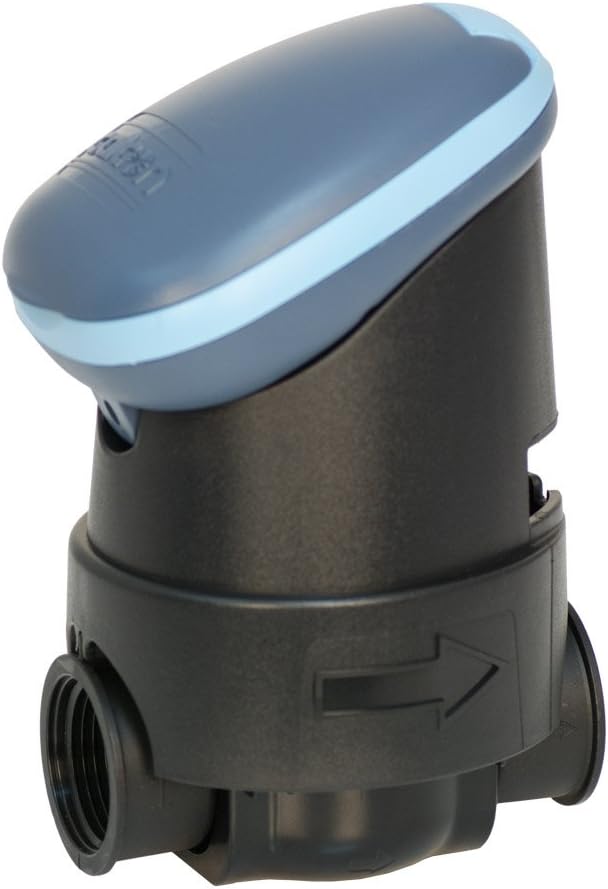
Figura 2: Galcon 7101D Valve with Flow Direction Arrow. This image illustrates the valve component, showing the arrow indicating the correct water flow direction for installation.
6. Instruções de operação
The Galcon 7101D features 6 large buttons for programming and operation. Refer to the on-screen prompts for specific settings.
6.1 Configurar a hora e o dia atuais
Follow the on-screen instructions to set the current time and day of the week. This is crucial for accurate scheduling.
6.2 Programação de Cronogramas de Irrigação
The controller supports two main programming modes:
- Programação semanal: Set specific days of the week for irrigation.
- Cyclic Programming: Set an irrigation cycle (e.g., every 2 days) regardless of the day of the week.
Use the programming buttons to navigate through the menu and set:
- Start Time(s)
- Duration of watering (in minutes)
- Frequency (specific days or cycle interval)
6.3 Operação Manual
To manually turn the water on or off, use the dedicated manual operation button. This allows for immediate watering outside of the programmed schedule.
6.4 Função de Retardo por Chuva
Activate the rain delay function to temporarily suspend irrigation for a set period (e.g., 24, 48, 72 hours) after rainfall. This conserves water and prevents overwatering.
7. Manutenção
- Substituição da bateria: Replace the 9V alkaline battery annually, or when the low battery indicator appears on the display.
- Limpeza: Clean the exterior of the controller with a damp pano. Não use produtos de limpeza abrasivos ou solventes.
- Winterização: In freezing climates, remove the controller and valve from the irrigation system and store indoors to prevent freeze damage.
8. Solução De Problemas
| Problema | Possível causa | Solução |
|---|---|---|
| O visor do controlador está em branco. | Bateria descarregada ou instalada incorretamente. | Replace the 9V alkaline battery, ensuring correct polarity. |
| Valve does not open/close. | Low battery, incorrect programming, or debris in valve. | Check battery, verify programming, or inspect valve for obstructions. |
| Vazamentos de água nas conexões. | Conexões soltas ou vedações danificadas. | Tighten connections. If leaks persist, check for damaged O-rings or seals. |
| Irrigation does not start at scheduled time. | Incorrect time/day setting, rain delay active, or programming error. | Verify current time and day, check if rain delay is active, review programa de irrigação. |
9. Especificações
- Modelo: 7101D
- Número da peça: GAR6S2312P0
- Válvula Tamanho: 3/4 de polegada
- Fonte de energia: 1 x 9V Alkaline Battery (required)
- Classificação à prova d'água: IP-68 (submersible up to 3 feet)
- Opções de programação: Weekly or Cyclic
- Dimensões: 4.4 x 3.9 x 7.4 polegadas (Produto)
- Peso: 3.2 onças
- Fabricante: Galcon USA, LTD
- Região de atuação: EUA e Canadá
10. Garantia e Suporte
For warranty information or technical support, please contact Galcon customer service. Refer to the product packaging or the official Galcon website para informações de contato atualizadas.
Observação: A desmontagem ou modificação não autorizada do produto pode anular a garantia.