
Introdução
This manual provides detailed instructions for setting up, operating, and maintaining your Lexmark MS312dn laser printer. Please read this guide thoroughly before using the printer to ensure optimal performance and longevity.
1. Desembalagem e configuração inicial
Carefully remove the printer from its packaging. The printer weighs approximately 14 kg (30.85 lbs). It is recommended to have assistance when lifting.

Imagem: Frente direita view of the Lexmark MS312dn laser printer, showing its compact design.
1.1 Conexão de Energia
Connect the power cord to the printer and then to a grounded electrical outlet. Do not connect to a power strip or extension cord during initial setup.
1.2 Conexão de rede e USB
The Lexmark MS312dn supports both Ethernet and USB 2.0 connectivity.
- Conexão Ethernet: Connect an Ethernet cable from your network router or switch to the Ethernet port on the printer.
- Conexão USB: Connect a USB 2.0 cable from your computer to the USB port on the printer.
1.3 Instalação de software
Insert the installation CD (if provided) into your computer's CD-ROM drive, or download the latest drivers and software from the official Lexmark support webSiga as instruções na tela para concluir a instalação.
The printer supports various operating systems, including Windows, Mac, and Linux. Server operating systems such as Windows Server 2003, 2008, and 2012 are also supported.
2. Operação da impressora
2.1 Painel de controle sobreview
The printer features a two-line LCD display and a control panel for easy navigation and status monitoring.

Imagem: Close-up view of the printer's control panel, featuring the LCD screen and navigation buttons.
2.2 Carregando papel
The standard input capacity is 300 sheets, with a maximum input capacity of 850 sheets across multiple trays. The multi-purpose tray holds 50 sheets.
- Abra a bandeja de papel.
- Ajuste as guias de papel de acordo com o tamanho do papel.
- Load the paper stack into the tray. Ensure the stack does not exceed the maximum fill line.
- Feche a bandeja de papel.
Supported media types include plain paper, card stock, envelopes, labels, and transparencies. Standard ISO A-series sizes (A4, A5, A6) and JIS B-series sizes (B5) are supported, along with non-ISO sizes like Letter, Legal, Executive, and Folio.
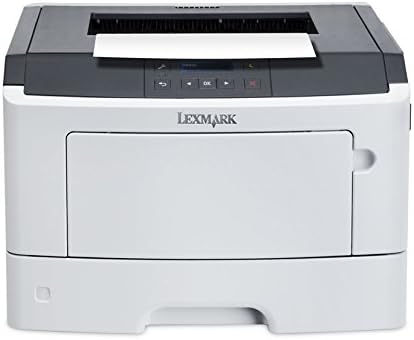
Imagem: Frente view of the Lexmark MS312dn printer with the main paper input tray extended.
2.3 Impressão de Documentos
The printer offers a print speed of up to 35 pages per minute (ppm) for black and white documents on A4/US Letter paper.
- Impressão padrão: Send your document to the printer from your computer.
- Impressão Duplex: The printer supports automatic duplex (two-sided) printing. This feature can be enabled through your printer settings on your computer.
- Impressão móvel: The printer is compatible with Apple AirPrint for convenient printing from mobile devices.

Imagem: Topo view of the Lexmark MS312dn printer, showing the paper output tray and control panel.
2.4 Gerenciamento de Rede
The Lexmark MS312dn is network-ready with Ethernet connectivity and supports Wi-Fi via optional connectivity. It features web-based management, allowing administrators to configure settings and monitor printer status remotely using supported network protocols such as HTTP, HTTPS, SNMP, DHCP, and DNS.
3. Manutenção
3.1 Substituição do cartucho de toner
When the toner level is low, a message will appear on the printer's LCD display. Follow these steps to replace the toner cartridge:
- Abra a tampa frontal da impressora.
- Carefully remove the old toner cartridge.
- Unpack the new Lexmark 501H toner cartridge (or compatible model) and gently shake it to distribute the toner.
- Insira o novo cartucho na impressora até ouvir um clique, indicando que ele se encaixou no lugar.
- Feche a tampa frontal.

Image: A Lexmark 501H toner cartridge shown with its packaging, indicating the type of consumable used by the printer.
3.2 Limpando a Impressora
A limpeza regular ajuda a manter a qualidade de impressão e prolonga a vida útil da sua impressora.
- Limpe a parte externa da impressora com um pano macio e seco.amp, pano sem fiapos.
- Clean the paper path rollers if paper jams occur frequently. Refer to the printer's on-screen help or Lexmark support for detailed instructions.
3.3 Ciclo de trabalho
The recommended monthly duty cycle for the Lexmark MS312dn is 500 - 2500 pages. The maximum duty cycle is 50,000 pages per month. Adhering to the recommended duty cycle helps ensure optimal printer performance and longevity.
4. Solução De Problemas
This section addresses common issues you might encounter with your Lexmark MS312dn printer.
4.1 Atolamentos de papel
If a paper jam occurs, the LCD display will show an error message indicating the location of the jam. Follow the on-screen instructions or consult the Lexmark support website for specific steps to clear the jam.
- Open the relevant covers and trays as indicated by the error message.
- Remova cuidadosamente qualquer papel preso, puxando na direção do caminho do papel para evitar rasgos.
- Close all covers and trays. The printer should resume printing.
4.2 Problemas de qualidade de impressão
If print quality is poor (e.g., streaks, faded text, smudges):
- Check the toner cartridge level and replace if low.
- Ensure you are using recommended paper types.
- Perform a print quality test from the printer's control panel or software to diagnose further.
4.3 Problemas de conectividade
If the printer is not connecting to your computer or network:
- Verify that all cables (power, USB, Ethernet) are securely connected.
- Restart the printer, computer, and network router.
- Check network settings on the printer's control panel and your computer.
- Ensure the correct printer drivers are installed.
5. Especificações técnicas
Below are the detailed technical specifications for the Lexmark MS312dn laser printer.
| Recurso | Especificação |
|---|---|
| Marca | Lexmark |
| Nome do modelo | MS312dn |
| Tecnologia de impressão | Laser (monocromático) |
| Resolução Máxima | 1200 x 1200 DPI |
| Print Speed (Black, A4/US Letter) | 35 ppm |
| Impressão Duplex | Automático |
| Standard Input Capacity | 300 folhas |
| Capacidade Máxima de Entrada | 850 folhas |
| Standard Output Capacity | 150 folhas |
| Freqüência do processador | 800 MHz (2-Core) |
| Memória interna | 128 MB (Max 128 MB) |
| Conectividade | Ethernet, USB 2.0, Optional Wireless LAN |
| Mobile Printing Technologies | Impressão aérea da Apple |
| Mostrar | LCD de 2 linhas |
| Ciclo de Trabalho Máximo | 50,000 páginas por mês |
| Ciclo de trabalho recomendado | 500 - 2500 pages per month |
| Consumo de energia (típico) | 520 W |
| Dimensões (L x P x A) | 398.7 mm x 381 mm x 261.6 mm |
| Peso | 14 kg (30.85 libras) |
| SO suportado | Windows, Mac, Linux, Windows Server |
6. Garantia e Suporte
For detailed warranty information, please refer to the documentation included with your printer or visit the official Lexmark website. Lexmark provides customer support and resources for troubleshooting, driver downloads, and service inquiries.
Você pode encontrar suporte adicional e informações de contato em Suporte da Lexmark Website.