
1. Introdução
This manual provides comprehensive instructions for the Adesso AKB-132UY Luminous Large Print Multimedia Desktop USB Keyboard. This keyboard is designed with large, high-contrast keys to enhance readability, particularly for users with visual impairments. It also integrates multimedia controls for convenience.

Figure 1: Adesso AKB-132UY Luminous Large Print Multimedia Desktop USB Keyboard. This image displays the full keyboard with its black frame and bright yellow keys, featuring large black characters.
2. Conteúdo da embalagem
Verifique se todos os itens estão presentes na embalagem:
- Adesso EasyTouch 132 - Florescent Yellow Multimedia Desktop Keyboard
- Guia de início rápido
3. Instruções de configuração
3.1 Conectando o teclado
- Localize uma porta USB disponível em seu computador.
- Plug the USB connector of the Adesso AKB-132UY keyboard into the USB port.
- O sistema operacional detectará e instalará automaticamente os drivers necessários. Normalmente, não é necessária a instalação de nenhum software adicional.
The keyboard is powered via the USB connection.
4. Operando o teclado
4.1 Principais Características
- Fluorescent 4X Large Print Keys: The keyboard features black characters printed in a large 4X size on bright fluorescent yellow keys. This design provides high contrast for improved visibility and readability, particularly beneficial for users with visual impairments.

Figura 2: Close view of the keyboard's QWERTY section, highlighting the large black characters on fluorescent yellow keys.
- Controles de multimídia: Dedicated hotkeys allow for one-touch control of media functions. These include:
- Reprodutor de mídia
- Diminuir volume
- Aumentar o volume
- Mudo
- Reproduzir/Pausar
- Faixa anterior
- Próxima faixa
- Parar

Figura 3: Close view of the numeric keypad and dedicated multimedia control keys located on the upper right side of the keyboard.
- Windows One-Touch Controls: Access common Windows applications directly with dedicated hotkeys:
- Meu Computador
- Pesquisar
- Calculadora
- Correspondência
- Página inicial (navegador)
- Favorites (Browser)
- Quiet Membrane Key Switches: The keyboard utilizes membrane key switches designed to provide a responsive and quiet typing experience. These switches are rated for a lifespan of up to five million keystrokes.
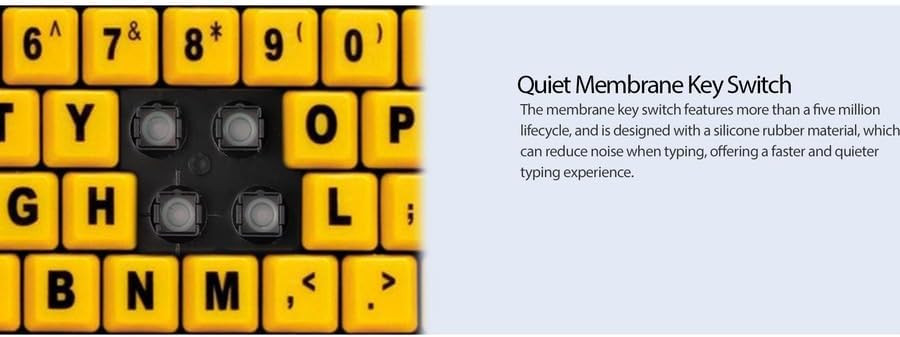
Figura 4: Detalhado view showing the internal membrane key switch mechanism beneath a keycap.
- 104-Key US Layout: The keyboard features a standard 104-key US layout, providing a familiar typing experience.
5. Manutenção
5.1 Limpeza do teclado
Para manter a aparência e a funcionalidade do teclado:
- Desconecte o teclado do computador antes de limpá-lo.
- Use um pano macio e levementeamp cloth to wipe the surface of the keys and the keyboard body.
- For stubborn dirt or debris between keys, use compressed air or a soft brush.
- Evite usar produtos químicos agressivos, produtos de limpeza abrasivos ou umidade excessiva, pois podem danificar o acabamento ou os componentes internos do teclado.
6. Solução De Problemas
If you encounter issues with your Adesso AKB-132UY keyboard, refer to the following troubleshooting steps:
6.1 Teclado não responde
- Verifique a conexão USB: Ensure the keyboard's USB cable is securely plugged into a functioning USB port on your computer. Try unplugging and re-plugging the cable.
- Experimente uma porta USB diferente: Connect the keyboard to another USB port on your computer to rule out a faulty port.
- Reinicialização do computador: Às vezes, uma simples reinicialização do sistema pode resolver problemas de conectividade.
- Teste em outro computador: If possible, test the keyboard on a different computer to determine if the issue is with the keyboard or your computer's setup.
6.2 Keys Sticking or Not Registering
- Clean Under Keys: Dust, crumbs, or debris can get lodged under keys. Use compressed air to clear any obstructions.
- Evite derramamentos: Liquid spills can cause keys to stick or malfunction. If a spill occurs, disconnect the keyboard immediately and allow it to dry completely before reconnecting.
7. Especificações
| Recurso | Descrição |
|---|---|
| Marca | Adesso |
| Número do modelo | AKB-132UY |
| Nome do modelo | Easy Touch 132 |
| Tecnologia de Conectividade | USB |
| Descrição do teclado | Membrana |
| Recurso especial | Large Print Keys |
| Cor | Preto Amarelo |
| Material | Plástico |
| Número de Chaves | 104 |
| Layout do teclado | QWERTY (US Layout) |
| Fonte de energia | Alimentação USB |
| Peso do item | 1.5 libras |
| Dispositivos compatíveis | PC |
8. Informações de garantia
The Adesso AKB-132UY keyboard comes with a Garantia limitada de 1 ano from the date of purchase. This warranty covers defects in materials and workmanship under normal use. For specific terms and conditions, please refer to the warranty card included in your package or visit the official Adesso website.
9. Suporte
For technical support, product registration, or additional information, please visit the official Adesso website em www.adesso.com. You may also find FAQs and driver downloads on their support pages.