
Introdução
The Nyko Media Remote for Xbox One provides convenient control over your Xbox One console and various media applications. This remote simplifies navigation and playback of streaming content and physical media, offering dedicated buttons for common functions. It also features the ability to power your Xbox One on and off, and control basic functions of your television.

Image: Nyko Media Remote for Xbox One, front view.
Conteúdo da embalagem
- Nyko Media Remote for Xbox One (Model: 86116)
- Observação: as pilhas AAA não estão incluídas e devem ser adquiridas separadamente.

Image: Nyko Media Remote for Xbox One in its retail packaging.
Configurar
1. Instalação da bateria
- Localize o compartimento da bateria na parte traseira do controle remoto.
- Deslize a tampa da bateria para baixo para abrir.
- Insira duas (2) pilhas AAA, certificando-se da polaridade correta (+/-) conforme indicado dentro do compartimento.
- Recoloque a tampa da bateria deslizando-a para cima até ouvir um clique.
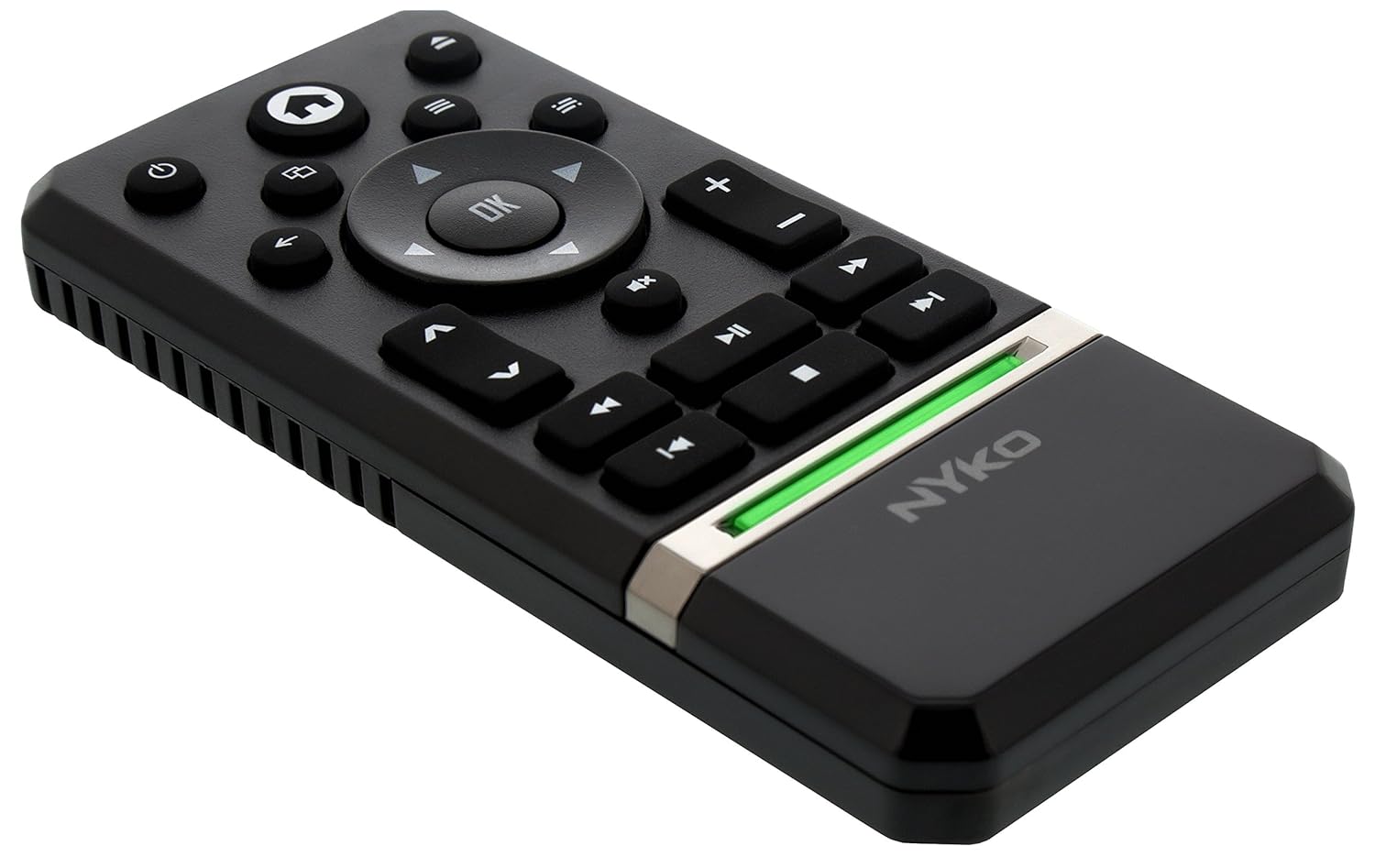
Imagem: Traseira view of the remote with the battery cover removed, illustrating the AAA battery placement.
2. Conexão inicial
The Nyko Media Remote uses infrared (IR) technology. No manual pairing is required for the Xbox One. Simply ensure a clear line of sight between the remote's IR emitter and the Xbox One's IR receiver.
For TV control functions (volume, channels, power), your TV must be configured to respond to the Xbox One's IR signals, typically through the Xbox One's OneGuide settings. The remote sends commands to the Xbox One, which then relays them to your TV via its IR blaster (if configured) or Kinect sensor.
Instruções de operação
The Nyko Media Remote provides comprehensive control for your Xbox One and various media applications. Refer to the diagram below for button identification and their primary functions.

Imagem: Frente view of the Nyko Media Remote, displaying all control buttons.
Funções dos botões:
| Botão | Função |
|---|---|
| Botão de energia (⏻) | Powers the Xbox One console on or off. |
| Botão Home (⌂) | Returns to the Xbox One Home screen. |
| View Botão (🗀) | Accesses additional information or options within an app or game. |
| Botão de menu (☰) | Opens context-sensitive menus or options. |
| Teclado direcional (D-Pad) | Navigates through menus and content. |
| Botão OK | Confirms selections. Can also function as Play/Pause in some apps. |
| Botão Voltar (←) | Retorna à tela ou menu anterior. |
| OneGuide Button (📱) | Launches the Xbox OneGuide for live TV and media. |
| Aumentar/diminuir volume (⏸ / ⏷) | Adjusts the television volume (requires TV setup via Xbox One). |
| Botão Mudo (🔇) | Mutes or unmutes television audio. |
| Canal para cima / para baixo (▲ / ▼) | Changes television channels (requires TV setup via Xbox One). |
| Retrocesso rápido (⏪) | Retrocede a reprodução de mídia. |
| Reproduzir/Pausar (⏯) | Reproduz ou pausa a reprodução de mídia. |
| Avanço rápido (⏩) | Acelera a reprodução de mídia. |
| Faixa anterior (⏮) | Pula para o início da faixa atual ou da faixa anterior. |
| Parar (⏹) | Interrompe a reprodução de mídia. |
| Próxima faixa (⏭) | Pula para a próxima faixa ou capítulo. |
Media and App Control:
The remote is designed for seamless control of various Xbox One applications, including:
- OneGuide
- Netflix
- Hulu Plus
- Vídeo instantâneo da Amazon
- Other streaming services and Blu-ray/DVD playback
Dedicated playback buttons (Play, Pause, Fast Forward, Rewind, Stop, Skip) provide intuitive control for movies, music, and other media.
Manutenção
Substituição da bateria:
When the remote's performance diminishes or it stops responding, it is likely time to replace the batteries. Follow the "Battery Installation" steps in the Setup section to replace the two AAA batteries.
Limpeza:
To clean the remote, gently wipe it with a soft, dry cloth. Avoid using harsh chemicals, abrasive cleaners, or excessive moisture, as these can damage the remote's finish or internal components.
Solução de problemas
- O controle remoto não está respondendo:
- Certifique-se de que as pilhas AAA novas estejam instaladas corretamente.
- Verify there is a clear line of sight between the remote and the Xbox One console. Obstructions can block the infrared signal.
- Move closer to the Xbox One console. The remote has a maximum effective range of approximately 9 meters (25 feet).
- TV Control (Volume, Channel, Power) Not Working:
- Confirm that your Xbox One's OneGuide settings are properly configured for your television. The remote sends commands to the Xbox One, which then controls the TV.
- Ensure any necessary IR blasters or Kinect sensors are correctly set up and positioned.
- Intermittent Response:
- This can sometimes occur due to weak batteries or environmental interference. Replace batteries and ensure a clear line of sight.
Especificações
| Recurso | Detalhe |
|---|---|
| Marca | Nyko |
| Nome do modelo | Controle remoto de mídia |
| Número do modelo | 86116 |
| Tecnologia de Conectividade | Infravermelho (IV) |
| Dispositivos compatíveis | Xbox One, Television (via Xbox One IR blaster/Kinect) |
| Tipo de Bateria | 2 pilhas AAA (não incluídas) |
| Alcance máximo | Até 9 metros (25 pés) |
| Peso do item | 0.1 libras (aproximadamente 45 gramas) |
| Cor | Cinza escuro |
| Características adicionais | Ergonomic design, dedicated media playback controls. |
Garantia e Suporte
Nyko products are designed for quality and reliability. For specific warranty details, please refer to the documentation included with your purchase or visit the official Nyko website. The product includes warranty information in multiple languages.
Suporte ao cliente:
- E-mail: customer.support@nyko.com
- Telefone: +1-888-400-6956
- Inscrição on-line: www.nyko.com
- Informações adicionais: http://uqr.me/nykotechnologies/qr/83215

Imagem: Traseira view of the product packaging, detailing features and customer support contact information.