
Introdução
This manual provides instructions for the Goldmaster RCU 881 Universal Remote Control. This device is designed to control various television sets using infrared technology, offering a convenient replacement or alternative to multiple original remote controls.
Informações de segurança
- Mantenha as pilhas fora do alcance das crianças.
- Não misture pilhas velhas e novas, ou tipos diferentes de pilhas.
- Do not expose the remote control to extreme temperatures, direct sunlight, or moisture.
- Descarte baterias usadas de acordo com as regulamentações ambientais locais.
- Avoid disassembling the remote control; this may void any warranty.
Conteúdo da embalagem
- 1 x Goldmaster RCU 881 Universal Remote Control
- Note: Batteries are not included and must be purchased separately (2x AAA batteries required).
Produto acimaview
The Goldmaster RCU 881 is a universal infrared remote control featuring a sleek silver design and a comprehensive button layout for intuitive control of compatible devices, primarily televisions.
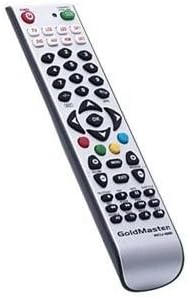
Imagem: Frente view of the Goldmaster RCU 881 Universal Remote Control, showing its silver finish and button layout.

Image: The official Goldmaster brand logo.
Configurar
1. Instalação da bateria
- Localize a tampa do compartimento da bateria na parte traseira do controle remoto.
- Slide the cover off in the direction indicated by an arrow (if present).
- Insert two AAA batteries, ensuring correct polarity (+ and - symbols match the markings inside the compartment).
- Recoloque a tampa do compartimento da bateria até que ela se encaixe firmemente no lugar.
2. Programação do controle remoto
The Goldmaster RCU 881 is a universal remote. Programming typically involves entering a code specific to your TV brand or using an automatic search function. Refer to the included code list (if available with your purchase) or follow these general steps:
- Turn on the device you wish to control (e.g., your television).
- Pressione e segure o DEFINIR button (or a similar button, if present) on the remote until the indicator light turns on and remains lit.
- Enter the 3 or 4-digit code for your TV brand using the number buttons. If the indicator light turns off, the code has been accepted.
- Teste o controle remoto pressionando o botão. PODER button or other function buttons. If the device responds, the programming is successful.
- If the code does not work, or if the indicator light flashes and turns off without controlling the device, repeat steps 2-4, trying other codes listed for your brand.
- If no code works, or if a code list is not provided, use the automatic search function:
- Pressione e segure o DEFINIR botão até que a luz indicadora acenda.
- Pressione o PODER button once. The indicator light will begin to flash slowly.
- Point the remote at your TV and repeatedly press the PODER botão (ou CH+ button) slowly, allowing a few seconds between presses, until the TV turns off.
- Once the TV turns off, immediately press the DEFINIR Pressione o botão para salvar o código. A luz indicadora se apagará.
- Test the remote. If it controls your TV, programming is complete. If not, repeat the automatic search process.
Note: Specific programming steps and available codes may vary. Consult the original packaging or manufacturer's website for a comprehensive code list or detailed instructions for your specific device model.
Instruções de operação
Once programmed, the Goldmaster RCU 881 functions like your original remote control for the assigned device. Below are common button functions:
- Botão de energia: Liga ou desliga o dispositivo.
- Channel Buttons (CH+/CH-): Muda de canal, para cima ou para baixo.
- Volume Buttons (VOL+/VOL-): Ajusta o volume do som.
- Botão Mudo: Silencia ou ativa o som.
- Botões numéricos (0-9): Utilizado para entrada direta de canal.
- Menu/Settings Buttons: Accesses device menus and settings.
- Botões de navegação (Cima/Baixo/Esquerda/Direita/OK): Navega pelos menus e confirma as seleções.
- Botão de entrada/fonte: Changes the input source (e.g., HDMI 1, AV, Component).
Button layout and specific functionality may vary based on the programmed device and the universal code used.
Manutenção
- Clean the remote control with a soft, dry cloth. Do not use liquid cleaners, abrasive materials, or chemical solvents.
- If the remote control will not be used for an extended period (e.g., one month or more), remove the batteries to prevent potential leakage and damage.
- Avoid dropping the remote control or exposing it to strong impacts, which can damage internal components.
- Store the remote in a cool, dry place away from direct sunlight.
Solução de problemas
O controle remoto não funciona após a programação:
- Ensure batteries are inserted correctly with the correct polarity and are not depleted. Replace if necessary.
- Re-attempt the programming process, trying different codes for your device brand.
- Certifique-se de que não haja obstruções entre o controle remoto e o receptor infravermelho do dispositivo.
- The remote control may not be compatible with all functions of your specific device model.
Alguns botões não estão funcionando:
- This can occur if the programmed code does not fully support all functions of your device. Try a different code.
- Certifique-se de que os botões estejam limpos e livres de resíduos.
Indicator light not turning on:
- Check battery installation and ensure batteries have sufficient charge. Replace batteries if needed.
Especificações
| Recurso | Detalhe |
|---|---|
| Marca | Mestre de Ouro |
| Modelo | RCU-881 |
| Tecnologia de Conectividade | Infravermelho |
| Dispositivos compatíveis | Televisão |
| Cor | Prata |
| Método de entrada | Botão |
| Pilhas incluídas | Não |
| Ano do modelo | 2014 |
| ASIN | B00PUIXRRA |
Garantia e Suporte
Specific warranty information for the Goldmaster RCU 881 Universal Remote Control is not provided in the product details. For warranty claims, technical support, or further assistance, please contact GoldMaster customer service directly or refer to the documentation included with your original purchase.
You can often find up-to-date support information and contact details on the official GoldMaster website.