
1. Introdução
The Argox AS8520 is a high-performance cordless imager designed for efficient barcode scanning. It features advanced wireless communication technology, allowing for a data transmission range of up to 100 meters. Equipped with a long-lasting Li-ion battery and an IP42 sealing level, the AS8520 is built for durability and mobility across various environments, including offices, supermarkets, warehouses, and manufacturing facilities.
2. Produto acabadoview
The AS8520 barcode scanner is designed for comfortable handling and robust performance. Key components include the scanning window, trigger button, and ergonomic grip.
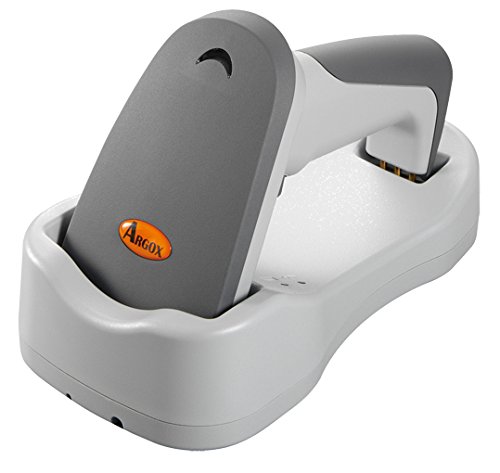
Figura 2.1: Lado view of the Argox AS8520 Barcode Scanner, showing the ergonomic handle and trigger button.
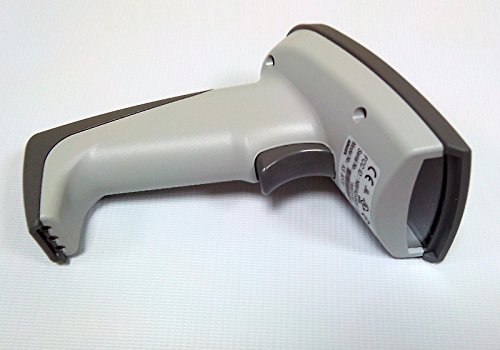
Figura 2.2: Frente view of the Argox AS8520 Barcode Scanner, highlighting the scanning window and product labels.
3. Guia de configuração
3.1. Instalação e carregamento da bateria
- Ensure the scanner is powered off before installing or removing the battery.
- Locate the battery compartment on the scanner handle.
- Insert the Li-ion battery pack, ensuring correct polarity.
- Feche o compartimento da bateria com segurança.
- Connect the scanner to its charging base or power adapter using the provided cable. Allow the battery to fully charge before first use.
3.2. Connecting to a Host Device
The Argox AS8520 can connect wirelessly to various host devices, including desktops, laptops, and smartphones. Refer to the separate quick start guide for specific pairing instructions for your operating system or device type.
4. Instruções de operação
4.1. Digitalização básica
- Ensure the scanner is powered on and successfully paired with your host device.
- Point the scanning window towards the barcode you wish to scan.
- Press and hold the trigger button. A red LED light source (630nm Visible Red LED) will illuminate the barcode.
- Position the scanner at an appropriate distance (the AS8520 offers superior depth of field up to 40 inches on 40-mil codes) until the barcode is successfully read. A successful scan is typically indicated by an audible beep and/or a visual indicator.
- Solte o botão de disparo.
4.2. Recursos avançados de digitalização
- Rapid Scan Rate: The AS8520 provides a rapid scan rate of 450 scans/sec for efficient data capture.
- Barcode Symbology Support: Supports GS1 Databar (RSS) and CS (Composite Symbology) barcodes.
- Sunlight Readability: Designed to be readable under direct sunlight conditions.
5. Manutenção
5.1. Limpeza do scanner
- Ensure the scanner is powered off before cleaning.
- Use um pano macio e sem fiapos levemente dampLimpe a parte externa do scanner com água ou uma solução de limpeza suave.
- For the scanning window, use a lens cleaning cloth to avoid scratches.
- Do not use abrasive cleaners, solvents, or immerse the scanner in liquid. The IP42 sealing level protects against dust and light water splashes, but not full immersion.
5.2. Cuidados com a bateria
- To maximize battery life, avoid fully discharging the Li-ion battery frequently.
- Guarde o scanner em local fresco e seco quando não estiver em uso por longos períodos.
- If the battery performance degrades significantly, consider replacing it with an authorized Argox replacement battery.
6. Solução De Problemas
| Problema | Possível causa | Solução |
|---|---|---|
| O scanner não liga. | A bateria está descarregada ou não está instalada corretamente. | Charge the battery. Ensure the battery is correctly seated in its compartment. |
| O leitor não lê códigos de barras. | Barcode is damaged, scanner is too far/close, or incorrect symbology settings. | Ensure the barcode is clear. Adjust scanning distance. Check scanner programming for supported barcode types. |
| Nenhum dado foi transmitido para o dispositivo host. | Scanner not paired or out of range. | Re-pair the scanner with the host device. Ensure the scanner is within the 100-meter transmission range. |
| Scanner is unresponsive. | Falha temporária de software. | Perform a soft reset by powering off and then on the scanner. If issues persist, consult the manufacturer's support. |
7. Especificações técnicas
| Recurso | Especificação |
|---|---|
| Modelo | AS8520 |
| Taxa de digitalização | 450 varreduras/seg |
| Fonte de luz | 630nm Visible Red LED |
| Desempenho de digitalização | Starting at 0.1mm (4 mil) |
| Profundidade de campo | Up to 40 inches on 40-mil codes |
| Faixa de transmissão de dados | 100 meters (wireless) |
| Dispositivos compatíveis | Computador de mesa, laptop, smartphone |
| Fonte de energia | Battery Powered (Li-ion battery pack) |
| Temperatura de operação | 0°C a 50°C (32°F a 122°F) |
| Temperatura de armazenamento | -20°C a 70°C (-4°F a 158°F) |
| Umidade | 10% a 90% de umidade relativa, sem condensação |
| Nível de luz | Até 70,000 lux |
| Current - Operating | 225 mA a 4.2 VCC |
| Current - Standby | 32 mA a 4.2 VCC |
| Power - Operating | 900 mW |
| Power - Standby | 150 mW |
| Reliability (Trigger) | 1,000,000 vezes |
| Reliability (Cable) | 320,000 times (90° bend) |
| Especificação de queda | 1.5 metro |
| Sealing Level | IP42 |
| Peso do item | 1.3 kg |
| GTIN/UPC | 702563636336 |
8. Garantia e Suporte
For detailed warranty information, please refer to the warranty card included with your product or visit the official Argox website. For technical support, service, or replacement parts, please contact your authorized Argox reseller or Argox customer service directly.