
1. Introdução
The PowerDrive PD3000 is a 3000 Watt power inverter designed to convert 12V DC power from your vehicle's battery into 115V AC household power. This unit provides 3000 Watts of continuous AC power and has a high surge capacity of up to 6000 Watts to accommodate devices with high starting power requirements. It features integrated Bluetooth wireless technology for remote monitoring and control via a mobile application, along with a removable control panel for flexible placement. This manual provides essential information for the safe and efficient operation of your PowerDrive PD3000 inverter.
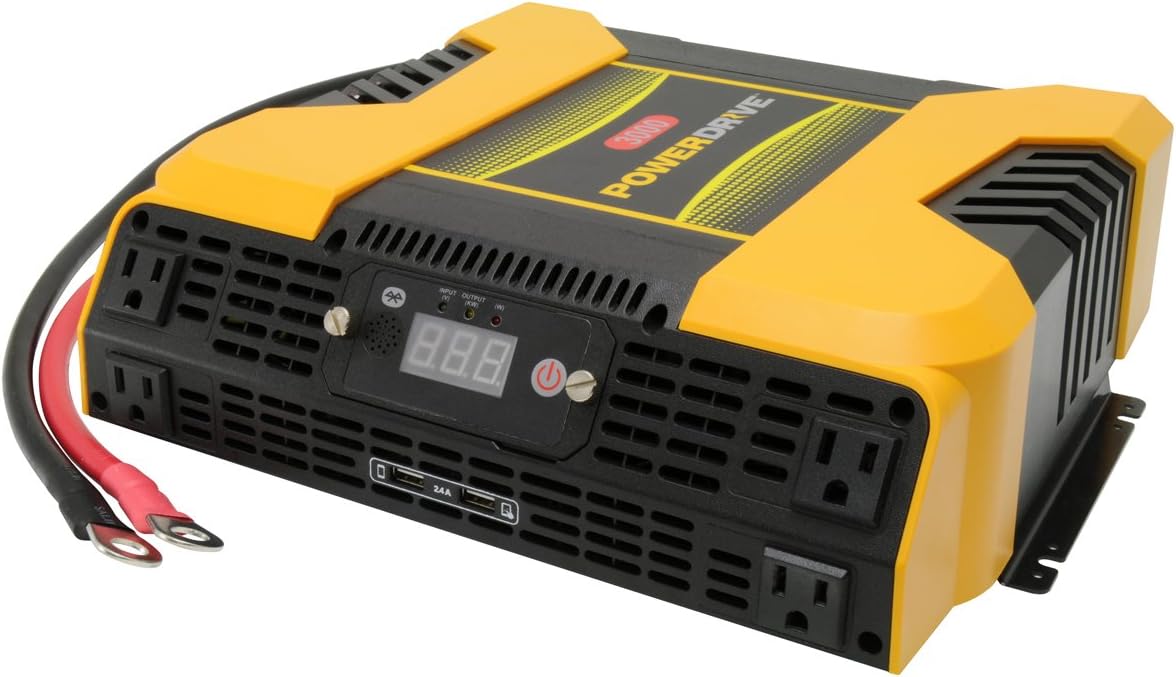
Figure 1.1: PowerDrive PD3000 3000 Watt Power Inverter, front view with outlets and display.
2. Informações de segurança
Please read and understand all safety instructions before installing or operating the inverter. Failure to follow these instructions may result in electrical shock, fire, serious injury, or property damage.
- Risco de choque elétrico: Não abra o inversor casing. Não existem peças que possam ser reparadas pelo usuário no interior. Encaminhe todos os serviços de manutenção para pessoal qualificado.
- Risco de incêndio: Do not operate the inverter near flammable materials, gases, or vapors. Ensure adequate ventilation around the inverter.
- Segurança da bateria: Connect the inverter only to a 12V DC battery system. Ensure battery terminals are clean and connections are secure. Wear eye protection and gloves when working with batteries.
- Ventilação: Certifique-se de que o inversor esteja instalado em uma área bem ventilada. Não obstrua as aberturas de ventilação.
- Proteção contra sobrecarga: Do not exceed the inverter's continuous power rating of 3000 Watts. Overloading can damage the inverter and connected devices.
- Umidade: Do not expose the inverter to rain, moisture, or spray.
3. Conteúdo da embalagem
Ao desembalar, verifique se todos os itens estão presentes:
- PowerDrive PD3000 Power Inverter Unit
- Manual de instruções
- Cabos de bateria (vermelho e preto)
- Removable Control Panel with Cable
4. Recursos do Produto
The PowerDrive PD3000 inverter offers a range of features for versatile power conversion:
- Saída de alta potência: Delivers 3000 Watts of continuous AC power with a 6000 Watt surge capacity.
- Multiple AC Outlets: Equipped with four (4) 3-prong AC outlets to support various devices.
- Portas de carregamento USB: Includes two (2) USB power ports (shared 2400mA total output) for charging mobile devices.
- Conectividade Bluetooth: Allows remote access to features and settings via a free downloadable mobile application.
- Removable Control Panel: Detachable control panel enables remote monitoring and testing, offering installation flexibility.
- Construção durável: Features a robust ABS PVC composite housing designed to protect internal electronic components.
- Proteções de segurança: Incorporates audible alarms and automatic shut-off triggers for low battery, high battery, and overload conditions.

Figure 4.1: Front panel of the PowerDrive PD3000 showing AC outlets, USB ports, and digital display.
5. Configuração e instalação
A instalação correta é crucial para o funcionamento seguro e eficiente do seu inversor.
5.1 Montagem do inversor
- Choose a dry, well-ventilated location away from direct sunlight, heat sources, and flammable materials.
- Ensure there is sufficient space around the inverter for air circulation, especially around the cooling fans.
- Mount the inverter securely using appropriate hardware (not included) to prevent movement during operation.
5.2 Connecting to a 12V DC Power Source
Importante: Certifique-se de que o inversor esteja DESLIGADO antes de fazer qualquer conexão.
- Conecte o VERMELHO (positive) battery cable to the VERMELHO (positive) terminal on the inverter. Tighten securely.
- Conecte a outra extremidade do VERMELHO (positive) battery cable to the positivo (+) terminal of your 12V DC battery. Tighten securely.
- Conecte o PRETO (negative) battery cable to the PRETO (negative) terminal on the inverter. Tighten securely.
- Conecte a outra extremidade do PRETO (negative) battery cable to the negativo (-) terminal of your 12V DC battery. Tighten securely.
- Verify all connections are tight and free from corrosion. Loose connections can cause overheating and damage.

Figure 5.1: PowerDrive PD3000 Inverter showing battery cable connections.

Figura 5.2: Traseira view of the PowerDrive PD3000 showing cooling fans and battery terminals.
5.3 Removable Control Panel Installation
The control panel can be used directly on the inverter or detached for remote operation.
- To use remotely, gently pull the control panel from the inverter.
- Connect the provided cable to the port on the back of the detached control panel and to the corresponding port on the inverter.
- Mount the control panel in a convenient location for monitoring and control.

Figure 5.3: PowerDrive PD3000 Inverter with its control panel detached for remote use.
6. Instruções de operação
6.1 Ligar/Desligar
- After ensuring all battery connections are secure, press and hold the power button on the inverter or the remote control panel for approximately 1-2 seconds.
- The digital display will illuminate, and the inverter will begin providing AC power.
- To turn off, press and hold the power button again until the display turns off.
6.2 Connecting AC Devices
- Plug your 115V AC devices into the 3-prong AC outlets on the front of the inverter.
- Garanta o valor totaltage of all connected devices does not exceed 3000 Watts.
- For devices with high starting loads (e.g., motors, compressors), ensure their surge wattage is within the inverter's 6000 Watt surge capacity.
6.3 Utilizando portas de carregamento USB
- Connect your USB-powered devices (e.g., smartphones, tablets) to the USB ports.
- The two USB ports share a total output of 2400mA (2.4A).
6.4 Understanding the Digital Display and Indicators
The digital display shows real-time information such as input voltage or output wattage. Indicator lights provide status feedback:
- LED de entrada: Indicates the status of the DC input power.
- LED de saída: Indicates the status of the AC output power.
- LED de falha: Illuminates to indicate an error condition (e.g., overload, low/high voltage)
7. Conectividade Bluetooth
The PowerDrive PD3000 features Bluetooth wireless technology, allowing you to monitor and control the inverter using a compatible smartphone application.
7.1 Downloading the Mobile App
- Procurar the official PowerDrive inverter app on your smartphone's app store (e.g., Apple App Store, Google Play Store).
- Baixe e instale o aplicativo.
7.2 Pairing with Your Inverter
- Certifique-se de que o Bluetooth esteja ativado em seu smartphone.
- Turn on the PowerDrive PD3000 inverter.
- Open the PowerDrive mobile app. The app should automatically detect nearby PowerDrive inverters.
- Follow the on-screen prompts within the app to pair with your PD3000 inverter.
7.3 Recursos do aplicativo
Once paired, the app allows you to:
- Monitorar o volume de entradatage e saída wattage.
- View inverter status and fault codes.
- Remotely turn the inverter on or off.
- Adjust certain settings (refer to the app's help section for details).

Figure 7.1: Smartphone displaying the PowerDrive mobile application interface.
8. Manutenção
A manutenção regular garante o desempenho ideal e a longevidade do seu inversor.
- Limpeza: Limpe periodicamente a parte externa do inversor com um pano seco e macio. Não utilize produtos de limpeza líquidos ou solventes.
- Ventilação: Ensure the cooling fans and ventilation openings are free from dust and debris. Use compressed air to clear blockages if necessary.
- Conexões: Regularly check battery cable connections for tightness and corrosion. Clean terminals with a wire brush if corrosion is present.
- Armazenar: Se for armazenar o inversor por um período prolongado, desconecte-o da bateria e guarde-o em local fresco e seco.
9. Solução De Problemas
This section addresses common issues you might encounter with your PowerDrive PD3000 inverter.
9.1 Problemas e soluções comuns
- Inversor não liga:
- Check battery connections for tightness and proper polarity.
- Certifique-se de que o volume da bateriatage is above 10.5V DC (Low Battery Shut Down Point).
- Verifique se o botão liga/desliga foi pressionado e mantido pressionado pelo tempo necessário.
- Sem saída CA:
- Check if the inverter is powered on and the Output LED is illuminated.
- Ensure the connected AC device is functioning correctly.
- Check for an overload condition (Fault LED illuminated). Reduce the load.
- Audible Alarm / Fault LED On:
- Alarme de bateria fraca: Activates at 11 ± 0.3V DC. Recharge or replace the battery. The inverter will shut down at 10.5 ± 0.3V DC.
- High Battery Shut Down: Occurs at 15.5 ± 0.5V DC. Check the charging system of your vehicle.
- Sobrecarga: O total wattage of connected devices exceeds 3000 Watts. Disconnect some devices.
- Acima da temperatura: Inverter is overheating. Ensure proper ventilation and reduce load.
- Problemas de conexão Bluetooth:
- Ensure Bluetooth is enabled on your smartphone and the inverter is powered on.
- Restart the mobile app and try pairing again.
- Ensure your smartphone is within range of the inverter.
10. Especificações
| Especificação | Valor |
|---|---|
| Modelo | PD3000 |
| Continuous AC Power Output | 3000 Watts |
| Pico de potência de surto | 6000 Watts |
| Volume de entrada CCtage | 12.8V |
| Vol de saída ACtage | 115V |
| Frequência de saída AC | 58Hz-62Hz |
| Saída USB | 5V / 2 (Shared 2400mA) |
| Eficiência (máxima) | >88% |
| Eficiência (carga total) | >84% |
| Battery Drain (No AC Load) | <0.6A |
| Low Battery Alarm Trigger | 11 ± 0.3 V CC |
| Low Battery Shut Down Point | 10.5 ± 0.3 V CC |
| High Battery Shut Down Point | 15.5 ± 0.5 V CC |
| Recovering Voltage after Under Voltage Turn-off | 12 ± 0.3 V CC |
| Peso do item | 12.14 libras |
| Dimensões do produto | 16.2 x 16.3 x 7.6 polegadas |
11. Garantia e Suporte
For warranty information or technical support, please refer to the documentation included with your purchase or visit the official PowerDrive webGuarde seu comprovante de compra para eventuais solicitações de garantia.


