
Alpine IVA-W520E
Manual do Usuário Alpine IVA-W520E
Model: IVA-W520E
1. Introdução
The Alpine IVA-W520E is a full-featured 2DIN DVD player solution designed for in-car entertainment and media. It integrates advanced video and audio technologies, including a 7-inch LED touchscreen and a Burr-Brown 24-bit DAC, to deliver high-quality sound and clear images. This manual provides essential information for the proper installation, operation, and maintenance of your IVA-W520E unit.
2. Informações de segurança
Please read all safety instructions carefully before installing or operating the unit. Failure to follow these instructions may result in injury or damage to the unit or vehicle.
- Instalação profissional recomendada: Due to the complexity of car audio-visual systems, professional installation is highly recommended to ensure proper wiring and functionality.
- Fonte de energia: Conecte a unidade somente a uma fonte de alimentação de 12V CC com aterramento negativo.
- Evite distrações: Do not operate the unit's controls or view video content while driving, as this can lead to accidents. Always pull over to a safe location before making adjustments.
- Ventilação: Assegure ventilação adequada ao redor do aparelho para evitar superaquecimento. Não obstrua as aberturas de ventilação.
- Umidade e Líquidos: Keep the unit away from moisture and liquids. Do not expose it to rain or water.
- Limpeza: Use um pano macio e seco para a limpeza. Evite produtos de limpeza abrasivos ou solventes.
3. Conteúdo da embalagem
Verifique se todos os itens estão presentes na embalagem antes de prosseguir com a instalação:
- Alpine IVA-W520E Head Unit
- Chicote de energia/alto-falante
- Acessórios de montagem (parafusos, suportes)
- Anel de acabamento
- Manual do usuário (este documento)
- Informações de garantia
4. Configuração e instalação
4.1. Diretrizes de instalação
Proper installation is crucial for optimal performance and safety. It is highly recommended to have the unit installed by a qualified professional.
- Desconecte a bateria: Antes de iniciar qualquer trabalho elétrico, desconecte o terminal negativo da bateria do veículo para evitar curto-circuito.
- Montagem: Securely mount the unit in the vehicle's double-DIN opening using the provided mounting brackets and screws. Ensure it is stable and does not obstruct any vehicle controls.
- Fiação: Connect the power harness, speaker wires, and other input/output cables according to the wiring diagram provided in the separate installation guide. Pay close attention to ground connections.
- Antenna and External Devices: Connect the radio antenna and any external devices such as a reverse camera or external amplificadores.
4.2. Configuração inicial
After installation, reconnect the battery and power on the unit for the first time.
- Seleção de idioma: Siga as instruções na tela para selecionar o idioma de sua preferência.
- Hora e data: Set the correct time and date for accurate display.
- Configurações de áudio: Adjust basic audio settings such as volume, balance, and fader.
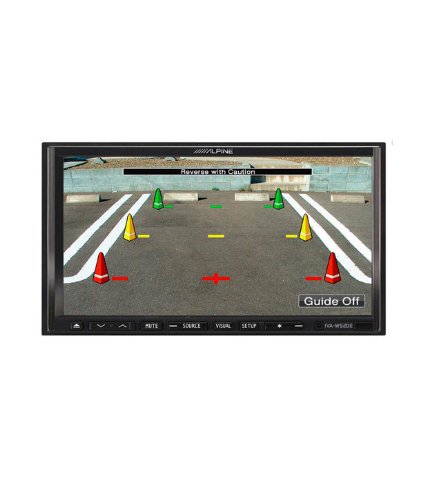
Figura 4.1: Example of the IVA-W520E displaying a reverse camera feed, showing parking guidelines. This feature aids in safe vehicle maneuvering.
5. Operação da unidade
5.1. Controles por tela sensível ao toque e botões
The IVA-W520E features a responsive 7-inch LED touchscreen for primary control, supplemented by physical buttons for quick access to common functions.
- Tela sensível ao toque: Navigate menus, select sources, and control playback by touching the screen.
- Controle de volume: Use the dedicated volume buttons or on-screen controls to adjust audio levels.
- Botão de fonte: Press to cycle through available audio/video sources (Radio, DVD, USB, iPod, AUX, Bluetooth).
- Botão Mudo: Silencia temporariamente a saída de áudio.
- Botão de configuração: Acesse o menu de configurações do sistema.
5.2. Reprodução de áudio
The unit supports various audio formats and sources, enhanced by its Burr-Brown 24-bit DAC for superior sound quality.
- Áudio USB: Conecte um dispositivo USB que contenha áudio. files. The unit will display track information and allow navigation through folders.
- iPod/iPhone Connectivity: Connect your iPod or iPhone for direct audio playback and control.
- Reprodução de DVD/CD: Insert a DVD or CD into the disc slot for audio or video playback.
- Sintonizador de rádio: Acesse estações de rádio AM/FM.
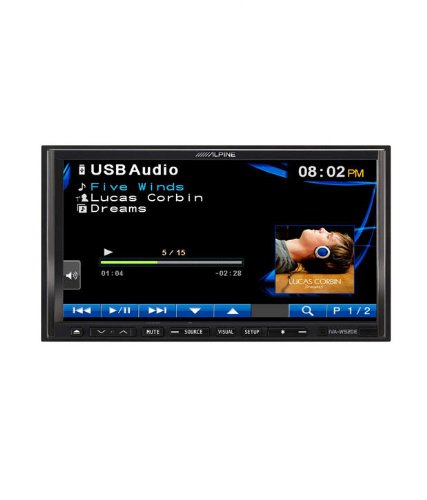
Figure 5.1: The IVA-W520E displaying the USB Audio interface, showing current track, artist, and playback controls. This allows for easy navigation of digital music files.
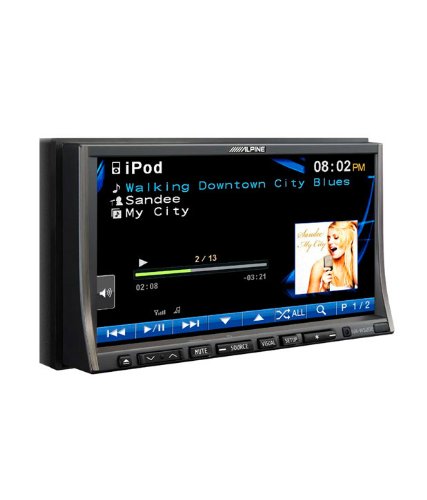
Figure 5.2: The IVA-W520E displaying the iPod interface, showing a list of songs and album art. This demonstrates seamless integration with Apple devices for music playback.
5.3. Reprodução de vídeo
The 7-inch LED screen provides enhanced image quality with higher resolution, better contrast, and improved color reproduction compared to standard LCD screens.
- DVD Video: Insert a video DVD for playback. Ensure the parking brake safety wire is correctly connected for video to display while the vehicle is stationary.
- External Video Input: The unit supports external video sources, such as a reverse camera or other video devices.
5.4. Conectividade Bluetooth
The IVA-W520E is upgradable for Bluetooth hands-free system functionality, allowing for safe and convenient communication while driving.
- Emparelhamento: Refer to the separate Bluetooth module manual (if applicable) for pairing instructions with your mobile phone.
- Chamadas com viva-voz: Make and receive calls directly through the unit.
- Streaming de áudio: Stream audio from your Bluetooth-enabled device.
5.5. Navigation System (Upgradable)
The unit is designed to be upgradable with a navigation system. Consult your Alpine dealer for compatible navigation modules and installation.
6. Manutenção
Regular maintenance helps ensure the longevity and optimal performance of your Alpine IVA-W520E.
- Limpeza de tela: Gently wipe the touchscreen with a soft, lint-free cloth. For stubborn smudges, slightly dampen the cloth with water or a screen-specific cleaner. Do not spray cleaner directly onto the screen.
- Slot de disco: Mantenha a entrada do disco livre de poeira e detritos. Evite inserir discos tortos, riscados ou irregulares.
- Limpeza geral: Use a soft, dry cloth to wipe the unit's exterior. Avoid harsh chemicals or abrasive materials.
7. Solução De Problemas
If you encounter issues with your IVA-W520E, refer to the following common problems and solutions:
| Problema | Possível causa | Solução |
|---|---|---|
| Sem energia | Fusível queimado, fiação incorreta, conexão solta. | Check vehicle fuses and unit's fuse. Verify power and ground wiring connections. Ensure battery is connected. |
| Sem som | Volume too low, mute activated, speaker wiring issue, incorrect source selected. | Aumente o volume. Desative o modo silencioso. Verifique as conexões das caixas de som. Selecione a fonte de áudio correta. |
| Erro de disco | Dirty, scratched, or incompatible disc. | Clean the disc. Try a different, known-good disc. Ensure disc format is supported. |
| Video Not Displaying (while driving) | Parking brake safety wire not connected or incorrectly connected. | This is a safety feature. Video playback is disabled while the vehicle is in motion. Ensure the parking brake wire is correctly connected to the vehicle's parking brake circuit. |
| Problemas de emparelhamento Bluetooth | Bluetooth module not connected, phone not in pairing mode, interference. | Ensure optional Bluetooth module is correctly installed. Put phone in pairing mode. Move closer to the unit. |
If the problem persists after trying these solutions, please contact your authorized Alpine dealer or customer support.
8. Especificações
Key technical specifications for the Alpine IVA-W520E:
- Modelo: IVA-W520E
- Tamanho da tela: 7 polegadas (18 cm)
- Tipo de exibição: LED LCD Touchscreen
- Resolução: 480 x 272 pixels
- DAC de áudio: Burr-Brown 24-bit
- Dispositivos compatíveis: Smartphone (via USB/iPod, Bluetooth upgradable)
- Características especiais: Touchscreen, Bluetooth (upgradable)
- Modo de saída de áudio: Palestrante
- Fabricante: Alpino
- Primeiro disponível: 20 de agosto de 2015
9. Garantia e Suporte
For detailed warranty information, please refer to the warranty card included with your product package or visit the official Alpine webGuarde o comprovante de compra como prova de aquisição.
For technical support, service, or inquiries about compatible accessories and upgrades (such as navigation modules or Bluetooth kits), please contact your authorized Alpine dealer or visit the Alpine customer support portal online.
Oficial Alpino Website: www.alpine.com
Ask a question about this manual
Ask about setup, troubleshooting, compatibility, parts, safety, or missing instructions. Manuals+ will review the question and use this page’s manual context to help answer it.