
1. Introdução
The Sony SBH54 is a versatile Stereo Bluetooth Headset designed for wireless communication and audio playback. It offers both handset and headset functionalities, allowing you to take and make calls, view messages, listen to music, and tune into FM radio directly from its display. Crafted from premium metal with a splash-proof design, it combines elegance with durability.
Key features include Bluetooth Wireless 3.0, NFC technology for easy pairing, an OLED display, and built-in noise cancellation for clear audio during calls. The headset supports A2DP profile and can connect to two devices simultaneously.
2. Produto acabadoview
The SBH54 features a compact design that fits comfortably in your hand. It includes an OLED display for information at a glance and physical controls for media and call management.
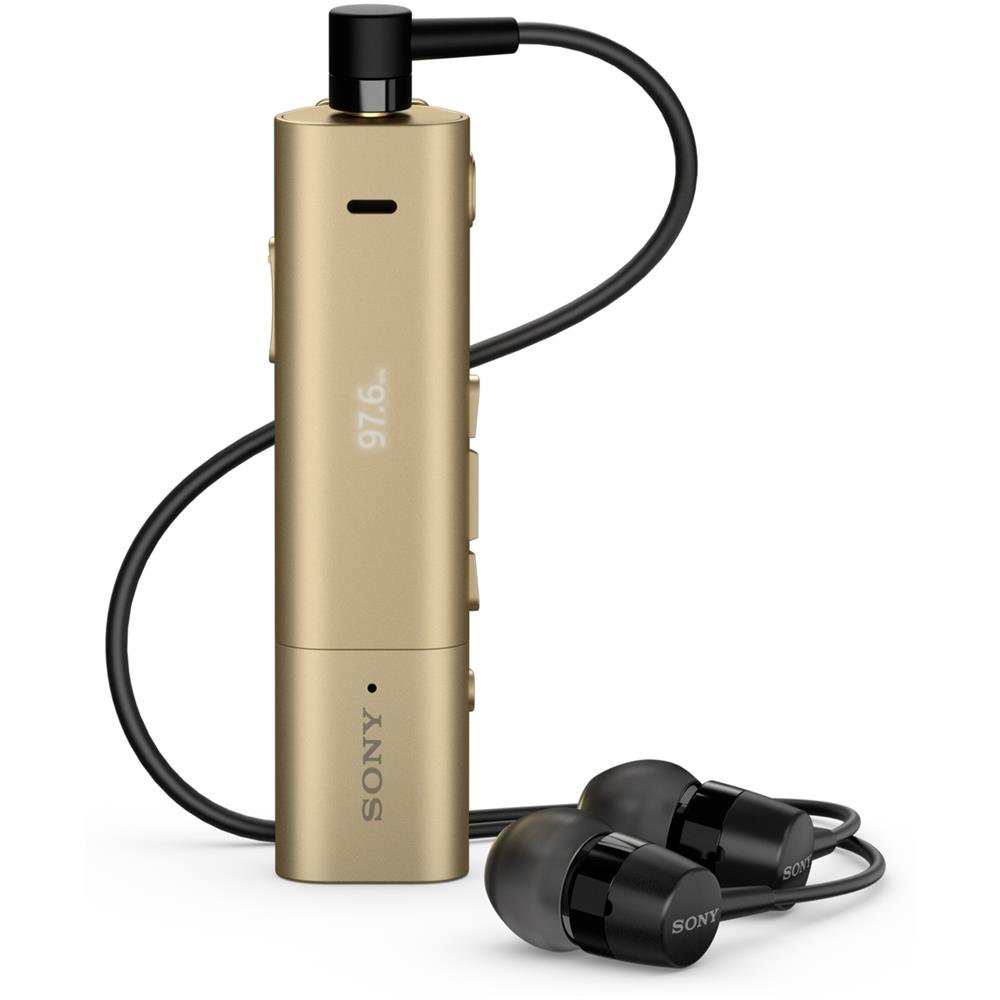
Image: Sony SBH54 Gold Stereo Bluetooth Headset. This image displays the compact, gold-colored headset with its integrated clip and display screen.
Controles e Indicadores:
- Display OLED: Shows caller ID, messages, music track information, and FM radio frequency.
- Botão multifuncional: For call answering/ending, play/pause music.
- Botões de volume: Ajuste o volume do áudio.
- Botões de navegação: Para navegação no menu e para pular faixas.
- Microfone: Integrated for voice calls.
- Plug do fone de ouvido: 3.5mm port for connecting the included premium headphones.
- Porta de carregamento: Porta micro USB para carregar o dispositivo.
3. Configuração
3.1 Carregando o fone de ouvido
- Connect the supplied USB cable to the headset's charging port and to a USB power adapter or a computer's USB port.
- O indicador de bateria no visor mostrará o status do carregamento.
- Carregue totalmente o fone de ouvido antes do primeiro uso.
3.2 Pairing with a Device (Bluetooth)
- Certifique-se de que o fone de ouvido esteja carregado e desligado.
- Press and hold the power button until the headset enters pairing mode (indicated by a specific light pattern or message on the display).
- No seu smartphone ou outro dispositivo com Bluetooth, ative o Bluetooth e procure por dispositivos disponíveis.
- Selecione "SBH54" na lista de dispositivos encontrados.
- If prompted, enter the passcode "0000" (four zeros).
- Once paired, the headset will indicate a successful connection.
3.3 Pairing with a Device (NFC)
For devices with NFC (Near Field Communication):
- Certifique-se de que o NFC esteja ativado no seu smartphone e que a tela esteja desbloqueada.
- Touch the NFC detection area of your smartphone to the NFC detection area on the SBH54 headset.
- Siga as instruções na tela para concluir o processo de pareamento.
4. Operando o fone de ouvido
4.1 Ligar/Desligar
- Para ligar: Pressione e segure o botão liga/desliga até que o visor acenda.
- Para desligar: Mantenha pressionado o botão liga/desliga até que a tela desligue.
4.2 Fazendo e recebendo chamadas
- Atender uma chamada: When a call comes in, press the multi-function button.
- Finalizando uma chamada: During a call, press the multi-function button.
- Rejeitando uma chamada: Press and hold the multi-function button when a call comes in.
- Fazer uma chamada: Dial the number on your phone. The call will automatically route to the headset. You can also use voice commands if supported by your phone.
- Função do aparelho: The compact SBH54 can be used as an unobtrusive handset for calls.
- Cancelamento de ruído: The headset features echo, wind, and noise cancellation for clear voice transmission.
- Voz HD: Enhances voice clarity for both parties during a call.
4.3 Reprodução de música
- Reproduzir/Pausar: Pressione o botão multifuncional.
- Próxima faixa: Press the forward navigation button.
- Faixa anterior: Press the backward navigation button.
- Controle de volume: Use os botões de aumentar/diminuir o volume.
Rádio 4.4 FM
- Ativar Rádio FM: Navigate through the headset menu to select the FM Radio function.
- Sintonize as estações: Use the navigation buttons to scan or manually tune to FM frequencies.
- Salvar predefinições: The headset may allow saving favorite stations (refer to on-screen prompts).
5. Manutenção
- Limpeza: Limpe o fone de ouvido com um pano macio e seco. Evite usar produtos químicos agressivos ou materiais abrasivos.
- Resistência à água: The SBH54 has a splash-proof design. This means it can withstand light splashes of water but should not be submerged or exposed to heavy rain. Ensure the charging port cover is securely closed.
- Armazenar: Guarde o fone de ouvido em local fresco e seco, longe da luz solar direta e de temperaturas extremas.
- Cuidados com a bateria: Para prolongar a vida útil da bateria, evite descarregá-la completamente com frequência. Recarregue-a regularmente.
6. Solução De Problemas
Problemas e soluções comuns:
- O fone de ouvido não liga: Verifique se a bateria está carregada. Conecte a uma fonte de energia e tente novamente.
- Cannot pair with a device:
- Certifique-se de que o fone de ouvido esteja no modo de emparelhamento.
- Certifique-se de que o Bluetooth esteja ativado no seu dispositivo.
- Aproxime o fone de ouvido do seu dispositivo.
- Reinicie o fone de ouvido e o dispositivo.
- Limpe as conexões Bluetooth anteriores no seu dispositivo e tente emparelhar novamente.
- Sem áudio ou com má qualidade de áudio:
- Verifique os níveis de volume tanto no fone de ouvido quanto no dispositivo conectado.
- Certifique-se de que o fone de ouvido esteja dentro do alcance do seu dispositivo.
- Desconecte e reconecte a conexão Bluetooth.
- Ensure the headphones are properly plugged into the 3.5mm jack.
- Rádio FM não funciona: Ensure you are in an area with good FM signal reception.
7. Especificações
| Recurso | Detalhe |
|---|---|
| Marca | Sony |
| Número do modelo | SBH54GD |
| Cor | Ouro |
| Colocação da orelha | No ouvido |
| Fator de forma | No ouvido |
| Controle de Ruído | Cancelamento de ruído ativo |
| Peso do item | 0.1 quilos |
| Tipo de driver de áudio | Driver Dinâmico |
| Faixa de frequência | 20 Hz - 20,000 Hz |
| Material do gabinete | Metal |
| Dispositivos compatíveis | Smartphones, Laptops, Tablets, Bluetooth-enabled Devices |
| Nível de resistência à água | Water Resistant (Splash-proof) |
| Tecnologia de Conectividade | Bluetooth, NFC |
| Tecnologia sem fio | Bluetooth, NFC |
| Versão Bluetooth | 3.0 |
| Tipo de controle | Controle de Mídia |
| Método de controle | Remoto |
8. Garantia e Suporte
For warranty information and customer support, please refer to the documentation included with your purchase or visit the official Sony support webOs termos específicos da garantia podem variar conforme a região e o revendedor.
Suporte online: www.sony.com/electronics/support