
1. Introdução
This manual provides detailed instructions for the installation, operation, and maintenance of your Alpine CDE-163BT Advanced Bluetooth CD Receiver. Please read this manual thoroughly before using the unit to ensure proper operation and to prevent damage. Keep this manual for future reference.
The Alpine CDE-163BT is a versatile car stereo receiver featuring advanced Bluetooth connectivity for hands-free calling and audio streaming, CD playback, USB input, and FM/AM tuner capabilities. It is designed to deliver high-quality audio performance and user-friendly control.
2. Configuração e instalação
2.1 Conteúdo da embalagem
Antes de iniciar a instalação, verifique se todos os componentes estão presentes:
- Alpine CDE-163BT Head Unit
- Chicote de Fiação
- Manga de montagem e anel de acabamento
- Microfone para chamadas Bluetooth em modo mãos-livres
- Manual do Proprietário (este documento)
- Acessórios de montagem (parafusos, suportes)
2.2 Diagrama de fiação
Refer to the wiring diagram provided with the unit's installation guide for specific connections. Key connections include:
- Poder: Yellow (constant 12V), Red (switched 12V), Black (ground).
- Palestrantes: White/White-Black (Front Left), Gray/Gray-Black (Front Right), Green/Green-Black (Rear Left), Purple/Purple-Black (Rear Right).
- Antena: Blue (power antenna/amplifier remote turn-on).
- Microfone: Connect the supplied microphone to the dedicated input for hands-free calling.
Cuidado: Incorrect wiring can cause damage to the unit or vehicle's electrical system. If you are unsure about any wiring connections, consult a qualified professional installer.
2.3 Inicialização Inicial
Após a instalação, ligue a ignição do seu veículo. O aparelho deverá ligar. Siga as instruções na tela para a configuração inicial, como seleção de idioma ou ajuste do relógio.
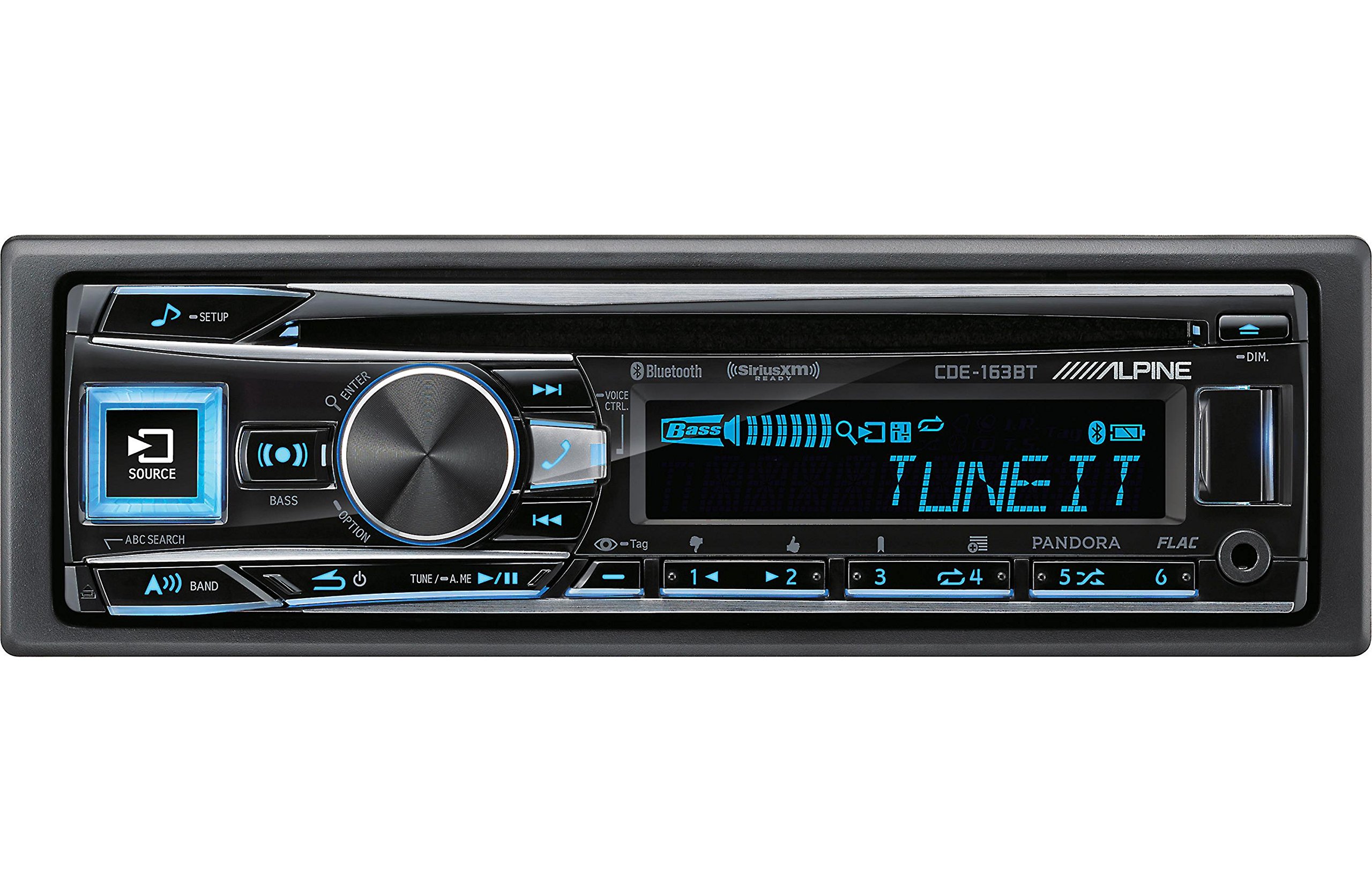
Figure 2.3.1: Front panel of the Alpine CDE-163BT receiver. This image displays the main controls, including the large rotary knob, source button, setup button, and display screen showing "TUNEIT" and "Bass" indicators.
3. Operação
3.1 Controles do painel frontalview
Familiarize-se com os principais controles do painel frontal:
Figura 3.1.1: Detalhado view of the Alpine CDE-163BT front panel. Key controls include the SOURCE button (left, illuminated), SETUP button (top left), large central rotary knob for volume and selection, BASS/OPTION button, VOICE CTRL button, and various preset/track skip buttons along the bottom.
- Botão FONTE: Selects the audio source (CD, Tuner, USB, Bluetooth Audio, AUX).
- Botão SETUP: Accesses the main setup menu for system adjustments.
- Rotary Knob (Volume/ENTER): Turns to adjust volume. Press to confirm selections in menus.
- BASS/OPTION Button: Provides quick access to bass settings or other options depending on the current mode.
- VOICE CTRL Button: Activates voice control features on connected smartphones.
- Botão BAND: Switches between FM1, FM2, FM3, and AM bands in tuner mode.
- TUNE/A.ME/II Buttons: Used for manual tuning, auto memory, and play/pause functions.
- Track Skip/Preset Buttons (1-6): Used for skipping tracks or selecting radio presets.
- Botão DIM: Ajusta o brilho da tela.
3.2 Ligar/Desligar e Seleção de Fonte
- Para ligar a unidade ON, press any button (e.g., SOURCE or the Rotary Knob).
- Para ligar a unidade DESLIGADO, press and hold the power button (often integrated with the TUNE/A.ME button).
- Pressione o FONTE button repeatedly to cycle through available audio sources: CD, Tuner, USB, Bluetooth Audio, AUX.
3.3 Controle de volume
Rotate the large central Botão rotativo No sentido horário, aumenta-se o volume, e no sentido anti-horário, diminui-se o volume.
3.4 Configurações de áudio
Pressione o BASS/OPTION button or navigate through the SETUP menu to adjust audio settings such as Bass, Treble, Balance (left/right), and Fader (front/rear). Use the Rotary Knob to adjust values and press it to confirm.
3.5 Radio Operation (FM/AM Tuner)
- Select "Tuner" as the source using the FONTE botão.
- Pressione o BANDA Botão para alternar entre as bandas FM1, FM2, FM3 e AM.
- Sintonia manual: Pressione o SINTONIA buttons (◀ / ▶) to manually tune frequencies.
- Busque o ajuste: Pressione e segure o SINTONIA botões para buscar automaticamente a próxima estação com sinal forte.
- Estações predefinidas: To store a station, tune to the desired frequency, then press and hold one of the numbered preset buttons (1-6) until you hear a beep. To recall a preset, simply press the corresponding numbered button.
3.6 Reprodução de CD
- Insira um CD na entrada de disco. O aparelho mudará automaticamente para a entrada de CD e iniciará a reprodução.
- Use the ◀ / ▶ buttons to skip tracks.
- Pressione o TUNE/A.ME/II button for Play/Pause.
- Pressione o ABC SEARCH button to search for tracks by name.
3.7 Conectividade Bluetooth
The CDE-163BT features built-in Bluetooth for hands-free calling and audio streaming.
3.7.1 Emparelhando um dispositivo Bluetooth
- Certifique-se de que o Bluetooth esteja ativado em seu dispositivo móvel.
- On the CDE-163BT, go to the SETUP menu and select "Bluetooth Setup".
- Choose "Pairing" or "Device Search".
- On your mobile device, search for available Bluetooth devices and select "Alpine CDE-163BT".
- Confirm the pairing code if prompted. Once paired, the Bluetooth icon on the receiver's display will illuminate.
3.7.2 Chamadas em modo mãos-livres
- Quando uma chamada for recebida, o aparelho exibirá o identificador de chamadas. Pressione o DIGITAR button (Rotary Knob) to answer.
- Para encerrar uma chamada, pressione a tecla DIGITAR botão novamente.
- Use the supplied microphone for clear communication.
- Pressione o VOICE CTRL botão para ativar o assistente de voz do seu smartphone.
3.7.3 Transmissão de áudio via Bluetooth
- Select "Bluetooth Audio" as the source.
- Start playback on your paired mobile device. Audio will stream through the receiver.
- Use the ◀ / ▶ buttons on the receiver to skip tracks.
Reprodução USB 3.8
- Connect a USB storage device (e.g., USB flash drive) to the USB port.
- Select "USB" as the source. The unit will automatically detect and begin playing compatible audio files (including FLAC format).
- Use the ◀ / ▶ buttons to skip tracks.
- The unit supports various audio formats.
3.9 Pandora and SiriusXM Ready
- Pandora: Connect your iPhone or Android smartphone via USB or Bluetooth and launch the Pandora app. Select Pandora as the source on the receiver to control the app.
- SiriusXM: This unit is SiriusXM Ready. An optional SiriusXM Connect Vehicle Tuner and subscription are required for satellite radio reception. Connect the tuner and select SiriusXM as the source.
3.10 Configurações de exibição
- Pressione o ESCURO button to adjust the display brightness.
- Access the SETUP menu to customize display colors for buttons and the screen.
4. Manutenção
4.1 Limpando a Unidade
Wipe the front panel with a soft, dry cloth. For stubborn stains, dampen the cloth lightly with water. Avoid using harsh chemicals, abrasive cleaners, or solvents as they can damage the finish.
4.2 Cuidados com o Disco
Handle CDs by their edges. Keep discs clean and free of scratches. If a disc is dirty, wipe it gently from the center outwards with a soft, lint-free cloth. Do not use solvents or abrasive cleaners on discs.
5. Solução De Problemas
If you experience issues with your CDE-163BT, refer to the table below for common problems and solutions.
| Problema | Possível causa | Solução |
|---|---|---|
| Sem energia | Fiação incorreta; Fusível queimado; Ignição do veículo desligada. | Check power connections; Replace fuse; Turn vehicle ignition on. |
| Sem som | Volume muito baixo; Modo mudo ativado; Fiação das caixas de som incorreta; Ampmais vivo. | Aumentar o volume; Desativar o modo silencioso; Verificar as conexões das caixas de som; Verificar amppoder do lificador. |
| Bluetooth não conecta | Device not in pairing mode; Bluetooth off on phone; Interference. | Ensure phone Bluetooth is on and discoverable; Re-attempt pairing; Move closer to unit. |
| O CD pula ou não toca. | Dirty or scratched disc; Disc inserted incorrectly. | Clean disc; Insert disc correctly; Try a different disc. |
| Dispositivo USB não reconhecido | Formato incompatível; Dispositivo USB danificado; Conexão solta. | Garantir files are compatible; Try a different USB device; Reconnect USB device. |
Se o problema persistir após tentar essas soluções, entre em contato com o suporte ao cliente da Alpine.
6. Especificações
Below are the technical specifications for the Alpine CDE-163BT Advanced Bluetooth CD Receiver:
- Número do modelo: 79380
- Dimensões do produto: 5 x 11 x 10 polegadas
- Peso do item: 4.05 libras (4.1 libras)
- Tecnologias de comunicação sem fio: Bluetooth
- Tecnologias de conectividade: Bluetooth
- Características especiais: Bluetooth integrado, sintonizador FM
- Outros recursos de exibição: Sem fio
- Cor: PRETO
- Fabricante: Alpino
- Tecnologia de conectividade: Bluetooth
- Dispositivos compatíveis: Smartphone
- Tipo de conector: Jack de 3.5 mm, USB
- Modo de saída de áudio: Mono, estéreo
- Configuração do canal de som surround: 4 canais
- O quetage: 200 watts
- Data da primeira disponibilidade: 19 de janeiro de 2016
7. Garantia e Suporte ao Cliente
7.1 Informações de garantia
Alpine products are manufactured to the highest quality standards. This product is covered by a limited warranty. Please refer to the separate warranty card included with your purchase for specific terms, conditions, and duration of coverage. Retain your proof of purchase for warranty claims.
7.2 Suporte ao cliente
For technical assistance, troubleshooting beyond this manual, or warranty service, please contact Alpine customer support:
- Website: Visite o site oficial dos Alpes. webSite com recursos de suporte, perguntas frequentes e formulários de contato.
- Telefone: Consulte o Alpino website or your warranty card for regional customer service phone numbers.
- Centros de Serviços Autorizados: For repairs, locate an authorized Alpine service center through the official website.
When contacting support, please have your product model number (CDE-163BT) and serial number ready.