
1. Introdução
This manual provides essential instructions for the proper setup, operation, and maintenance of your YI YAS.1616.INT 4K Action Camera Kit. Please read this manual thoroughly before using the product to ensure optimal performance and safety. Keep this manual for future reference.
2. Produto acabadoview
2.1 Conteúdo do kit
The YI YAS.1616.INT 4K Action Camera Kit includes the following components:
- YI 4K Action Camera
- YI Monopod
- Controle Remoto Bluetooth
- Bateria recarregável
- Cabo USB
- Manual de instruções

Image 2.1: Contents of the YI 4K Action Camera Kit.
2.2 Recursos da câmera
The YI 4K Action Camera is designed for high-quality video and photo capture, featuring:
- 4K/30fps Video Recording: Captures video at 60mbps, offering 4 times the quality of standard 1080p.
- Advanced Imaging Hardware: Equipped with an Amarelle A9SE75 chip, Sony IMX377 image sensor, and 7-layer optical glass lenses with an F2.8 large aperture for enhanced light intake.
- 2.19" LCD Touchscreen: A 640 x 360 high-resolution display with Gorilla Glass Retina for easy previewing, shooting, and scratch resistance.
- Bateria de longa duração: A 1400mAh 4.4V lithium-ion battery provides up to 120 minutes of 4K/30fps video recording on a single charge.
- Sistema de resfriamento eficiente: Prevents overheating during extended recording sessions.
- Conectividade: Built-in Wi-Fi for smartphone app control and Bluetooth for remote control.
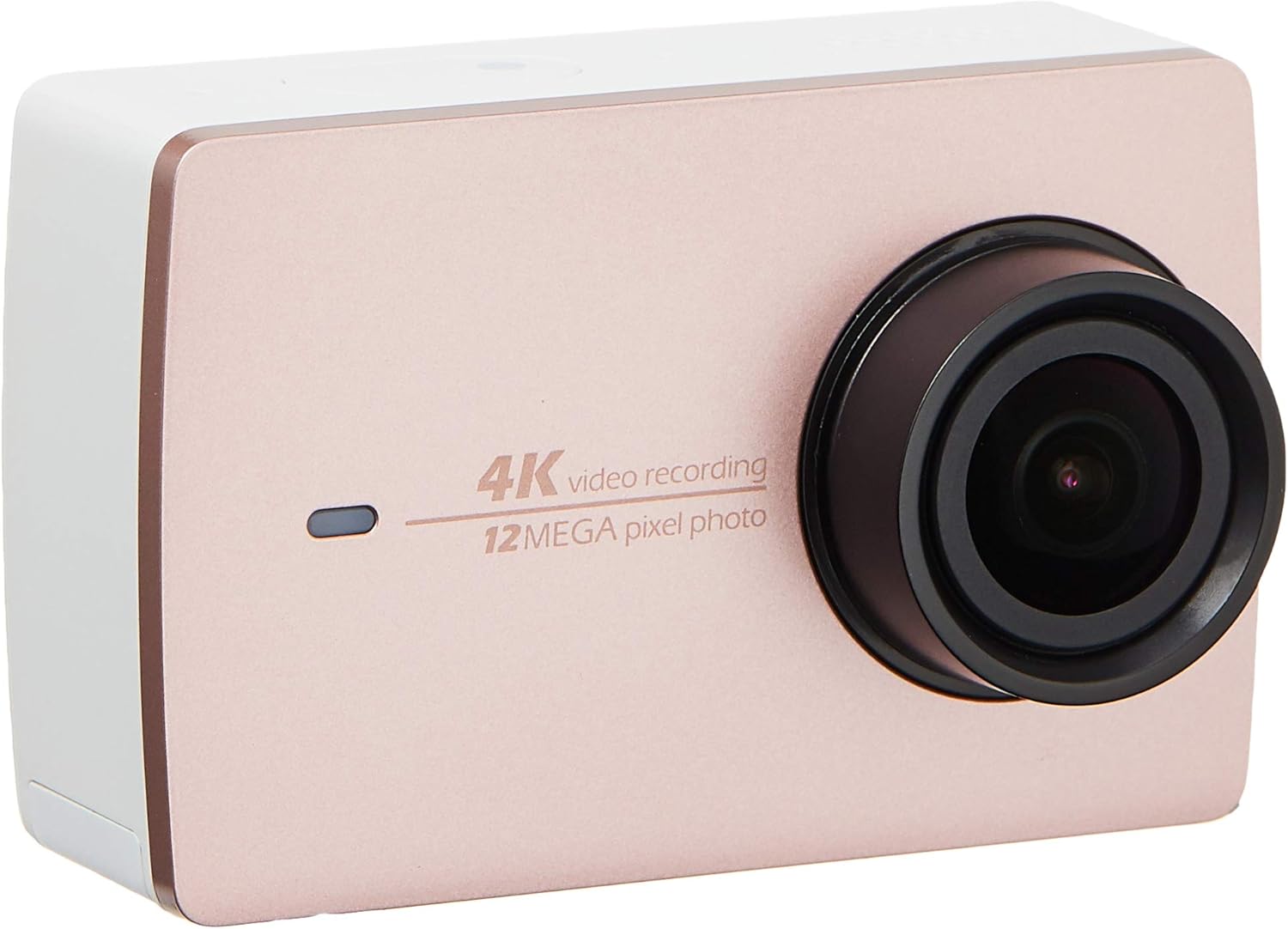
Imagem 2.2: Frente view of the YI 4K Action Camera.
3. Configuração
3.1 Instalação e carregamento da bateria
- Localize o compartimento da bateria na câmera.
- Insert the 1400mAh lithium-ion battery, ensuring correct polarity.
- Feche o compartimento da bateria com segurança.
- Conecte a câmera a uma fonte de energia usando o cabo USB fornecido para carregá-la. O indicador de carregamento acenderá.
3.2 Instalação do cartão de memória
The YI 4K Action Camera supports SDHC and SmartMedia flash memory types.
- Abra a tampa do slot do cartão de memória.
- Insert a compatible memory card (not included) into the slot with the contacts facing the correct direction. Push until it clicks into place.
- Feche a tampa do slot do cartão de memória.
3.3 Ligar/Desligar
- Para ligar: Mantenha pressionado o botão Liga/Desliga até que a tela acenda.
- Para desligar: Mantenha pressionado o botão Liga/Desliga até que a câmera desligue.
3.4 Connecting the Bluetooth Remote
The included Bluetooth remote allows for convenient control of the camera.
- Certifique-se de que a câmera esteja ligada.
- Activate Bluetooth pairing mode on the camera via the settings menu.
- Follow the remote's instructions to enter pairing mode.
- Once paired, the remote can be used to switch between video and photo modes and trigger recording/capture.

Image 3.1: The YI Monopod, included in the kit.
4. Operando a câmera
Navegação por tela sensível ao toque de 4.1 polegadas
The 2.19" LCD touchscreen provides intuitive control:
- Deslize: Navigate through different modes (Video, Photo, Time-lapse, etc.) and settings.
- Tocar: Select options, adjust settings, or start/stop recording.
- Préview: View seu foo capturadotage and photos directly on the screen.
4.2 Gravação de vídeo
- Select the Video mode on the touchscreen.
- Adjust video resolution (e.g., 4K/30fps) and other settings as desired.
- Press the Shutter button or tap the record icon on the screen to start recording.
- Press the Shutter button or tap the record icon again to stop recording.
4.3 Captura de fotos
- Select the Photo mode on the touchscreen.
- Adjust photo settings such as resolution, exposure, and white balance.
- Press the Shutter button or tap the capture icon on the screen to take a photo.
4.4 Conectividade Wi-Fi e uso de aplicativos
The camera's built-in Wi-Fi allows connection to a smartphone app for remote control, live preview, and content management.
- Download the official YI Action Camera app from your device's app store.
- Ative o Wi-Fi na câmera através do menu de configurações.
- Connect your smartphone to the camera's Wi-Fi network (SSID and password displayed on camera screen).
- Open the YI Action Camera app to control the camera, view Footage, e transferência files.
5. Manutenção
5.1 Limpeza
- Use a soft, lint-free cloth to clean the camera body and touchscreen.
- Para as lentes, utilize um pano e solução de limpeza específicos para lentes. Evite materiais abrasivos.
- Certifique-se de que todas as portas estejam livres de poeira e detritos.
5.2 Armazenamento
- Guarde a câmera em um local fresco e seco, longe da luz solar direta e de temperaturas extremas.
- Remova a bateria se for armazená-la por longos períodos para evitar vazamentos.
5.3 atualizações de firmware
Periodically check the official YI website or the YI Action Camera app for available firmware updates. Keeping your camera's firmware updated ensures optimal performance and access to new features.
6. Solução De Problemas
6.1 Problemas e soluções comuns
- A câmera não liga: Certifique-se de que a bateria esteja totalmente carregada e inserida corretamente.
- A gravação para inesperadamente: Check if the memory card has sufficient space or if it's a high-speed card suitable for 4K recording. Ensure the battery is not depleted.
- Tela sensível ao toque não responde: Try restarting the camera. If the issue persists, ensure the screen is clean and dry.
- Bluetooth remote not connecting: Ensure both the camera and remote are in pairing mode and within range. Check the remote's battery.
- Problemas de conexão Wi-Fi: Verify the camera's Wi-Fi is enabled and your smartphone is connected to the correct network. Try restarting both devices.
For further assistance, refer to the official YI support resources.
7. Especificações
| Fabricante | YI |
| Número do modelo | 90010 |
| Dimensões do produto | 6.6 x 3 x 4.3 cm |
| Peso | 96.39 g |
| Tecnologia de sensor fotográfico | CMOS |
| Resolução de captura de vídeo | 4K |
| Distância focal máxima | 1 |
| Abertura Máxima | 2.8 milímetros |
| Tipo de Memória Flash | SDHC, SmartMedia |
| Formato de captura de vídeo | MP4 |
| Formato de áudio suportado | AAC, MP3 |
| Tamanho da tela | 2.19 polegadas |
| Tecnologia de Conectividade | Wi-fi |

Image 7.1: YI 4K Action Camera with monopod, illustrating approximate dimensions.
8. Garantia e Suporte
8.1 Informações de garantia
Este produto vem com um Garantia local (Singapura) de 1 anoGuarde o comprovante de compra para eventuais solicitações de garantia. A garantia cobre defeitos de fabricação em condições normais de uso.
8.2 Suporte ao cliente
For technical support, service, or warranty inquiries, please visit the official YI Technology website or contact their authorized service centers in Singapore. Contact information can typically be found on the product packaging or the official website.