
1. Introdução
The COTEC SP-4000-148 is a high-frequency pure sine wave inverter designed to convert 48VDC battery power into 120VAC household electricity. This inverter delivers a continuous output of 4000W, making it suitable for various applications requiring stable and clean AC power. Its robust design and advanced features ensure reliable performance and protection for your connected devices.
Principais características:
- Saída de onda senoidal pura para eletrônicos sensíveis.
- Power ON / OFF remote control capability (Green Terminal).
- Input & output fully isolated for enhanced safety.
- Temperature & load controlled cooling fan.
- User-friendly interface with 3-color LED status indicators.
- Output frequency (50/60 Hz) selectable via DIP switch.
- Volume de saídatage selectable via DIP switch.
- Power saving mode adjustable via variable resistor.
- Comprehensive input protections: Reverse Polarity (Fuse), Under Voltage, Vol.tage.
- Extensive output protections: Short Circuit, Overload, Over Temperature.
- Type 1 Indoor Aluminum Enclosure.
- E13 / UL / CE / FCC approved.
2. Informações de segurança
Read all instructions and warnings carefully before installing or operating the inverter. Failure to follow these instructions may result in electric shock, fire, serious injury, or death.
Precauções Gerais de Segurança:
- Risco elétrico: This inverter produces high voltage AC power. Treat the output terminals with the same respect as any utility AC outlet.
- Pessoal qualificado: A instalação e a manutenção devem ser realizadas somente por pessoal qualificado.
- Ventilação: Assegure ventilação adequada ao redor do inversor. Não obstrua as aberturas de ventilação. O superaquecimento pode causar danos ou incêndio.
- Ambiente: Do not expose the inverter to rain, snow, spray, or any liquids. Do not operate in areas with flammable fumes or gases.
- Aterramento: The inverter must be properly grounded. Refer to the installation section for grounding instructions.
- Segurança da bateria: Work near lead-acid batteries is dangerous. Batteries can generate explosive gases. Ensure proper ventilation and wear eye protection.
- Entrada DC: Connect the DC input cables with correct polarity. Reverse polarity will blow the internal fuse and void the warranty.
- Sobrecarga: Do not exceed the inverter's rated output power. Overloading can damage the inverter and connected appliances.
- Manutenção: Before performing any maintenance or cleaning, disconnect all power sources (DC and AC).
3. Produto acabadoview
The COTEC SP-4000-148 inverter features a robust aluminum enclosure and clearly labeled connection points for ease of installation and operation. Familiarize yourself with the components before proceeding with installation.

Figura 3.1: geral view of the COTEC SP-4000-148 Pure Sine Wave Inverter. This image shows the blue aluminum casing and the grey end caps with ventilation slots.
Front Panel (AC Output Side):
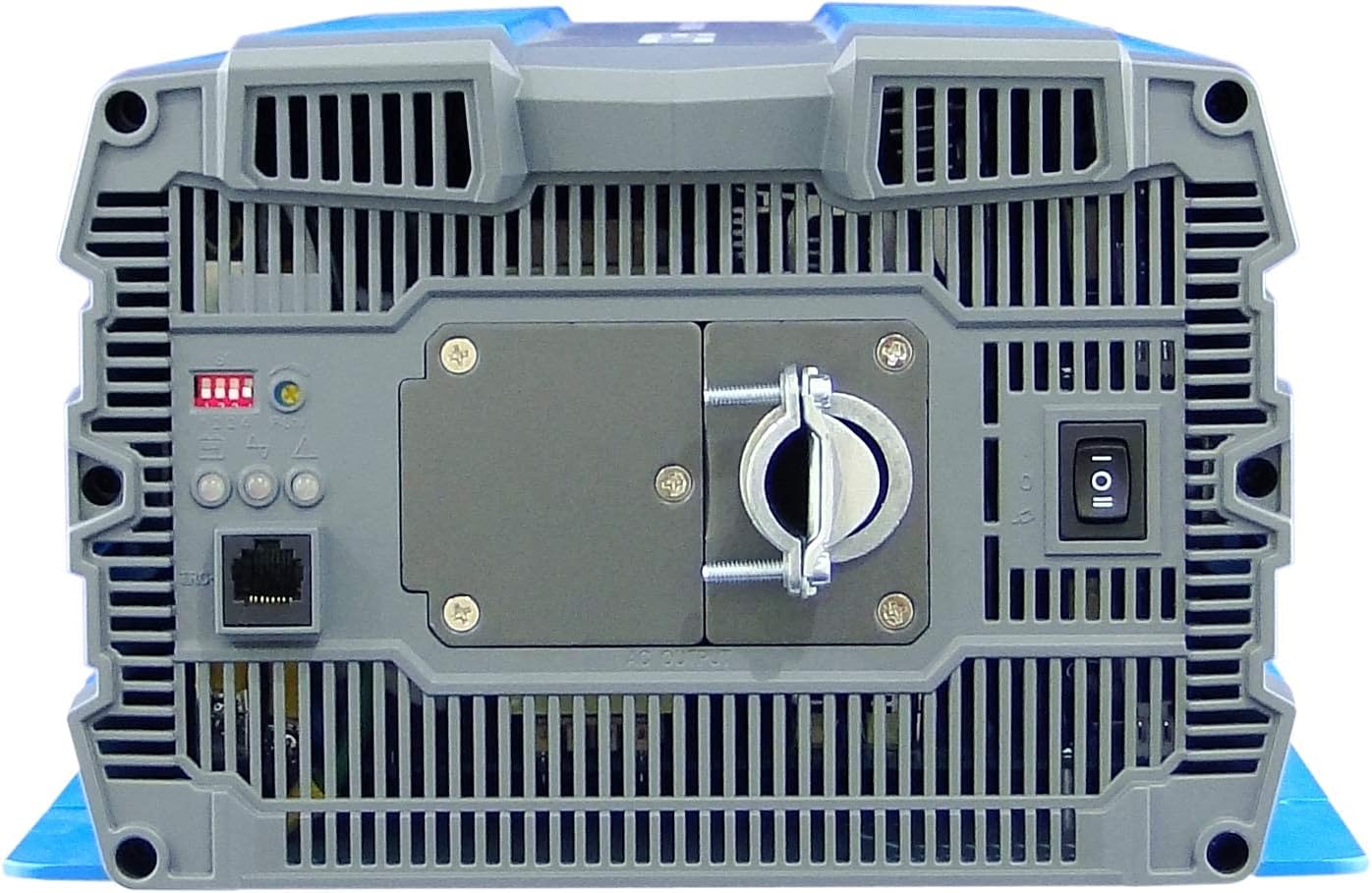
Figure 3.2: Front panel of the inverter. This view highlights the AC output terminal, the remote control terminal (green), LED status indicators, DIP switches, and the main power switch.
- Terminal de saída CA: Hardwire connection for 120VAC output.
- Remote Control Terminal (Green): For connecting an optional remote ON/OFF switch.
- LEDs indicadores de status: Provide visual feedback on inverter status (Power, Fault, Overload).
- Chaves DIP: Used to select output frequency (50/60 Hz) and output voltage.
- Power Saving Mode Resistor: Adjustable resistor for fine-tuning power saving mode.
- Chave de alimentação principal: Controls the inverter's power.
Rear Panel (DC Input Side):

Figure 3.3: Rear panel of the inverter. This view shows the DC input terminals (red for positive, black for negative) and the chassis ground connection point.
- Terminais de entrada CC: Heavy-duty terminals for connecting to the 48VDC battery bank. Ensure correct polarity (Red for Positive, Black for Negative).
- Chassis Ground Terminal: For connecting the inverter to an earth ground.
- Cooling Fan Vents: Ensure these vents are not obstructed for proper heat dissipation.
4. Instalação
A instalação correta é crucial para o funcionamento seguro e eficiente do seu inversor. Siga estas etapas cuidadosamente.
4.1 Montagem do inversor
- Escolha um local seco e bem ventilado, longe da luz solar direta, fontes de calor e umidade.
- Mount the inverter on a non-combustible surface.
- Ensure there is at least 6 inches (15 cm) of clear space around all sides of the inverter for proper airflow.
- Use appropriate fasteners to secure the inverter firmly to the mounting surface.
4.2 Conexão de entrada CC
AVISO: Ensure the battery bank is disconnected or isolated before making any connections. Use appropriately sized cables and fuses/breakers.
- Connect the positive (+) DC cable (typically red) from your 48VDC battery bank to the red positive (+) terminal on the inverter's rear panel.
- Connect the negative (-) DC cable (typically black) from your 48VDC battery bank to the black negative (-) terminal on the inverter's rear panel.
- Ensure all DC connections are tight and secure to prevent loose connections and arcing.
- Install an external DC fuse or circuit breaker between the battery bank and the inverter's positive terminal, as close to the battery as possible. Consult the specifications for appropriate fuse sizing.
4.3 Conexão de Saída CA
The SP-4000-148 uses a hardwire AC output connection.
- Ensure the inverter is OFF and all DC power is disconnected.
- Connect your AC load wiring to the designated AC output terminal block on the front panel.
- Follow all local electrical codes for AC wiring.
- Ensure all AC connections are secure.
4.4 Aterramento
The inverter chassis must be properly grounded.
- Connect a ground wire from the chassis ground terminal on the inverter's rear panel to a reliable earth ground point.
- Ensure the ground connection is secure and meets all local electrical codes.
4.5 Remote Control Connection (Optional)
If using an optional remote control, connect it to the green terminal block on the front panel according to the remote control's instructions.
5. Operação
Once the inverter is properly installed and all connections are secure, you can begin operation.
5.1 Ligar/Desligar
- Ensure all DC and AC connections are correct and secure.
- If an external DC breaker is installed, ensure it is closed (ON).
- Flip the main power switch on the inverter's front panel to the 'ON' position.
- The LED indicators will illuminate, and the cooling fan may briefly activate.
- To power off, flip the main power switch to the 'OFF' position.
5.2 LEDs indicadores de status
The inverter features 3-color LED indicators to display its operational status:
- LED verde: Indica operação normal.
- LED amarelo: Indicates a warning or abnormal condition (e.g., low battery, minor overload). Refer to troubleshooting.
- LED vermelho: Indicates a fault or critical error (e.g., severe overload, over-temperature, short circuit). The inverter will typically shut down. Refer to troubleshooting.
5.3 Configurações do interruptor DIP
The DIP switches on the front panel allow configuration of output frequency and voltage. Refer to the detailed specifications or the label on the inverter for specific switch positions for desired settings.
- Frequência de saída: Select between 50 Hz or 60 Hz.
- Volume de saídatage: Select desired AC output voltage (e.g., 100V, 110V, 115V, 120V).
OBSERVAÇÃO: Always power off the inverter before changing DIP switch settings.
5.4 Modo de economia de energia
The power saving mode can be adjusted via the variable resistor on the front panel. This mode reduces standby power consumption when no load or a very light load is detected. Adjust the resistor to set the threshold for entering/exiting power saving mode.
6. Manutenção
A manutenção regular garante a longevidade e o desempenho ideal do seu inversor.
- Limpeza: Limpe periodicamente a parte externa do inversor com um pano seco e macio. Certifique-se de que as aberturas de ventilação estejam livres de poeira e detritos. Não utilize produtos de limpeza líquidos.
- Verificações de conexão: Annually inspect all DC and AC connections for tightness. Loose connections can cause overheating and damage.
- Manutenção da bateria: Follow the battery manufacturer's recommendations for maintenance, including checking electrolyte levels (for flooded batteries) and terminal cleanliness.
- Ambiente: Assegure-se de que o ambiente operacional permaneça dentro das faixas de temperatura e umidade especificadas.
7. Solução De Problemas
Esta seção fornece soluções para problemas comuns que você pode encontrar com seu inversor.
| Problema | Possível causa | Solução |
|---|---|---|
| Inverter does not turn on (No LEDs) | No DC input power; Blown DC fuse/breaker; Loose DC connections; Reverse polarity. | Verifique o volume da bateriatage; Check external DC fuse/breaker; Verify DC connections are tight and correct polarity. |
| Red LED illuminates, inverter shuts down | Overload; Short circuit on AC output; Over-temperature; Input over/under voltage. | Reduce AC load; Check AC wiring for short circuits; Allow inverter to cool down; Verify battery voltage está dentro da faixa operacional. |
| Yellow LED illuminates, intermittent operation | Minor overload; Low battery voltage warning; High temperature warning. | Reduce AC load; Recharge batteries; Ensure adequate ventilation. |
| No AC output, Green LED is on | AC output wiring issue; Faulty AC appliance. | Check AC output connections; Test with a different AC appliance. |
| Cooling fan runs constantly or loudly | High ambient temperature; Heavy load; Obstructed vents. | Ensure proper ventilation; Reduce load if possible; Clean vents. |
8. Especificações
The following table details the technical specifications for the COTEC SP-4000-148 Pure Sine Wave Inverter.

Figure 8.1: Detailed technical specifications for the COTEC SP-4000 series, including input, output, protection, and environmental parameters.
| Especificação | Valor |
|---|---|
| Marca | COTEK |
| Nome do modelo | Série SP |
| O quetage | 4000 watts |
| Vol de entradatage | 48 Volts CC |
| Potência de saída | 4000 Watts |
| Frequência de saída | 60 Hz (Selectable) |
| Total de tomadas | 1 (Hardwire) |
| Standby Power Shutoff | High Efficiency (Adjustable) |
| Tipo de gabinete | Type 1 Indoor Aluminum Enclosure |
| Aprovações | E13 / UL / CE / FCC |
| UPC | 648152674771 |
| Número da peça do fabricante | SP-4000-148 |
Desenhos Mecânicos:

Figure 8.2: Mechanical drawings providing dimensions for the COTEC SP-4000 series inverter, useful for installation planning.
9. Garantia e Suporte
COTEK products are manufactured to high-quality standards. This product is covered by a manufacturer's warranty against defects in materials and workmanship. Please refer to the warranty card included with your product or visit the official COTEC website para obter termos e condições detalhados da garantia.
Suporte ao cliente:
For technical assistance, troubleshooting, or warranty claims, please contact COTEC customer support through their official channels. Have your product model number (SP-4000-148) and purchase information ready when contacting support.
- Website: www.cotek.com.tw (Example, please verify official weblocal)
- E-mail: support@cotek.com (Exampe)
- Telefone: +1-XXX-XXX-XXXX (Exampe)