
Introdução
Obrigado pela compra.asing the QUMOX L165U 2.4GHz Wireless Gamepad. This high-quality game controller is designed for use with PC and Android devices, offering a reliable 2.4GHz wireless connection for an enhanced gaming experience. Please read this manual carefully to ensure proper setup and operation of your new gamepad.

Figure 1: QUMOX L165U Gamepad with included USB adapter and OTG connection kit.
Conteúdo da embalagem
Verifique se todos os itens estão presentes em sua embalagem:
- 1x QUMOX L165U Gamepad
- 1x 2.4GHz USB Wireless Adapter
- 1x OTG Connection Kit (Micro USB to USB-A adapter)
Configurar
1. Instalação da bateria
The QUMOX L165U Gamepad is powered by 2 AAA batteries (not included). To install the batteries:
- Localize o compartimento da bateria na parte traseira do gamepad.
- Abra a tampa da bateria.
- Insira 2 pilhas AAA, certificando-se da polaridade correta (+/-).
- Feche a tampa da bateria com segurança.

Figure 2: Open battery compartment for AAA battery installation.
2. Conectando a um PC
- Plug the 2.4GHz USB Wireless Adapter into an available USB port on your PC.
- Turn on the gamepad by pressing the 'START' button. The gamepad will automatically attempt to connect.
- The PC should recognize the gamepad and install necessary drivers automatically.
- If the gamepad does not connect, press the 'MODE' button on the gamepad to cycle through connection modes until it is recognized by your PC.
3. Connecting to an Android Device (with OTG support)
- Connect the OTG Connection Kit to your Android device's Micro USB port.
- Plug the 2.4GHz USB Wireless Adapter into the USB-A end of the OTG Connection Kit.
- Turn on the gamepad by pressing the 'START' button. The gamepad will automatically attempt to connect.
- Your Android device should recognize the gamepad.
- If the gamepad does not connect, press the 'MODE' button on the gamepad to cycle through connection modes until it is recognized by your Android device.
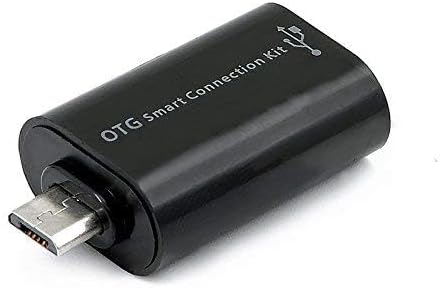
Figure 3: OTG Connection Kit for Android device connectivity.
Instruções de operação
Once connected, your QUMOX L165U Gamepad is ready for use. The layout is standard for most game controllers.
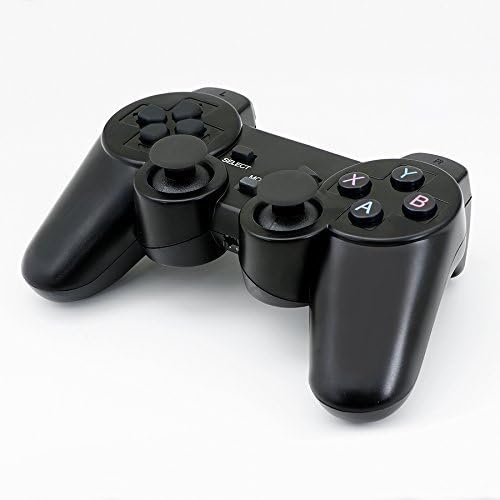
Figura 4: parte superior view of the QUMOX L165U Gamepad, highlighting button layout.
- Pad direcional (D-Pad): Para entrada direcional precisa.
- Joysticks analógicos: Two analog sticks for 360-degree movement and camera control.
- Botões de ação (A, B, X, Y): Botões de ação padrão para comandos dentro do jogo.
- Botões de ombro (L1, R1) e gatilhos (L2, R2): Located on the top of the gamepad for additional actions.
- SELECT/BACK Button: Typically used for menu navigation or specific in-game functions.
- Botão de início: Utilizado para pausar jogos ou confirmar seleções.
- Botão MODE: Cycles through different operating modes (e.g., Android, PC) if automatic detection fails.
Demonstração em vídeo
Vídeo 1: Um vendedor forneceu mais deview of a 2-pack wireless controller, demonstrating its features and compatibility. While showing a similar product, it illustrates general wireless controller usage and setup.
Manutenção
- Limpeza: Use a soft, dry cloth to clean the gamepad. Avoid using harsh chemicals or abrasive materials.
- Armazenar: Guarde o gamepad em local fresco e seco, longe da luz solar direta e de temperaturas extremas.
- Cuidados com a bateria: Remova as pilhas se o gamepad não for usado por um longo período para evitar vazamentos.
Solução de problemas
| Problema | Possível causa | Solução |
|---|---|---|
| Gamepad does not connect. | Low batteries, incorrect mode, adapter not properly inserted. | Replace batteries. Press the 'MODE' button to cycle through modes. Ensure USB adapter is fully inserted into PC or OTG adapter. |
| Os botões ou joysticks não respondem. | Connection issue, game incompatibility, physical damage. | Reconnect the gamepad. Check game settings for controller support. If issue persists, contact support. |
| Android device does not recognize gamepad. | Android device lacks OTG support, OTG adapter issue. | Verify your Android device supports OTG. Ensure OTG adapter is functioning correctly. |
Especificações
| Recurso | Detalhe |
|---|---|
| Número do modelo | L165U |
| Tecnologia de Conectividade | 2.4GHz Wireless (via USB Adapter) |
| Dispositivos compatíveis | PC, Android (with OTG support) |
| Fonte de energia | 2 pilhas AAA |
| Peso do item | 5.3 onças |
| Dimensões da embalagem | 8.07 x 5.63 x 2.95 polegadas |
| Cor | Preto |
Garantia e Suporte
For warranty information or technical support, please refer to the contact details provided with your purchase or visit the official QUMOX webGuarde seu comprovante de compra para eventuais solicitações de garantia.