
Introdução
This manual provides comprehensive instructions for the setup, operation, and maintenance of your GPX Digital AM/FM Clock Radio, model C224B. Please read this manual thoroughly before using the device to ensure proper functionality and to maximize your user experience. Keep this manual for future reference.
Produto acimaview
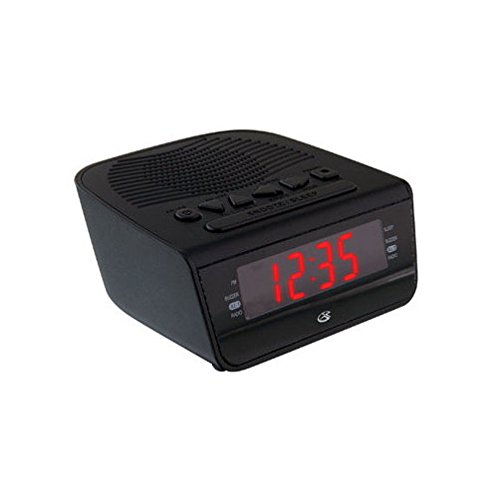
Figura 1: Frente view of the GPX Digital AM/FM Clock Radio. This image shows the compact black unit with its digital display and control buttons.
The GPX Digital AM/FM Clock Radio (C224B) is designed for reliable timekeeping and audio entertainment. Key features include a clear multi-display clock, AM/FM radio tuner, dual alarm functionality, and a battery backup option to ensure continuous operation during power interruptions. Its compact and modern design makes it suitable for various indoor settings.
Configurar
1. Desembalagem
Carefully remove the clock radio from its packaging. Ensure all components are present: the clock radio unit and the power adapter.
2. Conexão de energia
- Plug the power adapter into the DC input jack located on the back of the clock radio.
- Plug the other end of the power adapter into a standard wall outlet (AC 120V, 60Hz).
- The display will illuminate, indicating the unit is receiving power.
3. Instalação de bateria de reserva (opcional)
Para alimentação de reserva durante o funcionamento.tages, install batteries (not included).
- Localize o compartimento da bateria na parte inferior da unidade.
- Abra a tampa do compartimento da bateria.
- Insert the required batteries (e.g., 2 x AAA, check unit for specific type) according to the polarity markings (+ and -).
- Feche bem a tampa do compartimento da bateria.
Observação: Batteries are for backup only and will not power the display or radio functions continuously. They preserve time and alarm settings during a power interruption.
Instruções de operação
1. Definição da hora
- Pressione e segure o HORÁRIO DEFINIDO Pressione o botão até que o visor pisque.
- Use o HORA e MINUTO botões para ajustar o tempo.
- Imprensa HORÁRIO DEFINIDO Novamente, para confirmar e sair do modo de configuração de hora.
2. Configurar alarmes (Alarme 1 e Alarme 2)
This unit features dual alarms, allowing you to set two independent wake-up times.
- Pressione e segure o ALARME 1 CONJUNTO (ou ALARME 2 CONJUNTO) button until the alarm time flashes.
- Use o HORA e MINUTO buttons to adjust the desired alarm time.
- Imprensa ALARME 1 CONJUNTO (ou ALARME 2 CONJUNTO) again to confirm the time.
- Immediately after confirming the time, use the MODO DE ALARME button to select the alarm source: BUZZER or RÁDIO.
- The alarm icon (e.g., AL1 or AL2) will appear on the display, indicating the alarm is active.
Para desligar o alarme, pressione o botão correspondente. ALARME 1 LIGADO/DESLIGADO (ou ALARME 2 LIGADO/DESLIGADO) button. The alarm icon will disappear.
3. Operação do rádio AM/FM
- Pressione o RÁDIO LIGADO/DESLIGADO botão para ligar o rádio.
- Pressione o BANDA Botão para alternar entre as bandas AM e FM.
- Use o SINTONIZAR + or SOMBRA - botões para sintonizar manualmente a estação desejada.
- To automatically scan for the next available station, press and hold SINTONIZAR + or SOMBRA - por alguns segundos.
- Ajuste o volume usando o VOLUME + or VOLUME - botões.
- Para desligar o rádio, pressione o botão RÁDIO LIGADO/DESLIGADO botão novamente.
4. Função soneca
Quando o alarme tocar, pressione o SONECA Botão para silenciar temporariamente o alarme por aproximadamente 9 minutos. O alarme tocará novamente após o período de soneca.
5. Função de suspensão
The sleep function allows the radio to play for a set duration before automatically turning off.
- Enquanto o rádio estiver tocando, pressione o DORMIR Pressione o botão repetidamente para alternar entre os tempos de sono disponíveis (por exemplo, 90, 60, 30, 15 minutos, DESLIGADO).
- O rádio desligará automaticamente após o tempo selecionado.
Manutenção
1. Limpeza
To clean the unit, wipe the exterior with a soft, slightly damp cloth. Do not use abrasive cleaners or solvents, as these may damage the finish. Ensure the unit is unplugged before cleaning.
2. Substituição da bateria
If the battery backup function is not working, or if the unit loses time during a power outage, the backup batteries may need replacement. Follow the "Battery Backup Installation" steps in the Setup section to replace them.
Solução de problemas
| Problema | Possível causa | Solução |
|---|---|---|
| A unidade não liga. | Adaptador de energia não conectado ou tomada com defeito. | Verifique se o adaptador de energia está firmemente conectado à unidade e a uma tomada elétrica em funcionamento. Tente usar outra tomada. |
| O alarme não dispara. | Alarme não configurado, volume do alarme muito baixo ou alarme desligado. | Verify alarm time and source (buzzer/radio) are set correctly. Ensure alarm is activated (icon visible). Increase radio volume if alarm source is radio. |
| Má recepção de rádio. | Sinal fraco ou interferência. | Adjust the position of the unit or the antenna (if external). Move away from other electronic devices that may cause interference. |
| A hora e as configurações são perdidas após a queda de energia.tage. | As baterias de reserva estão descarregadas ou não estão instaladas. | Install fresh backup batteries or replace existing ones. |
Especificações
- Modelo: C224B
- Fonte de energia: AC 120V, 60Hz (main); Battery Powered (backup)
- Tipo de exibição: Display digital LED
- Bandas de Rádio: AM/FM
- Dimensões (Aprox.): 5.12" L x 5.12" A
- Peso (aprox.): 3 libras
- Cor: Preto
- Material: Plástico
Garantia e Suporte
Para informações sobre garantia ou suporte técnico, consulte o cartão de garantia incluído com o seu produto ou visite o site oficial da GPX. website. Do not attempt to repair this unit yourself, as this may void your warranty.
GPX Official Website: www.gpx.com