
FOSCAM FI9928P
Manual de Instruções da Câmera de Segurança WiFi PTZ Externa FOSCAM FI9928P 1080P
Modelo: FI9928P
Introdução
This manual provides comprehensive instructions for the installation, operation, and maintenance of your FOSCAM FI9928P Outdoor PTZ 1080P WiFi Security Camera. Please read this manual thoroughly before using the product to ensure proper setup and functionality.

Imagem: Frente view of the FOSCAM FI9928P Outdoor PTZ 1080P WiFi Security Camera.
The FOSCAM FI9928P is a full HD 1080P WiFi IP camera designed for home security. It features 4x optical zoom, pan and tilt capabilities, enhanced night vision up to 196 feet, IP66 weatherproof rating, two-way audio, and Wide Dynamic Range (WDR) technology.
Principais características
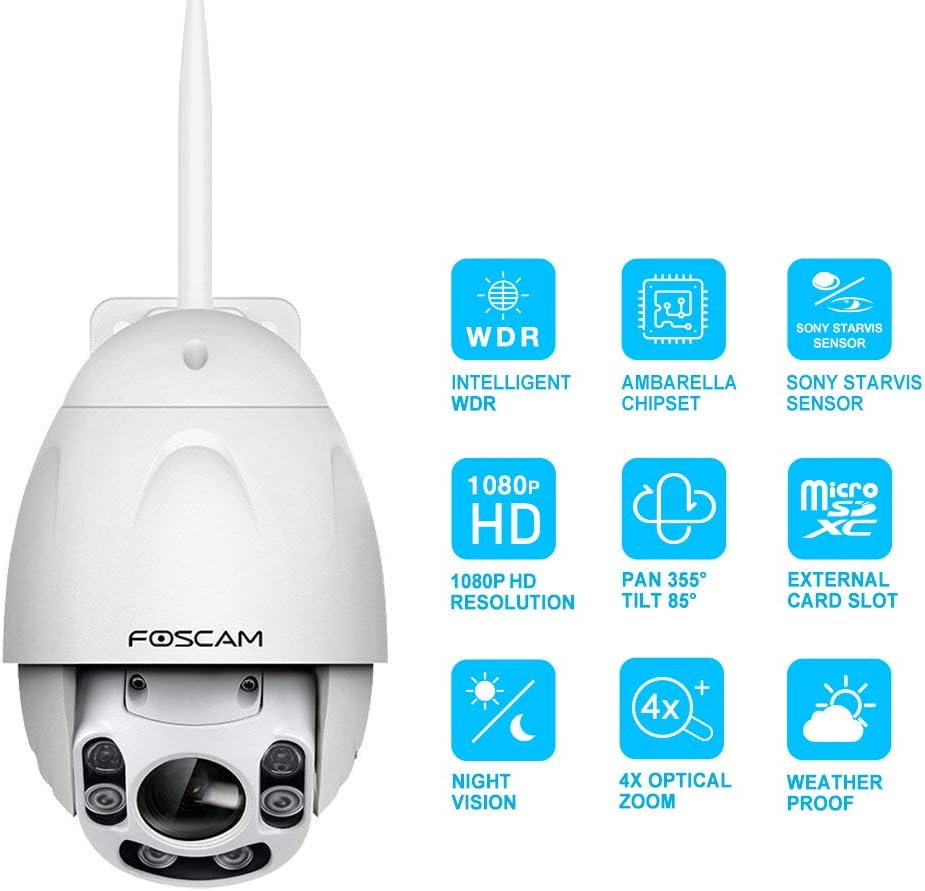
Image: Icons representing key features: Intelligent WDR, Ambarella Chipset, Sony Starvis Sensor, 1080P HD Resolution, Pan 355° Tilt 85°, External Card Slot, Night Vision, 4X Optical Zoom, Weatherproof.
- Vídeo HD 1080p: Delivers clear and smooth 1080p video at 25 frames per second, powered by an Ambarella chipset.
- Pan & Tilt with Optical Zoom: Offers a 355° horizontal and 85° vertical rotation range, along with true 4x optical zoom for detailed viewindo.
- Visão noturna aprimorada: Equipped with a Sony Starvis sensor and 6 high-performance infrared array LED lights, providing night vision up to 196 feet, including colorful vision in low-light conditions.
- IP66 à prova de intempéries: Designed to withstand outdoor conditions, protecting against rain and dust.
- Intelligent WDR & Image Distortion Correction: Corrects dark faces under heavy light and fixes common image distortion flaws for clear images in various lighting.
- Detecção de movimento e alertas: Detects movement and sends notifications via email or smartphone app.
- Áudio Bidirecional: Permite a comunicação através da câmera.
- Múltiplas opções de armazenamento: Supports Micro SD card (up to 128GB, not included), computer, NVR, FTP, NAS, or Foscam cloud storage.
- Controle de voz: Compatible with Amazon Alexa (requires latest firmware update) for instant live view on Echo Show devices.
Configurar
1. Desembalagem e inspeção inicial
Carefully remove all components from the packaging. Verify that all items listed in the "What's in the Box" section are present and undamaged. The package includes the camera unit.
2. Instalação Física
The FOSCAM FI9928P is designed for outdoor use with an IP66 weatherproof rating. Choose a suitable wall-mount location that provides the desired viewing angle and is within range of your Wi-Fi network or Ethernet connection.

Image: The FOSCAM FI9928P camera mounted outdoors, illustrating its IP66 weatherproof capability against rain.
Securely mount the camera using appropriate hardware for your chosen surface. Ensure the power cable and any optional network cables are routed safely and protected from environmental elements.
3. Conexão de rede
The camera supports both Wi-Fi and Ethernet connectivity.
- Configuração Wi-Fi: For wireless connection, ensure your camera is within range of your Wi-Fi router. The Foscam App will guide you through connecting the camera to your Wi-Fi network.
- Configuração Ethernet: For a wired connection, connect an Ethernet cable from your router to the camera's Ethernet port.
4. Foscam App and Software Setup
Download the free Foscam App for iOS or Android devices. Follow the in-app instructions to add your camera. The app provides an easy setup process, often involving scanning a QR code on the camera.
For desktop management, Foscam VMS (Video Management Software) is available. The camera is also compatible with third-party VMS like Blue Iris and ONVIF recording devices, and can be accessed via IE, Chrome, and Firefox browsers.
5. Instalação do cartão Micro SD
The camera supports Micro SD cards up to 128GB (not included) for local storage. To install, remove the two screws securing the Micro SD card panel, insert the card, and re-secure the panel. Ensure the panel is properly sealed to maintain the IP66 weatherproof rating.
Instruções de operação
1. Controle de panorâmica, inclinação e zoom
Utilize the Foscam App or Foscam VMS to control the camera's movement. The camera offers a 355° horizontal pan and 85° vertical tilt. The 4x optical zoom allows you to magnify specific areas without losing image clarity.

Image: A smartphone displaying the Foscam app interface, showing controls for pan, tilt, and 4x optical zoom for the FI9928P camera.
2. Visão noturna
The camera automatically switches to night vision mode in low-light conditions. With its Sony Starvis sensor and 6 IR LEDs, it provides clear vision up to 196 feet. The camera can also deliver colorful images in very low light, unlike many cameras that only show black and white.

Image: A split image showing the camera's view during the day in full color and at night with enhanced night vision, highlighting the 196 ft range.
3. Detecção de movimento e alertas
Configure motion detection settings within the Foscam App or VMS. You can set specific alarm schedules and define areas you do not wish to monitor. Upon detection, the camera can send notifications to your email or smartphone app. Captured images can be stored on a Micro SD card, computer, NVR, FTP, NAS, or Foscam cloud.

Image: A smartphone displaying motion detection alerts from the Foscam app, showing timestampse e préview images of detected events.
4. Armazenamento em nuvem
Foscam Cloud utilizes US-based AWS servers for high-level encrypted security and privacy. Cloud storage protects recordings from loss due to camera damage or theft. A 7-day free cloud storage plan with 1 month's validity is available. This allows you to view live feeds, play back recordings, or save alert captures and video clips from the cloud. Additional cloud storage options are available.
5. Controle por voz com a Alexa
The FOSCAM FI9928P supports voice control via Amazon Alexa. Ensure your camera's firmware is updated to the newest version through the Foscam app. Once updated and linked, you can use simple voice commands to view the camera feed on compatible Echo Show devices (e.g., "Alexa, show me the front door").

Image: A person in a kitchen using voice commands to control the FOSCAM camera, with an Echo Show displaying the camera feed.
Manutenção
1. Limpeza
Limpe periodicamente a lente e o corpo da câmera com um pano macio e seco.amp cloth to remove dust, dirt, or water spots that may affect image quality. Avoid using harsh chemicals or abrasive materials.
2. Atualizações de firmware
Regularly check for and install firmware updates via the Foscam App. Firmware updates often include performance improvements, new features, and security enhancements. For example, Alexa compatibility requires the latest firmware.
3. Proteção contra intempéries
While the camera is IP66 weatherproof, ensure all cable connections are properly sealed and protected from direct exposure to extreme weather conditions to maximize longevity.
Solução de problemas
- Sem energia: Certifique-se de que o adaptador de energia esteja conectado firmemente tanto à câmera quanto a uma tomada elétrica em funcionamento.
- Não é possível conectar-se ao Wi-Fi:
- Verifique se a câmera está dentro do alcance do seu roteador Wi-Fi.
- Verifique se a sua senha de Wi-Fi foi digitada corretamente.
- Reinicie o roteador e a câmera.
- Se estiver usando uma conexão com fio, certifique-se de que o cabo Ethernet esteja conectado corretamente.
- Má qualidade de imagem:
- Limpe a lente da câmera.
- Certifique-se de que não haja obstruções no campo de visão da câmera. view.
- Check network stability for streaming issues.
- Verify WDR and Image Distortion Correction settings are enabled if needed.
- Alertas de movimento não estão funcionando:
- Confirm motion detection is enabled in the app/software.
- Check alarm schedules and monitored areas.
- Ensure notification settings on your smartphone are configured to receive alerts from the Foscam App.
- Micro SD Card Not Recording:
- Ensure the Micro SD card is correctly inserted and formatted.
- Check if the card is full; consider enabling loop recording or replacing the card.
- Verify recording settings in the Foscam App/VMS.
Especificações
| Recurso | Detalhe |
|---|---|
| Número do modelo | FI9928P |
| Resolução de captura de vídeo | 1080p |
| Taxa de quadros | 25 qps |
| Zoom óptico | 4x |
| Escala de panela | 355° |
| Faixa de inclinação | 85° |
| Alcance de visão noturna | Até 196 pés |
| Classificação à prova de intempéries | IP66 |
| Opções de armazenamento | Micro SD (up to 128GB), NVR, FTP, NAS, Foscam Cloud |
| Conectividade | Wi-Fi, Ethernet |
| Dispositivos compatíveis | iOS, Android, Amazon Alexa |
| Fonte de energia | AC/DC (12 Volts, 10 watts) |
| Dimensões (C x L x A) | 20.9 x 23.4 x 13.8 polegadas |
| Peso do item | 3.96 libras (1.8 kg) |
Garantia e Suporte
For technical assistance, product support, or warranty inquiries, please contact FOSCAM customer support. You can reach them via email at suporte@foscam.com.
FOSCAM has been providing security solutions for over 10 years, focusing on professional services and quality products.
Ask a question about this manual
Ask about setup, troubleshooting, compatibility, parts, safety, or missing instructions. Manuals+ will review the question and use this page’s manual context to help answer it.