
1. Introdução
Obrigado pela compra.asing the iHome IB90 Bluetooth Headphones. These headphones are designed to provide rich, detailed sound with an enhanced bass response, offering a comfortable listening experience with wireless freedom and extended battery life. This manual will guide you through the setup, operation, and maintenance of your new headphones.
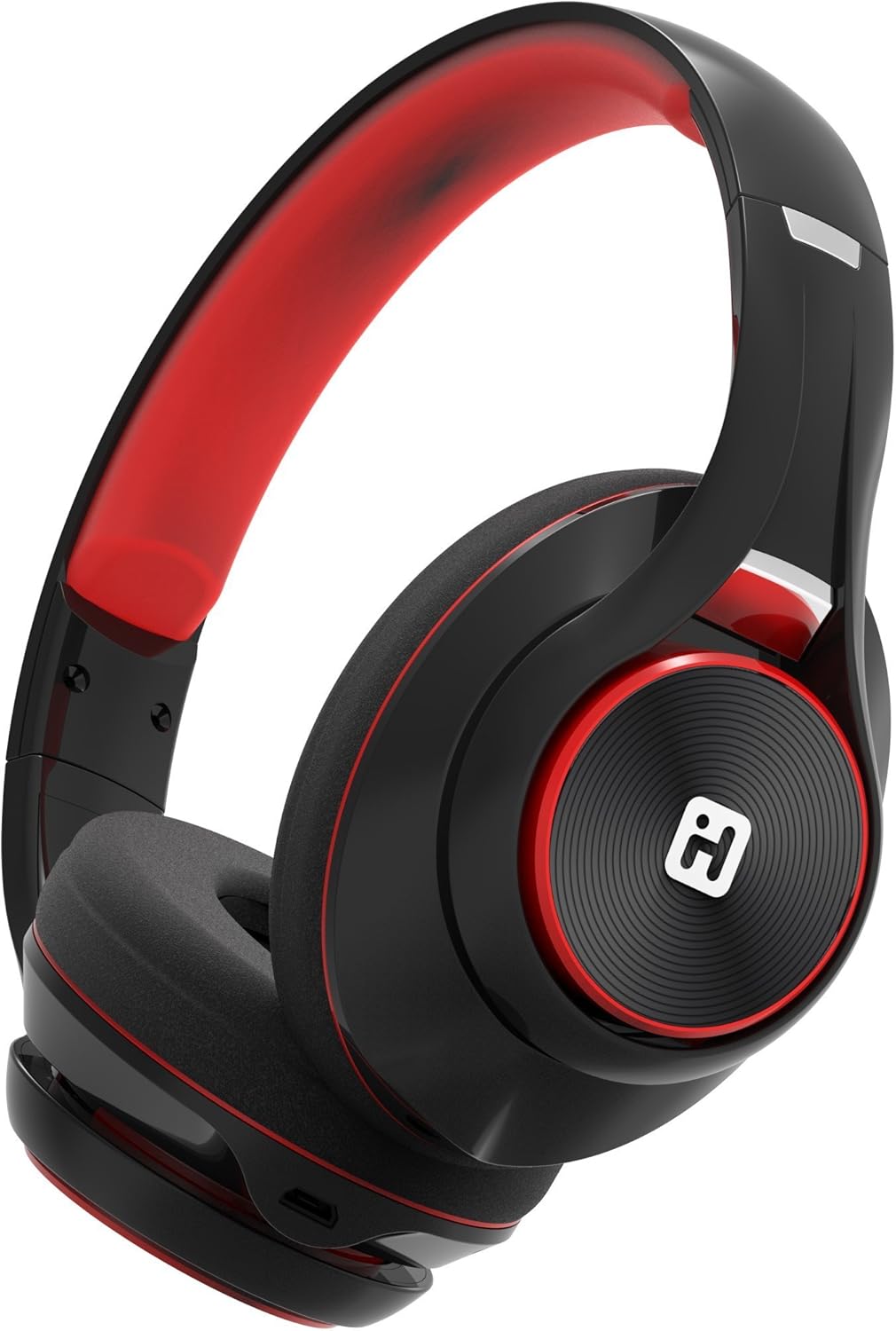
Image: iHome IB90 Bluetooth Headphones, featuring a comfortable over-ear design in black and red.
2. Conteúdo da embalagem
- iHome IB90 Bluetooth Headphones
- Cabo de áudio (para modo com fio)
- USB Charging Cable (not explicitly listed but implied for rechargeable battery)
3. Configuração
3.1 Carregando os fones de ouvido
Before initial use, fully charge your headphones. The extra-long life rechargeable battery provides up to 46 hours of continuous use on a single charge. A 10-minute charge can provide 1 hour of play when the battery is low.
- Conecte o cabo de carregamento USB fornecido à porta de carregamento dos fones de ouvido.
- Connect the other end of the USB cable to a powered USB port (e.g., computer, wall adapter).
- A luz indicadora de carregamento acenderá durante o carregamento e apagará quando a carga estiver completa.
3.2 Emparelhamento Bluetooth
Pair your iHome IB90 headphones with your Bluetooth-enabled device to enjoy wireless audio.
- Certifique-se de que os fones de ouvido estejam carregados e desligados.
- Press and hold the Power/Bluetooth button on the headphones until the indicator light flashes, indicating pairing mode. Voice prompts will confirm Bluetooth connection status.
- On your device (smartphone, tablet, computer), go to the Bluetooth settings and enable Bluetooth.
- Select "iHome IB90" (or similar model name) from the list of available devices.
- Once connected, a voice prompt will confirm successful pairing, and the indicator light will change.
3.3 Melody Voice Assistant Setup
The iHome IB90 headphones are compatible with the free Melody voice-powered personal music assistant app, allowing you to control music from services like Spotify and iHeartRadio using voice commands. The voice control button on the earcup also works with Siri and Google Assistant.
Image: Melody Personal Music Assistant app logo.
- Download the Melody app from your device's app store (App Store for iOS, Google Play for Android).
- Open the Melody app and follow the on-screen instructions to set up your account and link your preferred music streaming services.
- Ensure your headphones are paired with your device.
- Use the voice control button on the earcup to activate Melody or your device's native voice assistant (Siri/Google Assistant) and issue commands.
Video: This video demonstrates the features and functionality of the Melody voice-powered personal music assistant, highlighting its integration with iHome products for hands-free music control and access to various streaming platforms.
4. Operando os fones de ouvido
4.1 On-Ear Remote Control
The earcup features convenient controls for managing your audio and calls:
- Reproduzir/Pausar: Press the designated button to play or pause audio.
- Seleção de trilha: Use the track buttons to skip forward or backward.
- Controle de volume: Ajuste o volume usando os botões de volume.
- Atender/terminar chamadas: The built-in echo-cancelling microphone allows for hands-free phone calls. Press the call button to answer or end a call.

Image: Close-up of the iHome IB90 headphone earcup, illustrating the location of control buttons.
4.2 Controle de voz
Activate your personal voice assistant (Melody, Siri, or Google Assistant) by pressing the dedicated voice control button on the earcup. You can then use voice commands to:
- Play specific songs, artists, albums, or playlists.
- Check weather, set reminders, and make phone calls (via Siri/Google Assistant).
- Access music from various streaming platforms (via Melody app).
4.3 Modo com fio
The headphones can also be used in wired mode with the provided audio cable, ensuring you can continue listening even if the battery is depleted. Simply connect the audio cable to the headphone's audio input and your device's audio output.
5. Manutenção
5.1 Limpeza
Para manter seus fones de ouvido em boas condições:
- Limpe os fones de ouvido e a faixa de cabeça com um pano macio e seco.
- Evite usar produtos de limpeza abrasivos, solventes ou produtos químicos agressivos.
- Não mergulhe os fones de ouvido na água, pois eles não são resistentes à água.
5.2 Armazenamento
When not in use, store your headphones in a cool, dry place away from direct sunlight and extreme temperatures. The foldable design allows for compact storage and portability.
6. Solução De Problemas
If you encounter issues with your iHome IB90 headphones, refer to the following common solutions:
- Sem energia: Certifique-se de que os fones de ouvido estejam totalmente carregados. Conecte-os a uma fonte de energia usando o cabo de carregamento USB.
- Não foi possível emparelhar via Bluetooth: Make sure the headphones are in pairing mode (flashing indicator light). Turn off and on your device's Bluetooth, then try re-pairing. Ensure the headphones are not already connected to another device.
- Sem som ou volume baixo: Check the volume levels on both the headphones and your connected device. Ensure the headphones are properly paired. If using wired mode, ensure the audio cable is securely connected.
- Microfone não funciona: Verify that the headphones are properly connected via Bluetooth. Check your device's audio input settings to ensure the headphone microphone is selected.
- Vazamento de som: The iHome IB90 headphones feature passive noise isolation, not active noise cancellation (ANC). While they provide an immersive sound environment, they may not completely block out all external noise, and some sound may be audible to others at higher volumes.
7. Especificações
| Recurso | Detalhe |
|---|---|
| Marca | iCasa |
| Número do modelo | IB90v2BRC |
| Colocação da orelha | Sobre a orelha |
| Fator de forma | Na orelha |
| Controle de Ruído | Nenhuma (Isolamento Passivo de Ruído) |
| Tecnologia de Conectividade | Bluetooth |
| Tecnologia sem fio | Bluetooth |
| Tipo de controle | Controle remoto |
| Mídia Integrada | Fones de ouvido |
| Peso do item | 0.5 libras |
| Material do gabinete | Plástico |
| Usos específicos para o produto | Viagem |
| Nível de resistência à água | Não resistente à água |
8. Garantia e Suporte
Para informações sobre garantia e suporte ao cliente, consulte a documentação incluída com o seu produto ou visite o site oficial da iHome. webEste manual não contém detalhes específicos sobre a garantia.