
1. Introdução
This manual provides essential information for the safe and effective operation, setup, and maintenance of your BMC RESmart GII Auto CPAP System E-20A-H with Humidifier. Please read this manual thoroughly before using the device and retain it for future reference. This device is intended for the treatment of Obstructive Sleep Apnea (OSA).
2. Informações de segurança
Avisos de segurança importantes:
- Always disconnect the device from the power supply before cleaning or performing any maintenance.
- Não mergulhe o dispositivo em água ou qualquer outro líquido.
- Use only accessories and parts recommended by BMC.
- Keep the device away from direct sunlight, heat sources, and sharp objects.
- Consult your physician or healthcare provider if you experience any unusual symptoms or discomfort during use.
- Este dispositivo não se destina ao suporte de vida.
3. Produto acabadoview
The BMC RESmart GII Auto CPAP System E-20A-H is an intelligent device designed for the treatment of Obstructive Sleep Apnea. It features an integrated humidifier for enhanced comfort.
Componentes principais:
- Unidade principal: Houses the motor, control electronics, and display.
- Umidificador: Integrated unit with dual water chambers for efficient humidification.
- Tela LCD de 3.5 polegadas: Provides real-time information and access to settings.
- Botão de controle: Para navegar pelos menus e ajustar as configurações.
- Saída de ar: Connects to the CPAP tubing.
- Entrada de potência: Para conectar o adaptador de energia.
- Slot para cartão SD: For compliance data storage and retrieval (iCode II).
- SpO2 Kit Port (Optional): For real-time blood oxygen saturation and pulse rate monitoring.
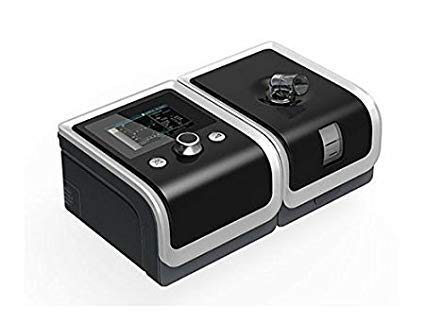
An image showing the BMC RESmart GII Auto CPAP device, featuring its main unit, control knob, and integrated humidifier. The device is black with a clear humidifier chamber visible.
4. Configuração
4.1 Desembalagem
- Remova cuidadosamente todos os componentes da embalagem.
- Inspect the device and accessories for any signs of damage. Do not use if damaged.
4.2 Conexão de energia
- Connect the power adapter to the power inlet on the back of the device.
- Conecte o cabo de alimentação a uma tomada elétrica adequada.
4.3 Filling the Humidifier
- Open the humidifier chamber by sliding or lifting the cover.
- Fill the water chamber with distilled water up to the maximum fill line. Do not overfill.
- Close the humidifier chamber securely.
4.4 Connecting Tubing and Mask
- Connect one end of the CPAP tubing to the air outlet on the device.
- Connect the other end of the tubing to your prescribed CPAP mask.
- Fit the mask comfortably and securely according to its own instructions.
5. Instruções de operação
5.1 Starting Therapy
- Ensure the device is properly set up and connected.
- Coloque sua máscara.
- Press the Start/Stop button (usually the control knob) to begin therapy. The device will automatically start delivering air.
5.2 Ajustando configurações
Use the control knob to navigate the menu on the 3.5-inch LCD display. Press the knob to select an option and rotate to adjust values.
- Faixa de pressão: 4-20 cm H2O (Auto CPAP adjusts automatically within this range).
- Ramp Tempo: Adjusts the time (0-60 minutes) for the pressure to gradually increase to the prescribed level.
- Humidification Level: Select from Off or levels 1-5 to control the humidity output.
- Reslex: Pressure relief feature (Off/1/2/3) for exhalation comfort.
- Auto On / Off: Can be enabled or disabled (Off by default).
5.3 Stopping Therapy
Press the Start/Stop button again to end therapy. The device will power down.
5.4 iCode II Data Retrieval
Compliance data is encoded by a QR code displayed on the device's screen. Use a compatible application to scan the QR code for quick data retrieval and monitoring.
6. Manutenção
Regular cleaning and maintenance are crucial for the optimal performance and longevity of your device.
6.1 Limpeza Diária
- Humidifier Water Chamber: Empty any remaining water and rinse with distilled water. Allow to air dry.
- Máscara: Wipe down the mask cushion with a damp cloth or specialized CPAP wipes.
6.2 Limpeza Semanal
- Humidifier Water Chamber: Wash with mild soap and warm water. Rinse thoroughly and allow to air dry completely.
- Tubos CPAP: Wash with mild soap and warm water. Rinse thoroughly and hang to air dry.
- Filtro de ar: Inspect the reusable air filter (if applicable). If dirty, rinse under running water and allow to air dry. Replace disposable filters as recommended.
6.3 Cuidados Gerais
- Limpe o exterior do dispositivo com anúncioamp cloth. Do not use abrasive cleaners or immerse the device.
- Replace air filters regularly as per manufacturer recommendations or if visibly dirty.
7. Solução De Problemas
Caso encontre algum problema, consulte os problemas e soluções comuns a seguir:
| Problema | Possível causa | Solução |
|---|---|---|
| Sem energia | Cabo de alimentação desconectado; Saída de energiatage | Check power connections; Restore power supply |
| Air leak from mask | Mask not fitted correctly; Mask worn out | Adjust mask straps; Replace mask cushion or mask |
| Dry mouth/throat | Humidifier off or set too low; Water chamber empty | Increase humidification level; Refill water chamber |
| O dispositivo é barulhento | Air filter dirty or blocked; Device on an uneven surface | Clean or replace air filter; Place device on a stable, flat surface |
| Pressure feels too high/low | Incorrect pressure setting; Ramp feature active | Consult your physician for pressure adjustments; Wait for ramp para completar |
If the problem persists, contact your healthcare provider or the manufacturer's customer support.
8. Especificações
| Recurso | Especificação |
|---|---|
| Modelo | E-20A-H |
| Modo | CPAP / Auto |
| Faixa de pressão | 4-20cm H2O |
| Pressure Increment | 0.5 cm H2O |
| Ramp Tempo | 0-60 minutos |
| Reslex | Desligado / 1/2/3 |
| Nível de som | <30 dBA |
| Humidification Levels | Desligado / 1-5 |
| Mostrar | LCD de 3.5 polegadas |
| Dimensões (CxLxA) | 170x196x118mm (device) / 290x196x134mm (with H60 humidifier) |
| Peso | <1.5kg (device) / <2.5kg (with H60 humidifier) |
| Fonte de energia | Input Range 100-240V AC, 50/60 Hz, 2.0 A max |
| Armazenamento de dados | SD Card (iCode II) |
| País de origem | China |
9. Garantia e Suporte
For warranty information, please refer to the documentation provided with your purchase or contact your retailer. For technical support, service, or questions regarding your BMC RESmart GII Auto CPAP System, please contact the seller or the manufacturer directly.


