Introdução
Thank you for choosing the ClearClick Retro AM/FM Radio with Bluetooth. This classic wooden vintage-style speaker combines nostalgic aesthetics with modern functionality, allowing you to enjoy both traditional radio broadcasts and contemporary digital audio. This manual provides essential information for setting up, operating, and maintaining your new radio.
Produto acimaview
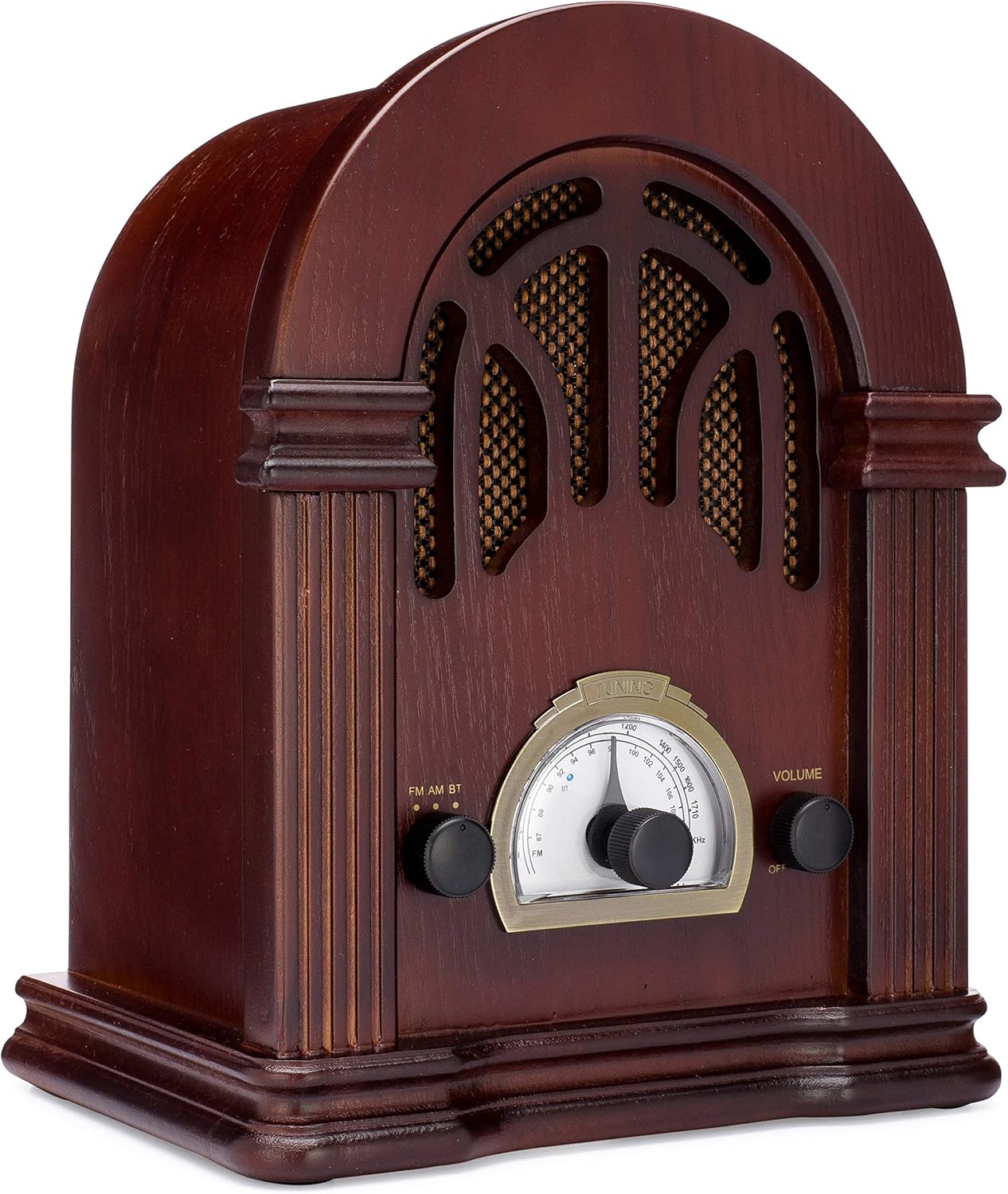
Figura 1: Frente view of the ClearClick Retro AM/FM Radio, showcasing its classic wooden design and central tuning dial.

Figure 2: Close-up of the tuning dial and control knobs for FM/AM/BT selection and volume.
The ClearClick Retro Radio features a beautiful, handmade wooden exterior, an easy-to-use tuning dial, and dedicated knobs for mode selection and volume control. It is designed to be powered by a standard North American power plug.
Configurar
- Desembalagem: Carefully remove the radio from its packaging. Ensure all components, including the power cord, are present.
- Colocação: Place the radio on a stable, flat surface away from direct sunlight, heat sources, and excessive moisture.
- Conexão de energia: Insert the included power cord into the AC input on the back of the radio. Plug the other end into a standard North American wall outlet (120V AC, 60Hz).
- Configuração da antena: For optimal FM reception, extend the built-in wire antenna fully. For AM reception, the radio utilizes an internal antenna; repositioning the radio may improve signal strength.
Instruções de operação
Ligar / desligar e controle de volume
- To power on the radio, rotate the right-side VOLUME knob clockwise until you hear a click.
- Para ajustar o volume, continue girando o VOLUME botão.
- Para desligar, gire o VOLUME knob counter-clockwise until it clicks off.
Operação de rádio AM / FM
- Rotate the left-side FM AM BT knob to select either FM or AM modo.
- Gire o centro AFINAÇÃO knob to scan for radio stations. The tuning backlight will illuminate in AM/FM mode.
- Ajuste o AFINAÇÃO knob carefully for clear reception.
Operação Bluetooth
- Rotate the left-side FM AM BT botão para selecionar BT mode. The radio will enter Bluetooth pairing mode, indicated by a blue LED.
- No seu dispositivo com Bluetooth (por exemplo, smartphone, tablet), procure por dispositivos Bluetooth disponíveis.
- Selecione "Vin"tage Radio" or "ClearClick Radio" from the list to pair.
- Once paired, the blue LED will remain solid, and you can play audio from your device through the radio.
- The radio's tuning backlight stays on even in Bluetooth mode (NEW 2019 feature).
Manutenção
- Limpeza: Use a soft, dry cloth to wipe the exterior of the radio. Do not use abrasive cleaners or solvents, as they may damage the wooden finish.
- Armazenar: When not in use for extended periods, store the radio in a cool, dry place, away from extreme temperatures and humidity.
- Ventilação: Ensure the radio has adequate ventilation to prevent overheating. Do not block the ventilation holes on the back.
Solução de problemas
| Problema | Possível causa | Solução |
|---|---|---|
| Sem energia | Cabo de alimentação não conectado; tomada inativa. | Ensure power cord is securely plugged into the radio and a working wall outlet. Check if the volume knob is turned on. |
| Má recepção de rádio | Sinal fraco; antena não estendida. | Fully extend the FM wire antenna. For AM, try repositioning the radio. Adjust the tuning knob slowly. |
| Bluetooth não conecta | Radio not in BT mode; device too far; device already paired. | Ensure radio is in BT mode. Move your device closer to the radio. Unpair "Vintage Radio" from your device's Bluetooth settings and try pairing again. |
| Sem som de Bluetooth | Volume too low on radio or device. | Increase volume on both the radio and your connected Bluetooth device. |
Especificações
- Dimensões do produto: 10.5" (A) x 8" (L) x 6" (P)
- Peso do item: 4.74 libras
- Tecnologia de conectividade: Bluetooth
- Tecnologia do sintonizador: AM, FM (2-Band)
- Fonte de energia: Corded Electric (Standard North American Power Plug)
- Componentes incluídos: Cabo de alimentação
- Nível de resistência à água: Não resistente à água
- Tecnologia de exibição: LCD (for tuning dial backlight)

Figura 3: Lateral view illustrating the dimensions of the radio.
Garantia e Suporte
The ClearClick Retro AM/FM Radio with Bluetooth comes with a Garantia total de 5 ano. ClearClick is a USA-Based Small Business committed to providing excellent customer support.
For warranty claims or technical assistance, please refer to the contact information provided with your product packaging or visit the official ClearClick webGuarde o comprovante de compra para validação da garantia.
Informações importantes de segurança
Please read and follow all safety instructions provided in the original product packaging. Do not expose the unit to rain or moisture. Do not disassemble the unit; refer all servicing to qualified personnel. Ensure proper ventilation to prevent overheating.