1. Produto acabadoview
The Noctua NF-S12A PWM chromax.Black.swap is a premium quiet fan designed for optimal airflow efficiency and superb acoustics. This 120x120x25 mm fan operates on 12V with a 4-pin PWM connector, allowing for automatic speed control up to a maximum of 1200 RPM. It features a low noise level of 17.8 dB(A) and an impressive MTTF (Mean Time To Failure) of over 150,000 hours, ensuring long-term reliability.
The chromax.Black.swap edition offers an attractive all-black design complemented by swappable anti-vibration pads in various colors (red, black, white, blue, yellow, and green), enabling aesthetic customization to match individual system builds.
Os principais recursos incluem:
- Premium quiet fan: 120x120x25 mm, 12V, 4-pin PWM, max. 1200 RPM, max. 17.8 dB(A), >150,000 h MTTF.
- Award-winning NF-S12A design: Recognized for outstanding airflow efficiency and superb acoustics, ideal for case cooling and other low impedance applications.
- 4-pin PWM version: For automatic speed control via 4-pin PWM fan headers.
- chromax.Black.swap edition: Features an attractive all-black design and swappable anti-vibration pads for color customization.
2. Conteúdo da embalagem
Your Noctua NF-S12A PWM chromax.Black.swap fan package includes the following items:
- Noctua NF-S12A PWM chromax.Black.swap fan
- NA-AVP1 chromax.Black anti-vibration pads (black)
- NA-AVP1 chromax.Red anti-vibration pads (red)
- NA-AVP1 chromax.White anti-vibration pads (white)
- NA-AVP1 chromax.Blue anti-vibration pads (blue)
- NA-AVP1 chromax.Yellow anti-vibration pads (yellow)
- NA-AVP1 chromax.Green anti-vibration pads (green)
- NA-YC1 4-pin PWM Y-cable
- Adaptador de baixo ruído NA-RC7 (L.N.A.)
- Cabo de extensão NA-EC1 de 30 cm
- Parafusos de montagem do ventilador
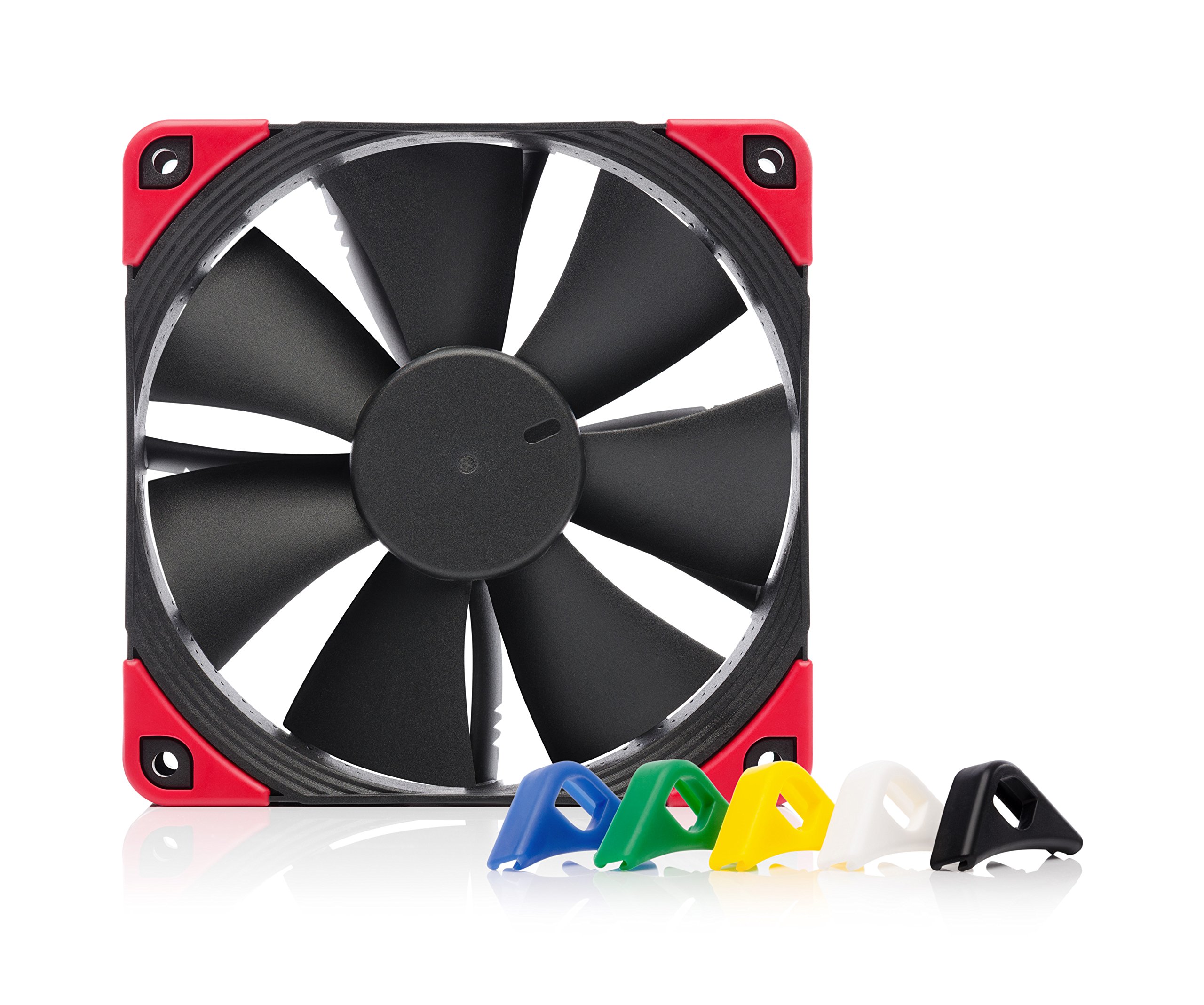
Image: Noctua NF-S12A PWM chromax.Black.swap fan, anti-vibration pads in various colors, extension cables, and mounting screws.
3. Configuração e instalação
Follow these steps to properly install your Noctua NF-S12A PWM chromax.Black.swap fan:
- Prepare o ventilador: Decide on the desired color for your anti-vibration pads. The chromax.Black.swap edition includes pads in black, red, white, blue, yellow, and green. Carefully attach the chosen pads to the corners of the fan frame.
- Monte o ventilador: Position the fan in your desired location (e.g., PC case, heatsink, radiator). Use the provided fan mounting screws to secure the fan firmly. Ensure the fan is oriented correctly for optimal airflow (intake or exhaust).
- Conecte o ventilador: The fan comes with a short 4-pin PWM cable. Connect this cable directly to an available 4-pin PWM fan header on your motherboard. If the cable length is insufficient, use the included NA-EC1 30cm extension cable.
- Optional: Low-Noise Adaptor (L.N.A.): For ultra-low noise operation, you can connect the NA-RC7 Low-Noise Adaptor (L.N.A.) between the fan and the motherboard fan header. This adaptor reduces the fan's maximum speed, resulting in quieter operation.
- Optional: Y-Cable: If you are installing multiple fans and wish to control them from a single motherboard header, use the NA-YC1 4-pin PWM Y-cable to daisy-chain two fans.

Image: The fan is shown within its packaging, highlighting the included swappable anti-vibration pads in multiple colors. Users can select their preferred color before installation.

Imagem: Uma imagem detalhada view of the 4-pin PWM connector, which allows for precise speed control via the motherboard.
4. Operando o Ventilador
The Noctua NF-S12A PWM fan is designed for automatic speed control via your motherboard's 4-pin PWM fan headers. The fan's speed will adjust dynamically based on your system's temperature, providing an optimal balance between cooling performance and noise levels.
- Controle Automático: Connect the fan to a 4-pin PWM header. Your motherboard's BIOS/UEFI or fan control software will manage the fan speed automatically.
- Controle manual: Most motherboards allow manual adjustment of PWM fan curves in the BIOS/UEFI or through dedicated software. Refer to your motherboard manual for specific instructions.
- Operação de baixo ruído: If you desire even quieter operation, use the included NA-RC7 Low-Noise Adaptor (L.N.A.) to reduce the maximum fan speed. This is particularly useful in low-impedance applications where maximum airflow is not critical.
5. Manutenção
Regular maintenance ensures optimal performance and longevity of your Noctua NF-S12A PWM fan:
- Limpeza: Periodically clean the fan blades and frame to remove dust buildup. Use a soft, dry cloth or compressed air. Ensure the fan is powered off before cleaning.
- Inspeção: Check the fan blades for any damage or obstructions. Ensure the cables are securely connected and not interfering with fan operation.
- Consequência: The SSO2 bearing system is maintenance-free and designed for long-term stability. No lubrication is required.
6. Solução De Problemas
If you encounter issues with your Noctua NF-S12A PWM fan, refer to the following troubleshooting tips:
- A ventoinha não está girando:
- Ensure the 4-pin PWM connector is securely plugged into the motherboard fan header.
- Check your motherboard's BIOS/UEFI settings to ensure the fan header is enabled and configured correctly (e.g., not set to 0% PWM at idle temperatures).
- If using the L.N.A., try connecting the fan directly to the motherboard to rule out the adaptor as the cause.
- Ruído excessivo:
- Verify that the anti-vibration pads are correctly installed on all four corners of the fan.
- Ensure no cables or other components are touching the fan blades or frame.
- Check for dust buildup on the fan blades, which can cause imbalance and noise.
- Adjust the fan speed curve in your motherboard's BIOS/UEFI to reduce RPM at lower temperatures.
- Consider using the NA-RC7 Low-Noise Adaptor (L.N.A.) for further speed reduction.
- Desempenho de resfriamento deficiente:
- Ensure the fan is oriented correctly for optimal airflow (e.g., intake for fresh air, exhaust for hot air).
- Check for obstructions in the fan's path, such as dust filters or tight spaces.
- Verify that the fan is spinning at an appropriate speed for the thermal load. Adjust the fan curve if necessary.
7. Especificações
| Recurso | Detalhe |
|---|---|
| Modelo | NF-S12A PWM CH.BK.S |
| Dimensões | 120x120x25 mm (4.72"L x 4.72"W x 0.98"H) |
| Tipo de conector | PWM de pinos 4 |
| Consequência | SSO2 |
| Velocidade máxima de rotação | 1200 RPM |
| Fluxo de ar máx. | 107.5 m³ / h (63 CFM) |
| Máx. Nível de ruído | 17.8 dB(A) |
| Volumetage | 12 V |
| MTTF | >150,000 h |
| Material | Fibre-glass reinforced PBT |
| Peso | 7 onças |
8. Garantia e Suporte
Noctua products are renowned for their impeccable quality and outstanding longevity. The NF-S12A PWM chromax.Black.swap fan comes with a Garantia do fabricante de 6 anos, ensuring peace of mind and reliable performance for an extended period.
For technical support, warranty claims, or any questions regarding your Noctua product, please visit the official Noctua website or contact their customer service directly. Detailed information and resources can be found at www.noctua.at.