
1. Introdução
The Edifier M3600D is a high-performance 2.1 active speaker system designed for multimedia use. Featuring THX certification and a total RMS output of 200 Watts, this system delivers powerful and clear audio. It includes a robust subwoofer and two satellite speakers, offering versatile connectivity options for various audio sources.
2. O que está na caixa
- 1 x Subwoofer
- 2 x Caixas de Som Satélite
- 1 x Cabo de alimentação
- Connecting Cables (for satellites and audio input)
- 1 x Manual do Usuário
3. Configuração
Follow these steps to set up your Edifier M3600D speaker system:
- Colocação: Position the subwoofer on the floor, ideally near a wall for enhanced bass. Place the satellite speakers on either side of your listening area, ensuring they are equidistant from you for optimal stereo imaging.
- Conecte as caixas de som satélite: Connect the right and left satellite speakers to the corresponding output ports on the rear of the subwoofer using the provided cables. The right satellite speaker typically features the volume control and input selection.
- Conectar fonte de áudio: Choose your preferred audio input method (Optical, Coaxial, Line In, or AUX) and connect the appropriate cable from your audio source (e.g., computer, TV, smartphone) to the subwoofer's input ports.
- Conexão de energia: Plug the power cable into the subwoofer's power input, then connect it to a wall outlet.
- Ligar: Turn on the power switch located on the rear of the subwoofer. The system is now ready for operation.

Figure 3.1: Edifier M3600D Multimedia 2.1 Active Speaker System. This image shows the main subwoofer unit alongside the two satellite speakers, illustrating the complete system setup.
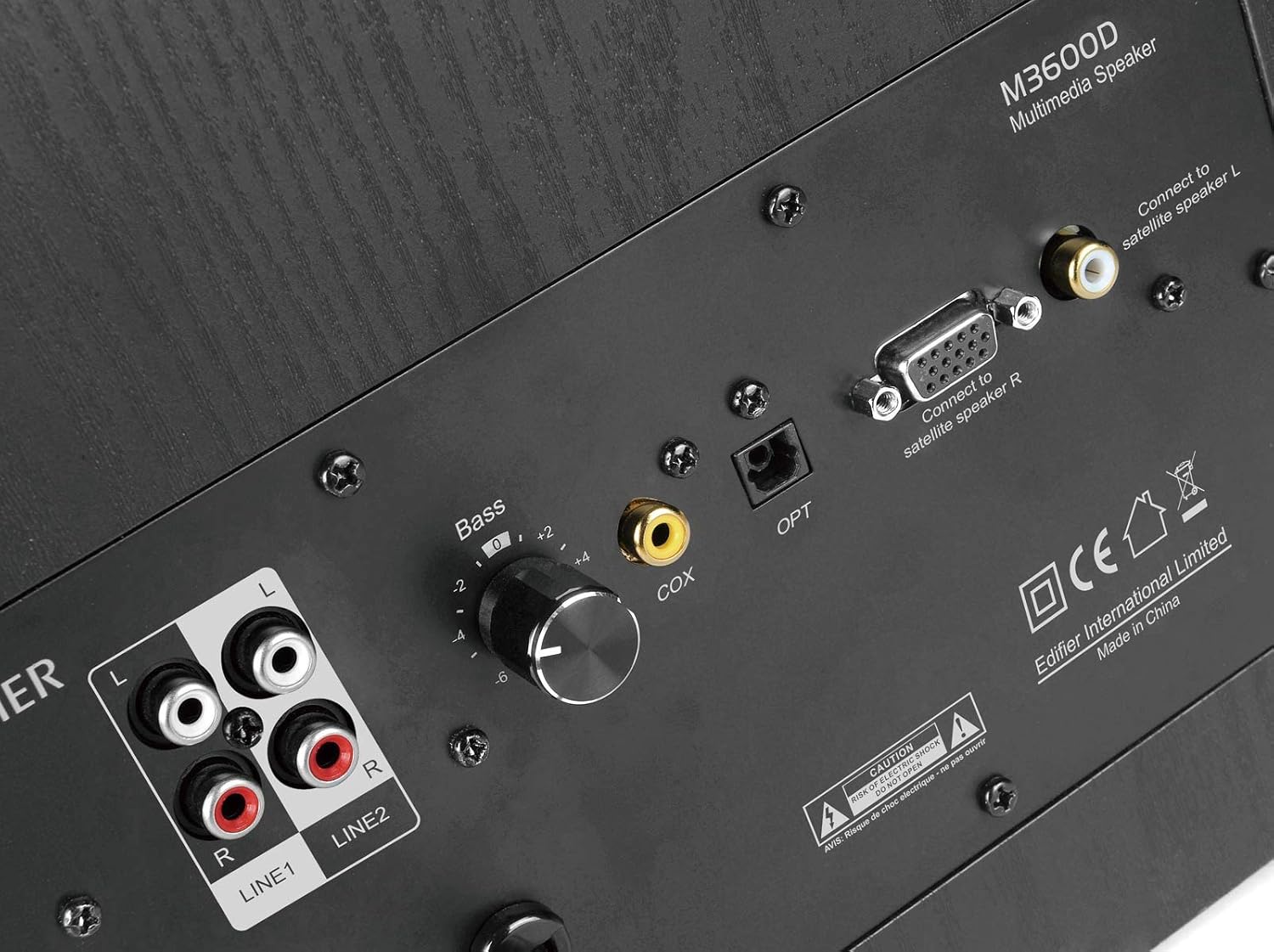
Figure 3.2: Rear panel of the M3600D subwoofer. This image highlights the various input ports (Line In 1, Line In 2, Coaxial, Optical) and the output connections for the satellite speakers, along with the bass control knob and power switch.
4. Instruções de operação
Após a configuração do sistema, siga estas instruções de operação:
- Ligar/desligar: Use the main power switch on the rear of the subwoofer to turn the system on or off.
- Controle de volume: The large rotary dial on the front of the right satellite speaker controls the master volume. Rotate clockwise to increase volume and counter-clockwise to decrease it.
- Seleção de entrada: Press the volume dial on the right satellite speaker to cycle through the available audio inputs (Optical, Coaxial, Line In 1, Line In 2, AUX). An indicator light will show the currently selected input.
- Ajuste de graves: Use the 'Bass' control knob located on the rear panel of the subwoofer to adjust the bass level to your preference.
- Saída de fone de ouvido: A 3.5mm headphone jack is available on the right satellite speaker for private listening. Plugging in headphones will mute the speakers.
5. Conectividade
The M3600D offers multiple connectivity options:
- Optical Input (OPT): For high-quality digital audio connection from devices like TVs, game consoles, or Blu-ray players.
- Coaxial Input (COX): Another digital audio input option, suitable for similar devices as the optical input.
- Entrada de linha 1 (RCA): Stereo RCA input for connecting devices with RCA audio outputs.
- Entrada de linha 2 (RCA): Additional stereo RCA input for another audio source.
- Entrada AUX (3.5 mm): A standard 3.5mm auxiliary input for connecting smartphones, tablets, laptops, or MP3 players.
Observação: This system does not support Bluetooth connectivity. For wireless audio, an external Bluetooth adapter would be required (not included).
6. Especificações
| Recurso | Especificação |
|---|---|
| Nome do modelo | M3600D |
| Tipo de alto-falante | 2.1 Multimedia Speaker System (Subwoofer) |
| Potência Total de Saída | 200 Watts RMS (Subwoofer: 130W, Satellites: 2 x 35W) |
| Certificado THX | Sim |
| Material | Wood (MDF cabinet with vinyl wood grain laminate) |
| Entradas | Optical, Coaxial, Line In (RCA x2), AUX (3.5mm) |
| Método de controle | Rotary Volume/Input Dial (on satellite), Bass Knob (on subwoofer) |
| Diâmetro do subwoofer | 7 Centimeters (Woofer Diameter) |
| Tamanho do driver de áudio | 17.78 centímetros |
| Cor | Preto |
| Dimensões do produto | 12 x 16.75 x 11 polegadas |
| Peso do item | 21 libras |
| Dispositivos compatíveis | Smartphone, Tablet, Desktop, Laptop, MP3 Player, Television, Projector |
7. Solução De Problemas
If you encounter issues with your M3600D speaker system, please refer to the following common troubleshooting steps:
- Sem som:
- Ensure the power cable is securely connected and the power switch on the subwoofer is ON.
- Verify that the correct input source is selected on the right satellite speaker.
- Check all audio cables for secure connections between the source, satellites, and subwoofer.
- Increase the volume on both the speaker system and your audio source.
- If using headphones, ensure they are unplugged from the satellite speaker.
- Som distorcido:
- Reduce the volume on both the speaker system and your audio source.
- Check if the audio source itself is producing distorted sound. Try a different source.
- Certifique-se de que todos os cabos estejam conectados corretamente e não danificados.
- Ajuste o botão de controle de graves no subwoofer.
- Som intermitente:
- Verifique se há conexões de cabo soltas.
- Ensure there are no strong electromagnetic interferences near the speakers.
- Experimente usar um cabo de áudio ou uma fonte de entrada diferente para isolar o problema.
If the issue persists after trying these steps, please contact Edifier customer support.
8. Manutenção
To ensure the longevity and optimal performance of your Edifier M3600D speaker system, follow these maintenance guidelines:
- Limpeza: Use um pano macio e seco para limpar as superfícies das caixas de som e do subwoofer. Evite usar produtos de limpeza abrasivos, ceras ou solventes.
- Colocação: Place the speakers on a stable, level surface to prevent accidental falls. Avoid placing them in direct sunlight, near heat sources, or in areas with high humidity or dust.
- Ventilação: Assegure ventilação adequada ao redor do subwoofer para evitar superaquecimento. Não obstrua nenhuma abertura de ventilação.
- Gerenciamento de cabos: Mantenha os cabos organizados e livres de nós ou tensão excessiva para evitar danos.
- Desligue quando não estiver em uso: For extended periods of inactivity, it is recommended to turn off the system using the main power switch.
9. Garantia e Suporte
The Edifier M3600D Multimedia 2.1 Active Speaker System comes with a Garantia limitada de 2 ano. This warranty covers manufacturing defects and ensures hassle-free full replacement in the USA and Canada.
For warranty claims, technical assistance, or further inquiries, please contact Edifier USA customer support. Refer to the official Edifier webPara obter os detalhes de suporte mais atualizados, consulte o site ou as informações de contato fornecidas na embalagem do produto.