Introdução
This manual provides detailed instructions for the safe and efficient operation of your Mikado MD-BT20S 20W Bluetooth AmpAmplificador. Leia este manual atentamente antes de usar o produto e guarde-o para futuras consultas.
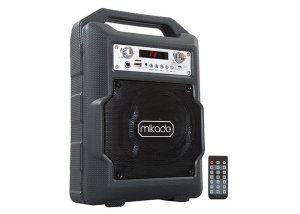
Image: The Mikado MD-BT20S 20W Bluetooth Amplifier, a portable audio system with an integrated handle.
Informações de segurança
- Não exponha o dispositivo à água ou umidade excessiva.
- Evite colocar o dispositivo perto de fontes de calor ou sob luz solar direta.
- Não tente desmontar ou reparar a unidade por conta própria. Encaminhe todos os serviços de manutenção a pessoal qualificado.
- Use only the specified power supply (DC-5V) and compatible lithium battery.
- Mantenha fora do alcance de crianças.
Conteúdo da embalagem
The Mikado MD-BT20S package includes:
- Mikado MD-BT20S Bluetooth AmpUnidade de Lider
- Manual do usuário (este documento)
- Certificado de Garantia
- Controle remoto
- Cabo de carregamento USB
Produto acimaview
Familiarize yourself with the various parts and controls of your MD-BT20S ampmais vivo.
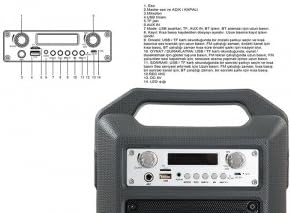
Imagem: Detalhada view of the Mikado MD-BT20S control panel with numbered components.
- Controle de eco: Ajusta o efeito de eco para entrada de microfone.
- Master Volume and ON/OFF Switch: Controls the overall volume and powers the device on/off.
- Entrada de microfone: Entrada de 6.35 mm para conectar um microfone.
- Porta USB: For connecting USB flash drives to play audio files.
- Ranhura para cartão TF (Micro SD): For inserting Micro SD cards to play audio files.
- Porta AUX IN: Entrada de 3.5 mm para conectar dispositivos de áudio externos.
- Botão de modo: Switches between USB, TF, AUX In, BT (Bluetooth), and FM radio modes. Press and hold to initiate FM station search.
- Faixa anterior / Diminuir volume: Pressione rapidamente para a faixa/estação anterior. Pressione e segure para diminuir o volume.
- Play/Pause / FM Scan: Short press to play/pause audio. In FM mode, short press to auto-scan and save stations.
- Próxima faixa / Aumentar volume: Pressione rapidamente para a próxima faixa/estação. Pressione e segure para aumentar o volume.
- Recording Button (REC): Initiates and stops audio recording to USB/TF card.
- DC 5V Entrada: Power input port for charging or operating the device via USB cable.
- Telão LED: Mostra o modo atual, o número da faixa, a frequência FM, etc.
Configurar
Ligando o dispositivo
The MD-BT20S supports dual power modes: DC-5V via USB cable or internal lithium battery.
- To charge the internal battery or operate via external power, connect the provided USB cable to the DC 5V input on the unit and a compatible USB power adapter (not included) or USB port.
- Ensure the battery is sufficiently charged for portable use.

Imagem: Traseira view do amplifier showing the battery compartment and a USB charging cable.
Ligação inicial
Turn the Master Volume knob (labeled 2 in Product Overview) clockwise to power on the device. The LED display will illuminate.
Instruções de operação
Seleção de modo
Press the "Mode" button (labeled 7) repeatedly to cycle through available input sources: Bluetooth (BT), USB, TF (Micro SD), AUX In, and FM Radio.
Conexão Bluetooth
- Troque o amplifier to "BT" mode using the Mode button. The LED display will show "BT" and a pairing indicator may flash.
- No seu smartphone ou outro dispositivo com Bluetooth, procure por dispositivos Bluetooth disponíveis.
- Select "MD-BT20S" from the list to pair.
- Uma vez emparelhado, o amplifier will emit a confirmation sound, and the "BT" indicator will stop flashing. You can now play audio from your device.
Reprodução de cartão USB/TF
- Insira um pen drive ou um cartão TF (Micro SD) contendo áudio MP3. files into the respective port (labeled 4 for USB, 5 for TF).
- O amplifier will automatically switch to USB or TF mode and begin playing the first track. If not, press the "Mode" button to select the correct source.
- Use the Previous/Next Track buttons (labeled 8 and 10) for navigation and the Play/Pause button (labeled 9) for playback control. Long press Previous/Next for volume adjustment.
Operação de rádio FM
- Troque o amplifier to "FM" mode using the Mode button.
- To perform an automatic station scan, press and hold the "Mode" button (labeled 7) or the Play/Pause button (labeled 9) for a few seconds. The ampO amplificador irá procurar e salvar as estações de FM disponíveis.
- Use the Previous/Next Track buttons (labeled 8 and 10) to navigate between saved stations. Long press for volume adjustment.
Conexão AUX
- Connect an external audio device (e.g., MP3 player, laptop) to the "AUX IN" port (labeled 6) using a 3.5mm audio cable (not included).
- Troque o amplifier to "AUX In" mode using the Mode button.
- Controle a reprodução a partir do seu dispositivo externo conectado.
Uso do microfone
Connect a microphone to the Microphone Input port (labeled 3). Adjust the Echo control (labeled 1) and Master Volume (labeled 2) as needed.
Função de gravação
To use the recording function, ensure a USB drive or TF card is inserted. Press the "REC" button (labeled 11) to start recording. Press again to stop.
Controle remoto
The included remote control provides convenient access to various functions, including power, mode selection, track navigation, volume control, and EQ settings. Point the remote control directly at the amplifier's front panel for optimal response.
Manutenção
- Limpe o dispositivo com um pano macio e seco. Não utilize produtos de limpeza abrasivos ou solventes.
- Mantenha as portas livres de poeira e detritos.
- Quando não estiver em uso por longos períodos, guarde o amplifier in a cool, dry place.
- Evite deixar cair ou submeter o dispositivo a impactos fortes.
Solução de problemas
| Problema | Possível causa | Solução |
|---|---|---|
| Sem energia | Battery depleted; Power cable not connected | Charge the battery; Connect the USB power cable |
| Sem som | Volume too low; Incorrect mode selected; Device not paired (Bluetooth) | Increase volume; Select correct input mode; Re-pair Bluetooth device |
| Falha no pareamento Bluetooth | Amplifier not in BT mode; Device too far; Interference | Garantir amplifier is in BT mode; Move devices closer; Turn off other Bluetooth devices |
| O cartão USB/TF não está funcionando. | Incorreto file format; Card not inserted correctly; Corrupted files | Garantir files are MP3; Reinsert card; Try a different card/files |
Especificações
- Modelo: Mikado MD-BT20S
- Potência de saída: 20 W
- Conectividade: Bluetooth, USB, TF (Micro SD), AUX In, FM Radio
- Entrada de energia: CC 5V (USB)
- Dispositivos compatíveis: Smartphones, laptops
- Dimensões: 34.5 x 15 x 24 cm
- Peso: 6 quilos
- Cor: Preto
- Características especiais: Lightweight, LED Display, Remote Control
Garantia e Suporte
This product comes with a warranty certificate included in the package. Please refer to the warranty certificate for specific terms and conditions. For technical support or service inquiries, please contact your local Mikado dealer or authorized service center.