
1. Introdução
This manual provides detailed instructions for the installation, operation, and maintenance of your Vibe Powerbox Micro Mono Amplifier, model POWERBOX400.1M-V7. Please read this manual thoroughly before attempting installation or operation to ensure proper use and to prevent damage to the unit or your vehicle's audio system.
The Vibe Powerbox Micro Mono Amplifier is a compact, high-performance Class D amplifier designed for car audio systems. It delivers up to 400W RMS, making it suitable for powering subwoofers. Its small footprint allows for flexible installation options.
2. Informações de segurança
- Sempre desconecte o terminal negativo da bateria do veículo antes de iniciar qualquer trabalho elétrico.
- Ensure all wiring is correctly routed and secured to prevent damage from moving parts or sharp edges.
- Use appropriate gauge wiring for power and speaker connections as specified in this manual to prevent overheating and potential fire hazards.
- Não monte o ampAmplificador em locais expostos à luz solar direta, calor excessivo, umidade ou poeira.
- Consulte um instalador profissional de som automotivo se tiver dúvidas sobre qualquer parte do processo de instalação.
- Operando o amplifier at excessively high volumes for prolonged periods can cause hearing damage.
3. Conteúdo da embalagem
Verifique se todos os itens estão presentes na embalagem antes de prosseguir com a instalação:
- Vibe Powerbox Micro Mono Amplifier (POWERBOX400.1M-V7)
- Remote Gain Control Unit
- Cabos de áudio RCA
- Mounting Hardware (screws, connectors)
- Manual do usuário

4. Recursos do Produto
- Class D Micro Amplifier design for high efficiency and compact size.
- Ultra-compact footprint for easy and discreet installation.
- Output: 1 x 400W RMS at 1 ohm, with a maximum output of 800W.
- Dimensions: 37 x 157 x 82mm (approximately 1.46 x 6.18 x 3.23 inches).
- Compatible with Critical Link Rapid kits for simplified integration.
- Features Deltabox™ Connectivity auto turn-on.
- VIBE Sound Studio™ Active crossovers.
- 1 Ohm Stable operation.
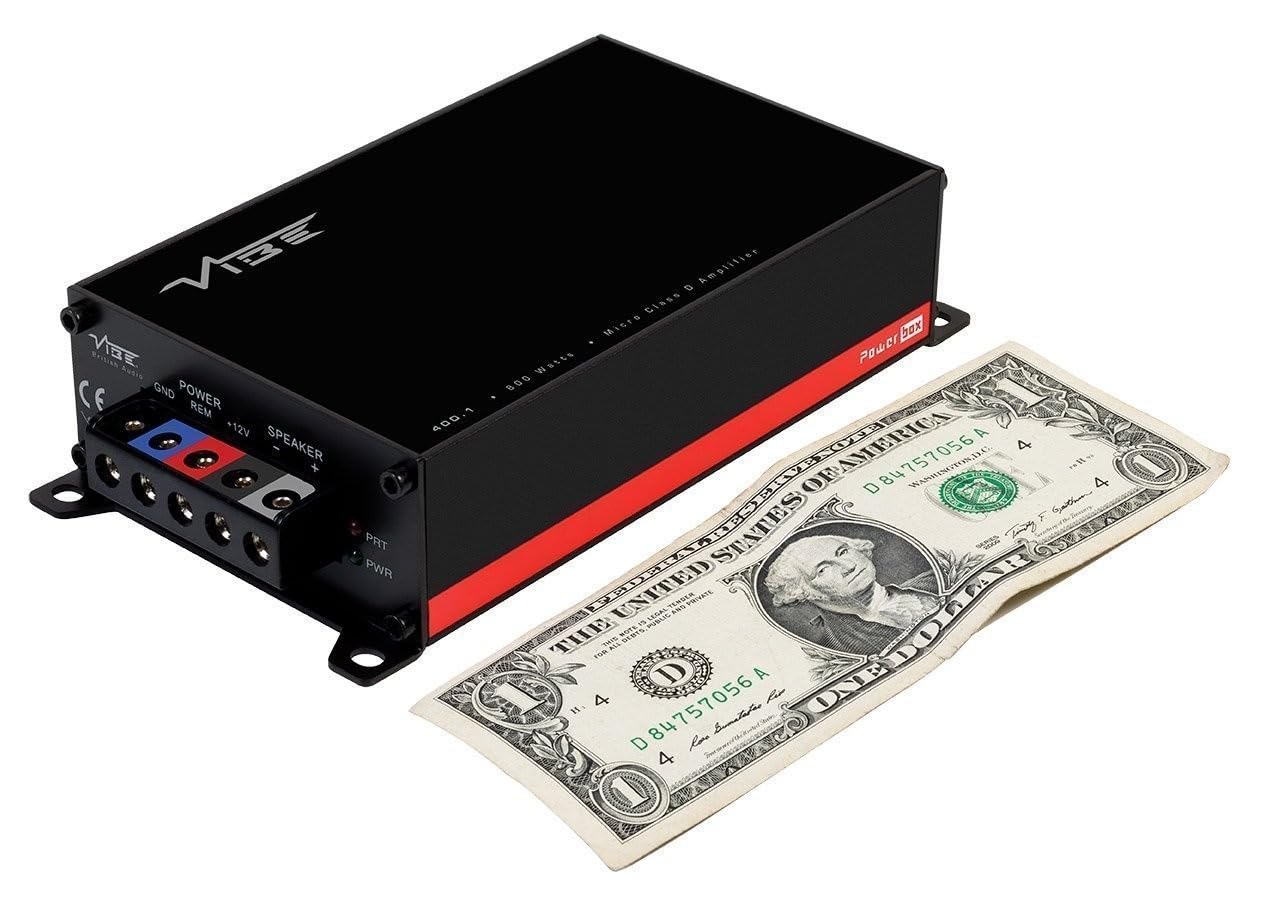
5. Identificação do componente
5.1 Power and Speaker Terminals

The power input section includes terminals for Ground (GND), Remote Turn-On (REM), and +12V power. The speaker output section provides terminals for connecting your subwoofer.
5.2 Input and Control Panel
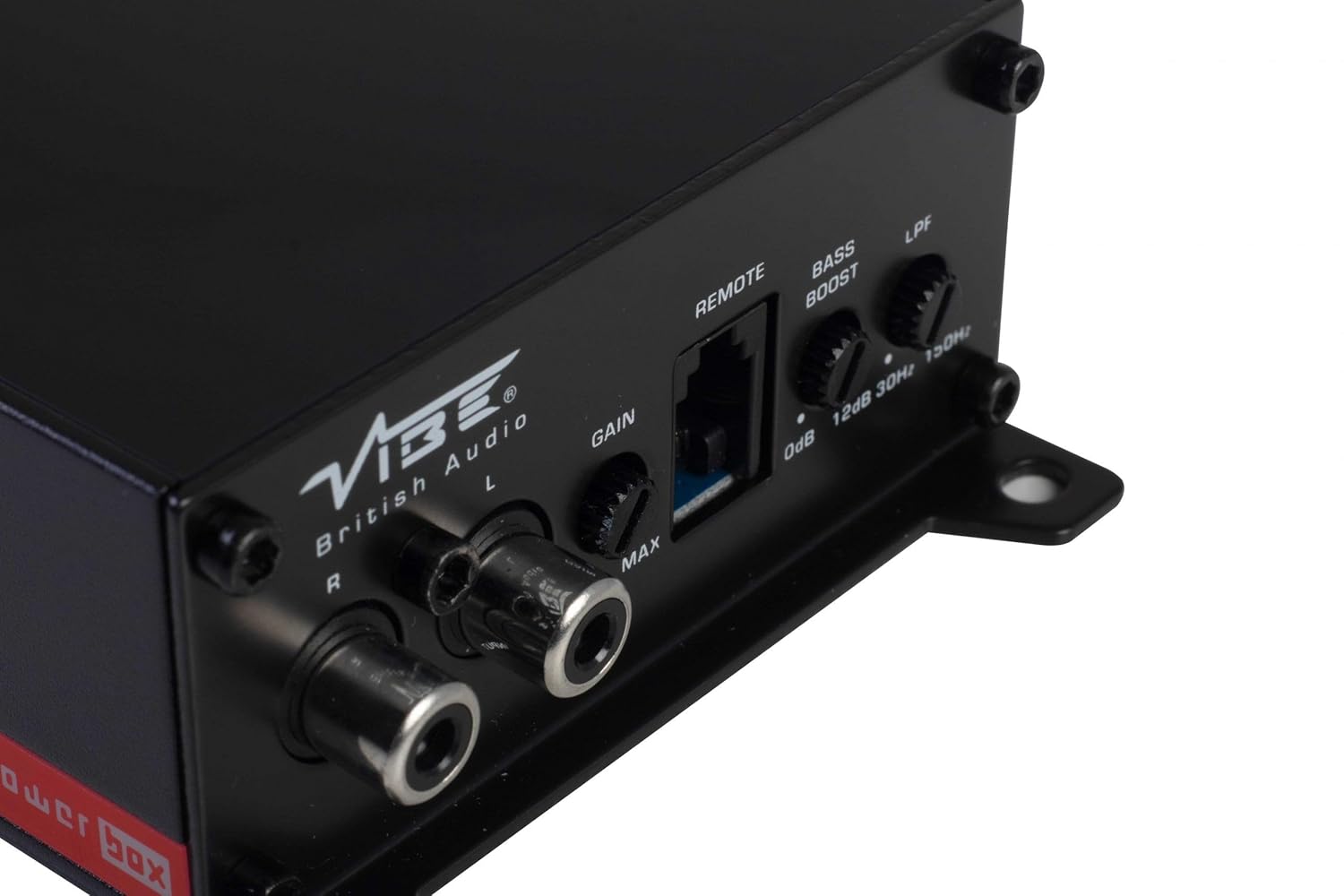
This panel features the RCA input jacks for audio signal, a Gain control knob to match the amplifier's input sensitivity to your head unit's output, a dedicated port for the remote gain control, a Bass Boost switch for enhancing low frequencies, and an LPF (Low Pass Filter) control to adjust the upper frequency limit for the subwoofer.
5.3 Remote Gain Control

The remote gain control unit connects to the amplifier via the 'REMOTE' port and allows for convenient adjustment of the subwoofer's output level from the vehicle's cabin.
6. Configuração e instalação
Proper installation is crucial for optimal performance and safety. If you are not confident in your ability to install the amplifier, seek professional assistance.
6.1 Local de Montagem
Choose a mounting location that is dry, well-ventilated, and away from direct heat sources. The compact size of the Powerbox Micro allows for installation under seats, behind trim panels, or in other discreet locations. Ensure there is sufficient airflow around the amplificador para resfriamento.
6.2 Conexões de Fiação
Fiação de energia:
- Conecte o +12V terminal to the vehicle's positive battery terminal using a suitable gauge power cable (e.g., 8 AWG or 10 AWG). Install an in-line fuse holder within 18 inches (45 cm) of the battery.
- Conecte o Terra terminal to a clean, unpainted metal surface on the vehicle's chassis. Ensure a good electrical connection. The ground cable should be of the same gauge as the power cable and as short as possible.
- Conecte o REM (Remote Turn-On) terminal to the remote output of your head unit. This wire signals the amplifier to turn on and off with your stereo. If your head unit lacks a remote output, you can use an accessory wire that turns on with the ignition, or utilize the amplifier's auto-sense feature if applicable.
Fiação do alto-falante:
- Conecte seu subwoofer ao Saída do alto-falante terminals (+ and -). Ensure correct polarity. This amplifier is 1 Ohm stable, allowing flexibility in subwoofer impedance configurations. Refer to your subwoofer's specifications for optimal impedance matching.
Signal Input (RCA):
- Connect the RCA output from your head unit or signal processor to the ENTRADA (L/R) Conectores RCA no ampmais vivo.
Controle de ganho remoto:
- Plug the remote gain control unit into the dedicated REMOTO porta no amplifier. Route the cable to a convenient location for adjustment.
ISO T Harness / ISOAWK Kit:
- For simplified installation with existing stereo looms, an optional ISOAWK kit (available separately) can be used to make the amplifier compatible with an ISO T harness. This allows for plug-and-play integration for audio signal, power, and ground, potentially eliminating the need for separate battery connections.
7. Operação
7.1 Inicialização
Após todas as conexões serem feitas e verificadas, reconecte a bateria do veículo. Ligue o aparelho de som. amplifier's power indicator (PWR) should illuminate green. If the protection indicator (PRT) illuminates red, refer to the troubleshooting section.
7.2 Ajuste de ganho
O controle de ganho corresponde ao ampSensibilidade de entrada do amplificador em relação ao volume de saídatage of your head unit. To set the gain:
- Vire o amplifier's Gain control to its minimum (MIN) setting.
- Ajuste o volume do seu aparelho de som para cerca de 75-80% do máximo.
- Toque uma peça musical dinâmica.
- Aumente lentamente o amplifier's Gain control until you hear distortion, then back it off slightly until the sound is clear.
The remote gain control unit allows for real-time adjustment of the subwoofer level without affecting the main system volume.
7.3 Filtro Passa-Baixa (LPF)
The LPF control sets the upper frequency limit for the amplifier's output. This is essential for subwoofers, ensuring they only reproduce low frequencies. Adjust the LPF knob (typically 30Hz to 150Hz) to blend the subwoofer's output seamlessly with your main speakers. A common starting point is around 80-100Hz.
7.4 Aumento de graves
The Bass Boost switch provides an adjustable low-frequency enhancement. Use this feature sparingly, as excessive bass boost can lead to distortion and potential damage to your subwoofer. Adjust the boost level (0dB to 12dB) to your preference.
8. Manutenção
- Limpeza: Limpe periodicamente o ampLimpe a parte externa do amplificador com um pano macio e seco. Não utilize produtos químicos agressivos ou abrasivos.
- Conexões: Regularly check all power, ground, and speaker connections to ensure they are secure and free from corrosion. Loose connections can cause performance issues or damage.
- Ventilação: Assegurar que o ampAs aletas de resfriamento do amplificador não estão obstruídas para manter a dissipação de calor adequada.
9. Solução De Problemas
| Problema | Possível causa | Solução |
|---|---|---|
| Sem energia (LED PWR apagado) | Blown fuse, loose power/ground connection, no remote signal. | Verifique o fusível em linha e confirme as conexões de +12V, GND e REM. |
| Protection Mode (PRT LED on) | Superaquecimento, curto-circuito na fiação das caixas de som, impedância muito baixa. | Ensure proper ventilation, check speaker wiring for shorts, verify speaker impedance. |
| Sem saída de som | No input signal, gain too low, speaker wires disconnected. | Check RCA input connections, adjust gain, verify speaker wiring. |
| Som distorcido | Gain set too high, LPF incorrectly set, poor ground connection. | Reduce gain, adjust LPF, check ground connection. |
10. Especificações
- Número do modelo: POWERBOX400.1M-V7
- AmpLifier Type: Classe D Mono Ampmais vivo
- Potência de saída RMS: 1 x 400W RMS @ 1 Ohm
- Potência máxima de saída: 800 W
- Dimensões do produto (C x L x A): Aproximadamente 157 x 82 x 37 mm (6.18 x 3.23 x 1.46 polegadas)
- Peso: Aproximadamente 1.54 libras
- Volumetage: 12 Volts (Nominal)
- Vol. Máximo de Suprimentotage: 12 Volts
- Tipo de montagem: Montagem em superfície
- Fabricante: Vibe Audio
- Data da primeira disponibilidade: 21 de julho de 2018
11. Garantia e Suporte
Vibe Audio products are designed and manufactured to the highest standards. For warranty information and technical support, please refer to the warranty card included with your product or visit the official Vibe Audio website. Guarde o comprovante de compra para solicitações de garantia.