
HC 100
HC Smart Electric Curtain Tracks HT100B User Manual
Model: HT100B (Model Number: 100)
Introdução
The HC Smart Electric Curtain Track System HT100B provides an automated solution for controlling your curtains. This system features a built-in Wi-Fi connection, allowing control via mobile applications, Amazon Alexa, and Google Home devices without requiring additional bridges. It is designed for quick and easy installation and is suitable for various window types, including straight, curved, and bay windows.
This manual provides comprehensive instructions for the installation, operation, and maintenance of your HC Smart Electric Curtain Tracks.
Informações de segurança
- Certifique-se de que a fonte de alimentação esteja desconectada antes da instalação ou manutenção para evitar choque elétrico.
- Do not attempt to disassemble or repair the motor or track system yourself. Refer to qualified personnel for service.
- Keep hands and loose clothing clear of the track and motor during operation to avoid injury.
- Este produto foi projetado apenas para uso interno. Não o exponha à umidade ou a temperaturas extremas.
- Use only the specified power adapter and components provided by the manufacturer.
Conteúdo da embalagem
Verifique se todos os componentes estão presentes antes de iniciar a instalação:
- 1 x Smart Motor
- 1 x Controle Remoto
- Pre-assembled Curtain Tracks (length as ordered)
- Ceiling Brackets (Wall brackets available separately)
- Pulleys (approximately 8 per meter of track)
- Guias do usuário

Imagem: Acimaview of the HC Smart Electric Curtain Track System components.
Configuração e instalação
1. Identificação do componente
Familiarize yourself with the main components of the curtain track system:
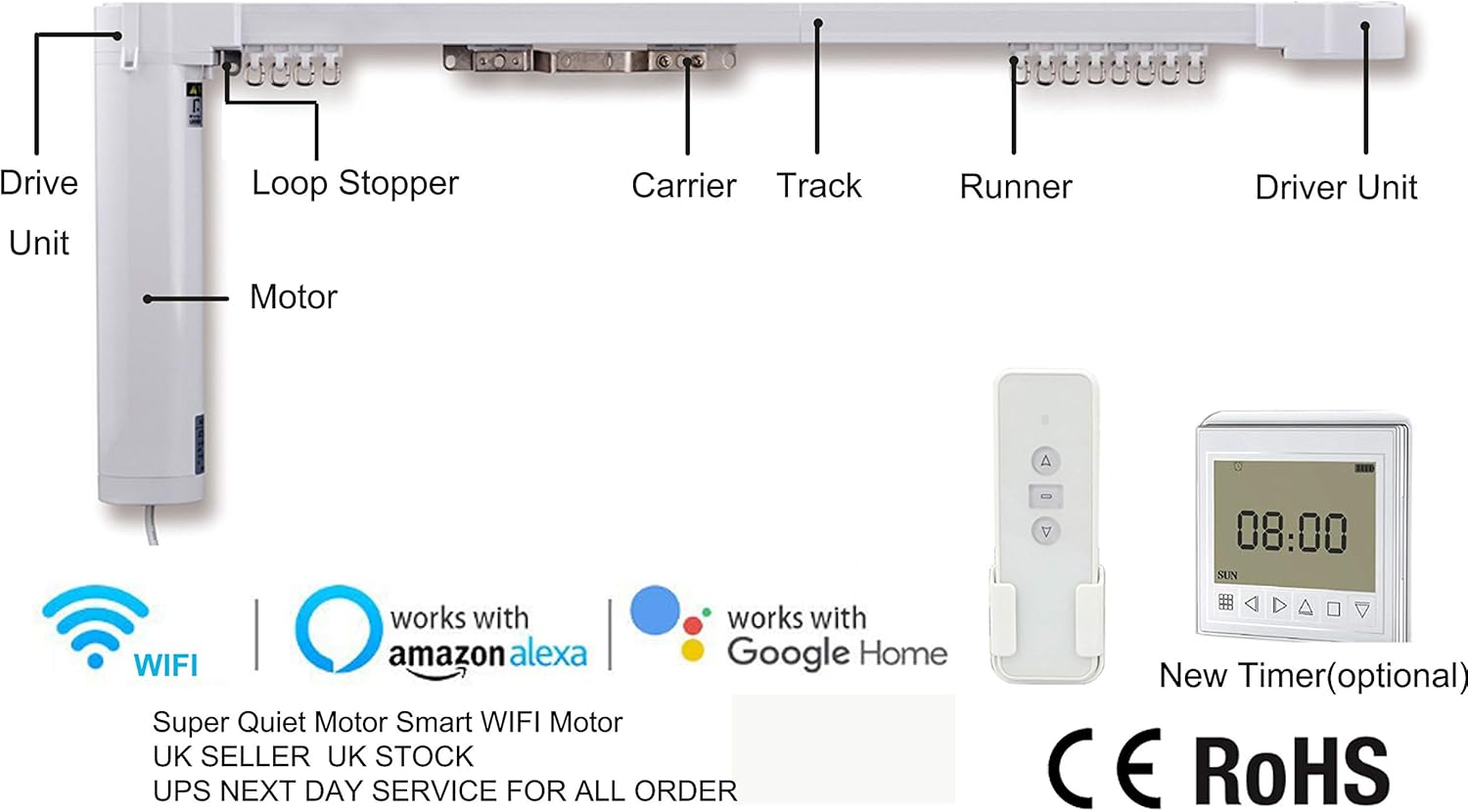
Image: Labeled diagram of the curtain track system components.
2. Measuring Your Curtain Track Area
Accurate measurement is crucial for proper fit and function. For optimal results, your track or pole should extend 15-20cm above your window and 15-20cm wider than the window on each side.

Image: Guide for measuring curtain track length.
Measure from the top of the track to your chosen end point.
3. Track Assembly and Mounting
The curtain tracks are pre-assembled for ease of installation. Depending on your window type, you may need to adjust the track configuration.
- Straight Window: The track will be a single straight section.
- Bay Window 90° / L-type Window 90°: Use the provided 90-degree connectors to form the corner.
- Bay Window 135°: Use the provided 135-degree connectors for wider angles.

Image: Various window configurations supported by the track system.
Mount the track securely using the provided ceiling brackets. Ensure the track is level and firmly attached to support the weight of the curtains and motor.
4. Instalação do motor
Attach the motor to the designated drive unit on the track. Ensure it clicks into place securely. Connect the power cable to the motor and then to a 110-240V power outlet.
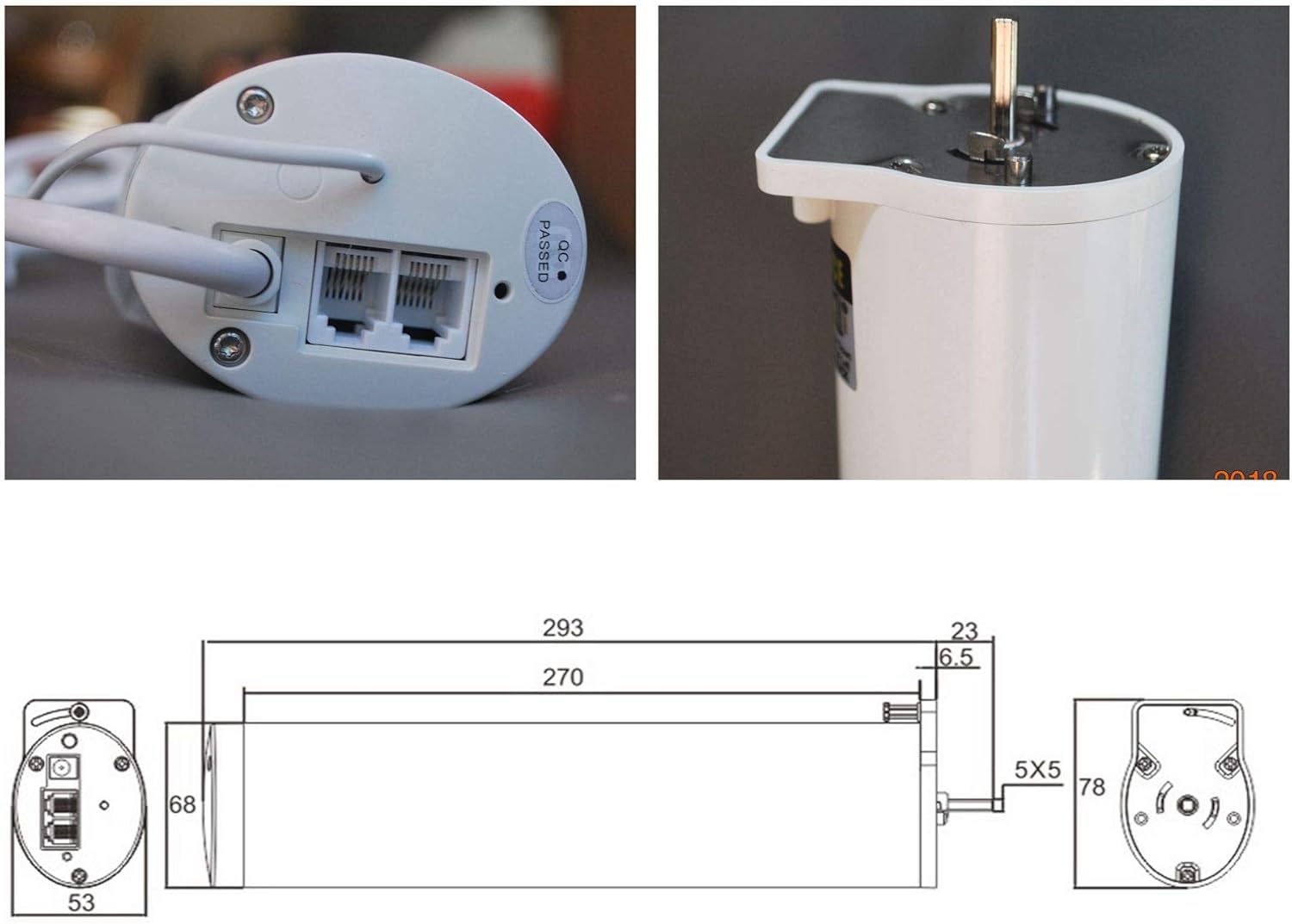
Image: Motor connection ports and drive mechanism.
The system supports both single and dual motor configurations depending on the track length and curtain weight.

Image: Single and Dual Motor System configurations.
Instruções de operação
1. Operação de controle remoto
The included remote control allows for direct operation of your curtain tracks.
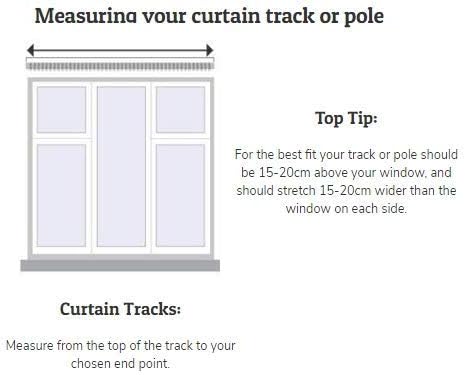
Image: Remote control for the smart curtain system.
- Pressione o Seta para cima button to open the curtains.
- Pressione o Seta para baixo button to close the curtains.
- Pressione o Parar / Pausar button (middle button) to stop the curtains at any desired position.
2. Smart Home Integration (Wi-Fi, Mobile Apps, Alexa, Google Home)
The HT100B system features built-in Wi-Fi for seamless integration with smart home platforms.
- Aplicativo móvel: Download the dedicated HC Smart Home app (refer to the included user guides for app name and download instructions). Follow the in-app instructions to pair your curtain system with your Wi-Fi network. Once paired, you can control the curtains, set schedules, and manage multiple motors.
- Amazon Alexa & Google Home: The system is compatible with Amazon Alexa and Google Home devices. After setting up the device in the mobile app, enable the corresponding skill/action in your Alexa or Google Home app. You can then use voice commands such as:
- "Alexa, abra as cortinas da sala de estar."
- "Ei, Google, feche as persianas do quarto."
- "Alexa, set living room curtains to 50%." (If supported by the app/skill)
For detailed pairing and voice command setup, please refer to the specific instructions within the mobile application and your smart home assistant's settings.
Manutenção
- Limpeza: Wipe the track and motor housing with a soft, dry cloth. Do not use abrasive cleaners or solvents.
- Inspeção da pista: Periodically inspect the track for any obstructions or debris that might hinder smooth operation. Remove any dust or foreign objects.
- Lubrificação: The track system is designed for low maintenance. Avoid applying lubricants unless specifically instructed by the manufacturer, as this can attract dust and cause issues.
- Cuidados Motores: Ensure the motor is not exposed to excessive heat or moisture.
Solução de problemas
| Problema | Possível causa | Solução |
|---|---|---|
| Curtains do not move. | No power; Motor not properly connected; Remote control battery low; Track obstruction. | Check power connection; Ensure motor is securely attached; Replace remote battery; Clear track of obstructions. |
| Curtains stop midway or operate erratically. | Track obstruction; Limit settings incorrect; Wi-Fi interference. | Clear track; Re-calibrate limit settings via app (refer to app guide); Check Wi-Fi signal strength. |
| O controle remoto não responde. | Battery low/dead; Remote not paired; Interference. | Replace battery; Re-pair remote control (refer to pairing instructions); Reduce interference sources. |
| Cannot connect to Wi-Fi/Smart Home. | Incorrect Wi-Fi password; Router too far; 5GHz Wi-Fi network (system typically uses 2.4GHz); App/skill not enabled. | Verify password; Move router closer or use Wi-Fi extender; Ensure 2.4GHz network is used; Enable skill/action in smart home app. |
If you encounter issues not listed here or require further assistance, please contact HC customer support.
Especificações
- Marca: HC
- Número do modelo: 100
- Cor: Branco
- Dimensões do produto: 120 x 12 x 10 cm (Track length varies by order)
- Material: Metal
- Fonte de energia: 110-240V
- Max Curtain Track Size: 200 centimeters (78 inches) (for single motor, larger sizes with dual motors)
- Características especiais: Wi-Fi Connection, Mobile Apps, Amazon Alexa and Google Home (no bridge device required)
- Fabricante: HC EUROPE
- Código UPC: 609792183238
Garantia e Suporte
For warranty information and customer support, please refer to the documentation included with your product or visit the official HC Smart Home website. Many customers have reported excellent after-sales service and support from HC.
Additional guides and video demonstrations may be available from the manufacturer to assist with installation and setup.