
Alpha EK 60
Manual do Usuário do Teclado de Piano Eletrônico Alpha EK-60 de 61 Teclas
Portable Digital Keyboard with Audio Input, Microphone Input, Headphone Output, 255 Tones, Rhythms, LED Display
1. Introdução
Obrigado pela compra.asing the Alpha EK-60 61-Key Electronic Piano Keyboard. This manual provides detailed instructions for the proper setup, operation, and maintenance of your new instrument. The EK-60 is designed to offer a rich musical experience with its versatile features, including a wide range of tones and rhythms, intelligent teaching functions, and various connectivity options. Please read this manual thoroughly before using the product to ensure optimal performance and longevity.
2. Informações de segurança
Para evitar choque elétrico, incêndio ou danos ao aparelho, observe as seguintes precauções:
- Do not expose the keyboard to rain or moisture.
- Do not place objects filled with liquids, such as vases, on the keyboard.
- Não bloqueie nenhuma abertura de ventilação.
- Utilize apenas o adaptador de energia especificado.
- Não desmonte nem modifique a unidade. Encaminhe todos os serviços de manutenção a pessoal qualificado.
- Mantenha fora do alcance de crianças pequenas.
3. Conteúdo da embalagem
Por favor, verifique se todos os seguintes itens estão incluídos em seu pacote:
- 1 x Alpha 61-Key Standard Keyboard EK-60
- 1 x Suporte Ajustável
- 1 x suporte para partituras
- 1 x adaptador de energia
- 1 x Manual do Usuário (este documento)
4. Produto acabadoview
Familiarize yourself with the components of your Alpha EK-60 keyboard.
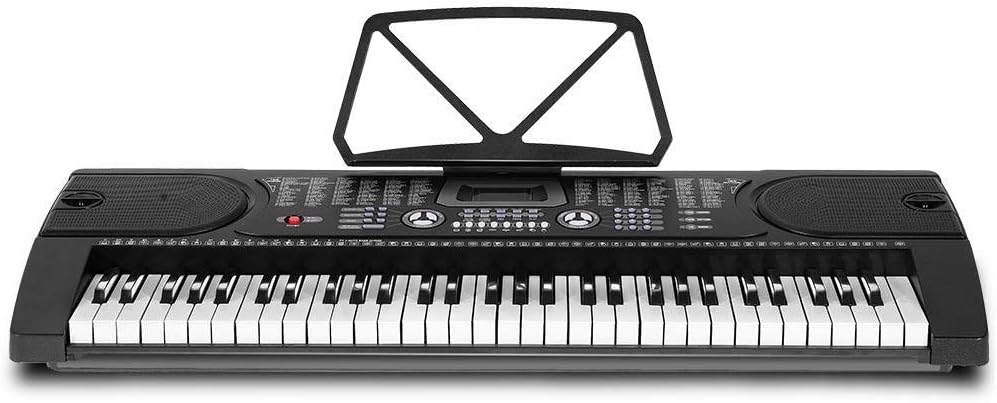
Figura 4.1: Visão de cima para baixo view of the Alpha EK-60 keyboard, highlighting the control panel, integrated speakers, and the 61 standard piano keys.

Figure 4.2: Detail of the LED display for convenient settings adjustment and the battery compartment for portable use.

Figura 4.3: View of the multiple jacks including Audio Input, Microphone Input, and Headphone Output for versatile connectivity.
Principais características:
- 61-Key Standard Piano Keyboard
- LED display for easy navigation
- 24 músicas demo
- 255 timbres (instrument sounds)
- 255 rhythms (accompaniment styles)
- 61 kinds of keyboard percussions
- 8 Panel Percussions
- Master volume, accompaniment volume, and tempo control
- Intelligent teaching function: one-key, follow and ensemble function
- Função de programação de ritmo
- Auto chord and chord timbre option
- Funcionalidade de gravação e reprodução
- Sustain and vibrato effects
- Microphone input and speaker output
- Headphone jack for silent practice
- Battery powered option (6 x AA-size batteries, not included)
5. Configuração
5.1 Montagem do suporte
- Unpack all components of the adjustable stand.
- Connect the horizontal support bars to the vertical legs, ensuring they are securely fastened.
- Adjust the height of the stand to your preferred playing position using the adjustment knobs. The stand is adjustable from 59cm to 79cm in height.
- Place the keyboard securely on top of the assembled stand.
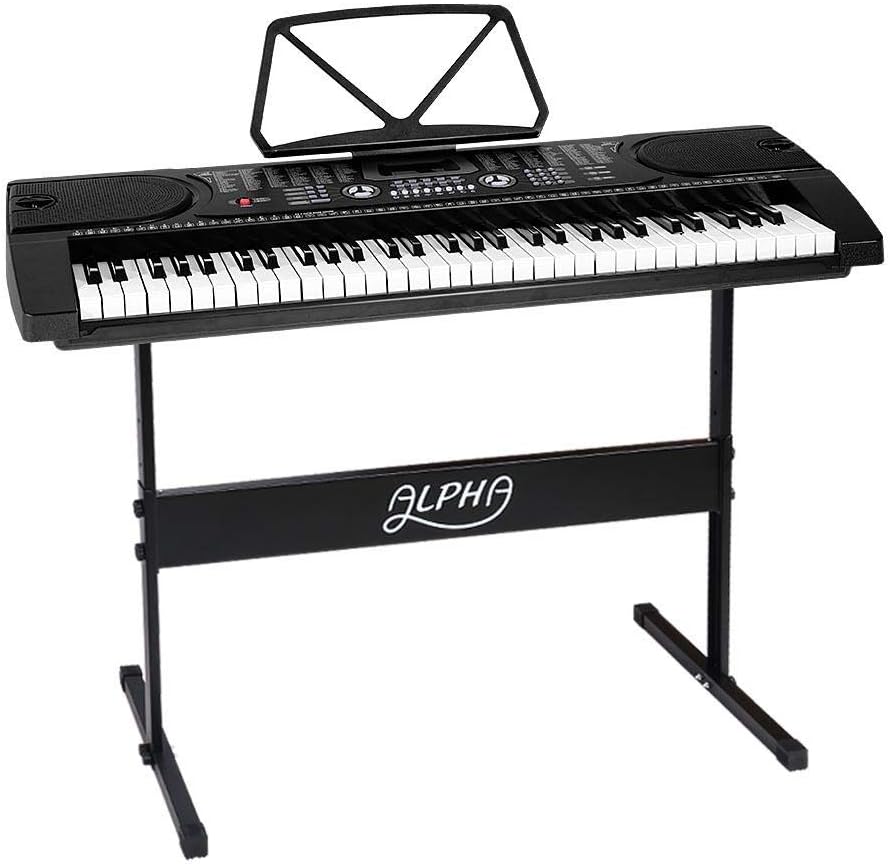
Figure 5.1: The Alpha EK-60 keyboard fully assembled on its adjustable stand, ready for use.
5.2 Alimentação do teclado
The Alpha EK-60 can be powered by the included AC adaptor or by batteries.
Usando o adaptador AC:
- Connect the DC plug of the power adaptor to the DC 9V input jack on the rear of the keyboard.
- Ligue o adaptador CA a uma tomada de parede padrão.
Usando baterias:
- Localize o compartimento da bateria na parte inferior do teclado.
- Abra a tampa do compartimento da bateria.
- Insert 6 x AA-size batteries (not included), ensuring correct polarity (+/-).
- Feche bem a tampa do compartimento da bateria.
Note: When using batteries, disconnect the AC adaptor. The keyboard will automatically switch to battery power if the adaptor is removed.
6. Instruções de operação
6.1 Operação básica
- Ligar/desligar: Pressione o PODER Botão para ligar ou desligar o teclado.
- Controle de volume: Use o VOLUME PRINCIPAL Botão para ajustar o nível geral do som.
- Controle de tempo: Use o TEMPO buttons to adjust the speed of rhythms and demo songs.
6.2 Selecionando Tons e Ritmos
- Tones (Timbre): Pressione o DOORBELL button, then use the number pad or +/- buttons to select from 255 different instrument sounds. The selected timbre number will appear on the LED display.
- Ritmos: Pressione o RITMO button, then use the number pad or +/- buttons to select from 255 accompaniment rhythms. Press INICIAR/PARAR Para iniciar ou finalizar o ritmo.
6.3 Intelligent Teaching Function
The EK-60 features a 3-step intelligent teaching system to help you learn to play.
- Uma chave: Plays the melody of a demo song by pressing any key.
- Seguir: Waits for you to play the correct note before proceeding with the melody.
- Junto: Plays the accompaniment while you play the melody.
To use, select a demo song, then press the desired teaching mode button (UMA CHAVE, SEGUIR, ou CONJUNTO).
6.4 Gravação e Reprodução
The keyboard allows you to record your performances.
- Pressione o REC button to start recording. The LED display will indicate recording mode.
- Toque a melodia que desejar.
- Pressione o JOGAR Botão para interromper a gravação e reproduzir sua apresentação gravada.
6.5 Conectividade
- Plug do fone de ouvido: Conecte os fones de ouvido ao FONE DE OUVIDO jack for silent practice.
- Entrada de microfone: Conecte um microfone ao MIC INPUT jack to sing along while playing.
- Entrada/saída de áudio: Use o ENTRADA DE ÁUDIO to connect external audio devices (e.g., MP3 player) and the SAÍDA DE ÁUDIO to connect to external speakers or an ampmais vivo.
7. Manutenção
Proper care will ensure the longevity of your Alpha EK-60 keyboard.
- Limpeza: Limpe o teclado com um pano macio e seco. Para sujeira persistente, use um pano levemente umedecido.amp cloth and then wipe dry immediately. Do not use abrasive cleaners, waxes, or solvents.
- Armazenar: When not in use for extended periods, store the keyboard in a cool, dry place away from direct sunlight and extreme temperatures. If using batteries, remove them before long-term storage to prevent leakage.
- Manuseio: Evite deixar o teclado cair ou submetê-lo a impactos fortes.
8. Solução De Problemas
If you encounter any issues with your keyboard, refer to the following table for common problems and solutions.
| Problema | Possível causa | Solução |
|---|---|---|
| Sem som | Volume is too low; Power is off; Headphones connected; Faulty power connection. | Increase master volume; Turn on power; Disconnect headphones; Check power adaptor or replace batteries. |
| Teclas não respondem | Keyboard is in a teaching mode; Internal malfunction. | Exit teaching mode; Power cycle the keyboard. If issue persists, contact support. |
| Rhythm/Demo song not playing | Rhythm/Demo song not selected; START/STOP button not pressed. | Select a rhythm/demo song; Press START/STOP. |
| Som distorcido | Volume too high; External device connected incorrectly. | Reduce volume; Check connections of external devices. |
Se o problema persistir após tentar essas soluções, entre em contato com o suporte ao cliente.
9. Especificações
| Recurso | Descrição |
|---|---|
| Modelo | EK-60 |
| Chaves | 61 Standard Piano Keys |
| Key Width | 1.9 centímetros |
| Tones (Timbres) | 255 |
| Ritmos | 255 |
| Músicas demo | 24 |
| Polifonia Máxima | 8 |
| Conectividade | Audio Input, Audio Output, Headphone Jack (3.5mm), Microphone Input (3.5mm) |
| Fonte de energia | AC Adaptor (DC 9V) or 6 x AA-size batteries (not included) |
| Dimensões (teclado) | 86 cm (L) x 32.5 cm (L) |
| Dimensions (Overall with Stand) | 86cm (L) x 32.5cm (W) x 59-79cm (H) |
| Peso | 6.2 quilos |
| Cor | Preto |

Figure 9.1: Detailed dimensions of the Alpha EK-60 keyboard and its adjustable stand.
10. Garantia e Suporte
10.1 Informações de garantia
The Alpha EK-60 keyboard comes with a Garantia de 1 ano from the date of purchase. This warranty covers manufacturing defects and ensures the product is free from defects in material and workmanship under normal use. It does not cover damage caused by misuse, accident, unauthorized modification, or normal wear and tear.
10.2 Suporte ao cliente
For any queries, technical assistance, or warranty claims, please contact the seller or manufacturer directly. Please have your purchase receipt and product model number (EK-60) ready when contacting support.
Ask a question about this manual
Ask about setup, troubleshooting, compatibility, parts, safety, or missing instructions. Manuals+ will review the question and use this page’s manual context to help answer it.