
1. Introdução
The Wimberley AP-601 is a precision-machined replacement lens foot designed to enhance the stability and functionality of specific Canon telephoto lenses. It replaces the factory lens foot, offering a lower center of gravity for improved balance and integrating an Arca-Swiss style dovetail for direct compatibility with quick-release clamps. This manual provides detailed instructions for installation, operation, and maintenance of your AP-601 lens foot.

Image 1: The Wimberley AP-601 Replacement Lens Foot, showcasing its robust design and Arca-Swiss compatible dovetail.
2. Componentes incluídos
Antes de iniciar a instalação, verifique se todos os componentes estão presentes:
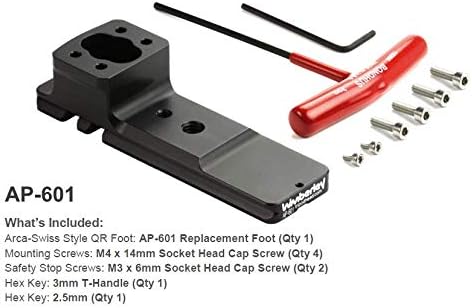
Image 2: All items included with the Wimberley AP-601 Replacement Lens Foot, including mounting screws and hex keys.
- AP-601 Arca-Swiss Style Replacement Lens Foot (Qty 1)
- Mounting Screws – M4 x 14mm Socket Head Cap Screw (Qty 4)
- Safety Stop Screws - M3 x 6mm Socket Head Cap Screw (Qty 2)
- Hex Key – 3mm T-handle (Qty 1)
- Hex Key – 2.5mm (Qty 1)
3. Compatibilidade
The AP-601 Replacement Lens Foot is specifically designed for use with the following Canon lenses:
- Canon 100-300 RF f/2.8 IS
- Canon 400 f/2.8 IS version III
- Canon 400 RF f/2.8 IS
- Canon 800 RF f/5.6 IS
Observação: This product is not compatible with most Manfrotto or Gitzo clamps due to differing quick-release plate standards.
4. Instruções de instalação
Follow these steps to replace your lens's factory foot with the Wimberley AP-601:

Image 3: Visual guide for attaching the AP-601 replacement foot to the lens collar using the provided screws.
- Remove Existing Foot: Carefully unscrew and remove the factory lens foot from your compatible Canon lens. Keep the original screws in a safe place.
- Position AP-601: Align the Wimberley AP-601 replacement foot with the mounting holes on the lens collar. Ensure proper orientation.
- Fixe com parafusos: Insert the four M4 x 14mm Socket Head Cap Screws (provided) into the mounting holes. Use the 3mm T-handle Hex Key to tighten them securely. Do not overtighten.
- Install Safety Stop Screws (Optional): If desired, screw the two M3 x 6mm Socket Head Cap Safety Stop Screws into the small threaded holes at the front and back of the foot using the 2.5mm Hex Key. These screws prevent the foot from accidentally sliding out of a quick-release clamp.
- Verifique a estabilidade: Gently test the installed foot to ensure it is firmly attached and stable before mounting your lens to a tripod or monopod.
5. Instruções de operação
5.1 Arca-Swiss Compatibility
The AP-601 features an integrated Arca-Swiss style dovetail, allowing it to slide directly into any Arca-Swiss compatible quick-release clamp. This provides a secure and efficient mounting solution for tripods, monopods, and gimbal heads.
5.2 Using Flash Brackets
The AP-601 replacement foot incorporates a double dovetail cross-section. This design allows for the attachment of Wimberley Flash Brackets and other third-party quick-release style brackets directly to the top of the lens foot.

Image 4: Illustration of how a flash bracket can be mounted onto the double dovetail of the AP-601 foot.
5.3 Using Optional Safety-Stop Screws
The two included safety stop screws are designed to be threaded into the small holes at the ends of the foot. When installed, these screws act as stops, preventing the lens foot from accidentally sliding completely out of a quick-release clamp if it becomes loose. If you choose to use both safety stops, you must open the jaws of your quick-release clamp wide enough to load your lens from the top, rather than sliding it in from the side.

Image 5: Depiction of safety stop screws in place and the method for top-loading a lens into a quick-release clamp when safety stops are used.
Wimberley recommends using quick-release clamps that feature safety stop channels. These channels allow for a full range of forward and backward movement of the plate while preventing it from slipping out if the clamp é inadvertidamente afrouxado.
5.4 Lens Balance and Handling
The AP-601 is engineered to lower the center of gravity of your lens, providing optimal balance when mounted. This design improves stability and handling, especially with heavy telephoto lenses.

Image 6: A Canon 400 f/2.8 IS III lens shown with the AP-601 replacement foot (top) compared to the factory foot and reversed hood (bottom), highlighting the compact profile.

Image 7: A Canon 400 RF f/2.8 IS lens shown with the AP-601 replacement foot (top) compared to the factory foot and reversed hood (bottom), demonstrating improved balance and reduced bulk.
6. Manutenção
The Wimberley AP-601 is constructed from anodized 6061 aluminum with stainless steel fasteners, designed for durability and minimal maintenance. To ensure its longevity:
- Keep the foot clean from dust and debris. Wipe with a soft, dry cloth.
- Avoid using harsh chemicals or abrasive materials, which can damage the anodized finish.
- Periodically check that all mounting screws are securely tightened.
7. Solução De Problemas
If you encounter any issues with your AP-601 lens foot, consider the following:
- Foot feels loose: Ensure all four M4 mounting screws are tightened securely using the 3mm Hex Key.
- Cannot slide into quick-release clamp: Verify that your quick-release clamp is Arca-Swiss compatible. If using safety stop screws, ensure the clamp jaws are opened wide enough for top-loading.
- Improper balance: Confirm the AP-601 is correctly installed and that your lens is listed as compatible.
8. Especificações
| Recurso | Detalhe |
|---|---|
| Número do modelo | AP-601 |
| Material | Anodized 6061 Aluminum, Stainless Steel Fasteners |
| Compatibilidade | Arca-Swiss style quick-release clamps |
| Peso | 7.5 onças |
| Localização da fabricação | Made in USA, Assembled in Charlottesville, Virginia |
9. Garantia e Suporte
Wimberley provides a Garantia de 10 anos on all its products, including the AP-601 Replacement Lens Foot. This warranty covers manufacturing defects and ensures the quality and durability of your product.
For technical support, warranty claims, or further assistance, please contact Wimberley directly. Refer to the official Wimberley website para obter as informações de contato mais atualizadas.