
COSTWAY EP23485BK
COSTWAY 28-Inch Oscillating Tower Fan User Manual
Model: EP23485BK
Introdução
Obrigado pela compra.asing the COSTWAY 28-Inch Oscillating Tower Fan. This manual provides important information regarding the safe operation, assembly, use, and maintenance of your fan. Please read it thoroughly before use and retain it for future reference.
Instruções importantes de segurança
- Leia todas as instruções antes de usar este ventilador.
- Desligue sempre o ventilador da tomada antes de o limpar, realizar manutenção ou mover.
- Não utilize o ventilador com um cabo ou ficha danificados. Se o cabo ou a ficha estiverem danificados, contacte o apoio ao cliente.
- Keep fingers and other objects away from the air inlet and outlet openings.
- Do not use the fan near water or in wet conditions.
- Certifique-se de que o ventilador esteja colocado em uma superfície estável e nivelada para evitar que tombe.
- Este aparelho não se destina ao uso por pessoas (incluindo crianças) com capacidades físicas, sensoriais ou mentais reduzidas, ou com falta de experiência e conhecimento, a menos que tenham recebido supervisão ou instruções sobre o uso do aparelho de uma pessoa responsável pela sua segurança.
- As crianças devem ser supervisionadas para garantir que não brinquem com o aparelho.
- The dense netted air outlet is designed to protect fingers from injury. Do not attempt to bypass this safety feature.

Conteúdo da embalagem
Verifique se todos os componentes estão presentes antes da montagem.
- Unidade de ventilador de torre
- Base Redonda
- Cabo de alimentação (pré-instalado)
Configuração e montagem
The COSTWAY Tower Fan is designed for easy assembly with no tools required.
- Remova cuidadosamente todos os componentes da embalagem.
- Place the tower fan unit upside down on a soft, flat surface.
- Align the round base with the bottom of the fan unit.
- Secure the base to the fan unit using the provided wing nuts. Ensure they are tightened firmly for stability.
- Place the assembled fan upright on a stable, level surface.

Instruções de operação
Familiarize yourself with the controls for optimal use.
Painel de controle encerradoview

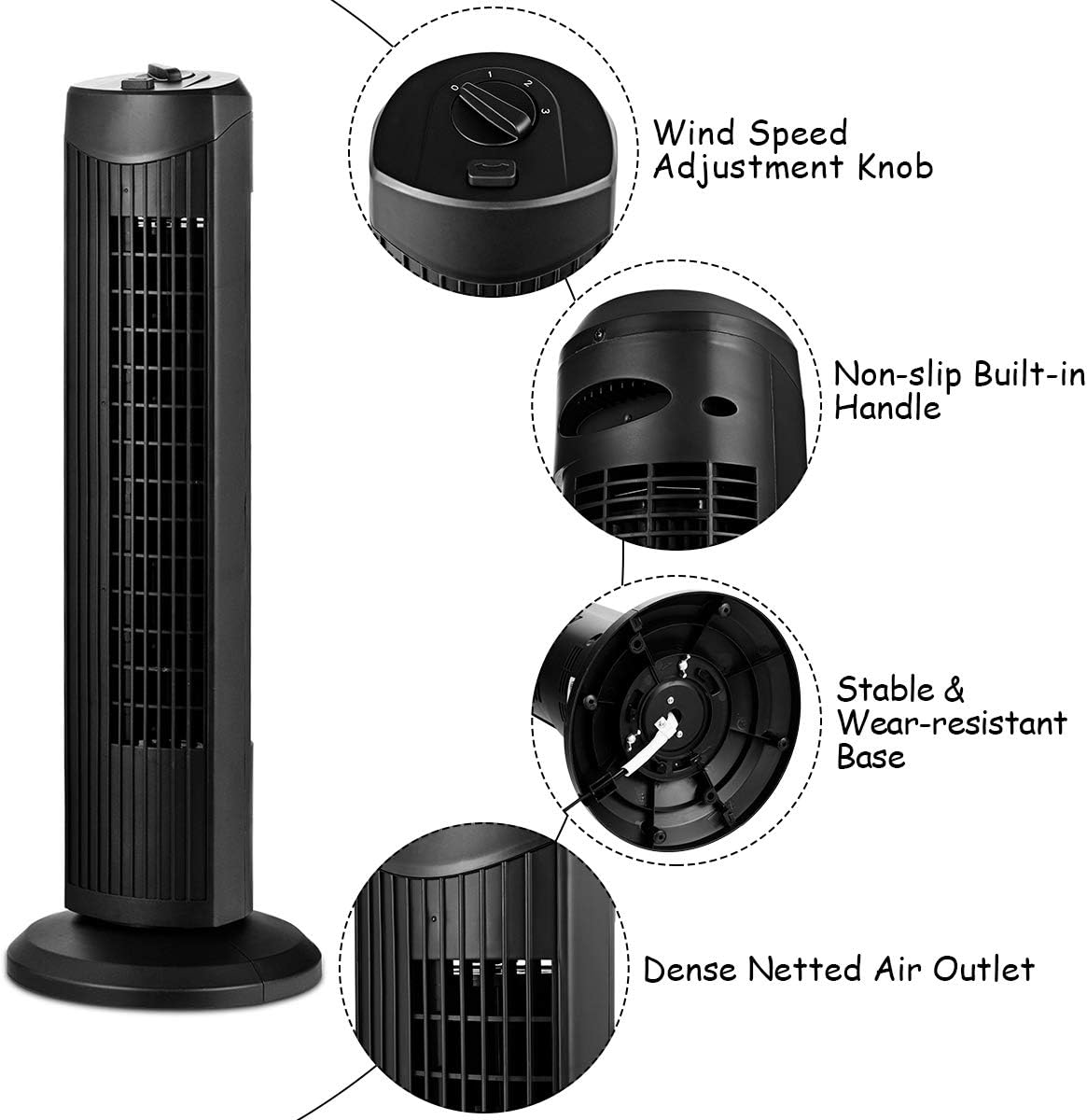
Ligar/Desligar e Seleção de Velocidade
- Conecte o cabo de alimentação a uma tomada elétrica padrão de 120 V AC.
- Vire o Wind Speed Adjustment Knob clockwise to select your desired fan speed:
- 0: Desligado
- 1: Low-grade Wind (Soft Wind)
- 2: Mid-grade Wind (Refreshing Wind)
- 3: High-grade Wind (Strong Winds)
- To turn the fan off, rotate the knob counter-clockwise to the "0" position.

Função de oscilação
- Para ativar o recurso de oscilação, pressione o botão Botão de oscilação located next to the speed knob. The fan head will begin to rotate from side to side, distributing air across a wider area.
- Para interromper a oscilação, pressione o Botão de oscilação de novo.
- Note: The oscillation function operates independently of the fan speed. Ensure both the fan speed knob is set to "0" and the oscillation button is disengaged to fully power off the unit.

Manutenção e Limpeza
A limpeza regular ajuda a manter o desempenho do ventilador e prolonga sua vida útil.
- Sempre desligue o ventilador antes de limpá-lo.
- Use um pano macio e macioamp Use um pano para limpar as superfícies externas do ventilador. Não utilize produtos de limpeza abrasivos ou solventes.
- For dust accumulation in the air outlet, use a vacuum cleaner with a brush attachment or compressed air to gently remove dust. Do not insert any objects into the air outlet.
- Certifique-se de que o ventilador esteja completamente seco antes de ligá-lo novamente na tomada e utilizá-lo.
- Quando não estiver em uso, guarde o ventilador em local fresco e seco, de preferência na embalagem original.
Solução de problemas
| Problema | Possível causa | Solução |
|---|---|---|
| O ventilador não liga. | Not plugged in; power outlet not working; speed knob set to "0". | Ensure the fan is securely plugged into a working outlet. Rotate the speed knob to a setting other than "0". |
| Fan is oscillating but not blowing air. | Oscillation button engaged, but speed knob set to "0". | Turn the speed knob to a setting (1, 2, or 3) to activate airflow. |
| Fluxo de ar reduzido. | As entradas/saídas de ar estão bloqueadas ou empoeiradas. | Unplug the fan and clean the air inlets and outlets as described in the Maintenance section. |
| Ruído incomum durante a operação. | Fan not on a stable surface; internal obstruction. | Place the fan on a firm, level surface. If noise persists, unplug and inspect for any visible obstructions. Do not attempt to disassemble the unit. |
Especificações
- Marca: COSTWAY
- Número do modelo: EP23485BK
- Dimensões do produto: 9.5"P x 9.5"L x 28"A
- Peso do item: 5.5 libras
- Cor: Preto
- Fonte de energia: Elétrico com fio
- Volumetage: 120 Volts
- O quetage: 35 Watts
- Número de velocidades: 3
- Características especiais: Bladeless, Oscillating
- Método de controle: Controle de botão (toque)
- Material: Metal, Plástico
- Uso interno/externo: Interior
Garantia e Suporte ao Cliente
For warranty information or technical support, please contact COSTWAY customer service. Refer to your purchase documentation for specific warranty terms and contact details.
Website: www.costway.com
Ask a question about this manual
Ask about setup, troubleshooting, compatibility, parts, safety, or missing instructions. Manuals+ will review the question and use this page’s manual context to help answer it.