
SteelSeries 64636
Manual do Usuário do Teclado Mecânico para Jogos SteelSeries Apex 7
Modelo: 64636
Introdução
The SteelSeries Apex 7 is a mechanical gaming keyboard designed for performance and customization. It features an integrated OLED Smart Display, dedicated media controls, USB passthrough, and durable mechanical switches. This manual provides detailed instructions for setup, operation, maintenance, and troubleshooting.
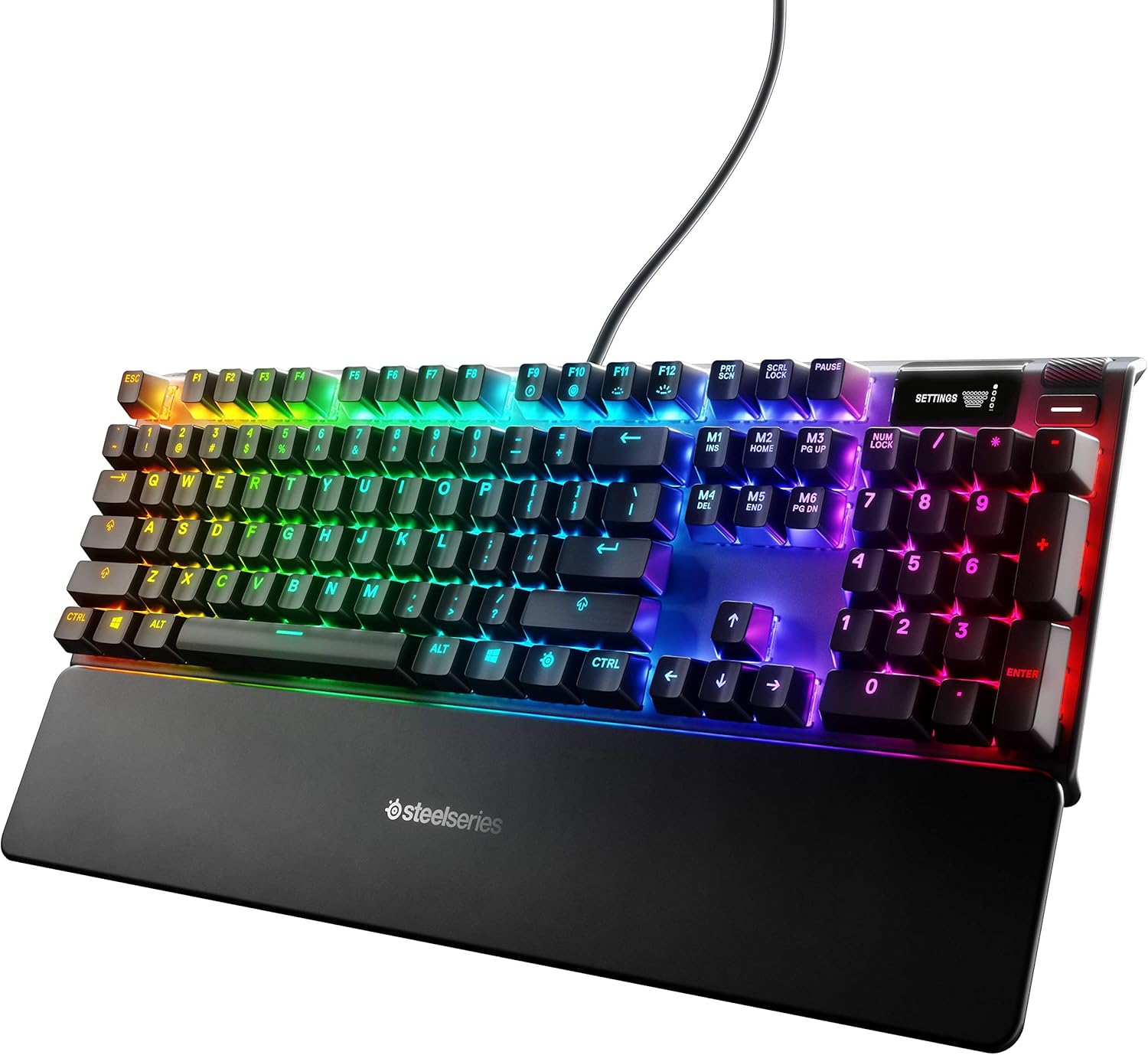
Figure 1: SteelSeries Apex 7 Mechanical Gaming Keyboard with RGB illumination and wrist rest.
O que está na caixa
- Apex 7 Gaming Keyboard
- Descanso de pulso magnético
- Guia de informações do produto
Configurar
- Conecte o teclado: Plug the keyboard's USB cable into an available USB port on your PC or Mac. The keyboard may require two USB ports for full functionality (one for the keyboard, one for the USB passthrough).
- Fixe o apoio de pulso: The premium magnetic wrist rest can be easily attached to the front edge of the keyboard for ergonomic support.
- Instalar software: Download and install the SteelSeries Engine software from the official SteelSeries website. This software is required for advanced customization of RGB illumination, key bindings, and OLED display functions.
- Ajustar ângulo do teclado: Utilize os pés ajustáveis na parte inferior do teclado para definir o ângulo de digitação de sua preferência.

Figure 2: Adjustable feet on the underside of the keyboard for ergonomic positioning.
Instruções de operação
OLED Smart Display and Media Controls
The integrated OLED Smart Display and dedicated media controls provide on-the-fly information and customization options without requiring software interaction. Use the clickable metal roller and media key to navigate menus and adjust settings.
- Rolo de Volume: The metal roller controls system volume. Pressing it mutes/unmutes audio.
- Chave de mídia: Located next to the volume roller, this button controls media playback (play/pause, skip track).
- OLED Menu Navigation: Press and hold the media key to enter the OLED menu. Use the volume roller to scroll through options and press the roller to select.
- Personalização: The OLED can display information from games, Spotify, or Discord. It also allows for software-free customization of settings.

Figure 3: Detail of the OLED Smart Display and media controls.
Iluminação RGB
The Apex 7 features per-key RGB illumination, offering 16.8 million colors for unmatched customization. Lighting effects can be configured via the SteelSeries Engine software or through the OLED display.

Figure 4: Dynamic per-key RGB illumination on the Apex 7 keyboard.
Passagem USB
An illuminated USB passthrough port is located on the keyboard, allowing you to connect other USB devices directly to your keyboard for convenience.

Figure 5: Illuminated USB passthrough port for connecting peripherals.
Interruptores mecânicos
The Apex 7 utilizes durable mechanical gaming switches, specifically linear red switches, known for their smooth and quiet operation. These switches provide consistent movement from top to bottom without a tactile bump, allowing for rapid actuation.

Figure 6: Mechanical switches are designed for durability and responsiveness.
Aircraft Grade Aluminum Alloy Frame
The keyboard is constructed with an aircraft-grade aluminum alloy frame, ensuring enhanced durability and stability during intense gaming sessions.

Figure 7: The robust aluminum alloy frame contributes to the keyboard's longevity.
Manutenção
- Limpeza: Use a soft, dry cloth to wipe down the keyboard surface. For deeper cleaning, gently remove keycaps and use compressed air to clear debris from beneath the switches. The magnetic wrist rest can be easily detached and cleaned.
- Atualizações de software: Regularly check for and install updates for the SteelSeries Engine software to ensure optimal performance and access to new features.
Solução de problemas
- Teclado não responde: Ensure all USB cables are securely connected to your computer. Try connecting the keyboard to a different USB port. Restart your computer.
- Problemas com iluminação RGB: Verify that the SteelSeries Engine software is running and updated. Check lighting profiles within the software or via the OLED display.
- Tela OLED não funciona: Ensure the keyboard is properly connected. Check for any software conflicts or updates.
- Key Malfunctions: If a specific key is not registering or feels unusual, try removing the keycap and cleaning the switch area with compressed air. If the issue persists, contact SteelSeries support.
Especificações
| Recurso | Detalhe |
|---|---|
| Marca | Série Steel |
| Número do modelo | 64636 |
| Série | Apex 7 Mechanical Gaming Keyboard – Red Switch |
| Plataforma de Hardware | PC, Mac |
| Sistema operacional | PC, Mac |
| Peso do item | 2.1 libras |
| Dimensões do produto | 5.5 x 17.2 x 1.6 polegadas |
| Cor | Red – Linear & Quiet |
| Fonte de energia | Elétrico com fio |
| Tecnologia de Conectividade | Com fio |
| Descrição do teclado | Jogos |
| Usos recomendados | Jogos |
| Características especiais | Backlit, Ergonomic, Wrist Rest, Integrated Stand, Customizable Display Keys, Volume Roller |
| Retroiluminação do Teclado | RGB |
Vídeo oficial do produto
Vídeo 1: Um excessoview of the SteelSeries Apex 7 Mechanical Gaming Keyboard, highlighting its key features and design.
Garantia e Suporte
For warranty information, technical support, or to download the latest SteelSeries Engine software, please visit the official SteelSeries website. Guarde o recibo de compra para reclamações de garantia.
Online resources and FAQs are available to assist with common questions and issues.
Ask a question about this manual
Ask about setup, troubleshooting, compatibility, parts, safety, or missing instructions. Manuals+ will review the question and use this page’s manual context to help answer it.