
Introdução
This manual provides comprehensive instructions for the setup, operation, and maintenance of your Zerone Universal Remote Control. This remote is designed to function with various Pioneer DVD player models, offering a convenient replacement or secondary control unit.
Compatibilidade
The Zerone Universal Remote Control is compatible with the following Pioneer DVD player models:
- Pioneiro VXX2811
- Pioneiro VXX2914
- Pioneiro VXX3218
- Pioneiro VXX2801
- Pioneiro VXX2800
- Pioneiro VXX2913
For optimal performance, ensure your DVD player model is listed above.
Configurar
1. Instalação da bateria
- Localize o compartimento da bateria na parte traseira do controle remoto.
- Deslize a tampa da bateria para baixo ou pressione a trava e levante para abrir.
- Insert two (2) AA 1.5V batteries, ensuring the positive (+) and negative (-) terminals align correctly with the markings inside the compartment.
- Recoloque a tampa da bateria deslizando-a de volta para a posição até ouvir um clique.
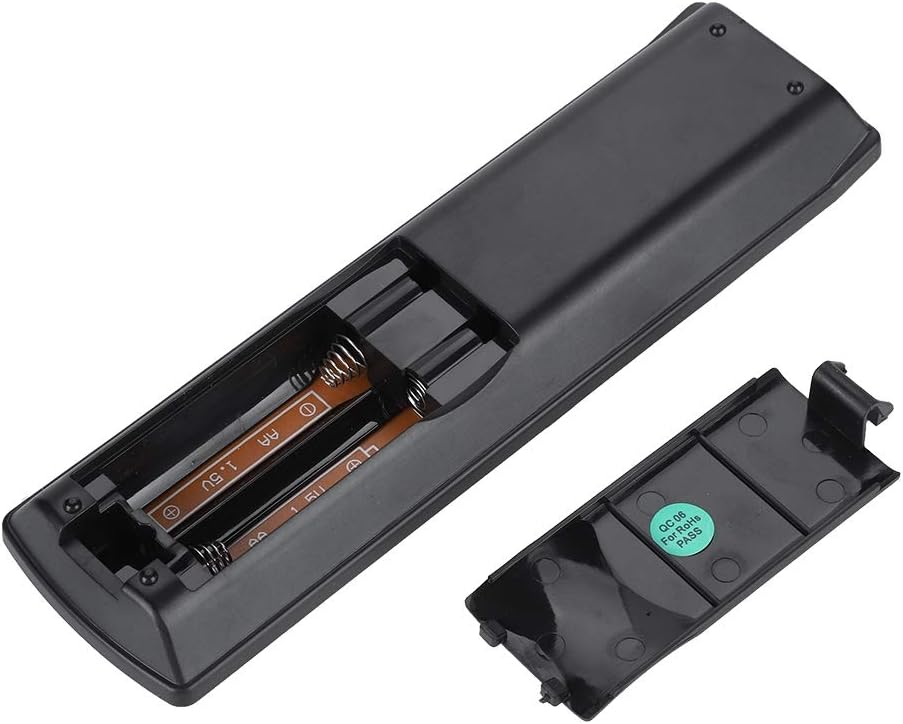
Imagem: Traseira view of the Zerone remote control, showing the battery compartment cover.

Image: The battery compartment of the remote control with two AA batteries correctly inserted.
No programming or setup is required. Once batteries are installed, the remote is ready for use with compatible Pioneer DVD players.
Instruções de operação
Point the remote control directly at your Pioneer DVD player. The effective control distance is typically over 8 meters (approximately 26 feet), though this may vary based on environmental factors and the specific DVD player model.

Imagem: Frente view of the Zerone Universal Remote Control, displaying all buttons and their labels.
Principais funções:
- EM ESPERA/LIGADO: Powers the DVD player on or off.
- ABRIR FECHAR: Abre ou fecha a bandeja do disco.
- ÁUDIO: Seleciona faixas de áudio ou idiomas.
- SUBTÍTULO: Toggles or selects subtitle options.
- ÂNGULO: Altera o viewing angle if supported by the DVD.
- Botões numéricos (0-9): Seleção ou entrada direta de faixas.
- CLARO: Clears numerical input.
- ENTRAR: Confirma seleções.
- MENU DE CIMA: Acessa o menu principal do DVD.
- CARDÁPIO: Accesses the disc menu.
- HOME MENU: Navigates to the home menu of the DVD player.
- RETORNAR: Retorna à tela ou menu anterior.
- Directional Pad (Up, Down, Left, Right) & ENTER: Navega pelos menus e confirma as seleções.
- Playback Controls (Play, Pause, Stop, Fast Forward, Rewind, Skip Forward, Skip Backward): Standard media playback functions.
- MODO DE REPRODUÇÃO: Selects playback modes (e.g., repeat, shuffle).
- CIRCULAR: Adjusts surround sound settings.
- ZOOM: Zooms in or out on the video.
- EXIBIÇÃO: Exibe informações na tela.

Image: A hand holding the Zerone remote control, demonstrating its ergonomic design and ease of use.

Image: The remote control positioned in front of a television displaying content, illustrating its intended use.

Image: A visual representation of the remote control's effective operating distance, indicating a range of over 8 meters.
Manutenção
- Limpeza: Limpe o controle remoto com um pano macio e seco. Não utilize produtos de limpeza líquidos ou materiais abrasivos.
- Substituição da bateria: Substitua as pilhas quando o controle remoto ficar lento ou parar de funcionar. Sempre substitua as duas pilhas ao mesmo tempo por pilhas novas.
- Armazenar: Guarde o controle remoto em local fresco e seco, longe da luz solar direta e de temperaturas extremas.
- Evite danos: Do not drop the remote or expose it to water.
Solução de problemas
- O controle remoto não está respondendo:
- Certifique-se de que as baterias estejam instaladas corretamente e respeitando a polaridade.
- Substitua as pilhas antigas por pilhas AA novas.
- Check for any obstructions between the remote control and the DVD player's infrared sensor.
- Ensure you are within the effective operating range (typically within 8 meters).
- Algumas funções não estão funcionando:
- Verify that your Pioneer DVD player model is listed in the compatibility section.
- Some advanced functions may be specific to the original remote or not supported by all DVD player models.
Especificações
| Material da concha | High-grade ABS |
| Distância de controle | > 8 meters (316 inches) |
| Tipo de Bateria | 2 x AA 1.5V Batteries (Not included) |
| Dimensões | Aproximadamente 174 x 49 x 20 mm (6.85 x 1.93 x 0.79 polegadas) |
| Peso | Aproximadamente 75g (2.46 onças) |
| Número do modelo | 743562180017 |
Garantia e Suporte
For warranty information or technical support, please refer to the documentation provided with your purchase or contact the manufacturer, Zerone, directly through their official channels. Keep your purchase receipt as proof of purchase.