
HUAWEI GT
HUAWEI Watch GT Smartwatch User Manual
Model: GT | Brand: HUAWEI
Introdução
This manual provides comprehensive instructions for the HUAWEI Watch GT smartwatch. It features a 1.39-inch AMOLED touchscreen, integrated GPS, and a heart rate monitor. This guide will assist you with initial setup, daily operation, maintenance, and understanding the device's capabilities.
The HUAWEI Watch GT is designed for users seeking a blend of style and advanced health and fitness tracking. Its robust build, including a ceramic case and silicone band, ensures durability for various activities.

Imagem: Frente view of the HUAWEI Watch GT smartwatch with an orange silicone band.
Principais características
- Tela sensível ao toque AMOLED de 1.39 polegadas: Proporciona cores vibrantes e visibilidade nítida.
- GPS integrado: Accurate tracking for outdoor activities like running, cycling, and climbing.
- Monitor de frequência cardíaca: Continuously tracks heart rate for health insights.
- Monitoramento do sono: Analyzes sleep patterns to help improve sleep quality.
- Resistência à água: Rated for 50 meters, suitable for swimming.
- Bateria de longa duração: Projetado para uso prolongado entre as recargas.
- Vários modos esportivos: Supports various activities including triathlon, running, walking, cycling, swimming, and climbing.
- Construção durável: Features a ceramic case and silicone band.
Configurar
1. Desembalagem e inspeção inicial
Carefully remove all components from the packaging. Verify that all items are present: the HUAWEI Watch GT, charging cable, and documentation.

Image: The HUAWEI Watch GT smartwatch as it appears when first unboxed.
2. Carregando o dispositivo
Before first use, fully charge your HUAWEI Watch GT. Connect the charging cable to the watch's charging port and plug the other end into a USB power adapter (not included) or a computer's USB port. The watch display will indicate charging status.

Imagem: Traseira view of the HUAWEI Watch GT, highlighting the heart rate sensor and charging contacts.
3. Emparelhando com seu smartphone
- Download the HUAWEI Health app from your smartphone's app store (compatible with iOS and Android devices).
- Abra o aplicativo e siga as instruções na tela para criar uma conta ou fazer login.
- Certifique-se de que o Bluetooth esteja ativado em seu smartphone.
- In the HUAWEI Health app, navigate to 'Devices' and select 'Add device'. Choose your HUAWEI Watch GT from the list of available devices.
- Confirme a solicitação de pareamento no seu relógio e no smartphone.
Instruções de operação
Navegação básica
- Deslize para cima/para baixo: Navegue pelas notificações e configurações rápidas.
- Deslize para a esquerda/direita: Access different widgets like heart rate, weather, and activity data.
- Tocar: Selecione um item ou abra um aplicativo.
- Pressione o botão superior: Access the app list or return to the home screen.
- Pressione o botão inferior: Customizable shortcut, typically for workout modes.

Image: The HUAWEI Watch GT displaying a watch face with time and date.
Monitoramento da frequência cardíaca
The HUAWEI Watch GT continuously monitors your heart rate. You can view your current heart rate and historical data through the heart rate widget or the HUAWEI Health app. Ensure the watch is snug on your wrist for accurate readings.

Image: A user wearing the HUAWEI Watch GT, which displays heart rate information on its screen.
Rastreamento GPS
The built-in GPS provides precise location tracking for outdoor workouts. Start an outdoor activity mode (e.g., Outdoor Run, Cycling) to activate GPS. The watch will record your route, distance, and pace.

Image: The HUAWEI Watch GT showing GPS signal acquisition, indicating readiness for outdoor tracking.
Modos de treino
Select from various pre-installed workout modes to track your activities. Each mode is optimized to provide relevant metrics for that specific exercise. Examples include running, cycling, swimming, and triathlon.

Image: The HUAWEI Watch GT displaying a selection of workout icons, indicating different sport modes.
Monitoramento do sono
Wear your watch to bed to automatically track your sleep. The HUAWEI Health app will provide detailed analysis of your sleep stages (deep, light, REM) and offer suggestions for improvement.

Image: The HUAWEI Watch GT displaying sleep duration and quality metrics.
Manutenção
- Limpeza: Limpe regularmente o relógio e a pulseira com um pano macio e seco.amp pano. Evite produtos químicos agressivos.
- Resistência à água: The watch is water resistant up to 50 meters. It is suitable for shallow-water activities like swimming in a pool or ocean. Do not use it for diving, hot showers, or saunas, as steam and hot water can compromise the seals.
- Armazenar: Guarde o relógio em local fresco e seco quando não estiver em uso.
- Contatos de carregamento: Mantenha os contatos de carregamento na parte traseira do relógio limpos e secos para garantir um carregamento adequado.
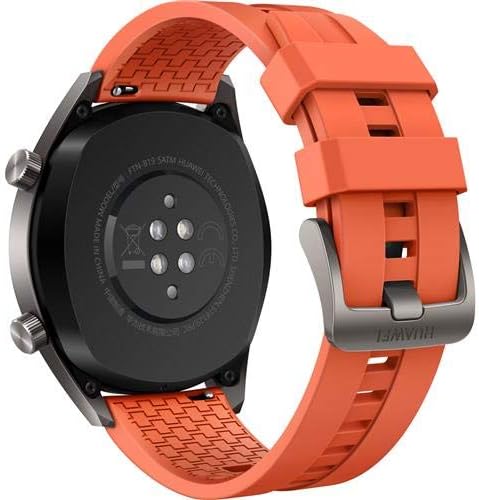
Imagem: Traseira view of the HUAWEI Watch GT smartwatch, showing the heart rate sensor and charging pins, important for maintenance.
Solução de problemas
- Relógio que não liga: Certifique-se de que o relógio esteja totalmente carregado. Conecte-o ao carregador e aguarde alguns minutos antes de tentar ligá-lo.
- Não foi possível emparelhar com o smartphone:
- Certifique-se de que o Bluetooth esteja ativado em seu telefone.
- Certifique-se de que o aplicativo HUAWEI Health esteja atualizado para a versão mais recente.
- Reinicie o relógio e o smartphone.
- Tente desemparelhar e emparelhar novamente o dispositivo através do aplicativo.
- Inaccurate heart rate/GPS data: Certifique-se de que o relógio esteja bem ajustado ao seu pulso, nem muito folgado nem muito apertado. Para usar o GPS, certifique-se de estar em uma área aberta com boa visibilidade. view do céu.
- Vida curta da bateria: Check if features like always-on display or continuous heart rate monitoring are enabled, as these can consume more power. Adjust settings in the HUAWEI Health app to optimize battery life.
Especificações
| Recurso | Detalhe |
|---|---|
| Marca | HUAWEI |
| Nome do modelo | GT |
| Tamanho da tela | 1.39 polegadas |
| Tipo de exibição | AMOLED |
| Resolução | 454 x 454 |
| Tecnologia de Conectividade | Wifi Bluetooth |
| GPS | Built-in GPS (Galileo, Glonass, GPS) |
| Características especiais | GPS, Heart Rate Monitor |
| Sistema operacional | Android (Compatible with iOS and Android devices) |
| Profundidade de resistência à água | 50 Meters (IP68) |
| Tipo de material da banda | Silicone |
| Tipo de material da caixa | Cerâmica |
| Entrada de Interface Humana | Tela sensível ao toque |
| Métricas Medidas | Sensor Ótico de Frequência Cardíaca |
Garantia e Suporte
This HUAWEI Watch GT includes a Canadian Warranty. For specific warranty terms and conditions, please refer to the warranty card included in your product packaging or visit the official HUAWEI support website.
For technical support, troubleshooting assistance, or service inquiries, please contact HUAWEI customer support. Manufacturer contact information: Plano, TX 75024, US.
Vídeos de produtos
MayuFit Fitness Tracker Overview
Vídeo: Este vídeo fornece uma visão geralview of the MayuFit Fitness Tracker, demonstrating its features and functionality. While not specifically the HUAWEI Watch GT, it illustrates general fitness tracker capabilities.
Ask a question about this manual
Ask about setup, troubleshooting, compatibility, parts, safety, or missing instructions. Manuals+ will review the question and use this page’s manual context to help answer it.