
1. Introdução
The GuliKit NS07PRO Bluetooth Adapter is designed to provide wireless audio connectivity for various gaming platforms. This compact device allows users to connect Bluetooth headphones and speakers to their Nintendo Switch, PC, and PlayStation 4, enhancing the gaming experience with wireless sound and voice chat capabilities.
2. Principais características
- Design ultrafino: The adapter features a slim profile, making it unobtrusive when connected to your device.
- Compatibilidade multiplataforma: Works seamlessly with Nintendo Switch, PC, and PlayStation 4.
- In-Game Voice Chat Support: Includes a microphone gadget for games requiring audio input and output.
- Áudio de baixa latência: Supports Qualcomm aptX Low Latency technology for synchronized audio, provided your headphones also support aptX LL or aptX.
- Dual Headphone Connection: Allows two Bluetooth headphones to connect simultaneously for shared audio.
- Nenhuma alimentação externa necessária: Powered directly by the connected device, ensuring low power consumption.
- Hidden Buttons and LEDs: Designed to minimize visual interference during gameplay.
3. Conteúdo da embalagem
Por favor, verifique se todos os itens estão presentes em sua embalagem:
- GuliKit NS07PRO Bluetooth Adapter
- Adaptador USB Tipo C para USB Tipo A
- 3.5mm Microphone Gadget
- Manual do usuário (este documento)
4. Instruções de configuração
4.1. For Nintendo Switch (Handheld Mode)
- Locate the USB Type-C port at the bottom of your Nintendo Switch console.
- Carefully insert the GuliKit NS07PRO Bluetooth Adapter into the USB Type-C port.
- To pair your Bluetooth headphones, press and hold either the 'A' or 'B' button on the adapter until the LED indicator flashes rapidly.
- Coloque seus fones de ouvido Bluetooth no modo de emparelhamento.
- Once connected, the LED on the adapter will indicate the active audio codec (SBC, aptX, or LL).

Image: The GuliKit NS07PRO Bluetooth Adapter connected to a Nintendo Switch, illustrating its compatibility with various devices including the Switch, PC, and PS4.
4.2. For Nintendo Switch (TV Dock Mode), PC, and PS4
- Connect the GuliKit NS07PRO Bluetooth Adapter to the provided USB Type-C to USB Type-A adapter.
- Plug the combined adapter into an available USB Type-A port on your Nintendo Switch dock, PC, or PS4 console.
- Follow the pairing steps (hold 'A' or 'B' button on the adapter, then put headphones into pairing mode) as described for handheld mode.
- For PS4, ensure that the audio output settings are configured to output audio through the USB device.
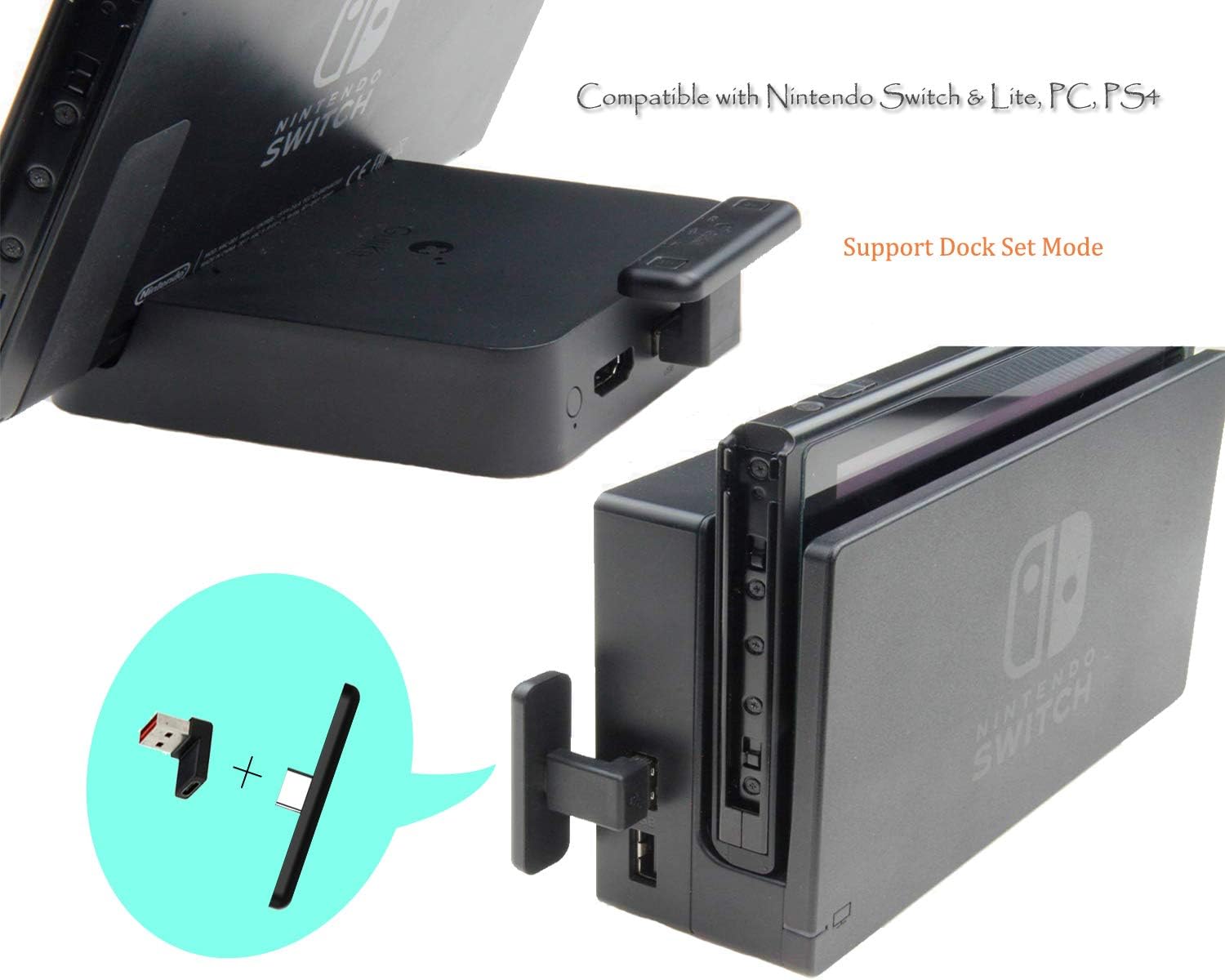
Image: The GuliKit NS07PRO Bluetooth Adapter shown connected to a Nintendo Switch dock, demonstrating its use in TV mode with the USB-A adapter.
4.3. Voice Chat Setup
If in-game voice chat is required (e.g., for games like Fortnite):
- Plug the small 3.5mm microphone gadget into the 3.5mm audio jack on your Nintendo Switch or Switch Lite.
- The GuliKit NS07PRO will still function as the audio adapter, and the microphone gadget will handle voice input.
5. Instruções de operação
5.1. Emparelhamento de dispositivos Bluetooth
Para emparelhar um novo dispositivo Bluetooth:
- Ensure the GuliKit NS07PRO adapter is plugged into your console or PC.
- Press and hold either the 'A' or 'B' button on the adapter for approximately 3 seconds until the corresponding LED flashes rapidly. This indicates pairing mode.
- Ative o modo de emparelhamento em seus fones de ouvido ou alto-falante Bluetooth.
- The devices will automatically connect. The LED on the adapter will remain solid and indicate the active audio codec (SBC, aptX, or LL).

Imagem: Uma imagem detalhada view of the GuliKit NS07PRO adapter, highlighting its 'A' and 'B' pairing buttons and the LED indicators for SBC, aptX, and aptX Low Latency audio codecs.
5.2. Work Mode Indicator
The small LEDs located in the middle of the adapter clearly indicate the current audio codec in use:
- SBCs: Codec Bluetooth padrão.
- aptX: Higher quality audio codec.
- LL (aptX Low Latency): Optimized for minimal audio delay, ideal for gaming.
The adapter automatically selects the best available codec supported by your connected Bluetooth device.
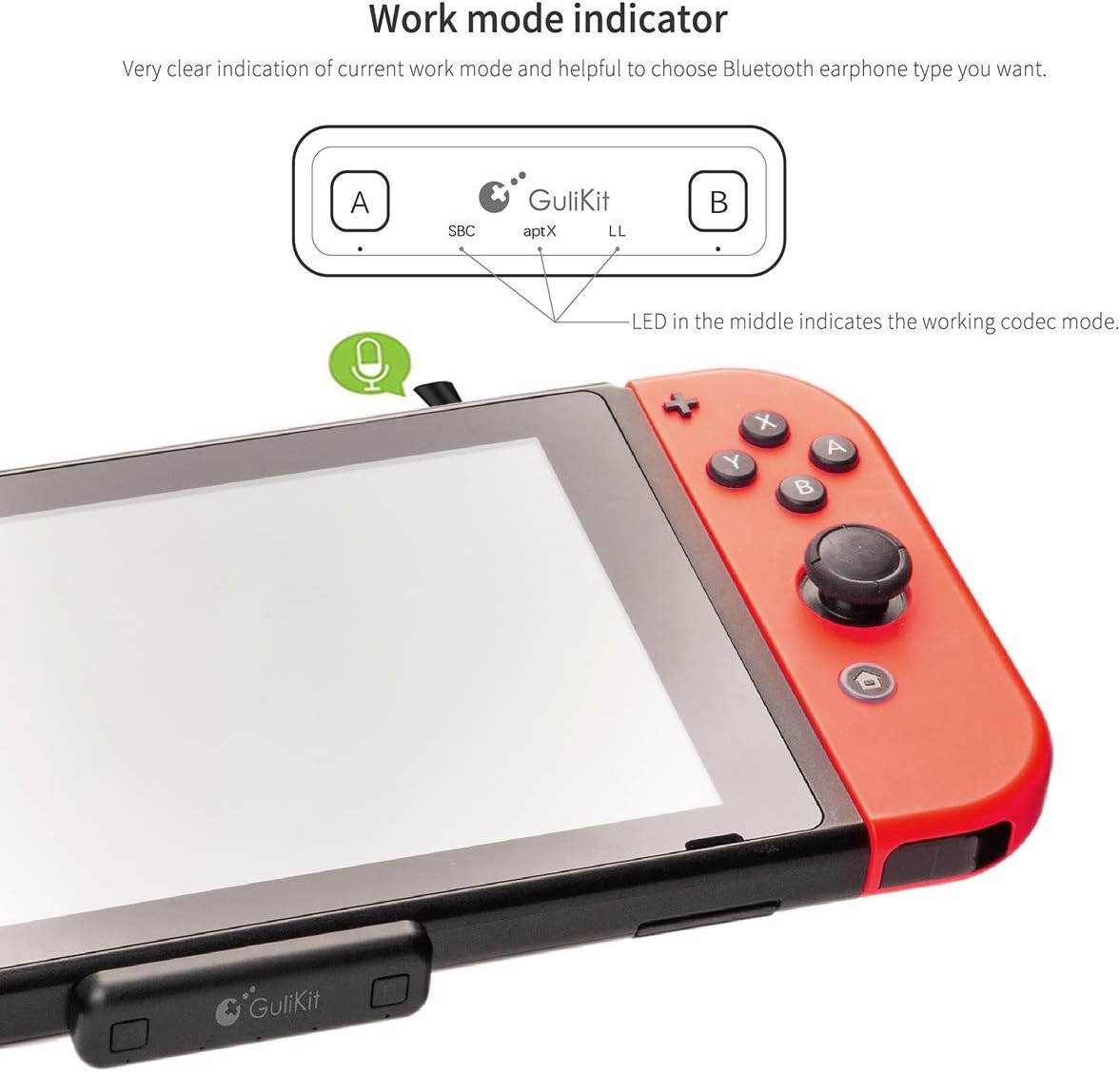
Image: The GuliKit NS07PRO adapter attached to a Nintendo Switch, with an arrow pointing to the work mode indicator LEDs, which show the active audio codec.

Image: The GuliKit NS07PRO adapter positioned alongside a pair of over-ear headphones, visually representing its capability for Super Hi-Fi and Low Latency audio transmission.
6. Manutenção
To ensure the longevity and optimal performance of your GuliKit NS07PRO Bluetooth Adapter:
- Mantenha o adaptador limpo e livre de poeira e detritos. Use um pano macio e seco para a limpeza.
- Evite expor o adaptador a temperaturas extremas, umidade ou luz solar direta.
- Store the adapter in its protective case when not in use to prevent damage.
- Não tente desmontar ou reparar o dispositivo por conta própria, pois isso anulará a garantia.
7. Solução De Problemas
7.1. No Audio or Intermittent Connection
- Ensure the adapter is securely plugged into the device's USB-C port or the USB-A adapter is firmly connected to the dock/PC/PS4.
- Verify that your Bluetooth headphones are fully charged and in pairing mode.
- Try re-pairing the headphones with the adapter.
- Move closer to the adapter to rule out range issues.
- Verifique se outros dispositivos Bluetooth estão causando interferência.
7.2. Audio Lag/Delay
- Audio lag can occur if your Bluetooth headphones do not support aptX Low Latency (aptX LL) or aptX codecs. The adapter will default to SBC, which may have a noticeable delay.
- For optimal performance, use headphones that support aptX LL.
7.3. Microfone não funciona
- Ensure the 3.5mm microphone gadget is fully inserted into the audio jack of your Switch or Switch Lite.
- Check in-game or system settings to confirm that the microphone input is correctly selected.
8. Especificações
- Número do modelo: NS07PRO
- Dimensões do produto: 1.9 x 0.6 x 0.3 polegadas
- Peso do item: 1.58 onças
- Tipo de conector: USB Tipo C
- Dispositivos compatíveis: Nintendo Switch, Nintendo Switch Lite, PC, PS4
- Fabricante: Gulikit
- Primeiro disponível: 19 de dezembro de 2019

Imagem: Um profissional lateralfile view of the GuliKit NS07PRO Bluetooth Adapter, emphasizing its remarkably thin 5mm design.
9. Garantia e Suporte
GuliKit products are designed for reliability and performance. For warranty information or technical support, please refer to the official GuliKit webou entre em contato diretamente com o serviço de atendimento ao cliente. Guarde o comprovante de compra para eventuais solicitações de garantia.