
Festool 576070
Festool ETS 125 REQ-Plus Random Orbital Sander User Manual
This manual provides detailed instructions for the safe and effective operation, setup, maintenance, and troubleshooting of the Festool ETS 125 REQ-Plus Random Orbital Sander.
Introdução
The Festool ETS 125 REQ-Plus is a versatile random orbital sander designed for achieving maximum surface quality during finishing or pre-sanding tasks. Its compact size and lightweight design make it suitable for extended use, including vertical and overhead applications. This tool incorporates features such as a sanding pad brake and Vibration-stop balancing for enhanced performance and user comfort.
Os principais recursos incluem:
- Design ergonômico para manuseio confortável durante uso prolongado.
- Step-less variable speed control for adapting to various applications.
- Balanced Vibration-stop (VS) design for smooth operation and superior finish results.
- Jetstream design for efficient dust removal, contributing to cleaner air, better finishes, and extended abrasive and pad life.
- Supplied in a new SysGen3 Systainer for organized storage and transport.
Informações gerais de segurança
Always observe general power tool safety guidelines to prevent electric shock, fire, and serious injury. Keep your work area clean and well-lit. Do not operate power tools in explosive atmospheres, such as in the presence of flammable liquids, gases, or dust. Always wear appropriate personal protective equipment, including eye protection, hearing protection, and a dust mask. Disconnect the plug from the power source before making any adjustments, changing accessories, or storing power tools.
Produto acimaview e Componentes
The Festool ETS 125 REQ-Plus Random Orbital Sander comes with several components designed for optimal performance and convenience.
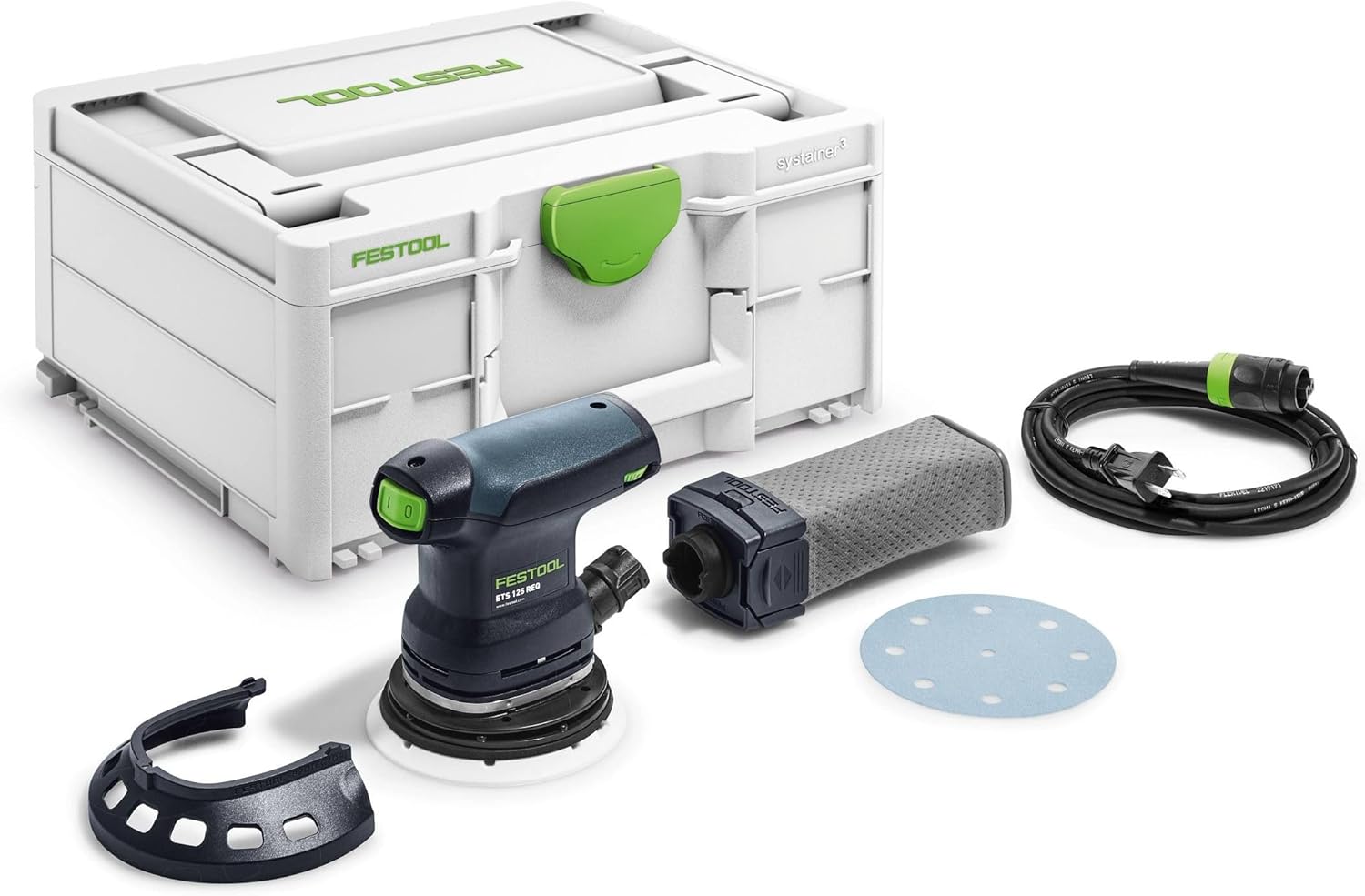
Figure 1: Complete Festool ETS 125 REQ-Plus kit, showing the sander, Systainer, dust bag, power cord, and a sanding disc.
Componentes incluídos:
- ETS 125 REQ Random Orbital Sander
- StickFix Soft Sander Backing Pad (D125)
- Longlife Dust Bag
- Festool PROTECTOR
- SYSGEN3 Systainer Case
Configurar
1. Attaching the Sanding Pad and Abrasive
Ensure the sander is disconnected from the power supply before attaching or changing the sanding pad or abrasive. The ETS 125 REQ-Plus uses a StickFix sanding pad system for quick and secure abrasive changes.
- Align the holes on the abrasive disc with the holes on the StickFix sanding pad.
- Press the abrasive disc firmly onto the pad to ensure a secure attachment.
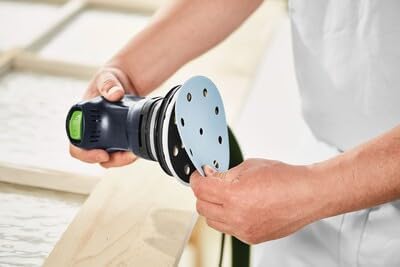
Figure 2: Attaching a sanding disc to the sander's StickFix pad.
2. Conectando a Extração de Poeira
Effective dust extraction is crucial for a clean work environment, better finish quality, and extended abrasive life. The ETS 125 REQ-Plus can be used with the included longlife dust bag or connected to an external dust extractor.
- Using the Longlife Dust Bag: Attach the dust bag securely to the dust port at the rear of the sander. Ensure it clicks into place.
- Connecting to an External Dust Extractor: Connect the hose of your Festool dust extractor to the sander's dust port. The Jetstream design works optimally with Festool extractors for highly efficient dust removal.
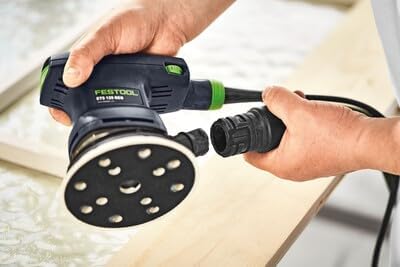
Figure 3: Connecting a dust extraction hose to the sander.

Figure 4: The sander connected to a dust extraction hose.
Instruções de operação
1. Ligar e desligar
Connect the sander to a suitable power outlet. The power switch is typically located on the top of the tool. Press the switch to turn the sander on, and press it again to turn it off.
2. Ajustando a velocidade
The ETS 125 REQ-Plus features step-less variable speed control. Use the speed adjustment dial to select the appropriate sanding speed for your material and application. Lower speeds are generally suitable for delicate work or heat-sensitive materials, while higher speeds are for aggressive material removal.
3. Sanding Technique
For best results, hold the sander firmly with both hands (if applicable) or one hand for lighter tasks, ensuring even pressure. Move the sander smoothly and consistently across the workpiece. Avoid applying excessive pressure, as this can reduce sanding efficiency and potentially damage the surface or the tool. The balanced vibration stop design minimizes fatigue and improves finish quality.
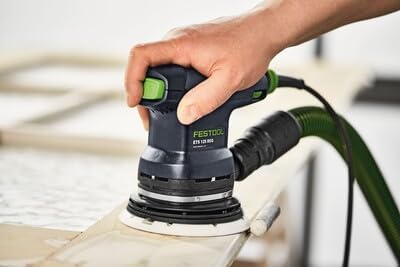
Figure 5: Proper technique for operating the sander on a workpiece.
Manutenção
Regular maintenance ensures the longevity and optimal performance of your Festool sander. Always disconnect the tool from the power supply before performing any maintenance.
1. Cleaning the Sander
- Limpe a parte externa da lixadeira com um pano limpo e seco.amp pano. Não use produtos químicos ou solventes agressivos.
- Use compressed air to clear dust from ventilation openings and the motor housing.
2. Dust Bag Maintenance
- Empty the longlife dust bag regularly to maintain effective dust collection.
- Inspect the dust bag for any tears or damage and replace if necessary.
3. Sanding Pad Inspection
- Periodically inspect the StickFix sanding pad for wear, damage, or reduced adhesion. A worn pad can lead to poor sanding results and premature abrasive wear.
- Replace the sanding pad if it shows signs of significant wear or damage.
Solução de problemas
| Problema | Possível causa | Solução |
|---|---|---|
| A lixadeira não liga. | Sem alimentação elétrica; interruptor com defeito; cabo de alimentação danificado. | Check power connection and outlet. Inspect power cord for damage. If issues persist, contact Festool service. |
| Pouca extração de poeira. | Dust bag full; dust port clogged; hose disconnected or damaged; worn abrasive. | Empty dust bag. Clear dust port and hose. Ensure hose is securely connected. Replace worn abrasive. |
| Excessive vibration or poor finish. | Worn sanding pad; incorrect abrasive; uneven pressure; damaged workpiece. | Inspect and replace sanding pad if worn. Use appropriate grit abrasive. Apply even, light pressure. |
| Sander overheats. | Blocked ventilation slots; continuous heavy load; faulty motor. | Clear ventilation slots. Allow tool to cool down. Avoid prolonged heavy use. If persistent, contact service. |
Especificações
| Recurso | Detalhe |
|---|---|
| Marca | Festool |
| Número do modelo | 576070 |
| Dimensões do produto | 15.59"C x 11.65"L x 7.36"A |
| Peso do item | 8.23 libras |
| Fonte de energia | Elétrico com fio |
| Corrente do adaptador AC | 2.5 Amps |
| Tipo de grão (incluído) | Light (120 Grit) |
| Sanding Stroke | 5/64" (2.0 mm) |
| Componentes incluídos | ETS 125 REQ, StickFix Soft Sander Backing Pad D125, longlife dust bag, Festool PROTECTOR, in SYSGEN3 |
Garantia e Suporte
Festool stands behind its products with comprehensive support and warranty programs. For detailed information, please refer to the official Festool website ou entre em contato com o atendimento ao cliente.
- Garantia de reembolso de 30 dias: If you are not completely satisfied, you may return the product within 30 days.
- Garantia de satisfação de 3 ano: Festool offers a 3-year warranty covering defects in material and workmanship.
- Dedicated Expert Support: Access to expert assistance for product inquiries, technical support, and service.
Para obter mais assistência, visite o Loja Festool na Amazon or the official Festool website.
Ask a question about this manual
Ask about setup, troubleshooting, compatibility, parts, safety, or missing instructions. Manuals+ will review the question and use this page’s manual context to help answer it.