
OJ Electronics UDG-4999
Manual do usuário do termostato não programável OJ Microline UTN4-4999
Model: UDG-4999 | Brand: OJ Electronics
1. Introdução
This manual provides detailed instructions for the installation, operation, and maintenance of your OJ Microline UTN4-4999 (Model UDG-4999) Non-Programmable Thermostat. This thermostat is designed for electric radiant floor heating systems and features dual sensing (air and floor) and dual voltage capabilities (120V & 240V). It includes a built-in Class A GFCI for enhanced safety.
The OJ Microline UTN4-4999 offers straightforward temperature control without complex programming, making it ideal for users seeking a simple and effective solution for their floor heating needs.

Figura 1: Frente view of the OJ Microline UTN4-4999 Non-Programmable Thermostat, displaying time and temperature.
2. Informações de segurança
Instruções importantes de segurança:
- Risco elétrico: Installation must be performed by a qualified electrician in accordance with local and national electrical codes. Disconnect power at the circuit breaker before installation or servicing.
- Interruptor de circuito de falha à terra (GFCI): This thermostat includes a built-in Class A GFCI, which is required for all underfloor heating systems. Test the GFCI regularly as per local codes and manufacturer recommendations.
- Volumetage Compatibilidade: Verifique se o volume do termostato está correto.tage (120V or 240V) matches your heating system's voltage.
- Sensor de chão: The included floor sensor must be properly installed to prevent overheating and ensure accurate temperature control.
- Não mergulhe the thermostat or sensor in water.
- Não opere the thermostat with damaged wiring or if it has been dropped or damaged.

Figure 2: The OJ Microline thermostat installed in a bathroom, highlighting its sleek design and integration.
3. Configuração e instalação
Installation of the OJ Microline UTN4-4999 thermostat requires adherence to electrical safety standards. It is recommended that a qualified electrician performs the installation.
3.1 Lista de verificação de pré-instalação
- Verify that the power supply to the heating system is disconnected at the main circuit breaker.
- Confirme o volumetage of your heating system (120V or 240V) matches the thermostat's capabilities.
- Ensure you have all necessary tools: screwdriver, wire strippers, electrical tape, etc.
- Locate a suitable wall box for mounting the thermostat.
3.2 Diagrama de fiação
Refer to the wiring diagram below for proper connection. All connections must be secure and comply with local electrical codes.
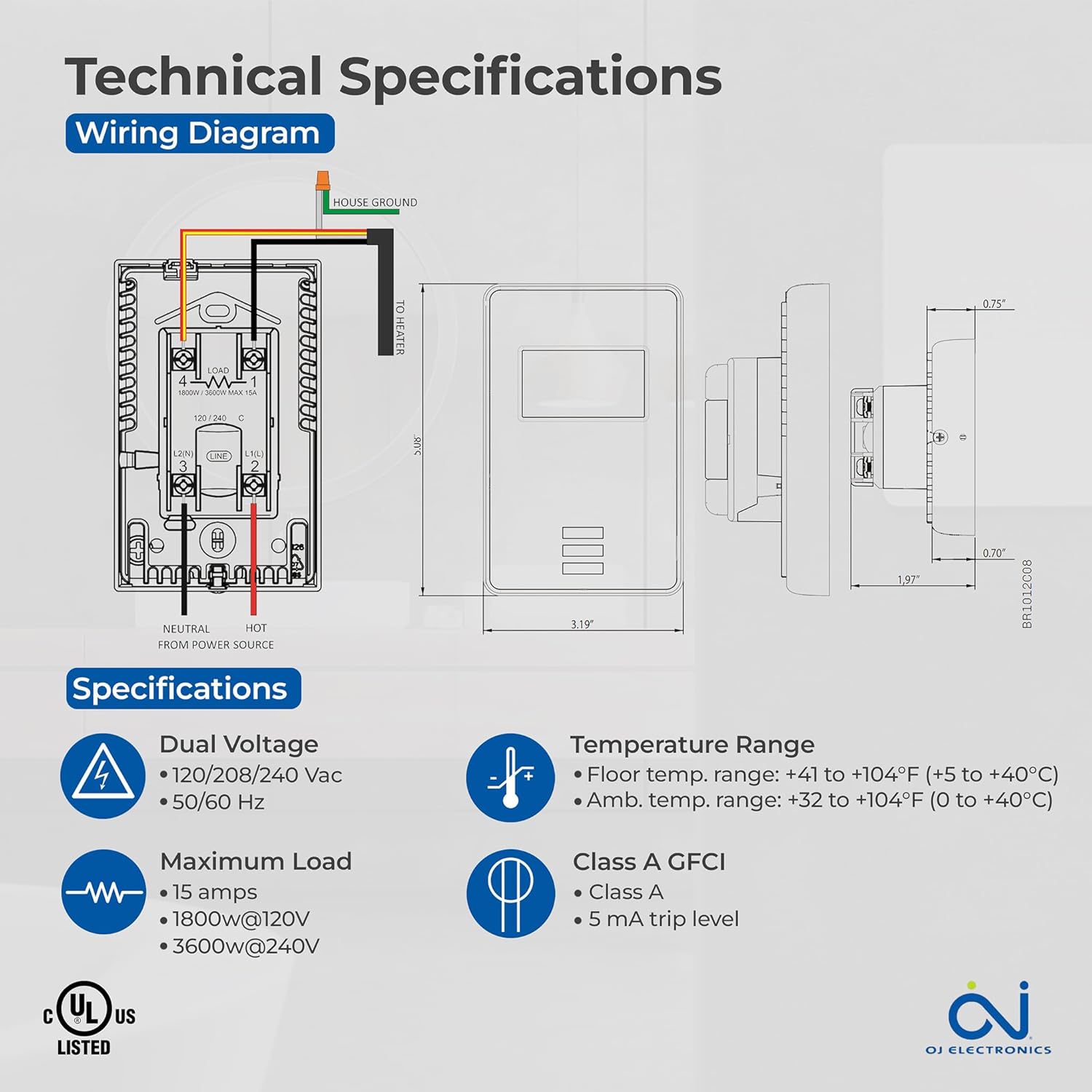
Figure 3: Detailed wiring diagram and technical specifications for the thermostat. Shows connections for House Ground, Neutral, Hot from Power Source, and To Heater.
3.3 Floor Sensor Installation
The 10Kohm floor sensor is included and essential for floor temperature control and protection. Install the sensor cable in a conduit or directly within the floor heating system, ensuring it is positioned centrally between heating elements for accurate readings. Do not cut or splice the sensor cable unless specifically instructed by the heating system manufacturer.

Figure 4: The included OJ Microline floor sensor, a black cable with a small probe at the end.
3.4 Montagem do Termostato
- After wiring, carefully push the thermostat into the wall box.
- Secure the thermostat to the wall box using the provided screws.
- Fixe a placa frontal.
- Restaure a energia no disjuntor.
4. Operação
The OJ Microline UTN4-4999 is a non-programmable thermostat designed for simple and direct temperature control.
4.1 Ajuste da temperatura
To adjust the desired temperature (setpoint), use the Up e Abaixo arrow buttons located below the display. The display will show the current temperature and the setpoint. The heating system will activate or deactivate to maintain the setpoint.

Figure 5: A hand interacting with the thermostat's buttons to adjust the temperature setting.
Modos de controle 4.2
The thermostat offers three control modes, selectable based on your heating requirements and floor type:
- (A) Ambient temperature with Floor protection: The thermostat controls based on the room's air temperature, but will limit the floor temperature to prevent overheating, especially important for sensitive floor coverings like laminate or engineered wood.
- (B) Floor temperature with Floor protection: The thermostat controls directly based on the floor sensor reading, also with an upper limit for floor protection. This mode is ideal for maintaining a consistent floor surface temperature.
- (C) Ambient temperature without Floor protection: The thermostat controls solely based on the room's air temperature, without an upper limit on floor temperature. Use this mode only if your floor covering can withstand high temperatures.
Consult your heating system installer or the thermostat's advanced settings (if available, refer to the full technical manual for details) to select the appropriate control mode.
5. Manutenção
The OJ Microline UTN4-4999 thermostat is designed for minimal maintenance.
- Limpeza: Limpe a superfície do termostato com um pano macio e seco.amp cloth. Do not use abrasive cleaners, solvents, or chemical sprays, as these can damage the display or casing.
- Teste GFCI: Regularly test the built-in GFCI as per local electrical codes, typically monthly. Press the "TEST" button on the thermostat. The display should indicate a trip, and the heating will turn off. Press the "RESET" button to restore normal operation. If the GFCI does not trip or reset, contact a qualified electrician.
- Inspeção: Periodically inspect the thermostat and wiring for any signs of damage or loose connections. If any issues are found, disconnect power and consult a qualified electrician.
6. Solução De Problemas
Se você estiver com problemas no seu termostato, consulte os problemas comuns e suas soluções a seguir:
| Problema | Possível causa | Solução |
|---|---|---|
| O visor do termostato está em branco. | O termostato não está recebendo energia. | Check the circuit breaker. Ensure all wiring connections are secure. |
| O sistema de aquecimento não está ligando. | Setpoint is below ambient/floor temperature; GFCI tripped; wiring issue. | Increase setpoint. Check and reset GFCI. Verify wiring connections. |
| GFCI trips frequently. | Ground fault in heating cable or wiring. | Immediately disconnect power and consult a qualified electrician to diagnose the ground fault. |
| Leitura de temperatura imprecisa. | Improper sensor placement; sensor damage; air drafts. | Ensure sensor is correctly placed. Inspect sensor for damage. Minimize drafts near the thermostat. |
Se o problema persistir após tentar essas soluções, entre em contato com o suporte ao cliente ou com um eletricista qualificado.
7. Especificações
| Recurso | Detalhe |
|---|---|
| Número do modelo | UDG-4999 |
| Marca | JO Eletrônica |
| Tipo de controlador | Termostato |
| Estilo | Não Programável |
| Volumetage | 120V, 208V, 240V AC (Dual Voltage) |
| Carga Máxima | 15A (1800W @ 120V, 3600W @ 240V) |
| Freqüência | 50/60 Hz |
| GFCI | Built-in Class A (5 mA trip level) |
| Sensores | Built-in Air Sensor, 10Kohm Floor Sensor (included) |
| Floor Limit Range | +41 a +104°F (+5 a +40°C) |
| Faixa de temperatura ambiente | +32 a +104°F (0 a +40°C) |
| Tipo de exibição | Digital com retroiluminação |
| Método de controle | Controle de botão (toque) |
| Tipo de montagem | Montagem na parede |
| Conformidade | c UL us Listed for USA and Canada |
| Dimensões | 6 x 3.5 x 2.75 polegadas (Embalagem) |
| Peso do item | 16 onças (1 libra) |

Figure 6: Key features of the thermostat including energy efficiency, simple operation, dual sensing, and built-in GFCI.
8. Informações de garantia
The OJ Microline UTN4-4999 Thermostat comes with a manufacturer's limited Garantia de 3 anoEsta garantia cobre defeitos de materiais e de fabricação sob uso e serviço normais. Guarde seu comprovante de compra para eventuais solicitações de garantia.
For detailed warranty terms and conditions, please refer to the documentation included with your product or visit the OJ Electronics official website.
9. Suporte ao cliente
For technical assistance, troubleshooting beyond this manual, or warranty inquiries, please contact OJ Electronics customer support.
- Suporte online: Visit the official OJ Electronics website for FAQs, additional resources, and contact forms.
- Suporte por e-mail: Consulte a embalagem do produto ou o manual oficial. website for specific email addresses.
- Suporte por telefone: Consulte a embalagem do produto ou o manual oficial. webSite com números de telefone de atendimento ao cliente.
When contacting support, please have your product model number (UDG-4999) and purchase date available.
Ask a question about this manual
Ask about setup, troubleshooting, compatibility, parts, safety, or missing instructions. Manuals+ will review the question and use this page’s manual context to help answer it.