
1. Introdução
This manual provides instructions for the Yunir AKB69680403 Universal TV Remote Control. This remote is designed as a replacement and is compatible with most LG LCD, LED, and Plasma televisions. It offers stable performance and includes all essential functions of an original remote without requiring any programming or setup.

Image 1.1: The Yunir AKB69680403 remote control in hand, demonstrating its ergonomic design.
The remote control features a compact size and an easy-to-grip design, ensuring comfortable use. Its dedicated menu navigation keys and direct channel access simplify TV operation.
2. Configuração
2.1 Instalação da bateria
The AKB69680403 remote control requires AAA batteries (not included) for operation. Follow these steps to install the batteries:
- Localize a tampa do compartimento da bateria na parte traseira do controle remoto.
- Pressione a trava e deslize a tampa para fora.
- Insira duas (2) pilhas AAA, certificando-se de que os terminais positivo (+) e negativo (-) estejam alinhados corretamente com as marcações dentro do compartimento.
- Deslize a tampa do compartimento da bateria de volta para o lugar até ouvir um clique que a encaixe firmemente.
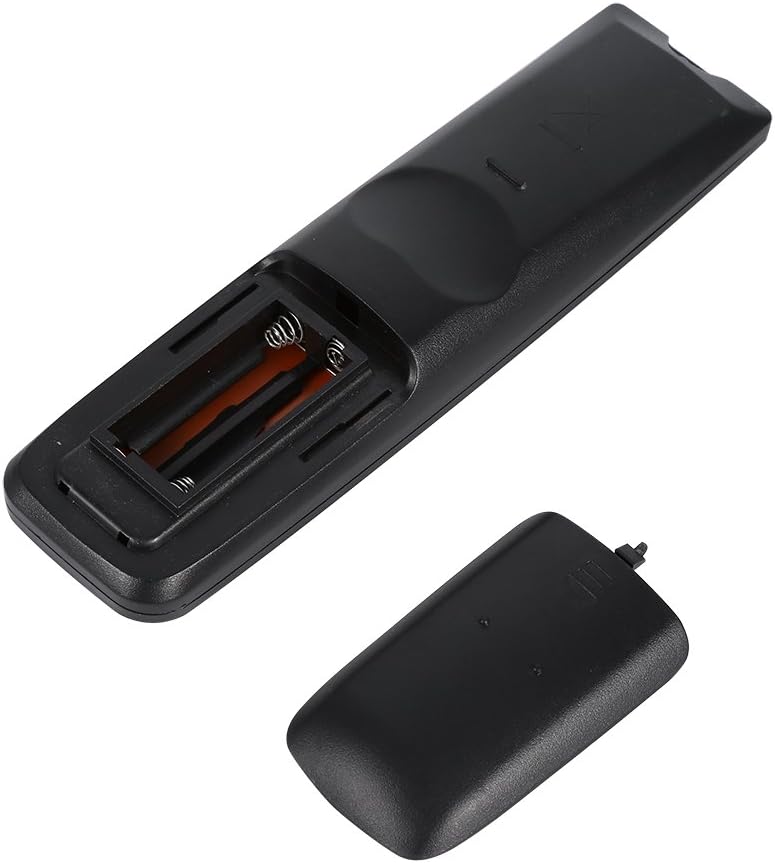
Imagem 2.1: View of the remote control's open battery compartment, ready for AAA battery insertion.
Observação:
- Use sempre pilhas novas do mesmo tipo.
- Não misture pilhas velhas e novas, ou tipos diferentes de pilhas.
- Remova as pilhas se o controle remoto não for usado por um longo período para evitar vazamentos.
3. Instruções de operação
The Yunir AKB69680403 remote control is designed for immediate use with compatible LG TVs without any prior programming. Simply point the remote at your television and begin operation.

Imagem 3.1: Terminadoview of the remote control's buttons and layout.
3.1 Funções dos botões
- PODER: Liga ou desliga a TV.
- ENTRADA: Seleciona a fonte de entrada (HDMI, AV, etc.).
- ECONOMIA DE ENERGIA: Activates or deactivates energy-saving modes.
- Televisão/RAD: Alterna entre os modos TV e Rádio.
- AV MODE: Selects audio/video modes.
- Botões numéricos (0-9): Directly selects channels.
- LISTA: Exibe a lista de canais.
- Q.VIEW: Retorna ao anterior viewcanal ed.
- VOLUME +/-: Ajusta o nível de volume.
- CH +/-: Muda de canal, para cima ou para baixo.
- MUDO: Silencia ou ativa o som da TV.
- PAGE ^/v: Navigates through pages in menus or lists.
- Directional Pad (Up, Down, Left, Right) & OK: Navega pelos menus e confirma as seleções.
- CARDÁPIO: Opens the main TV menu.
- TEXTO: Acessa serviços de teletexto.
- T.OPT: Teletext options.
- INFORMAÇÕES: Exibe informações sobre o programa ou entrada atual.
- GUIA: Abre o guia eletrônico de programação.
- MARK/FAV: Marks content or accesses favorite channels.
- RETORNO/SAÍDA: Retorna à tela anterior ou sai de um menu.
- Botões coloridos (vermelho, verde, amarelo, azul): Utilizado para funções específicas em menus ou aplicativos, conforme indicado na tela da TV.
Some buttons, such as the number buttons, are fluorescent to assist with operation in low-light conditions.
4. Manutenção
4.1 Limpeza
Para manter a aparência e a funcionalidade do controle remoto:
- Limpe o controle remoto com um pano macio e seco.
- Para sujeira persistente, levementeampMolhe o pano com água ou uma solução de limpeza suave e, em seguida, seque-o imediatamente.
- Do not use abrasive cleaners, alcohol, or solvents, as these can damage the surface or internal components.
4.2 Cuidados com a bateria
- Replace batteries when the remote's response becomes sluggish or inconsistent.
- Descarte as baterias usadas de maneira responsável, de acordo com os regulamentos locais.
5. Solução De Problemas
Se você tiver problemas com o seu controle remoto, consulte os problemas e soluções comuns a seguir:
- O controle remoto não está respondendo:
- Verifique se as pilhas estão inseridas corretamente e com a polaridade correta.
- Substitua as pilhas por novas.
- Certifique-se de que não haja obstruções entre o controle remoto e o sensor infravermelho da TV.
- Certifique-se de estar dentro do alcance operacional efetivo e de apontar o controle remoto diretamente para a TV.
- Some functions do not work:
- While this remote is broadly compatible, some specific advanced functions of your original TV remote might not be supported.
- Verify that your TV model is an LG LCD, LED, or Plasma TV.
6. Especificações
| Recurso | Detalhe |
|---|---|
| Nome do produto | TV Remote Controller |
| Modelo | AKB69680403 |
| Compatibilidade | Most LG LCD, LED, or Plasma TVs |
| Fonte de energia | 2 x pilhas AAA (não incluídas) |
| Material | abdômen |
| Cor | Preto |
| Dimensões (C x L x A) | 17.9 x 4.7 x 2 cm (7.05 x 1.85 x 0.79 polegadas) |
| Peso do item | 2.46 onças |
| Fabricante | Tonysa |

Image 6.1: The remote control displaying its physical dimensions.
7. Garantia e Suporte
Specific warranty information for this product is not provided in the available data. For any product-related inquiries, technical support, or warranty claims, please contact the retailer or manufacturer directly. Keep your purchase receipt as proof of purchase.