
Ipega PG-9069
Ipega PG-9069 Bluetooth Gamepad
Manual de instruções do usuário
1. Introdução
Obrigado pela compra.asing the Ipega PG-9069 Bluetooth Gamepad. This controller is designed to enhance your gaming experience across various platforms, including Android, iOS, and PC. It features a built-in touchpad, dual motor vibration, and a stretchable phone bracket for versatile use. Please read this manual carefully before using the product to ensure proper operation and to maximize its potential.

Figure 1: Ipega PG-9069 Bluetooth Gamepad
This image displays the Ipega PG-9069 Bluetooth Gamepad from an angled perspective, showcasing its ergonomic design, dual joysticks, D-pad, action buttons, and the central touchpad. The Ipega logo is visible on the left handle.
2. Conteúdo da embalagem
Por favor, verifique o conteúdo da embalagem ao desembalar:
- 1 x Ipega PG-9069 Bluetooth Gamepad
- 1 x Micro USB Charging Cable (90cm)
- 1 x Stretchable Phone Bracket
- 1 x Manual do Usuário (este documento)
3. Recursos do Produto
- Ampla compatibilidade: Supports Bluetooth-enabled Android tablets, phones, TV boxes, smart TVs, VR devices, iOS phones/tablets, Mac OSX PCs, and Windows 7/8/10/XP.
- Controle preciso: Built-in Hall sensors in L2 and R2 keys for more accurate and responsive control.
- Feedback de vibração: Dual motor vibration function provides immersive feedback (available when wired to PC in X-INPUT mode only).
- Jogabilidade aprimorada: Features Turbo and Macro modes for customized and exciting game experiences.
- Touchpad integrado: Mouse touch function for convenient navigation on Android and PC platforms.
- Design ergonômico: Designed for comfortable and extended gaming sessions.
- Mobile Gaming Ready: Includes a stretchable phone bracket for attaching smartphones.
4. Controles e funções
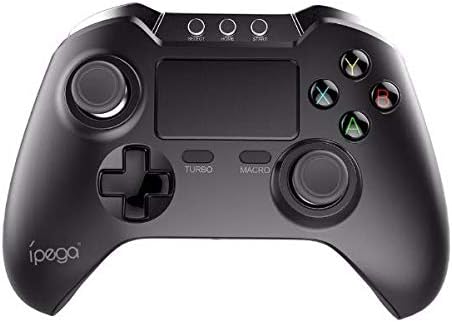
Figura 2: parte superior view do gamepad Ipega PG-9069
Esta imagem fornece uma visão clara de cima para baixo. view of the Ipega PG-9069 Gamepad, highlighting the layout of its buttons and controls. Visible elements include the dual analog sticks, D-pad, action buttons (A, B, X, Y), central touchpad, and the Turbo and Macro buttons.
- Alavanca analógica esquerda: Utilizado para controle de movimento e câmera.
- Alavanca analógica direita: Used for camera control or aiming.
- D-Pad (Controle direcional): Para entrada direcional precisa.
- Botões de ação (A, B, X, Y): Para ações dentro do jogo.
- Botões L1/R1: Botões nos ombros.
- Gatilhos L2/R2: Analog triggers with Hall sensors for precise input.
- Botão HOME: Ligar/desligar, alternar entre modos.
- SELECT/BACK Button: Varies by game/platform.
- Botão de início: Varies by game/platform.
- Botão TURBO: Activates/deactivates turbo function for rapid firing.
- MACRO Button: Used to program and execute macro sequences.
- Painel tátil: Functions as a mouse on compatible systems (Android/PC).
- Porta de carregamento (Micro USB): Located on the front edge.
5. Configuração e conexão
5.1. Carregando o controlador
Before first use, fully charge the controller. Connect the supplied Micro USB cable to the controller's charging port and the other end to a USB power source (e.g., computer USB port, USB wall adapter). The charging indicator light will illuminate during charging and turn off when fully charged. Charging time is approximately 2 hours.
5.2. Emparelhamento Bluetooth
The PG-9069 supports various Bluetooth pairing modes:
- Modo padrão Android: Pressione e segure o X + CASA buttons simultaneously until the indicator light flashes rapidly. Procurar "PG-9069" on your Android device's Bluetooth settings and connect.
- Modo iOS: Pressione e segure o S + CASA buttons simultaneously until the indicator light flashes rapidly. Procurar "PG-9069" on your iOS device's Bluetooth settings and connect.
- PC (Bluetooth Dongle Required): For PC, it is recommended to use a wired connection for optimal performance, especially for vibration. If using Bluetooth, ensure your PC has Bluetooth capability or use a Bluetooth dongle. Pair as per Android Standard Mode.
Após o emparelhamento bem-sucedido, a luz indicadora permanecerá acesa.
5.3. Wired Connection (PC Only)
For PC gaming, you can connect the controller directly via the Micro USB cable. This mode supports dual motor vibration. Simply connect the controller to your PC using the provided USB cable. The controller will be recognized as a standard gamepad (X-INPUT mode).
6. Instruções de operação
6.1. Ligar/desligar
Para ligar, pressione o botão LAR botão. Para desligar, pressione e segure o LAR Pressione o botão por 3 segundos até que a luz indicadora se apague.
6.2. Função Turbo
The Turbo function allows for rapid, continuous input of a button press. To activate: Press and hold the desired action button (e.g., A) and then press the TURBO button. To deactivate: Repeat the process.
6.3. Função Macro
The Macro function allows you to record a sequence of button presses and execute them with a single button. Refer to the specific game or application for macro programming details, as implementation may vary.
6.4. Touchpad Function
The central touchpad functions as a mouse on Android and PC platforms. Use your finger to navigate the cursor. Tapping the touchpad acts as a left-click.
6.5. Using the Phone Bracket

Figure 3: Ipega PG-9069 Gamepad with phone mounted
This image shows the Ipega PG-9069 Gamepad with a smartphone securely mounted on its integrated stretchable bracket, demonstrating its use for mobile gaming. The phone displays a game, indicating readiness for play.
Attach the stretchable phone bracket to the designated slot on the controller. Gently extend the bracket to secure your smartphone. Ensure the phone is firmly seated before use.
7. Solução De Problemas
- Controlador não conecta: Ensure the controller is charged. Verify you are in the correct pairing mode (Android/iOS). Delete previous pairings on your device and try pairing again.
- Atraso de entrada ou desconexão: Ensure there are no strong electromagnetic interferences nearby. Move closer to the device. Recharge the controller if the battery is low.
- Botões não respondem: Try resetting the controller (if a reset button is available, usually a small pinhole on the back). Re-pair the controller.
- A vibração não está funcionando: Ensure you are connected via wired mode to a PC and the game supports vibration feedback.
- O touchpad não está funcionando: Ensure you are in a compatible mode (Android/PC) and the application supports mouse input.
8. Especificações
| Parâmetro | Valor |
|---|---|
| Modelo | PG-9069 |
| Marca | Ipega |
| Tipo de conexão | Bluetooth V3.0, Wired (Micro USB) |
| Compatibilidade | Android, iOS, PC (Windows 7/8/10/XP, Mac OSX) |
| Tipo de Bateria | Bateria de polímero de lítio embutida |
| Capacidade da bateria | 380mAh |
| Bateria Voltage | 3.7V |
| Tempo de carregamento | Aproximadamente 2 horas |
| Tempo de trabalho | Aproximadamente 12 horas |
| Material | abdômen |
| Dimensões do produto | 15.40 x 11.50 x 5.50 cm (6.06 x 4.53 x 2.17 polegadas) |
9. Manutenção
- Clean the controller regularly with a soft, dry cloth. Do not use harsh chemicals or abrasive cleaners.
- Guarde o controlador em local fresco e seco, longe da luz solar direta e de temperaturas extremas.
- Evite deixar o controle cair ou submetê-lo a impactos fortes.
- Não tente desmontar ou modificar o controlador, pois isso anulará a garantia e poderá causar danos.
10. Informações de segurança
- Mantenha o dispositivo longe de água e outros líquidos.
- Do not expose the device to open flames or extreme heat.
- Mantenha fora do alcance de crianças.
- Descarte a bateria de acordo com as normas locais. Não a descarte junto com o lixo doméstico.
11. Garantia e Suporte
This product comes with a standard manufacturer's warranty. Please refer to the warranty card included in your package or contact your retailer for specific warranty terms and conditions. For technical support or inquiries, please contact the Ipega customer service department through their official website ou as informações de contato fornecidas com sua compra.