
1. Introdução
This manual provides comprehensive instructions for the IFYOO X208 2.4G Wireless and Wired Gaming Controller. It covers product features, setup procedures, operating modes, and important compatibility information to ensure optimal use of your device.

Figure 1: IFYOO X208 Gaming Controller. This image displays the front view of the black and silver controller, highlighting its ergonomic design and button layout.
2. Conteúdo da embalagem
Verifique se todos os itens listados abaixo estão incluídos em seu pacote:
- 1x IFYOO X208 Gaming Controller
- 1x 1M USB Charging Cable (Micro-USB)
- 1x Dongle USB de 2.4 GHz
- 1x Manual do Usuário (este documento)
- 1x Cartão de Garantia

Figure 2: Package Contents. This image shows the IFYOO X208 controller alongside its USB charging cable, 2.4GHz USB dongle, user manual, and warranty card.
3. Produto acabadoview
3.1 Principais Características
- Conectividade Dupla: Supports 2.4GHz wireless and wired connections.
- Multi-mode Support: Xinput, Dinput, Android, and PS3 modes.
- Feedback de vibração dupla: Provides immersive haptic feedback in supported games.
- JD-SWITCH Function: Allows switching between D-pad and Left Stick functions.
- Função TURBO: Enables rapid, continuous button presses.
- Design ergonômico: Features a comfortable grip, high-precision D-pad, wear-resistant anti-slip joysticks, and linear Hall magnetic induction triggers.
3.2 Layout do Controlador

Figure 3: Front Features. This image highlights the high-precision D-pad, engraved ABXY buttons, excellent non-slip grip, and wear-resistant anti-slip joysticks.

Figure 4: Top Features. This image illustrates the revolutionary designed shoulder buttons (L1/R1) and the 255-level magnetic induction triggers (L2/R2).
4. Configuração e Compatibilidade
4.1 Compatibilidade do sistema
- PC / Laptop: Windows 10/8/7/XP, Steam. (Windows XP may require driver installation).
- Dispositivos Android: Mobile Phones, Tablets, TVs, TV Boxes (version 4.0 or above, device must support OTG function). An OTG adapter or cable is required for Android devices with Type-C or Micro-USB ports.
- PlayStation 3 (PS3): Compatible with most PS3 games.
Important Note: This device is NOT compatible with Xbox 360, Xbox One, Mac OS, or PS4.
4.2 métodos de conexão
The IFYOO X208 controller supports both 2.4GHz wireless and wired connections.
Conexão sem fio 4.2.1 2.4GHz
- Insert the 2.4GHz USB dongle into an available USB port on your PC, Android device (via OTG adapter), or PS3 console.
- Turn on the controller. It will automatically attempt to connect to the dongle.
- Once connected, the indicator light on the controller will stabilize, indicating a successful wireless connection.
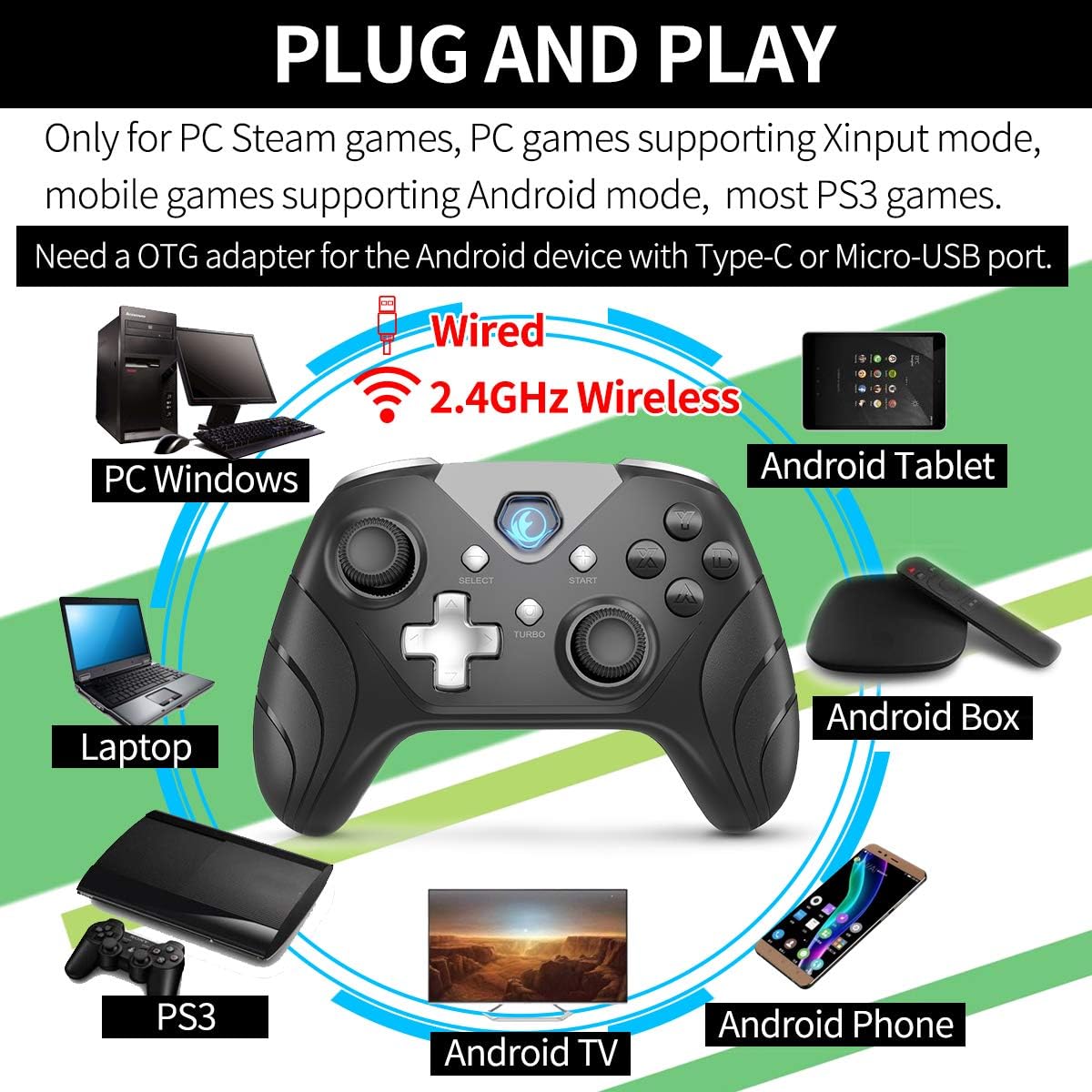
Figure 5: Connectivity Overview. This image illustrates the controller's compatibility with various devices (PC, Laptop, Android Tablet, Android Box, Android TV, Android Phone, PS3) via both wired and 2.4GHz wireless connections. It also notes the requirement for an OTG adapter for Android devices.

Figure 6: Android Device Connection. This image shows the IFYOO X208 controller connected wirelessly to an Android phone via an OTG adapter, demonstrating gameplay.

Figure 7: PC Connection. This image depicts the IFYOO X208 controller being used with a laptop for PC gaming.
4.2.2 conexão com fio
- Connect the Micro-USB end of the charging cable to the controller.
- Connect the USB-A end of the charging cable to an available USB port on your PC or PS3 console.
- The controller will automatically be recognized as a wired device.
The wired connection also charges the controller's internal battery.
5. Instruções de operação
5.1 Funcionalidade Multimodo
The controller supports multiple modes for different platforms:
- Modo Xinput: Primarily for PC games that support Xinput. This mode often enables dual vibration feedback.
- Dinput Mode: For older PC games or specific applications that require DirectInput.
- Modo Android: For compatible Android mobile games.
- Modo PS3: For PlayStation 3 consoles.
The controller typically switches modes automatically based on the connected device. Some games may require manual button mapping or third-party software for optimal performance.
5.2 JD-SWITCH Function
The JD-SWITCH function allows you to swap the input functionality between the D-pad and the Left Analog Stick. This can be useful for games where one input method is preferred for movement or specific actions.
- To activate/deactivate JD-SWITCH, press and hold the "TURBO" botão e então pressione o "SELECIONAR" botão.
- The indicator light may change to confirm the switch.
5.3 Função TURBO
The TURBO function enables rapid, continuous input for a selected button, reducing the need for repeated presses. This can be beneficial in games requiring fast button mashing.
- Press and hold the button you wish to assign TURBO functionality to (e.g., A, B, X, Y).
- Enquanto mantém esse botão pressionado, pressione o "TURBO" botão uma vez.
- Release both buttons. The assigned button will now activate continuously when held down.
- To clear the TURBO function for a specific button, repeat the process: hold the button, then press the "TURBO" botão.

Figure 8: Practical Functions. This image visually explains the JD-SWITCH function (swapping D-pad and Left Stick) and the TURBO function (creating continuous button presses).
5.4 Feedback de vibração dupla
The controller features dual vibration motors for enhanced gaming immersion. This function is primarily available in PC games that support Xinput mode and may need to be enabled within the game's settings.
6. Observações importantes e resolução de problemas
- Instalação do driver: For Windows 10 or above, DirectX 9.0c or higher may be required. If the controller is not recognized in Windows, try installing the latest version of the Microsoft Xbox 360 Controller gamepad driver. Windows XP systems specifically require driver installation.
- Android OTG: Ensure your Android device supports OTG (On-The-Go) functionality for wireless connection via the USB dongle. An OTG adapter or cable is necessary for devices with Type-C or Micro-USB ports.
- Configurações do jogo: Some games may require manual configuration of buttons or the use of third-party software to function correctly with the controller.
- Feedback de vibração: Dual vibration feedback is only active in PC games that support Xinput mode and where the feature is enabled in the game's settings.
6.1 Problemas e soluções comuns
- Controlador não conectando:
- Certifique-se de que o dongle USB de 2.4 GHz esteja inserido firmemente em uma porta USB funcional.
- Verifique se o controlador está ligado.
- For wired connection, ensure the USB cable is fully connected to both the controller and the device.
- Experimente uma porta USB diferente.
- Buttons Not Responding / Incorrect Input:
- Check game settings for controller configuration.
- Ensure the correct mode (Xinput/Dinput/Android/PS3) is active for your platform.
- If on PC, ensure necessary drivers are installed (e.g., Xbox 360 Controller driver for Windows).
- Sem feedback de vibração:
- Confirm the game supports Xinput mode.
- Check the game's settings to ensure vibration is enabled.
7. Especificações
| Dimensões do produto | 160 x 113 x 63 mm |
| Peso do produto | 205 ± 10g |
| Interface de carregamento | Micro USB |
| Método de conexão | 2.4GHz Wireless and Wired |
| Tempo de carregamento | 2-3 horas |
| Distância sem fio | Approx. 7 Meters |
| Capacidade da bateria | Polímero de lítio 600 mAh |
| Duração da bateria | Mais de 10 horas |
8. Manutenção
- Limpeza: Use um pano macio e seco para limpar o controle. Evite usar produtos químicos agressivos ou materiais abrasivos.
- Armazenar: Guarde o controlador em local fresco e seco, longe da luz solar direta e de temperaturas extremas.
- Cuidados com a bateria: Para prolongar a vida útil da bateria, evite descarregar completamente o controlador com frequência. Carregue-o regularmente, mesmo que não esteja em uso constante.
- Evite quedas: Proteja o controlador contra quedas e impactos, que podem danificar os componentes internos.
9. Garantia e Suporte
IFYOO offers a warranty for the X208 Gaming Controller. You may return or request a refund for any reason, or exchange/replace the product for any quality issue within 3 months of purchase.
For any questions, concerns, or support needs, please contact IFYOO customer service. Refer to the included Warranty Card for specific contact details and warranty terms.