1. Introdução
The Mikado MD-21BT Soundcube is a portable Bluetooth speaker designed for audio playback from various sources. It features a 3W speaker, a 300mAh rechargeable battery, Bluetooth connectivity, and a TF card slot for direct media playback. Additionally, it includes a luminous light function for enhanced ambiance.
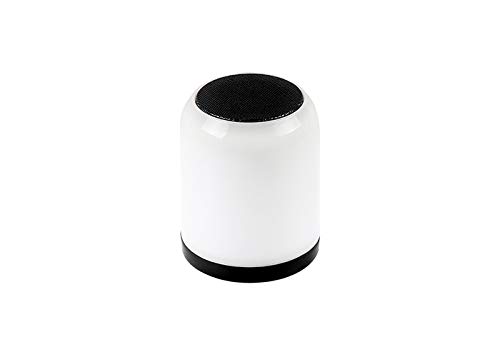
Figura 1.1: Frente view of the Mikado MD-21BT Soundcube Bluetooth Speaker.
2. Conteúdo da embalagem
Por favor, verifique se a embalagem contém os seguintes itens:
- Mikado MD-21BT Soundcube Bluetooth Speaker
- USB Charging Cable (typically included, though not explicitly detailed)
- Manual do usuário (este documento)
3. Configuração
3.1 Carregando o alto-falante
Before first use, fully charge the speaker. Connect the micro USB end of the charging cable to the speaker's charging port and the USB-A end to a standard USB power adapter (not included) or a computer's USB port. The charging indicator light will illuminate during charging and turn off or change color when fully charged.
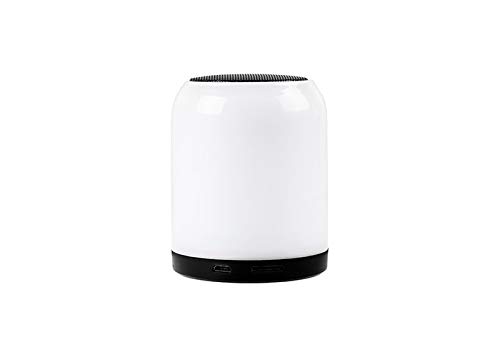
Figura 3.1: Lateral view of the speaker showing the Micro USB charging port.
3.2 Ligar/Desligar
To power on the speaker, press and hold the power button located on the bottom of the device until you hear an audible prompt or see the indicator light illuminate. To power off, press and hold the power button again until the speaker powers down.
4. Instruções de operação
4.1 Emparelhamento Bluetooth
- Ensure the speaker is powered on and in Bluetooth pairing mode. An audible prompt or flashing indicator light typically indicates pairing mode.
- No seu dispositivo móvel (smartphone, tablet, laptop), ative o Bluetooth e procure por dispositivos disponíveis.
- Select "MD-21BT" from the list of found devices.
- Once connected, the speaker will provide an audible confirmation, and the indicator light will typically become solid.
Reprodução de cartão TF 4.2
Para reproduzir música diretamente de um cartão TF (MicroSD):
- Insira um cartão TF com áudio MP3 fileestá no slot para cartão TF no alto-falante.
- The speaker should automatically detect the card and begin playing the audio files. If not, press the Mode button (if available) to switch to TF card mode.
- Use the playback control buttons (Play/Pause, Next/Previous Track) on the speaker to manage your music.
4.3 Luminous Light Function
The MD-21BT Soundcube features a luminous light function. Press the dedicated light button (if available) or a multi-function button to cycle through different light modes or to turn the light on/off. Refer to the button layout for specific controls.
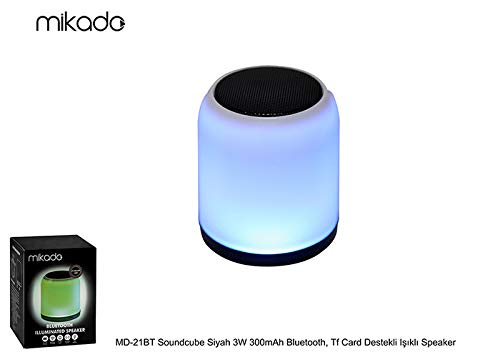
Figure 4.1: The speaker demonstrating its luminous light feature.
4.4 Volume Control and Playback
Volume can typically be adjusted using the volume buttons on the speaker or directly from your connected Bluetooth device. Playback controls (Play/Pause, Next/Previous) are usually located on the speaker's control panel.

Figura 4.2: parte inferior view of the speaker showing control buttons.
5. Manutenção
5.1 Limpeza
Wipe the speaker with a soft, dry cloth. Do not use abrasive cleaners, alcohol, or other chemical solvents, as these may damage the surface. Avoid exposing the speaker to excessive moisture.
5.2 Armazenamento
Guarde a caixa de som em local fresco e seco, longe da luz solar direta e de temperaturas extremas. Se for armazená-la por um longo período, carregue a bateria periodicamente para prolongar sua vida útil.
6. Solução De Problemas
| Problema | Possível causa | Solução |
|---|---|---|
| A caixa de som não liga. | A bateria está esgotada. | Carregue totalmente a caixa de som. |
| Não consigo conectar via Bluetooth. | O alto-falante não está em modo de emparelhamento ou o Bluetooth do dispositivo está desligado. | Ensure speaker is in pairing mode. Turn off and on Bluetooth on your device. Forget previous connections and try pairing again. |
| Sem som durante a reprodução. | O volume está muito baixo ou o dispositivo não está conectado. | Increase volume on both the speaker and the connected device. Verify Bluetooth connection or TF card insertion. |
| Cartão TF não reconhecido. | Card inserted incorrectly or unsupported format. | Reinsert the TF card correctly. Ensure the card contains MP3 files and is formatted correctly (e.g., FAT32). |
7. Especificações
| Recurso | Detalhe |
|---|---|
| Nome do modelo | MD-21BT |
| Tipo de alto-falante | Estéreo |
| Tecnologia de Conectividade | Bluetooth |
| Potência máxima de saída do alto-falante | 3 Watts |
| Fonte de energia | Alimentado por bateria (300mAh) |
| Recurso especial | Luminous Light, TF Card Support |
| Dispositivos compatíveis | Notebooks, Smartphones |
| Dimensões do produto | 1 x 1 x 1 cm (aproximadamente) |
| Peso do item | 100 g |
8. Garantia e Suporte
For warranty information and technical support, please refer to the documentation provided with your purchase or contact the Mikado customer service department. Keep your proof of purchase for warranty claims.