
Refoss RGR545
Manual do Usuário do Teclado Sem Fio para Porta de Garagem Refoss
Model: RGR545
Produto acimaview
The Refoss Wireless Garage Door Keypad provides keyless entry for your garage, offering convenience and security. This keypad is designed to work specifically with garage door openers featuring a purple learn button, operating on a 315 MHz frequency. It supports control of up to three individual garage doors with unique PINs.

Image: Refoss Wireless Garage Door Keypad. This image displays the keypad with its protective cover lifted, revealing the numeric buttons and the specific compatibility label for purple learn buttons.
Compatibilidade
This Refoss Wireless Garage Door Keypad is only compatible with garage door openers that have a PURPLE learn button. It works with Security+ 315 MHz Chamberlain, LiftMaster, and Craftsman garage openers manufactured between 2006 and 2014. Please verify your garage door opener's learn button color before proceeding with installation or programming.
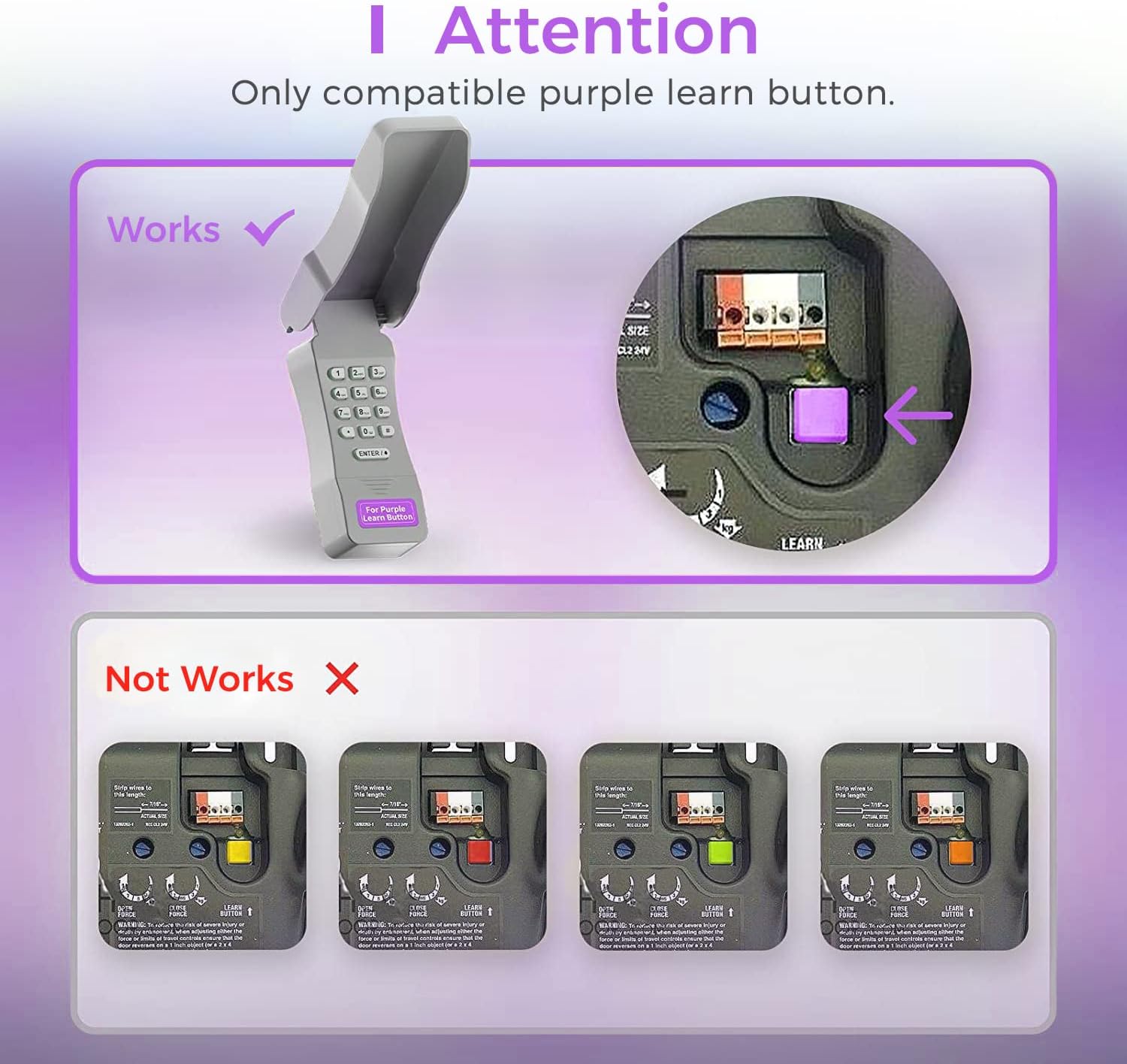
Image: Compatibility Diagram. This visual guide illustrates the correct purple learn button for compatibility and shows examples of incompatible learn button colors (red, orange, green, yellow).
Conteúdo da embalagem
Antes de iniciar a instalação, certifique-se de que todos os componentes estejam presentes na embalagem:
- 1 x Refoss Wireless Keypad
- 1 x Manual do Usuário (este documento)
- 4 x Parafusos
- 4 x âncoras de parafuso
- 4 x fita dupla face 3M
- Bateria 1 x 9V

Image: Package Contents. This illustration details all items included in the product box, ensuring users can verify they have everything needed for installation.
Configuração e programação
The Refoss Wireless Keypad is designed for easy, wireless programming. Follow these steps carefully to set up your keypad and program it to your garage door opener.
Etapa 1: instalar a bateria
- Open the battery compartment on the back of the keypad.
- Insira a bateria de 9V incluída, certificando-se da polaridade correta.
- Feche o compartimento da bateria com segurança.
Etapa 2: programar o teclado
This keypad can control up to three garage doors. Each door requires its own unique PIN.
- Localize o PURPLE Learn Button on your garage door opener motor unit. This button is typically found on the back or side panel of the motor.
- Pressione e solte imediatamente o PURPLE Learn Button. The learn indicator light on the opener will glow steadily for 30 seconds.
- Within 30 seconds, enter your desired 4-digit PIN on the Refoss keypad.
- Pressione e segure o ENTER / # button on the keypad until the garage door opener lights flash or two clicks are heard. This indicates successful programming.
- Test the keypad by entering your PIN and pressing ENTER / #. The garage door should activate.
To program additional garage doors (up to three), repeat Step 2 for each door, using a different 4-digit PIN for each.
Instruções de operação
Opening/Closing a Garage Door
- Enter your 4-digit PIN for the desired garage door.
- Pressione o ENTER / # botão.
- The garage door will open or close.
Controlling Multiple Doors
The keypad supports individual PINs for up to three garage doors. Simply enter the specific PIN for the door you wish to operate.

Image: One Keypad for Three Doors. This image visually represents the keypad's capability to manage up to three distinct garage doors using individual access codes.
Manutenção
Substituição da bateria
The keypad uses one 9V alkaline battery. When the keypad backlight dims or the keypad becomes unresponsive, it is time to replace the battery.
- Open the battery compartment on the back of the keypad.
- Remova a bateria antiga de 9V.
- Insira uma nova bateria alcalina de 9V, certificando-se da polaridade correta.
- Feche o compartimento da bateria com segurança.
Limpeza
Limpe a superfície do teclado com um pano macio e seco.amp pano. Não use produtos de limpeza abrasivos ou solventes.
Proteção contra intempéries
The keypad features a weatherproof protective cover designed to shield it from various weather conditions. Ensure the cover is properly closed when not in use to maximize its protective capabilities.

Image: Weatherproof and Fluorescent Features. This image demonstrates the keypad's durability against outdoor elements and its illuminated keys for visibility in low-light conditions.
Solução de problemas
| Problema | Possível causa | Solução |
|---|---|---|
| O teclado não responde. | Bateria descarregada ou fraca. | Substitua a bateria de 9V. |
| Garage door does not open/close after entering PIN. | Keypad not programmed correctly or incompatible opener. |
|
| Keypad backlight is dim. | Bateria fraca. | Substitua a bateria de 9V. |
| Cannot program multiple doors. | Incorrect programming sequence for additional doors. | Ensure you are using a unique PIN for each door and repeating the programming steps for each. |
Especificações
- Modelo: RGR545
- Compatibilidade: Chamberlain, LiftMaster, Craftsman garage door openers with PURPLE learn button (Security+ 315 MHz, manufactured 2006-2014)
- Freqüência: 315 MHz
- Número de portas suportadas: Até 3
- Fonte de energia: 1 pilha alcalina de 9V
- Dimensões: Aproximadamente 2 x 6 x 1 polegadas
- Peso: Aproximadamente 7.8 onças
- Características especiais: Weatherproof, Fluorescent Keypad
Informações de garantia
This Refoss Wireless Garage Door Keypad comes with a Garantia de 1 ano A garantia é válida a partir da data da compra. Esta garantia cobre defeitos de materiais e de fabricação sob uso normal. Não cobre danos causados por uso indevido, acidente, modificação não autorizada ou instalação inadequada.
Guarde o comprovante de compra para reclamações de garantia.
Suporte ao cliente
For any questions, technical assistance, or support regarding your Refoss Wireless Garage Door Keypad, please contact our customer support team. We offer caring customer support 7 days a week.
Refer to the product packaging or the Refoss official website para obter as informações de contato mais atualizadas.
Ask a question about this manual
Ask about setup, troubleshooting, compatibility, parts, safety, or missing instructions. Manuals+ will review the question and use this page’s manual context to help answer it.