
Produto acimaview
The XIAOMI Redmi 9I is a feature-rich smartphone designed for everyday use. This manual provides essential information for setting up, operating, maintaining, and troubleshooting your device.
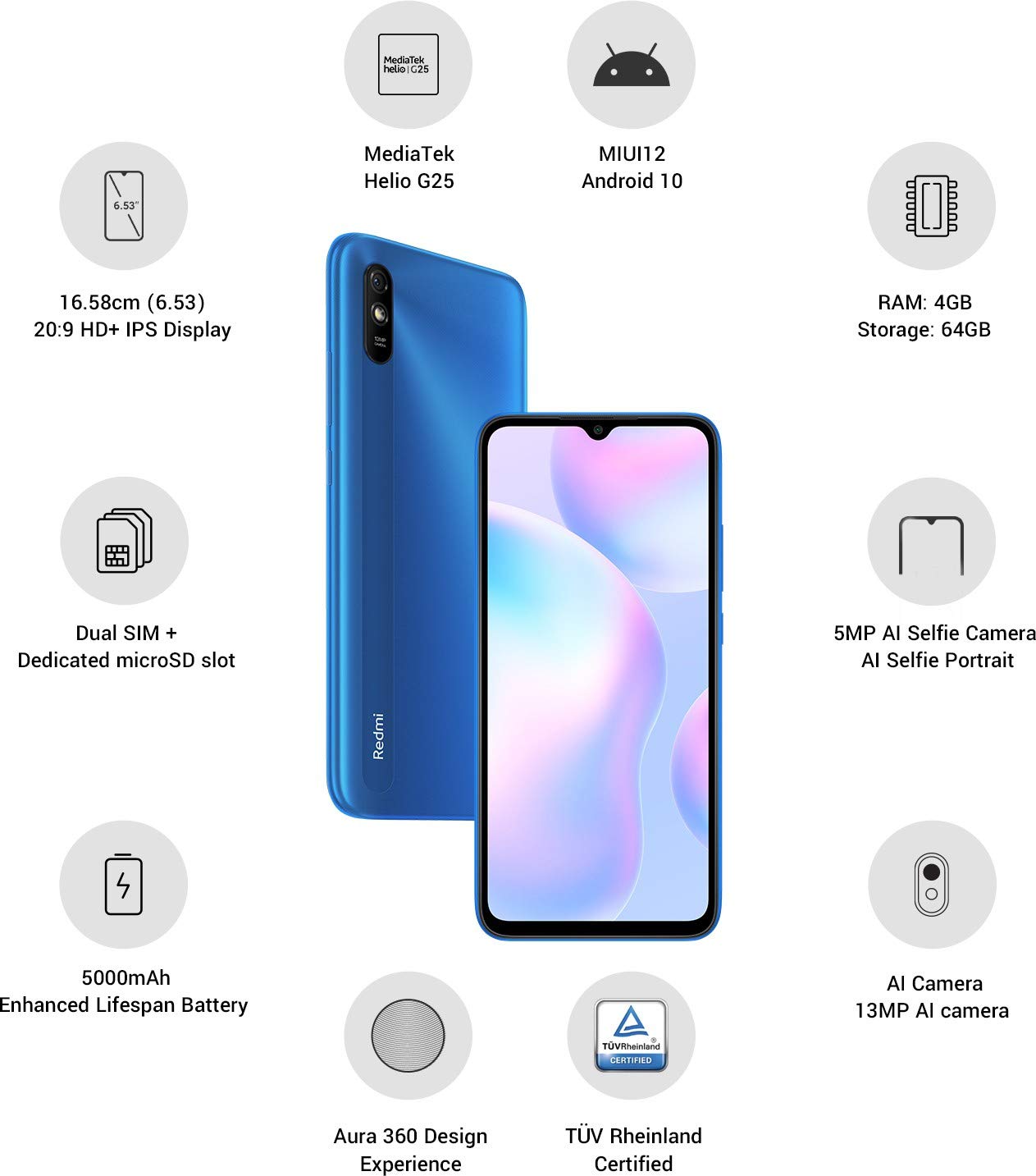
Imagem: Acimaview of the Xiaomi Redmi 9I highlighting key features such as the 6.53-inch HD+ IPS Display, MediaTek Helio G25 processor, MIUI12 Android 10, 4GB RAM, 64GB Storage, Dual SIM + dedicated microSD slot, 5000mAh battery, 5MP AI Selfie Camera, 13MP AI Camera, Aura 360 Design Experience, and TÜV Rheinland Certification.
Guia de configuração
1. Desembalagem e inspeção inicial
Retire cuidadosamente todos os itens da embalagem. Certifique-se de que os seguintes componentes estejam presentes:
- XIAOMI Redmi 9I Smartphone
- Adaptador de energia
- Cabo USB tipo C
- Ferramenta Ejetora SIM
- Guia de Início Rápido (se incluído)
2. Inserindo o(s) cartão(ões) SIM e o cartão microSD
Locate the SIM card tray on the side of your device. Use the provided SIM ejector tool to open the tray. Insert your Nano SIM card(s) and/or a microSD card into the designated slots. Ensure the cards are correctly oriented as shown in the diagram below. Gently push the tray back into the phone until it clicks into place.

Imagem: Lado view of the Xiaomi Redmi 9I, illustrating the location of the SIM card tray. The tray is designed to hold dual Nano SIM cards and a dedicated microSD card.
3. Carregando o dispositivo
Before first use, fully charge your Redmi 9I. Connect the USB Type-C cable to the phone's charging port (located at the bottom) and the other end to the power adapter. Plug the adapter into a wall outlet. The charging indicator will appear on the screen.

Imagem: Parte inferior view of the Xiaomi Redmi 9I, showing the USB Type-C charging port and speaker grille.
4. Ligando e configuração inicial
Press and hold the Power button (located on the right side of the device) until the XIAOMI logo appears. Follow the on-screen instructions to complete the initial setup, including language selection, Wi-Fi connection, Google account setup, and security settings.

Imagem: Lado view of the Xiaomi Redmi 9I, clearly showing the power button and volume rocker on the right edge of the device.
Instruções de operação
Navegação básica
- Tocar: Tap icons to open apps, select items, or confirm actions.
- Deslize: Slide your finger across the screen to scroll, switch between home screens, or navigate within apps.
- Pitada: Use dois dedos para ampliar ou reduzir as fotos e web páginas.
- Pressão longa: Press and hold an item for additional options or to move icons.
Fazendo chamadas e enviando mensagens
Tap the Phone icon to access the dialer. Enter a number or select a contact. Tap the Messages icon to compose and send text messages.
Conectando-se a Redes
- Wi-fi: Vá para Configurações > Wi-FiLigue o Wi-Fi e selecione a rede desejada. Digite a senha, se solicitado.
- Bluetooth: Vá para Configurações > Bluetooth, turn Bluetooth on, and pair with compatible devices.
- Dados móveis (4G): Certifique-se de que seu cartão SIM esteja ativo e que os dados móveis estejam habilitados. Configurações > Cartões SIM e redes móveis.
Usando a câmera
Tap the Camera icon to open the camera application. The Redmi 9I features a 13MP rear camera and a 5MP front camera. Switch between modes (Photo, Video, Portrait, etc.) by swiping across the screen. Tap the shutter button to capture photos or start/stop video recording.

Imagem: Traseira view of the Xiaomi Redmi 9I, showcasing the 13MP AI camera module and the Redmi branding.
Manutenção
Limpando Seu Dispositivo
Use um pano macio e sem fiapos para limpar a tela e a carcaça do seu telefone. Evite usar produtos químicos agressivos ou materiais abrasivos, que podem danificar a tela ou o acabamento. Para manchas persistentes, esfregue levemente com um pano macio e úmido.ampLimpe o pano com água ou um produto de limpeza para telas eletrônicas.
Atualizações de software
Verifique e instale regularmente as atualizações de software para garantir o melhor desempenho, segurança e acesso a novos recursos. Acesse Configurações > Sobre o telefone > Versão MIUI para verificar atualizações.
Cuidados com a bateria
The Redmi 9I is equipped with a 5000 mAh Lithium-Polymer battery. To prolong battery life:
- Evite temperaturas extremas.
- Não deixe a bateria descarregar completamente antes de recarregá-la com frequência.
- Utilize o carregador e o cabo originais.
- Optimize battery usage in Configurações > Bateria e desempenho.
Gerenciamento de Armazenamento
Seu dispositivo vem com 64 GB de armazenamento interno. Para gerenciar o armazenamento de forma eficaz:
- Apague regularmente os itens desnecessários. filefotos e vídeos.
- Desinstale aplicativos não utilizados.
- Utilize serviços de armazenamento em nuvem.
- Mover em grande escala files to an inserted microSD card.
Solução de problemas
This section addresses common issues you might encounter with your Redmi 9I.
Dispositivo não liga
- Ensure the battery is charged. Connect the phone to its charger for at least 30 minutes.
- Pressione e mantenha pressionado o botão Liga/Desliga por 10 a 15 segundos para forçar a reinicialização.
Conectividade de rede deficiente
- Verifique se o seu cartão SIM está inserido corretamente.
- Toggle Airplane Mode on and off (swipe down from the top for Quick Settings).
- Reinicie seu dispositivo.
- Verify your mobile data plan is active and you are in an area with network coverage.
Aplicativos travando ou congelando
- Feche e abra novamente o aplicativo problemático.
- Limpe o cache e os dados do aplicativo (Configurações > Aplicativos > Gerenciar aplicativos > [Nome do aplicativo] > Limpar dados).
- Certifique-se de que o aplicativo esteja atualizado para a versão mais recente.
- Reinicie seu telefone.
Tela sem resposta
- Force a reinicialização do dispositivo mantendo pressionado o botão Liga/Desliga.
- Se o problema persistir, considere restaurar as configurações de fábrica (Warning: This will erase all data on your phone. Back up important data first. Vá para Configurações > Sobre o telefone > Redefinição de fábrica).
Especificações
| Recurso | Detalhe |
|---|---|
| Marca | XIAOMI |
| Modelo | Redmi 9I |
| Sistema operacional | Android 9.0 (MIUI12) |
| BATER | 4 GB |
| Armazenamento interno | 64 GB |
| Processador | Snapdragon (2 GHz CPU Speed) |
| Tipo de exibição | LCD |
| Tamanho da tela | 6.53 polegadas |
| Câmera Traseira | 13 MP |
| Câmera Frontal | 5 MP |
| Capacidade da bateria | 5000 Miliamp Hours (Lithium-Polymer) |
| Slot para cartão SIM | Dual SIM (Nano) |
| Conectividade | 4G, Wi-Fi, Bluetooth, USB Type C |
| GPS | GLONASS |
| Material | Plástico |
| Nível de resistência à água | Resistente à água |
Informações de garantia
The XIAOMI Redmi 9I comes with a Garantia do fabricante de 1 anos from the date of purchase. This warranty covers manufacturing defects under normal use. For detailed terms and conditions, please refer to the warranty card included in your product packaging or visit the official XIAOMI support website.
Suporte ao cliente
If you encounter issues not covered in this manual or require further assistance, please contact XIAOMI customer support. You can typically find contact information (phone numbers, email, chat support) on the official XIAOMI website ou através da seção de suporte nas configurações do seu dispositivo.
Before contacting support, please have your device's model number (Redmi 9I) and serial number ready. The serial number can usually be found in Configurações > Sobre o telefone > Status.